



Great customer service separates thriving Shopify stores from struggling ones. When shoppers get quick, helpful answers, they buy more and come back. When they don't, they leave bad reviews and warn their friends.
Most articles about "customer service for Shopify" miss the point. They focus on how to contact Shopify's support team when you need help. But that's backwards. Your real challenge is helping your own customers when they have questions about orders, returns, or products.
This guide covers how to build an effective customer service operation for your Shopify store. We'll look at the channels you should offer, the tools that make it manageable, and strategies for scaling as you grow.
Editor's note: Want to hear some sample AI support calls made for your Shopify store?
- Just paste your store URL
- Get sample calls in under 20 seconds (no email required)
- Listen to demo calls for my store
Understanding your customer service channels
Shoppers expect to reach you through multiple channels. Each has its strengths and ideal use cases.

Email support
Email remains the backbone of e-commerce support. It's perfect for detailed inquiries, documentation, and non-urgent issues. Customers can explain complex problems without time pressure. You can research answers and respond thoughtfully.
Shopify Inbox handles basic email, but most stores eventually outgrow it. Response time expectations vary by industry, but under 24 hours is the baseline. Templates help maintain consistency, but personalization matters. Customers can spot copy-paste responses from a mile away.
Live chat
Live chat reduces cart abandonment and answers quick questions in real time. "Does this come in blue?" or "What's your return policy?" get instant answers, turning browsers into buyers.
Shopify Inbox offers free live chat, which works for new stores. Third-party options like Gorgias add automation and deeper Shopify integration. Zendesk is another popular choice for larger teams. The challenge is availability. Small teams can't staff chat 24/7, so you need clear offline messaging and email fallback.
Phone support
Phone support builds trust, especially for high-value purchases. Some customers simply prefer talking to a human. Complex issues often resolve faster with a five-minute call than ten back-and-forth emails.
The problem is cost. Hiring staff to answer phones gets expensive fast. Most small stores avoid phone support entirely. But AI phone agents are changing this. Ringly.io offers an AI phone rep called Seth that handles calls 24/7, looks up orders, processes returns, and escalates to your team only when needed. At $349 per month for 1,000 minutes, it's cheaper than a part-time employee.
Self-service options
FAQ pages, knowledge bases, and order tracking portals let customers help themselves. These reduce repetitive inquiries and operate around the clock.
The key is making them easy to find and actually useful. A buried FAQ page that doesn't answer real questions wastes everyone's time. Integrate self-service with Shopify's order system so customers can check status without contacting you.
Essential customer service tools for Shopify
The right tools automate repetitive work and give your team context to help customers faster.

Shopify Inbox (free)
Shopify Inbox comes with every Shopify plan at no extra cost. It unifies messaging across channels and adds a chat widget to your store. The mobile app lets you respond on the go.
Features include product links in chat, discount code sharing, and staff assignment. But limitations are real: no phone support, basic automation only, and no advanced ticketing. Most growing stores eventually need more.
Helpdesk and ticketing systems
When support volume grows, you need a proper helpdesk. These systems organize conversations into tickets, track status, and prevent requests from falling through cracks.
Gorgias is built specifically for e-commerce. Deep Shopify integration lets you edit orders, process refunds, and generate discount codes without leaving the ticket. Pricing starts at $10 per month for 50 tickets and scales to enterprise levels.

Zendesk serves over 100,000 companies including major brands. It's more comprehensive but also more complex. Suite Team starts at $55 per agent per month. The Shopify app integration shows customer data in tickets but has mixed reviews.

AI and automation tools
Automation handles repetitive questions so your team focuses on complex issues. Chatbots answer common questions instantly. AI phone agents like Ringly.io's Seth handle voice calls without human intervention.
Seth resolves around 73% of calls autonomously, including order tracking, returns, and product questions. It integrates with Shopify for real-time order lookups and escalates to your team when needed. Setup takes under an hour, and it supports 40 languages for global stores.
Shopify Flow automates workflows like tagging high-value customers or routing VIP requests to senior agents. Combine these tools strategically: AI handles routine inquiries, humans handle exceptions.
Returns and order management
Returns are inevitable in e-commerce. Making them painless builds loyalty. Apps like Returnly and Loop streamline the process, generate labels automatically, and update Shopify inventory.
Order tracking tools reduce "where's my order" (WISMO) inquiries. Proactive shipping notifications prevent these questions before they happen. When customers can track packages themselves, everyone saves time.
Building your customer service strategy
Tools matter, but strategy determines whether your support helps or hurts your business.
Setting response time goals
Industry benchmarks vary by channel. Email responses within 24 hours are standard, though faster is better. Live chat should connect customers to humans within minutes, not hours. Phone support needs immediate pickup or clear callback options.
Set realistic SLAs based on your team size. Better to promise 24-hour email response and hit it consistently than promise 4 hours and miss constantly. Communicate expectations clearly on your contact page.
Creating response templates
Templates speed up responses without sacrificing quality. Build them for common scenarios: order status checks, return instructions, shipping delays, and product questions.
Balance efficiency with personalization. Use variables for customer names and order details. Leave space for agents to add context-specific comments. Review templates monthly based on actual conversations.
Handling difficult situations
Angry customers happen. The goal is de-escalation, not winning arguments. Acknowledge frustration quickly. Apologize for real problems without making excuses. Offer concrete solutions, not vague promises.
Know when to offer refunds versus store credit. Small refunds often cost less than negative reviews. Escalation procedures should be clear: who handles angry customers, what's the approval process for exceptions, when does a founder get involved.
Measuring success
Track metrics that matter. Customer Satisfaction Score (CSAT) measures happiness directly. Response time shows efficiency. Resolution rate indicates first-contact fix rates.

Tools like Gorgias and Zendesk include reporting. For smaller teams, even a simple spreadsheet tracking complaints and resolutions helps spot patterns. Review metrics weekly and adjust processes based on what you learn.
Scaling customer service as you grow
Growth changes everything. What works at 10 orders per day breaks at 100.
Watch for warning signs: response times slipping, customer complaints increasing, team members burning out. These signal it's time to expand.
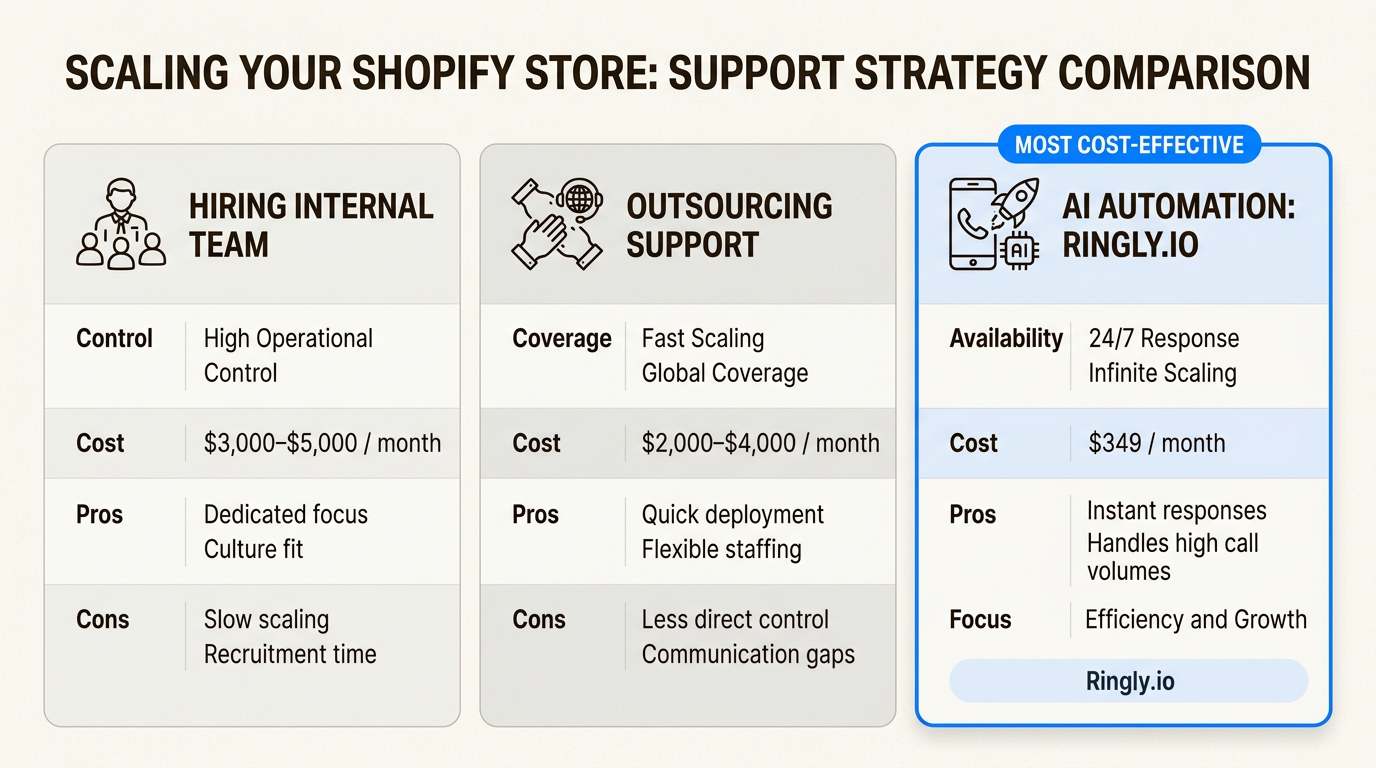
You have three options for scaling: hiring, outsourcing, or automation. Hiring gives you control but adds management overhead. Outsourcing to agencies reduces workload but can feel impersonal. Automation with AI tools like Ringly.io scales without proportional cost increases.
Training becomes critical as you add team members. Document processes clearly. Create a knowledge base of common issues and solutions. Review call recordings and ticket responses regularly for quality.
Consider AI phone support when you hit 100+ calls monthly. At that volume, Ringly.io's $349 Grow plan pays for itself compared to staffing. The 65% resolution guarantee means you only pay once it's working.
Getting started with better Shopify customer service
You don't need to overhaul everything overnight. Start with quick wins, then build systematically.
This week: Set up a proper FAQ page covering shipping, returns, and common product questions. Create five email templates for frequent scenarios. Install Shopify Inbox if you haven't already.
This month: Evaluate whether you need a proper helpdesk. If you're handling 50+ tickets monthly, Gorgias or similar tools pay for themselves in saved time. Set up proactive order notifications to reduce WISMO inquiries.
This quarter: Consider AI phone support if calls are piling up. Ringly.io offers a 14-day free trial with full features. Most stores go live in under an hour and see immediate relief on repetitive calls.
Great customer service isn't about being perfect. It's about being responsive, helpful, and human (even when humans aren't the ones answering). The stores that get this right turn support from a cost center into a competitive advantage.
Looking beyond legacy ticketing systems? Our Request Tracker alternatives roundup compares modern options for ecommerce support.
Frequently Asked Questions
What is the best customer service for Shopify stores just starting out?
Start with Shopify Inbox. It's free, handles basic chat and email, and integrates natively. Add a comprehensive FAQ page and email templates. As volume grows, upgrade to a dedicated helpdesk like Gorgias.
How much should I budget for customer service for Shopify operations?
Budget depends on volume. Free tools work initially. Expect $50-300 monthly for helpdesk software as you scale. AI phone support from Ringly.io starts at $349 monthly for 1,000 minutes. Factor in staff costs or agency fees if outsourcing.
Can AI really handle customer service for Shopify stores effectively?
AI handles routine inquiries well. Ringly.io's Seth resolves 73% of phone calls autonomously, including order tracking and returns. For complex or emotional issues, AI escalates to humans. The key is using AI for appropriate tasks, not everything.
What response times should I aim for with customer service for Shopify?
Email within 24 hours, live chat within minutes during business hours, phone immediately or with callback options. Set expectations clearly on your contact page and consistently meet them. Missing promised times damages trust more than slower but reliable responses.
How do I reduce repetitive questions in my customer service for Shopify?
Build a detailed FAQ page, enable order tracking self-service, send proactive shipping notifications, and use AI chatbots or phone agents for common questions. Analyze your tickets monthly to identify patterns and address root causes.
When should I consider AI phone support for my customer service for Shopify?
Consider AI phone support when you receive 100+ calls monthly, can't staff phones consistently, or want 24/7 coverage without hiring night shifts. Ringly.io's 14-day trial lets you test demand before committing.
What's the biggest mistake stores make with customer service for Shopify?
Treating support as a cost to minimize rather than an investment in retention. Stores that prioritize fast, helpful responses build loyal customers who spend more and refer friends. Stores that cut corners on support lose customers to competitors who care.
Looking for data to back up your strategy? Check out our latest research: 45+ AI customer service statistics for 2026, 50 ecommerce customer support statistics for 2026, 50 Shopify store statistics and trends for 2026, 50 customer experience statistics for 2026, 45 live chat statistics for 2026 and 45 customer retention statistics for 2026.



