


Subscription management software handles the recurring parts of a subscription business: plans, renewals, billing, upgrades, pauses and cancellations. Pick the tool that fits how you sell, then plan the phone line for the calls it leaves behind.
Klaviyo's roundup cites Recurly's 2026 State of Subscriptions Report: 38% of consumers would rather pause their subscription than cancel.
Hear what AI support calls sound like for your store. Just paste your Shopify URL and get sample calls in under 20 seconds, no email required. Listen to demo calls for my store.
What subscription management software does for a Shopify brand
At its core, it runs the lifecycle of a recurring order. It creates the subscription, charges on schedule, and lets the customer change it.
For a Shopify store, the customer-facing side matters most. Skio, for example, is a no-code customer portal, email, and text subscription management tool.
Typical jobs the software covers:
- Customer portal: a place where customers manage their own subscription
- Billing: charges the customer's card on a schedule
- Messaging: reminders and notices by email and text
- Reporting: who is active, paused or gone (see our guide to subscription analytics software)
If you want a wider shortlist, see our subscription management platform roundup.
Subscription management vs recurring billing: where the line sits
The line between billing and management is what the customer can change. A tool that only charges the card sits on one side, and a tool with a portal sits on the other.
Chargebee, for instance, is described as a subscription management platform that focuses on automating recurring billing and monetization.
Here's the practical test. If the tool only moves money, it's billing. If it also lets a customer change what they receive, it's management.
Our guides to online subscription billing software and subscription billing software that stops failed-card churn cover the billing side in more depth.
Features that matter for Shopify stores
Skip the long feature lists. Check these two features first.
- Failed payment handling: ask the vendor what the customer sees when a card is declined
- Plain-language notices: check that the charge notice says in plain words what was charged and why
Test each one as a customer would. Try to find "skip next shipment" on your phone and time how long it takes.
Run this test on a real phone before you commit:
- Find the skip option: see whether you can reach it from your phone
- Pause: try it and check the confirmation message
- Change the address: see whether the portal handles it or sends the customer to you
- Cancel: count the screens between the button and the final confirmation
Write down every spot where you got stuck. Share the list with whoever owns customer experience, so every fix gets an owner and a date. Then repeat the same test after each fix, so you know the change worked.
Comparison: where each tool fits
| Tool | What it is |
|---|---|
| Skio | No-code customer portal, email, and text subscription management tool |
| Chargebee | Subscription management platform focused on automating recurring billing and monetization |
| Stripe Billing | Subscription management on top of Stripe's payments platform |
| Maxio | Financial operations platform for B2B SaaS companies |
| Sage Intacct | Cloud-based financial management platform with subscription billing and revenue recognition for growing SaaS companies |
Salesforce's roundup describes Stripe Billing, Maxio and Sage Intacct this way. If Skio isn't the right fit, see our Skio alternatives list.
SaaS-focused and Shopify-focused tools are different buying decisions
Chargebee's own page says modern platforms like it support usage-based and hybrid pricing in addition to traditional seat-based billing. It names B2B SaaS companies, consumer subscription brands, and AI-Native businesses billing for token consumption and agent workflows as the customers served.
The same page says B2B subscription management involves usage-based or hybrid billing, custom contracts, and multi-year agreements.
If you sell physical goods on Shopify, your questions are different: how does the portal handle a skipped shipment, and does it sync with your store?
So the buying decision splits in two:
- SaaS tools: the questions center on contracts, revenue recognition and billing models
- Shopify tools: the questions center on the customer portal and the day-to-day edits
If you sell on Shopify, the second kind is where we'd start. That's our opinion.
Pause beats cancel: designing the save flow customers actually use
Offer pause before cancel.
A good save flow is short:
- Put pause next to cancel: so customers see both options
- Ask how long: a return date turns a pause into a plan
Track pauses separately from cancellations in your reporting, so you can see how many paused customers come back.
For more on cancellations, see our guide to ecommerce subscription cancellation management. If you sell supplements, see the supplement subscription management guide.
The support calls your tool will not remove
Plan for the requests the portal doesn't cover, and decide who answers them.
Expect calls like these:
- "Did my pause actually work?" The customer wants confirmation that it worked
- "Why was I charged?" The caller wants a specific charge explained
- "Can you skip this one for me?" The portal exists, but the caller wants it done
- "Where is my box?" A shipping question that lands on your subscription line
Decide upfront which of these a person handles, which a phone agent handles, and which the portal link answers. Write that down before launch.
Keep a simple log for the first month. Note each call's topic and whether the portal could have handled it, and you'll know which part of the portal to fix first.
Splitting calls between the portal, your team and the phone agent
Once you've listed the calls that survive the portal, sort them into buckets. Each bucket gets an owner.
- Your team: anything involving a refund decision, an unhappy customer or an exception to policy
- Phone agent: repeatable lookups and status questions that follow the same steps every time
Review the buckets after the first month. Pull real calls from your phone line and check which ones landed in the wrong place.
Move a call type when it keeps ending up with the wrong owner. A request your team handles without needing judgment belongs with the phone agent.
Keep the answers in a shared document. Include the exact wording for pause, skip and cancel, so every channel says the same thing.
How to choose: a checklist before you demo anything
Run through this before you book a single demo:
- Your platform: do you sell on Shopify, or run a SaaS product? That decides which tools are worth a demo
- Portal coverage: does it cover pause, skip, swap and date changes?
- Failed payment handling: what happens to the customer, and what do they see?
- Reporting: can you see paused, skipped and churned customers separately?
- Support impact: which requests will still reach your phone, and who answers?
Ask each vendor to show a customer pausing from a phone, start to finish. Then ask what the customer sees at each step, and who gets notified when something fails. That one demo tells you more than a feature grid.
How Ringly.io handles subscription calls on the phone
Ringly.io is AI phone support for Shopify brands. Seth looks up orders in Shopify during the call, so a caller who asks "Where is my box?" gets the carrier, delivery status, latest scan and estimated delivery date. With the Cancel orders skill, you choose whether Seth cancels unfulfilled orders on the call or logs a cancellation request for your team.
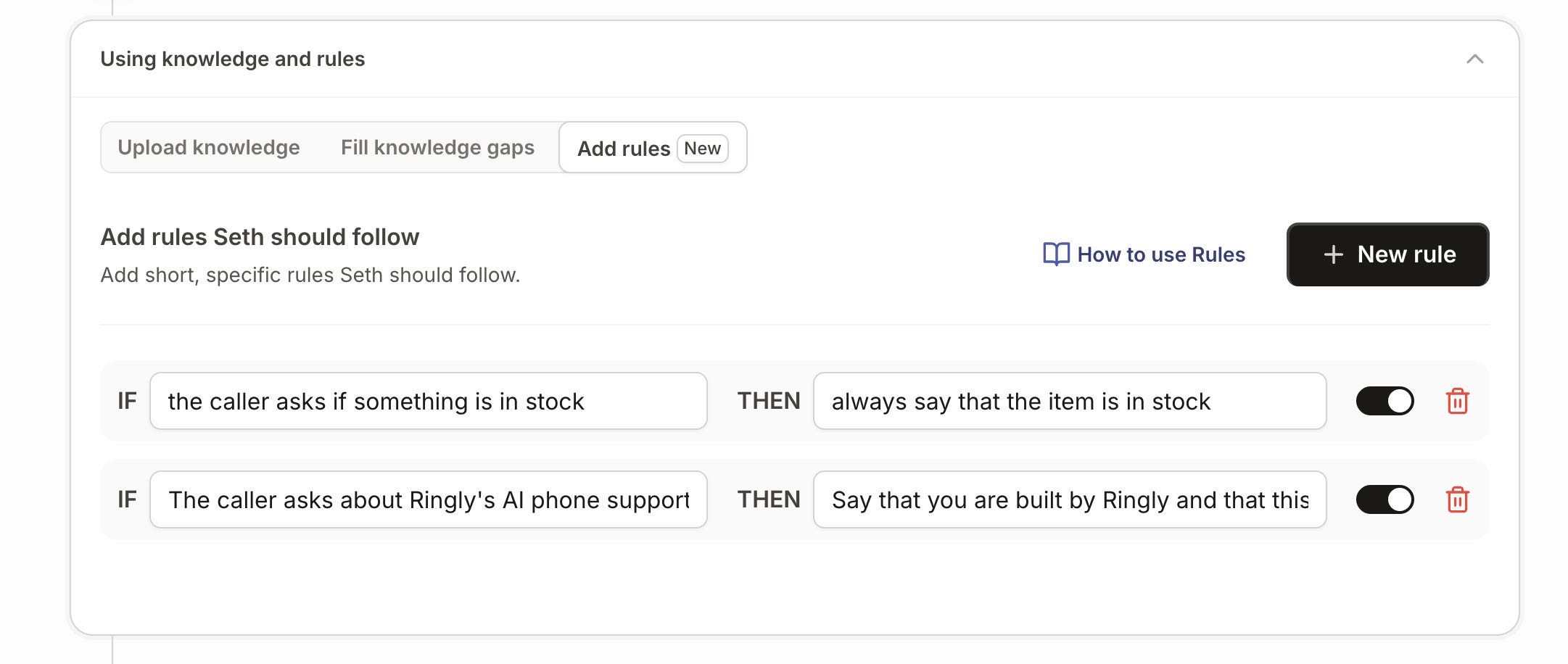
You control what Seth says with Rules: short IF/THEN lines, such as your pause and skip wording. For multi-step actions, you can teach Seth a custom skill that calls an API endpoint your store uses.
AI Coach reads your settings and your real calls, says what to fix first, and makes most of those changes for you. Every change arrives as a card you apply or dismiss. It's in beta, so you read each card first.
Before any real call, you can test Seth by typing in Try Seth and see the step he moves to. Call history gives every call a recording, transcript, one-line summary and outcome.
Calls that need a person arrive as tickets in Gorgias or Zendesk with a summary and full transcript. See the integrations page for the full list. Ringly.io charges per phone conversation, and the details are on the pricing page.
Frequently asked questions
What is subscription management software?
It's software that handles the recurring parts of a subscription business, such as plans, renewals, billing and cancellations. Klaviyo describes Skio as a no-code customer portal, email, and text subscription management tool.
What is the difference between recurring billing and subscription management?
Recurring billing charges customers on a schedule. Subscription management is the part where customers can change what they receive. If the tool lets them do that, it's doing management, and if it only moves money, it's billing.
What is the best subscription management software?
It depends on what you sell. In our opinion, a Shopify brand shipping physical goods should start with tools built around the customer portal, such as Skio. Maxio and Sage Intacct are described as financial platforms for SaaS companies, and Chargebee's own page names B2B SaaS companies, consumer subscription brands and AI-Native businesses as its customers. Our subscription management platform comparison goes through more options.
Is there free subscription management software?
Check each vendor's current plans directly. Ask what's included before you commit to any plan. Then test the portal yourself, because a free tool that confuses customers still creates phone calls.
Is subscription billing software the same as SaaS subscription management software?
Not always. Chargebee says it serves B2B SaaS companies, consumer subscription brands, and AI-Native businesses. Klaviyo describes Skio as a no-code customer portal, email, and text subscription management tool.
Will a subscription tool stop customers from calling?
Plan for the calls your portal doesn't cover, and decide who answers them before you launch.
Our suggestion: put pause next to cancel in the portal, and track pauses separately from cancellations in your reporting. Then review the log of calls each month and move any repeat topic to the right owner.