
Seth answers your Shopify calls instantly, even at 3am. It sees the order, answers the question, and escalates when you choose.






A customer calls at 9pm because the tracking page still says delayed. Another calls during a Black Friday queue to ask if a gift will arrive before a cutoff. Someone else wants to start a return, change an exchange, or check a policy before buying. If nobody answers, they email, call again, or leave without ordering.
The usual ecommerce answering service gives you coverage, but often stops at taking a message. A human receptionist can write down the caller's name and issue, then send it to your team. That helps you avoid voicemail, but it does not answer the question while the customer is on the phone. Your team still has to open Shopify, find the order, read the policy, and reply later.
Seth is built for the calls Shopify stores actually get. It starts the call with the caller, their Shopify orders, and what they said last time. It can look up an order, request a return, send an email, transfer the call, or create a helpdesk ticket. If you are comparing night coverage, read what an after hours answering service needs to cover before you pay for message taking.
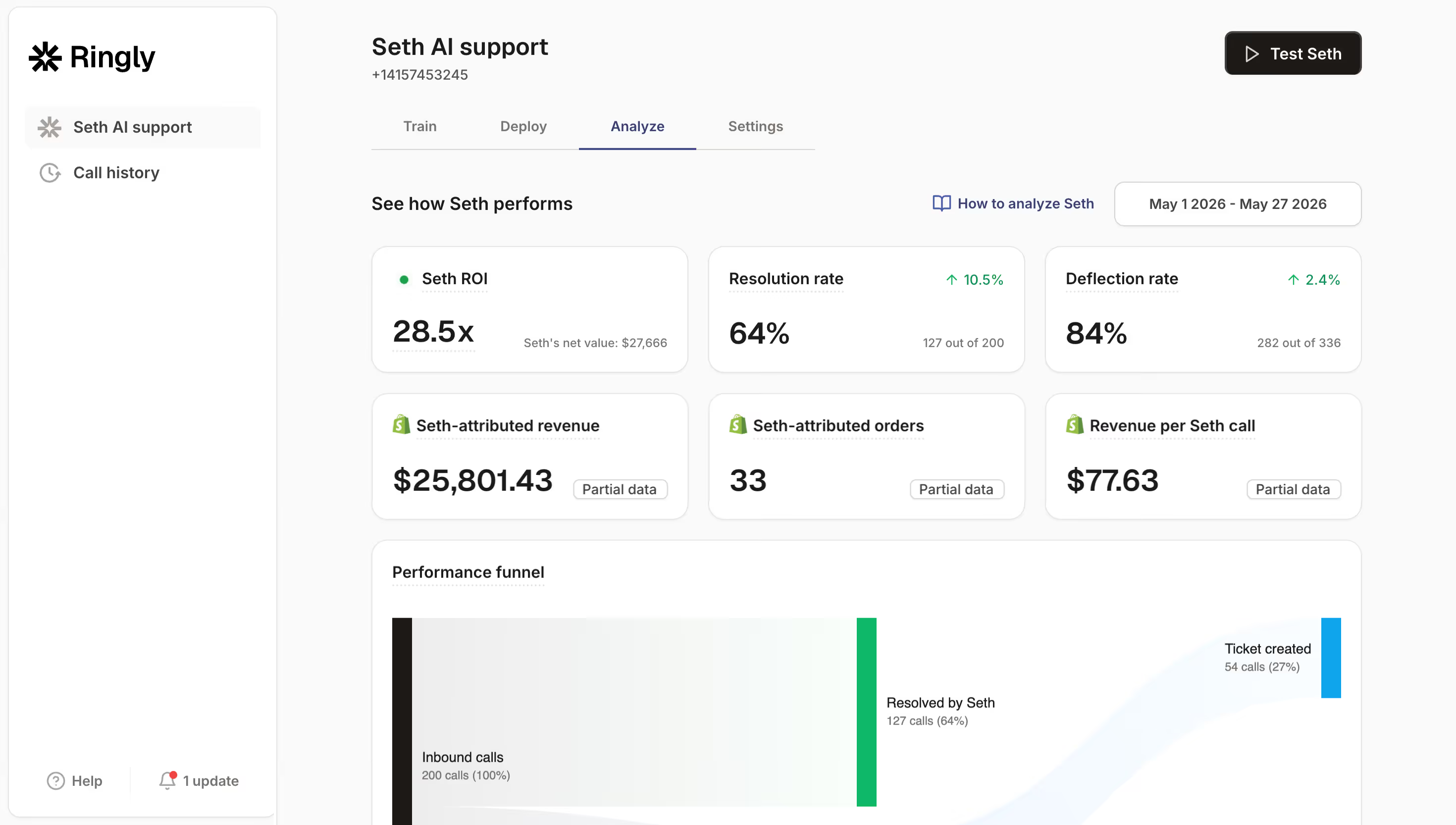
Seth does not take orders or payments on the call, cancel subscriptions natively, act as a human answering service, provide message-taking by people, or work as a chat product. When a call needs one of those paths, Seth follows your escalation rule. If you are comparing phone tools for Shopify, read the Shopify AI call answering app guide. Try for free, no credit card required.


AI Coach helps connect Shopify, your help docs, policies, website, and helpdesk if you use one. No engineer is needed. Seth learns what it can answer, what it should escalate, and how your store wants calls handled.
Keep your own number by forwarding calls to Seth, or use a number that comes with Seth. Most brands go live in under an hour, so your store can start covering inbound calls without changing how customers find you.
You decide what happens when Seth cannot or should not answer. It can transfer to a human, email the issue, or create a helpdesk ticket, for example in Gorgias. Rules can change by business hours.
 ShopifyGorgiasSeth
Ringly.io has one plan, Pay as you go. You can review it on the Ringly.io pricing page. Only pay when Seth talks to a customer, and a two-minute call and a nine-minute call cost the same. Seth resolves 65% of your support calls, or you don't pay for that month. For pricing context, read the answering service pricing guide.
| Option | Price as published | What a store gets | Source |
|---|---|---|---|
| Ringly.io (Seth) | $99/mo for the first 50 phone conversations, then $1.99 per conversation | AI phone support for Shopify brands with order context, instant answers, transfers, emails, tickets, recordings, transcripts, and attributed revenue. | ringly.io |
| Ruby | $250/month for 50 minutes, $395 for 100 minutes, $720 for 200 minutes | Human receptionists, billed by published minutes. | ruby.com |
| Smith.ai | Starter $300/month for 30 calls, $11.50 per extra call. Basic $810/month for 90 calls, $10.50 per extra call. Pro $2,100/month for 300 calls, $8.50 per extra call. | Human receptionists, billed by plan and extra calls. | smith.ai |
| PATLive | $189/month for 100 minutes, $2.09 per additional minute | Human answering service with published minutes and an estimate of about 40 calls. | patlive.com |
| Abby Connect | $165/month for 50 minutes, $329/month for 100 minutes | Human receptionists, billed by published minutes. | abbyconnect.com |
Prices read on September 30, 2026 from each vendor's own pricing page.
At 100 calls a month, about 80 calls end up billed with Seth, so the month is about $159/mo all in. For Smith.ai on Basic, the published 100 call example is $810 plus 10 x $10.50, which equals $915. Spam, wrong numbers, hang-ups, silent calls, callers who only want a human and get passed straight on, and your own team testing are not billed. Custom plan from 1,000+ calls a month. No contract, month to month. Set a monthly spend limit in Settings, and Seth pauses at the cap.
Ringly.io costs $99/mo for the first 50 phone conversations, then $1.99 per conversation. Only pay when Seth talks to a customer. A two-minute call and a nine-minute call cost the same. Calls that are spam, wrong numbers, hang-ups, silent calls, callers who only want a human and get passed straight on, and your own team testing are not billed. There is also a 30-day money back guarantee. Cancel anytime.
A phone answering service picks up inbound calls when your store cannot. With Seth, the call is answered instantly, including at 3am, and the AI starts with Shopify context. It can see who is calling, their orders, and what they said last time. Then it answers the question, looks up the order, requests a return, sends an email, transfers the call, or creates a helpdesk ticket based on your rules.
You set up Seth by connecting Shopify, your website, help docs, policies, and your helpdesk if you use one. AI Coach guides the integrations, so no engineer is needed. Then you choose escalation rules, decide what happens during and outside business hours, and forward your number or use a number that comes with Seth. Most brands go live in under an hour.
Seth is built for fast setup, and most brands go live in under an hour. AI Coach helps set up the integrations, so you do not need engineering work to connect Shopify, your policies, your help docs, and your helpdesk. You can forward your existing number or use a number that comes with Seth, then choose the escalation rules your team wants.
Yes, you can keep your own phone number by forwarding calls to Seth. Customers keep calling the number they already know, while Seth answers according to the rules you set. If you prefer, you can also use a number that comes with Seth. This means you can cover missed calls without changing the phone number shown on your store.
If a caller wants a real person and gets passed straight on, that call is not billed. You choose what escalation should happen. Seth can transfer to a human, email the issue to your team, or create a helpdesk ticket. The rule can differ by business hours, so you can transfer during the day and create a ticket overnight.
Yes, Seth can create a helpdesk ticket, for example in Gorgias, when that is the escalation path you choose. It can also email the issue or transfer the call to a human. This is useful when Seth is not sure, when a policy needs approval, or when the customer is asking for something that should be handled by your team.
Seth answers from your Shopify order data, website, help docs, and policies. It starts each call with full context, including who is calling, their Shopify orders, and what they said last time. If Seth is not sure, it escalates instead of guessing. That is the difference between answering with the order in front of it and simply taking a message.