

A Zendesk phone integration puts phone calls into Zendesk tickets, so a call leaves a record next to your email and chat. There are two routes. Either a person answers every call inside Zendesk, or an AI phone agent answers first and files a ticket when someone on your team is needed.
The rest of this page shows what each route puts on the ticket, plus the catch with channel labels.
Hear what AI support calls sound like for your store. Just paste your Shopify URL and get sample calls in under 20 seconds, no email required. Listen to demo calls for my store.
What a Zendesk phone integration means (and the two ways to get one)
Zendesk's pitch is that Zendesk Ticketing brings email, messaging, phone, social, and more into a single place. A phone integration is whatever feeds the phone part of that picture. The question is who picks up the call first.
Here are the two routes:
- Human-answered: a phone channel or phone system rings your agents, and the call is logged to a ticket.
- AI-answered first: an AI phone agent handles the conversation, and a ticket is created for calls that need a person.
The first route needs a person to answer each call.
For background on how the ticket side works, see our guide to the Zendesk ticketing system.
Zendesk Talk: what is included and how calls become tickets
Zendesk Talk is the phone channel built into Zendesk. Talk is included in the Suite Team and Suite Growth plans, according to Zendesk's help center. What each plan costs is in our Zendesk Talk pricing guide.
One description of the product calls it a cloud-based call center solution that integrates directly with Zendesk's ticketing system, allowing agents to manage all interactions from a single platform. The key words there are "call center" and "agents". Talk gives your people a place to take calls.
On keeping your number: you must have a Zendesk phone number, but if you have an existing number, you can forward calls from it to your Zendesk number.
CTI phone systems: click-to-call, screen pop and automatic logging
CTI, or Computer Telephony Integration, is the technology that connects telephone systems with computer software to enable capabilities like automatic call logging, screen pop, and click-to-call directly within a software interface, as Aircall's guide defines it.
In Zendesk terms, CTI allows calls to be made, received, and logged inside the Zendesk Agent Workspace without switching to a separate phone application, with call data written directly to the ticket record. Your agents stay in one window.
Two pieces of CTI are worth knowing by name:
- Click-to-call: the ability to initiate an outbound call by clicking a phone number directly within a Zendesk ticket or contact record, with no copying of the number into a separate phone application.
- Automatic ticket creation: a phone system creates or updates a Zendesk ticket in real time when a call begins or ends, matching the caller to an existing contact and populating the ticket fields without agent intervention.
Do you need CTI? Only if people will be placing and answering calls. If your goal is to stop agents from being on the phone for routine calls, CTI solves a different problem.
Adding an AI phone agent: what lands on the ticket when a call needs a person
The agent talks to the caller, resolves what it can, and hands over the rest. Ringly works this way: it files a Zendesk ticket with the full transcript and a summary whenever a call needs a person. More on this setup: AI voice bots for Zendesk Talk.
A useful phone ticket needs more than "customer called". Here is what this one holds:
- A short summary: for quick triage, so an agent knows the issue in seconds.
- The full transcript: for the detail when the summary isn't enough.
- A link to the call: a link back to the call itself.
- A private note: all of the above sits in a private note that only your team sees.
- The caller as requester: if the caller gave an email address, the ticket is filed as their own request, so they can reply to it like any other ticket.
Calls that need a person arrive open. When the agent hands a caller over to your team, or a caller asks to cancel an order, the ticket lands open in your queue.
There is also an optional setting. Turn on Create a ticket for every call and the calls the AI handled come in too, already solved, as a record. That gives you a full log without any of those tickets needing work.
For a closer look at what a helpdesk ticket from an AI call should hold, see our comparison of AI phone agents for helpdesks. If you are weighing Zendesk's own options against third-party ones, best AI agents for Zendesk covers that.
Zendesk's pricing page describes how you can automate end-to-end phone support interactions with AI-powered phone voice agents. Zendesk's voice AI documentation says that every call creates or updates a Zendesk ticket for tracking, reporting, and handoff context. Before it escalates, that agent is posting the call transcript and a summary to the ticket to prepare for handoff.
Zendesk Talk vs CTI phone system vs AI phone agent
Here is how the three routes compare on the points that matter to a small team.
| Zendesk Talk | CTI phone system | AI phone agent | |
|---|---|---|---|
| Who answers | Your agents | Your agents | The AI agent first, your team when needed |
| What the ticket gets | Calls handled next to tickets in one platform | Call data written directly to the ticket record | Summary, full transcript and a call link in a private note |
| When the ticket is made | Inside Zendesk's ticketing | When a call begins or ends | Calls that need a person, or every call if you switch that on |
The channel label is a separate question, and the next section covers it for the AI route.
Why AI-handled tickets show channel as API and how to use tags for views and triggers
Tickets created by the AI phone agent are not phone-channel tickets in Zendesk's eyes. Zendesk shows the channel of these tickets as API, not phone, and Zendesk sets the channel itself.
Look at a ticket and you will see API where you expected phone. Zendesk sets the channel itself, so build your views and triggers on the tags instead.
The fix is tags. Each ticket is tagged seth_ai_call, plus the call outcome (resolved, unresolved, transferred, escalated or unclear), the call category (like wismo or returns) and your store name.
Build your views and triggers on those tags. A few ideas that follow directly from the tag list:
- An AI calls view: every ticket carrying seth_ai_call, so you can see the AI-handled calls in one place.
- A needs-a-person view: tickets tagged escalated or unresolved, which is where your team starts each day.
- A returns view: tickets with the returns category tag, so one person can batch those.
- A WISMO view: tickets tagged wismo, useful for spotting how often callers ask where an order is.
- A per-store view: if you run more than one store, the store name tag splits them.
The same tags work for triggers.
What happens when no human is available: voicemail and handoff
A call that needs a person is only useful if that person can be reached. Plan for the case where nobody is on shift.
In Zendesk's own voice AI agent, there is a defined fallback: if no human agent is available, the customer can leave a voicemail.
With the AI phone agent described above, a call that needs a person lands as an open ticket in your queue, with the summary and transcript attached.
To keep this working in practice:
- Check the open queue first thing, using the needs-a-person view built on the escalated and unresolved tags.
- Read the summary before the transcript, and open the transcript only when the summary is unclear.
- Reply by email, since a caller who gave an address is the ticket's requester and can answer it like any other ticket.
How to choose for a Shopify store
The choice comes down to who will actually answer the phone. Cost matters too, and our look at what automated phone support costs and the AI vs human phone support comparison can help you weigh it.
Choose Zendesk Talk if:
- You want calls managed inside Zendesk itself, next to your tickets.
Choose a CTI phone system if:
- Your phone team is busy and wants click-to-call, screen pop and automatic logging in Agent Workspace.
- Outbound calling matters to your workflow.
Choose an AI phone agent if:
- Nobody has time to answer the phone, and you don't want to hire for it.
- You want tickets only when a person is needed, with a transcript and summary ready.
- You are comfortable using tags instead of the phone channel for your views and triggers.
If the answer is a mix, the options are not exclusive. If your store sells physical goods and the calls are mostly order questions, the AI route handles the routine ones. Our guide to the best helpdesk with phone support for Shopify compares helpdesks on exactly this point.
How Ringly.io handles Zendesk phone calls
Ringly.io is AI phone support for Shopify brands. Its AI phone agent, Seth, answers the call, and when a call needs a person, the Zendesk integration creates a ticket with a summary, the full transcript and a link to the call. Ringly.io charges per phone conversation, and the details are on the pricing page.
Video from the Ringly.io YouTube channel.
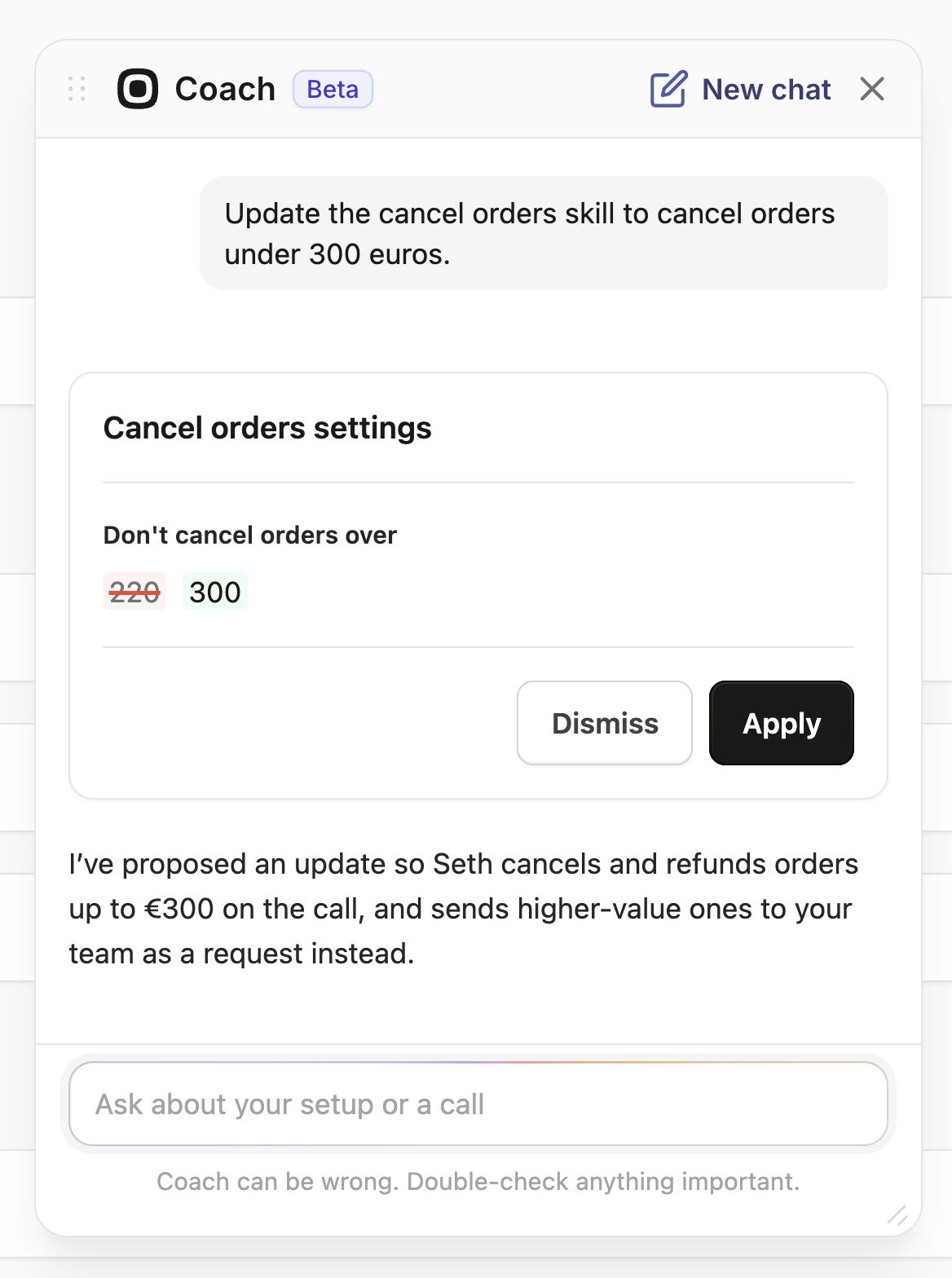
AI Coach is a chat assistant inside the Seth dashboard. It reads your settings and real calls, says what to fix first, and makes most of those changes for you. You click Apply or Dismiss on each one, so nothing changes on its own.
Around Zendesk, Seth connects to Shopify to look up orders and tracking, and to Gorgias if that is your helpdesk. Twilio lets you import your own phone number, and TrackingMore covers carrier tracking. Anything with an API can be reached through a custom skill. See the full integrations list.
Frequently asked questions
What does a Zendesk phone integration actually do?
It connects phone calls to Zendesk tickets so calls are logged next to your other channels. With CTI, that logging happens as agents take calls. With an AI phone agent, a ticket is created when a call needs a person, and every call can become a ticket if you turn that on.
Do I need Zendesk Talk to take phone calls in Zendesk?
Only if you want your own agents to answer calls inside Zendesk. Talk is included in the Suite Team and Suite Growth plans.
Can I keep my existing phone number and forward it to Zendesk?
Yes, in Zendesk's own setup. You must have a Zendesk phone number, but you can forward calls from an existing number to it. Ask any other phone vendor how it handles your current number before you commit.
Why do my phone tickets show the channel as API instead of phone?
Zendesk sets the channel itself, and tickets created by the AI phone agent arrive through the API. Use the tags to build views and triggers instead. Every ticket carries seth_ai_call, plus the outcome, category and store name.
Can an AI agent answer phone calls and create Zendesk tickets?
Yes. Ringly.io's AI phone agent answers the call, and the ticket holds a summary, the full transcript and a link to the call in a private note. Zendesk's pricing page also lists its own AI voice agents, so compare both on cost and on what the ticket contains.
What happens when a call needs a human and nobody is available?
With the AI phone agent on this page, a call that needs a person lands as an open ticket in your queue. In Zendesk's own voice AI agent, the customer can leave a voicemail if no human agent is available.
More on Zendesk: Zendesk AI agent, best AI agents for Zendesk, Zendesk ticketing system, Zendesk integrations, Zendesk vs intercom and how Ringly connects to Zendesk.