Zendesk Talk promises to handle your phone support with AI-powered features and seamless integration. But before you sign up, you need to understand what it really costs. The advertised prices start at $55 per agent per month, but that is just the beginning.
This guide breaks down Zendesk Talk pricing in detail. We will cover the base plans, usage fees that add up fast, expensive add-ons, and real-world cost examples for different team sizes. By the end, you will know whether Zendesk Talk fits your budget or if an alternative makes more sense.
Editor's note: Want to hear some sample AI support calls made for your Shopify store?
- Just paste your store URL
- Get sample calls in under 20 seconds (no email required)
- Listen to demo calls for my store

What is Zendesk Talk?
Zendesk Talk is a cloud-based call center solution built into the Zendesk Suite. It lets support teams handle inbound and outbound calls within the same workspace they use for email, chat, and messaging tickets.
The key selling point is integration. When a customer calls, agents see their full history across all channels. No switching between systems or losing context. The platform also includes AI features like automated call transcription, AI agents that can handle calls without human intervention, and real-time coaching suggestions for agents.
Zendesk Talk cannot be purchased on its own. It requires a full Zendesk Suite subscription. This bundling affects your total cost significantly, which we will explore in the next section.
Zendesk Talk pricing plans
Since Zendesk Talk comes bundled with the Suite, your pricing depends on which Suite tier you choose. All plans include AI agents at the "Essential" level, which means basic automated responses and ticket handling.
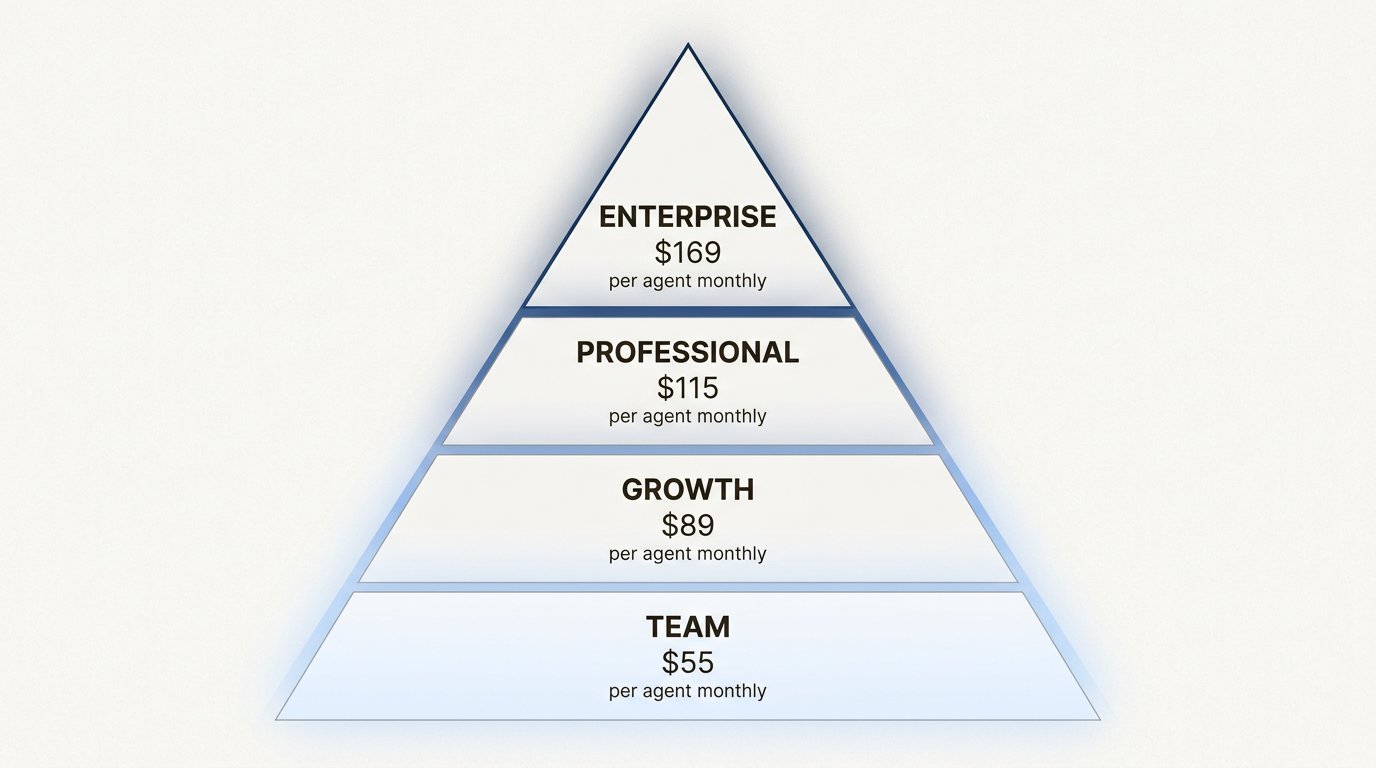
Suite Team: $55 per agent per month (annual billing)
The entry point for Zendesk Talk. At $69 per agent if you pay monthly, or $55 with annual billing.
Talk features included:
- Basic phone support with voicemail
- Call routing to groups
- Call recording
- Business hours
What is missing: No IVR phone trees, no skills-based routing, no call monitoring. You also pay extra for phone numbers and usage.
This plan works for small teams just getting started with phone support. But the limitations become apparent quickly as you scale.
Suite Growth: $89 per agent per month (annual billing)
At $115 monthly or $89 annually, this adds operational features.
Additional Talk features:
- SLA management
- Multilingual support (one default language)
- Overflow and after-hours routing
- Group routing
You still do not get IVR or advanced routing. But you do get better queue management and the ability to set service level agreements.
Suite Professional: $115 per agent per month (annual billing)
This is where Talk gets serious. $149 monthly or $115 annually.
Key additions:
- IVR phone trees (interactive voice response)
- Skills-based routing
- Call monitoring and barging
- Callback requests from queue
- CSAT surveys
- HIPAA compliance
- Multiple business hours
For most established support teams, this is the practical minimum. The IVR alone justifies the upgrade if you handle significant call volume.
Suite Enterprise: $169 per agent per month (annual billing)
The top tier at $219 monthly or $169 annually.
Enterprise additions:
- Custom agent roles
- Sandbox environment
- 99.95% uptime SLA
- Up to 300 help centers
- Advanced security features
- Multiple sandbox environments
This tier targets large organizations with complex needs and strict compliance requirements.
Complete pricing comparison
| Plan | Annual Price |
|---|---|
| Monthly Price | Talk Features |
| Best For | Suite Team |
| $55/agent | $69/agent |
| Basic routing, voicemail | Small teams starting out |
| Suite Growth | $89/agent |
| $115/agent | SLA management, overflow routing |
| Growing teams | Suite Professional |
| $115/agent | $149/agent |
| IVR, skills routing, monitoring | Established operations |
| Suite Enterprise | $169/agent |
| $219/agent | Custom roles, 99.95% SLA |
| Large enterprises | Source: Zendesk pricing page |
The hidden costs of Zendesk Talk
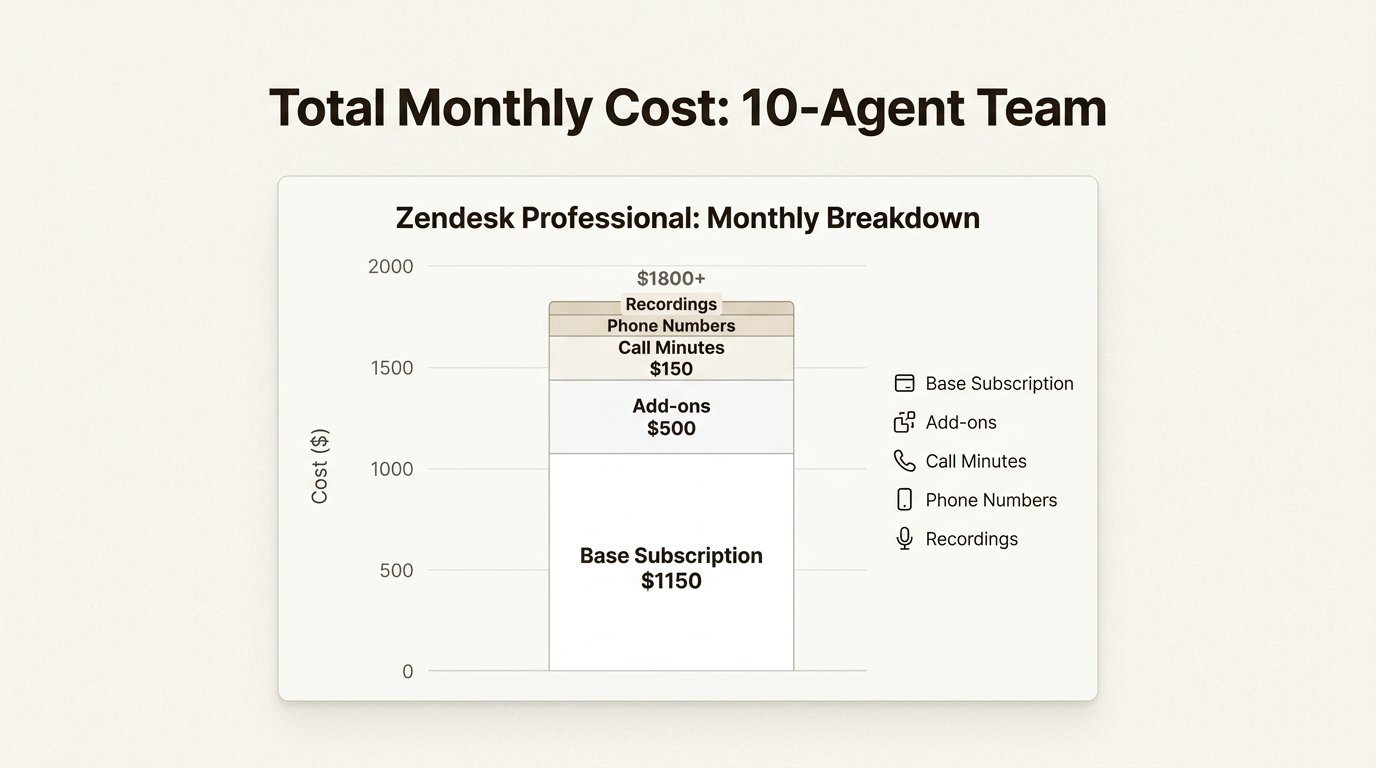
Zendesk Talk gets expensive beyond the base subscription. You pay for usage, and these costs scale with your call volume. They can easily exceed your subscription fees.
Phone numbers
| Number Type | Monthly Cost | Local numbers (US/Canada) |
|---|---|---|
| $1 per number | Toll-free numbers (US/Canada) | $2 per number |
| International numbers | Varies by country | Source: Zendesk Talk number pricing |
If you need multiple numbers for different departments or regions, this adds up fast. A ten-agent team with three local numbers pays just $3 per month for numbers, but larger operations with toll-free lines across countries see higher bills.
Call minutes
| Call Type | Rate (US/Canada) | Inbound calls (answered in browser) |
|---|---|---|
| $0.012 per minute | Inbound calls (forwarded to phone) | $0.022 per minute |
| Outbound calls | $0.022 per minute | Source: Zendesk Talk billing FAQ |
A customer on hold counts against your minutes. Forward calls to mobile phones and you pay nearly double the browser rate. International calls cost significantly more depending on the destination.
Recording and transcription
| Feature | Cost | Call recording |
|---|---|---|
| $0.003 per minute | Voicemail transcription | $0.01 per minute |
| Live call transcription | $0.027 per minute | Source: Zendesk Talk number pricing |
Transcription requires the Copilot add-on ($50 per agent monthly) plus per-minute fees. For a team recording all calls and using transcription, this adds substantial cost.
Text messaging
SMS costs between $0.009 and $0.013 per text depending on direction and destination. If you use Zendesk Text for two-factor authentication or notifications, budget accordingly.
Real cost example: 5-agent team
| Let us calculate monthly costs for a small team: | Item | Calculation | Monthly Cost | Suite Team (5 agents) | 5 x $55 | $275 |
|---|---|---|---|---|---|---|
| 2 local phone numbers | 2 x $1 | $2 | Inbound calls (500 min) | 500 x $0.012 | $6 | Outbound calls (200 min) |
| 200 x $0.022 | $4.40 | Call recording (700 min) | 700 x $0.003 | $2.10 | Total | ~$290 |
That is $58 per agent per month in actual costs, not $55. But this assumes light usage. Heavy call volumes change the math dramatically.
Zendesk Talk add-ons and their costs
Zendesk offers several add-ons that enhance Talk functionality. Each adds per-agent monthly costs.
| Add-on | Price |
|---|---|
| What It Does | Copilot |
| $50/agent/month | AI writing assistance, call summarization, transcription |
| Quality Assurance | $35/agent/month |
| Evaluate 100% of conversations, detect coaching opportunities | Workforce Management |
| $25/agent/month | AI forecasting, scheduling, real-time monitoring |
| Contact Center | $50/agent/month |
| Advanced contact center features | Advanced Data Privacy |
| $50/agent/month | Enhanced security (Enterprise only) |
| Workforce Engagement Bundle | $50/agent/month |
| WFM + QA combined | Source: Zendesk pricing page |
The add-on trap
Add-ons compound quickly. A Professional plan agent with Copilot and Quality Assurance costs:
$115 (base) + $50 (Copilot) + $35 (QA) = $200 per agent per month
For a ten-agent team, that is $2,000 monthly before usage fees. The math explains why many teams stick to base plans despite wanting advanced features.
Automated Resolution pricing
| Zendesk's AI agents use an "Automated Resolution" (AR) pricing model: | Plan |
|---|---|
| Included ARs | Committed AR Price |
| Pay-as-you-go AR Price | Suite Team |
| 5 per agent/month | $1.50 each |
| $2.00 each | Suite Growth |
| 5 per agent/month | $1.50 each |
| $2.00 each | Suite Professional |
| 10 per agent/month | $1.50 each |
| $2.00 each | Suite Enterprise |
| 15 per agent/month | $1.50 each |
| $2.00 each | Source: Zendesk pricing page |
If your AI agents resolve more calls than your included allowance, you pay per resolution. This creates unpredictable costs during high-volume periods.
Real-world cost examples
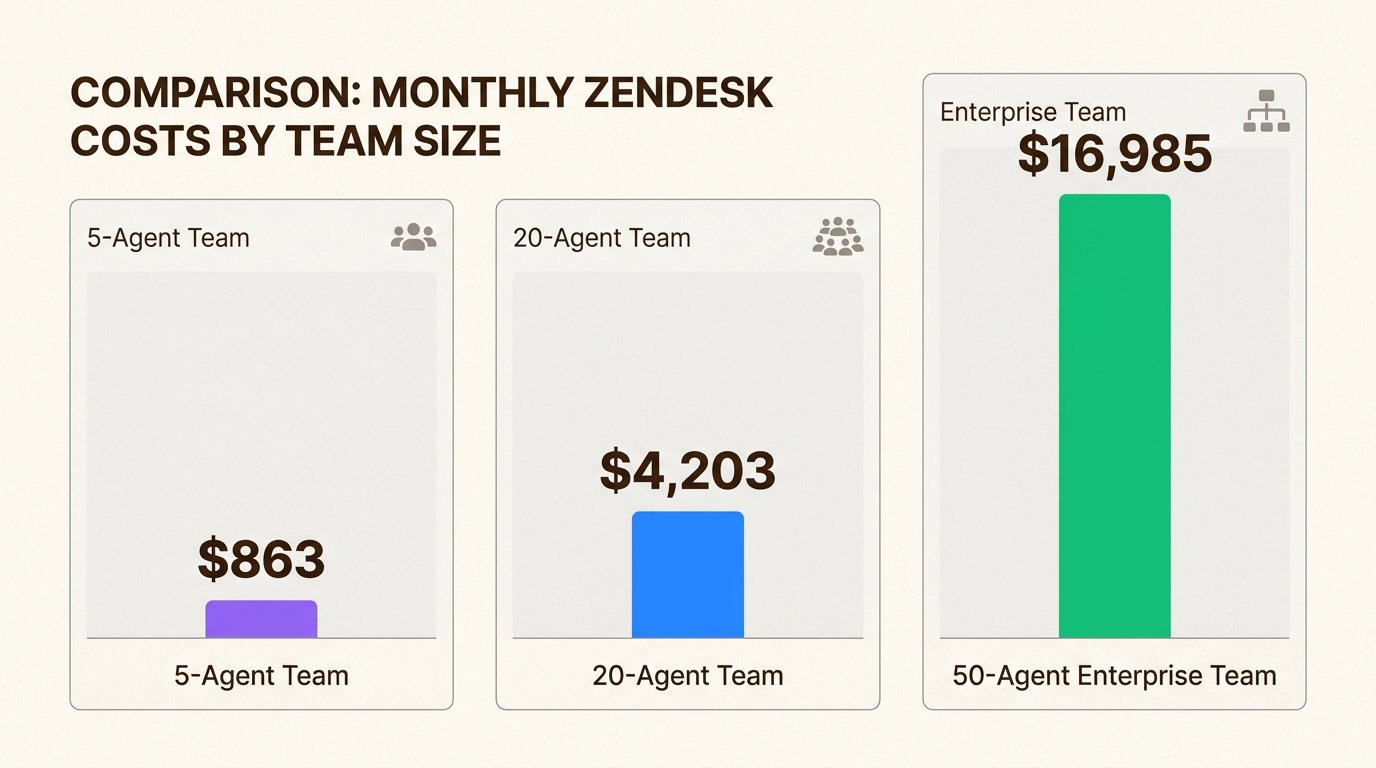
Let us look at actual costs for different team sizes with realistic usage patterns.
Small team: 5 agents, moderate usage
| Component | Monthly Cost |
|---|---|
| Suite Professional (5 agents) | $575 |
| 3 local phone numbers | $3 |
| Copilot add-on (5 agents) | $250 |
| Usage (1,500 inbound min, 500 outbound min) | ~$29 |
| Recording (2,000 min) | $6 |
| Total | $863 |
| Per agent | $173 |
This assumes a professional support team using AI features. Without Copilot, you would save $250 monthly but lose transcription and AI assistance.
Mid-market team: 20 agents, high usage
| Component | Monthly Cost |
|---|---|
| Suite Professional (20 agents) | $2,300 |
| 5 phone numbers (mixed local/toll-free) | $8 |
| Copilot add-on (20 agents) | $1,000 |
| Quality Assurance (20 agents) | $700 |
| Usage (8,000 inbound min, 3,000 outbound min) | ~$162 |
| Recording (11,000 min) | $33 |
| Total | $4,203 |
| Per agent | $210 |
At this scale, usage costs become significant. The per-agent cost exceeds the base subscription due to add-ons.
Enterprise team: 50 agents, full features
| Component | Monthly Cost |
|---|---|
| Suite Enterprise (50 agents) | $8,450 |
| 10 phone numbers | $15 |
| Copilot add-on (50 agents) | $2,500 |
| Quality Assurance (50 agents) | $1,750 |
| Workforce Management (50 agents) | $1,250 |
| Advanced Data Privacy (50 agents) | $2,500 |
| Usage (25,000 inbound min, 10,000 outbound min) | ~$520 |
| Total | $16,985 |
| Per agent | $340 |
Enterprise deployments with full feature sets see per-agent costs nearly double the base subscription price.
When Zendesk Talk makes sense (and when it does not)
Zendesk Talk excels in specific scenarios. It also falls short in others.
Good fit for:
- Existing Zendesk users. If you already use Zendesk Suite for email and chat, adding Talk keeps everything in one place.
- Omnichannel support teams. Teams handling phone, email, chat, and social together benefit from unified context.
- Enterprises needing compliance. HIPAA support, 99.95% SLAs, and advanced security features serve regulated industries.
- AI-forward organizations. The integrated AI agents and Copilot features appeal to teams wanting automation.
Poor fit for:
- Budget-conscious teams. Usage-based pricing and expensive add-ons create unpredictable bills.
- Phone-only operations. If you just need phone support without ticketing, you are paying for features you will not use.
- High-volume call centers. Per-minute pricing punishes growth. High call volumes generate massive usage fees.
- Small businesses. The minimum cost of $55 per agent monthly plus usage puts this out of reach for many small teams.
The fundamental limitation
Zendesk Talk requires named agent licenses. You cannot share pooled licenses across a team. Every agent who might take a call needs their own subscription. This differs from some competitors offering concurrent licensing models.
A simpler alternative for ecommerce phone support
If Zendesk Talk's pricing and complexity feel overwhelming, there is another approach. Ringly.io offers an AI phone agent specifically designed for ecommerce stores.
Instead of per-agent pricing and usage fees, Ringly.io charges a flat monthly rate. The AI agent, Seth, handles inbound calls 24/7, answers order questions, processes returns, and escalates complex issues to your team only when needed.
| Key differences: | Factor | Zendesk Talk | Ringly.io | Pricing model |
|---|---|---|---|---|
| Per-agent + usage | Flat monthly fee | Setup complexity | Requires configuration | 3-minute setup |
| AI handling | Add-on required ($50/agent) | Included in all plans | Shopify integration | Available via app |
Native integration
24/7 coverage
Requires agent staffing
AI handles all hours
For Shopify stores wanting automated phone support without the Zendesk overhead, Ringly.io offers a purpose-built alternative. Seth handles the calls so you can focus on growing your business.
Start your free trial and see how AI phone support works for your store.
Choosing the right phone support solution
Your decision depends on three factors: your current tools, your budget, and your call volume.
Choose Zendesk Talk if:
- You already use Zendesk Suite
- You need omnichannel support (phone + email + chat)
- You have budget for $150+ per agent monthly with add-ons
- You want integrated AI across all channels
Consider alternatives if:
- You need predictable monthly costs
- You want AI phone support without per-agent fees
- You run a Shopify store and need ecommerce-specific features
- Your team is small and budget-conscious
The right tool solves your specific problem without creating new ones. Zendesk Talk solves complex omnichannel support for established teams. For simpler phone support needs, lighter alternatives often make more sense.
Frequently Asked Questions
Can you buy Zendesk Talk without the full Suite?
No. Zendesk Talk requires a Zendesk Suite subscription. You cannot purchase it standalone. The cheapest entry point is Suite Team at $55 per agent per month with annual billing.
How much does Zendesk Talk cost for a small team of 5 agents?
Expect $275 to $575 monthly for the base subscription depending on your plan tier. Add usage fees ($20-50 monthly for moderate call volume) and any add-ons like Copilot ($250 monthly for 5 agents). Realistic total: $300 to $850 monthly.
What are the hidden costs in Zendesk Talk pricing?
Phone numbers ($1-2 monthly each), call minutes ($0.012-0.027 per minute depending on type), call recording ($0.003 per minute), and transcription ($0.01-0.027 per minute). These usage fees often exceed base subscription costs for high-volume teams.
Is Zendesk Talk worth the price compared to alternatives?
For teams already using Zendesk Suite who need integrated phone support, yes. The unified workspace justifies the cost. For teams wanting only phone support or seeking predictable pricing, alternatives like Ringly.io often provide better value.
Does Zendesk Talk offer concurrent agent licensing?
No. Zendesk Talk only offers named agent licensing. Every agent who takes calls needs their own subscription. You cannot share pooled licenses across a team.