

Zendesk says its ticketing brings email, messaging, phone, social, and more into a single place. For a Shopify store, the useful questions are which channels feed the queue, what an agent sees inside a ticket, and what happens to phone calls.
Hear what AI support calls sound like for your store. Just paste your Shopify URL and get sample calls in under 20 seconds, no email required. Listen to demo calls for my store.
What the Zendesk ticketing system is
Think of it as the inbox your whole support team shares.
Zendesk says it brings email, messaging, phone, social and more into a single place, so your team works from one list.
Zapier's comparison says Zendesk "has an edge" on ticketing. If you're still choosing a helpdesk, our Zendesk alternatives comparison and the Gorgias vs Zendesk breakdown for Shopify cover the other options.
When an AI phone agent creates a Zendesk ticket for a call, Zendesk shows the channel of that ticket as API, not phone (Zendesk connection guide). So if you filter by the phone channel to find call tickets, an AI phone agent's tickets won't be in that list.
We'll come back to that in the last two sections.
How a request becomes a ticket across email, chat, social and phone
Zendesk says tickets can come in through email, voice calls, live chat, messaging apps like WhatsApp and Facebook Messenger, and social media. All of those interactions are unified into one system.
For a store owner, the practical way to read that is by channel:
- Email: email requests become tickets in the same queue.
- Chat and messaging: live chat plus apps like WhatsApp and Facebook Messenger.
- Social: social media messages land in the same queue as everything else.
The Shopify App Store listing makes the same point from the store side. It says Zendesk enables customer interactions across messaging, phone, chat, email, social media, and more.
One habit worth building early: decide which channels you actually want to run.
Routing and SLAs: what the system does with a ticket
Once a ticket exists, something has to decide who gets it. Zendesk says omnichannel routing is included in all plans and automatically assigns tickets from email, chat and messaging based on agent availability and workload.
That sentence lists email, chat and messaging.
SLA timing is a separate matter. Zendesk lists SLA-based timing as available from the Growth plan and above.
What Shopify data an agent sees inside a ticket
A ticket is only useful if the agent can answer it without switching tabs. The Zendesk app for Shopify is built for that: it gives agents access to relevant customer data so they can solve tickets faster.
It also lets agents act, not just read. The same listing says agents can process refunds and cancellations directly from the Zendesk Support sidebar app.
If you want the full setup, our Zendesk and Shopify integration guide walks through connecting the two. And if your tool isn't covered by the Shopify app, the Zendesk Marketplace lists apps, connectors and themes, including Workato, which it describes as a way to automate workflows and integrate data between 1500+ apps using no code at all.
Which plan includes what
The UK pricing page says plans start from £15 per month, and that the entry Support Team plan covers an email and ticketing system.
| What you want | What Zendesk says |
|---|---|
| Email and ticketing | Covered on the entry Support Team plan |
| Omnichannel routing | Included in all plans |
| SLA-based timing | Growth plan and above |
| Starting price | From £15 per month (UK pricing page) |
That £15 figure comes from the UK page, so it's in pounds. If you sell mainly in the US, check Zendesk's US pricing page for dollar figures before you budget.
Intercom lists a shared inbox and ticketing system among the key features of its Essential plan.
Before you pick a plan, list the channels you plan to run and which of the features above you actually need.
Where phone calls fit, and how AI call tickets show up
Phone is the awkward channel in any ticketing system. A call isn't text, so something has to turn it into a ticket with a summary the team can scan.
You can use Zendesk's own voice channel, which is what how Zendesk Talk's AI voice bot works explains. Or you can run an AI phone agent that creates tickets in Zendesk for the calls that need your team.
The second route has the quirk we flagged earlier. Zendesk shows the channel of a ticket created by an AI phone agent as API. Phone doesn't appear as the channel on that ticket.
The practical check takes a minute: open one ticket created from a call and read the channel field. If it says API, build your views on something other than the phone channel.
Zendesk sets the channel itself, so use the tags on those tickets to build views or triggers for the calls instead of the channel field.
Escalation can run two ways. An AI phone agent can hand a call to your team by live transfer, cold or warm, or by ticket, and on a warm transfer it can brief the teammate first. The ticket route is the one that lands in Zendesk, with a summary, the full transcript and a link to the call.
How to set up views for calls from an AI phone agent
Once the tickets are flowing, keep your views few and simple.
Here's a simple starting point:
- Calls that need a person: set up one view filtered on the tags Zendesk shows on those tickets, and use it as the working queue for your team.
Skip the phone channel filter. As covered above, those tickets show as API, and Zendesk sets the channel itself, so the tags are what you build on.
A few habits keep the setup honest:
- Check the ticket first: the summary, full transcript and a link to the call are in it.
- Review a week of tickets: look at which topics come up most, then decide whether a macro, a help article or a better phone answer would remove them.
- Open the call when a ticket looks off: from any call in call history you can click Ask Coach, and Coach opens with that call loaded and suggests a fix.
That last step is where a ticket queue becomes useful beyond clearing it. The tickets tell you what customers actually call about.
Keep the Shopify side in view as well. The Zendesk app for Shopify gives agents access to relevant customer data, so a ticket that started as a call can be answered without switching tabs. On the phone side, the agent verifies the caller before sharing order details, silently by phone match or with the shipping ZIP code plus an order number or email.
How Ringly.io handles Zendesk tickets on the phone
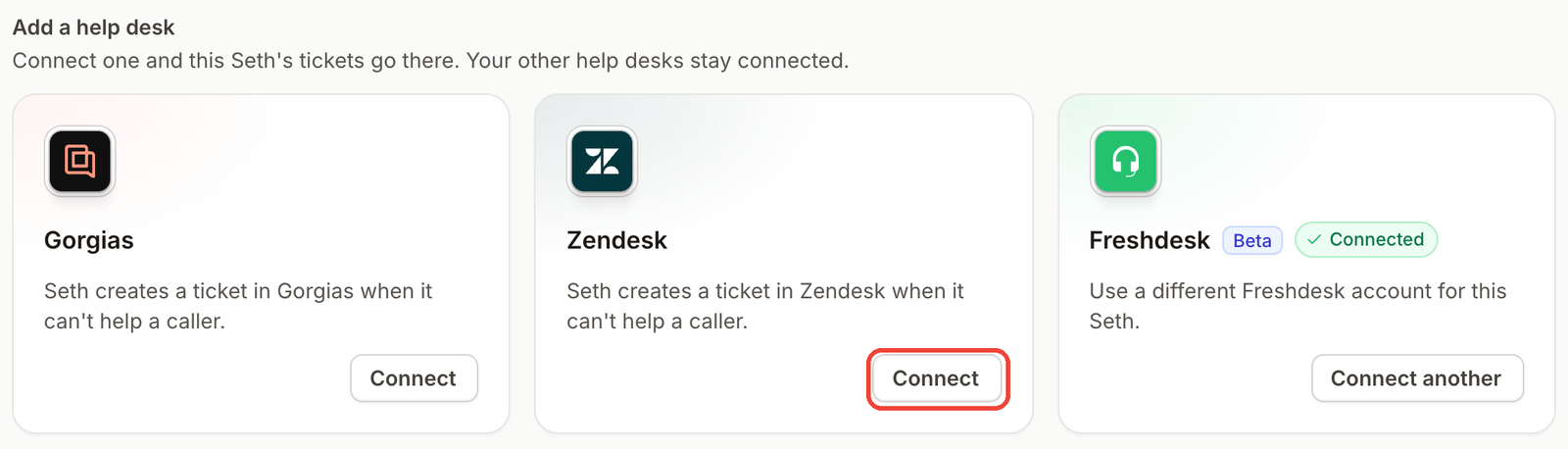
Ringly.io is AI phone support for Shopify brands. Seth answers calls as the store's AI phone agent and looks up orders in Shopify. For calls that need a person, he creates a Zendesk ticket with a summary, the full transcript and a link to the call in Ringly.
Video from the Ringly.io YouTube channel.
AI Coach is a chat assistant inside the Seth dashboard. It reads your settings and real calls, tells you what to fix first, and makes most of those changes for you. It shows each change for your approval, and it's in beta, so it can be wrong. Here's how Coach works.
You can test Seth by typing in the Try Seth panel before any real call, and a test chat never cancels a real order. If you run Gorgias instead, Seth logs calls there as tickets with the customer matched, a summary, the full transcript and tags.
If you connect a Twilio account, Seth can text the caller during a call and answer on a number you already own. Seth can also call any API endpoint mid-call through a custom skill, so a tool that isn't listed can still be connected if it has an API.
Ringly.io charges per phone conversation, and the details are on the pricing page.
Frequently asked questions
What is the Zendesk ticketing system?
Zendesk says it brings email, messaging, phone, social and more into a single place, so your team works from one list.
Which channels can create a Zendesk ticket?
Email, voice calls, live chat, messaging apps like WhatsApp and Facebook Messenger, and social media. If you add an AI phone agent, Zendesk shows the channel of its tickets as API.
How much does the Zendesk ticketing system cost?
Zendesk's UK pricing page shows plans starting from £15 per month. Read the Zendesk pricing guide for the full breakdown.
Does the Zendesk ticketing system use AI?
Separately, an AI phone agent like Seth answers the call itself. For calls that need a person, it creates a Zendesk ticket with a summary, the full transcript and a link to the call.
Can an AI phone agent create Zendesk tickets for my calls?
Yes. An AI phone agent can create a Zendesk ticket for calls that need your team. Zendesk shows those tickets with the API channel, so don't filter on the phone channel to find them.
Does omnichannel routing cost extra?
Zendesk says omnichannel routing is included in all plans. It automatically assigns tickets from email, chat and messaging based on agent availability and workload.
Do I need Zendesk's own voice channel to get call tickets?
No. You can use Zendesk's voice channel, or you can run an AI phone agent that creates tickets in Zendesk for the calls that need your team. Each of those tickets carries a summary, the full transcript and a link to the call.
More on Zendesk: Zendesk phone integration, Zendesk AI agent, best AI agents for Zendesk, Zendesk integrations, Zendesk vs intercom and how Ringly connects to Zendesk.