Running out of stock on your best-selling product is a nightmare.
So is tying up cash in inventory that sits in your warehouse for months.
Getting inventory management right means walking a tightrope between these two extremes.
Shopify includes built-in inventory tools with every plan, but knowing how to use them effectively (and when to add apps) can make the difference between a store that runs smoothly and one that's constantly fighting stock issues.
This guide covers everything from basic setup to advanced automation.
Editor’s note: Want to hear some sample AI support calls made for your Shopify store?
- Just paste your store URL
- Get sample calls in under 20 seconds (no email required)
- Listen to demo calls for my store

What is Shopify inventory management?
At its core, inventory management is tracking what you have, where it is, and how fast it's selling.
Shopify approaches this by giving every merchant a central inventory system that connects to their online store, physical retail locations, and third-party sales channels.
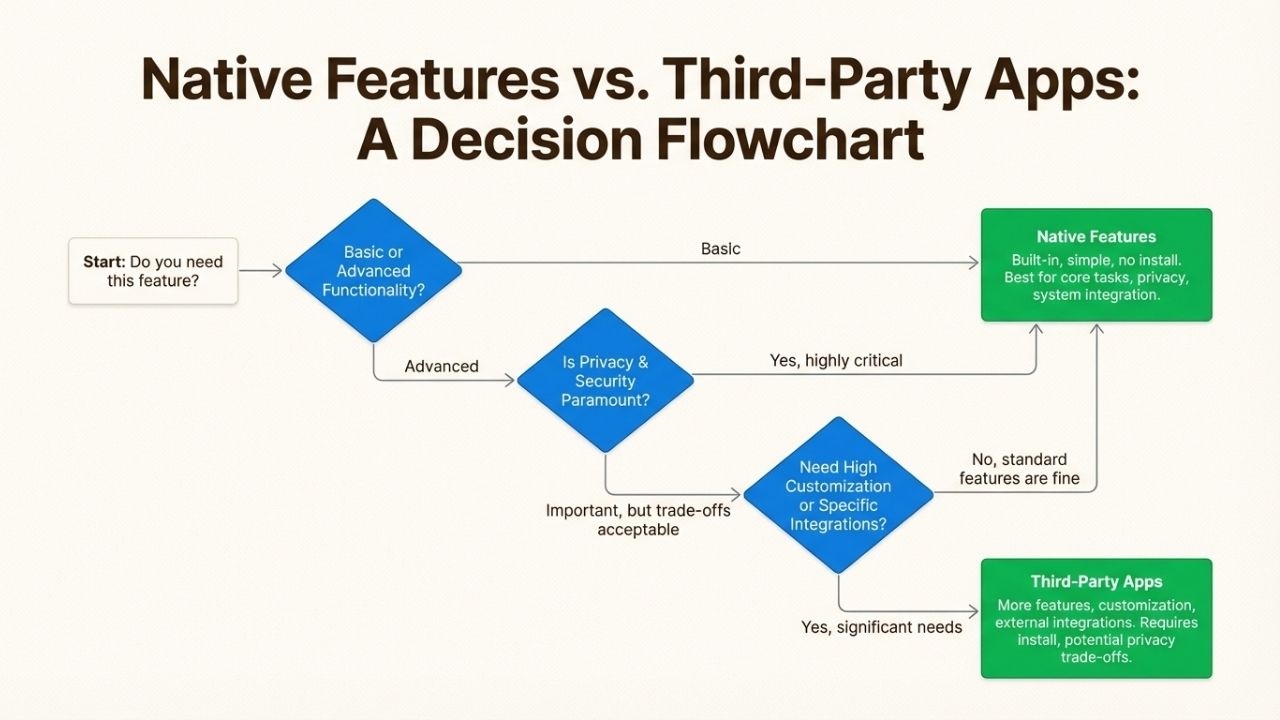
Here's the key thing to understand: Shopify's native inventory features handle the fundamentals well, but they're designed for straightforward use cases.
If you're selling simple products through a few channels, the built-in tools are probably enough.
But if you're managing bundles, dropshipping, multiple warehouses, or selling across Amazon, eBay, and TikTok Shop simultaneously, you'll likely need to extend Shopify with apps.
The good news is that all Shopify plans include inventory tracking. You don't pay extra for basic functionality.
The challenge is knowing when to stick with native features and when the complexity of your business justifies adding specialized apps.
Shopify's native inventory features
Shopify's built-in inventory system is more capable than many merchants realize.
Before you start browsing the App Store, it's worth understanding what's already included.
Inventory tracking and states
Shopify tracks inventory through several distinct states:
- On hand: The total physical units at a location
- Available: What customers can actually buy (not committed to orders)
- Committed: Units reserved for placed orders that haven't shipped yet
- Incoming: Inventory on its way to you from suppliers
- Reserved: Units set aside for holds or inspection
- Damaged/Safety stock/Quality control: Unsellable inventory categories
This matters because it prevents overselling.
When a customer places an order, Shopify immediately moves units from "available" to "committed." If you have 100 units on hand but 95 are committed to orders, Shopify knows only 5 are actually available for new purchases.
Multi-location support
If you stock inventory in multiple places (a warehouse, a retail store, a 3PL facility), Shopify can track quantities separately for each location.
You can also set priorities for which location fulfills orders first, and transfer inventory between locations when needed.
This becomes essential as you scale. A merchant selling from their garage can probably manage without it.
A merchant with two retail locations and a fulfillment center needs this capability.
Purchase orders and transfers
Shopify includes tools for creating purchase orders to send to suppliers and tracking incoming inventory.
You can also create transfers to move stock between your own locations. When transfers are received, inventory quantities update automatically.
Inventory reports and analytics
The platform includes several inventory-focused reports:
- ABC analysis: Identifies your top-performing products (the 20% that drive 80% of sales)
- Low stock alerts: Can be automated through Shopify Flow
- Inventory adjustments: Tracks changes with reasons (damage, theft, counting errors)
Channel sync
When you connect sales channels like Facebook, Instagram, Amazon, or TikTok Shop, Shopify keeps inventory synchronized across all of them.
Sell a unit through Instagram, and your Shopify store inventory decreases by one. This prevents the chaos of overselling across channels.
When you need a Shopify inventory app
Native features handle the basics, but there are clear signals that you've outgrown them.
Here are the scenarios where apps become necessary:
Multi-channel selling beyond Shopify's native integrations: Shopify connects to major platforms, but if you're selling on eBay, Etsy, or niche marketplaces, you'll need an integration app to keep inventory synchronized.
Advanced forecasting: Shopify shows you what sold, but it doesn't predict what will sell. Apps can analyze trends and suggest optimal reorder points.
Barcode scanning and warehouse workflows: If you're doing regular physical counts or have warehouse staff picking orders, barcode scanning apps speed up operations and reduce errors.
Bundle and kit management: Selling a "starter pack" that contains three separate SKUs? Native Shopify can't automatically deduct components from inventory when the bundle sells. You need an app for that.
Dropshipping automation: If suppliers ship directly to customers, you need apps that forward orders and sync supplier inventory levels.
ERP integration: When your business runs on NetSuite, SAP, or similar systems, inventory data needs to flow between Shopify and your ERP.
Multi-store inventory syncing: Running multiple Shopify stores that share the same inventory pool requires an app to keep quantities accurate across all storefronts.
Best Shopify inventory apps by use case
The Shopify App Store has over 480 inventory apps. Rather than overwhelming you with options, here are the top recommendations for specific scenarios based on ratings, review counts, and functionality:
Multi-channel selling
CedCommerce Amazon Channel (4.6★, 1,037 reviews)
This app handles the complexity of selling on Amazon while keeping inventory synchronized with Shopify.
It manages product listings, order syncing, and inventory updates in both directions. The free-to-install model means you only pay for the features you use.
Etsy Integration by QuickSync (4.9★, 1,771 reviews)
With nearly 1,800 reviews and a 4.9-star rating, this is the go-to solution for Etsy sellers. It syncs products, inventory, and orders between Shopify and Etsy.
The high review count suggests it's reliable for merchants doing significant volume.
LitCommerce (4.8★, 720 reviews)
If you're selling across multiple platforms including TikTok Shop, Temu, and Walmart, LitCommerce handles the complexity.
It centralizes inventory management so you don't have to update quantities separately for each marketplace.
Barcode and scanning
506 EasyScan SKU & Barcode (5.0★, 300 reviews)
A perfect 5-star rating from 300 reviews is impressive.
This app turns your phone or tablet into a barcode scanner for inventory counts, order picking, and receiving stock. It's particularly useful for warehouse operations or regular physical inventory counts.
CTS Multi Barcode Labels (4.9★, 89 reviews)
Before you can scan barcodes, you need to print them. This app generates and prints custom barcode labels for products and orders, integrating with most label printers.
Bundles and kits
Bundles.app (4.9★, 297 reviews)
When you sell a bundle, this app automatically adjusts the inventory of each component product. S
ell a "gift set" containing a candle, soap, and lotion, and the app deducts one unit from each component's inventory. Without this, you'd have to manually track component levels.
Multi-store sync
Syncio Inventory Sync (4.7★, 151 reviews)
If you run multiple Shopify stores that share inventory (common for brands with separate wholesale and retail storefronts), Syncio keeps quantities synchronized. When a product sells on one store, inventory decreases on all connected stores.
Supplier integration
syncX: Stock Sync (4.7★, 843 reviews)
This app automatically updates your inventory based on supplier feeds.
If your supplier provides a CSV file, FTP feed, or API with current stock levels, syncX can update your Shopify quantities automatically. Essential for dropshippers or anyone working with external fulfillment.
How to set up inventory tracking in Shopify
Getting inventory tracking working properly takes about 15 minutes if you do it right the first time. Here's the step-by-step process:
Step 1: Enable inventory tracking for products
For each product you want to track, go to the product details page in your Shopify admin. Scroll to the "Inventory" section and check the box to "Track quantity." You'll also set your initial quantity here.
Step 2: Set initial quantities
Enter your current stock levels for each product variant. If you have multiple locations, you'll set quantities for each location separately.
Be accurate here, starting with wrong numbers means your inventory will be wrong forever.
Step 3: Configure inventory policies
For each product, decide what happens when inventory reaches zero:
- Continue selling when out of stock: Good for products you can quickly restock or made-to-order items
- Don't allow purchase when out of stock: Prevents overselling for items with long restock times
Step 4: Set up low stock alerts with Shopify Flow
Shopify Flow is a free automation app from Shopify.
You can create a workflow that sends you an email or Slack notification when any product drops below a threshold you set (say, 10 units).
This gives you time to reorder before you actually run out.
Step 5: Configure multi-location inventory (if applicable)
If you stock products in multiple places, go to Settings > Locations and add each location.
Then assign inventory quantities to each location for every product. You can also set fulfillment priorities if you want orders to pull from specific locations first.
Common inventory management mistakes
Even with good tools, merchants make the same inventory errors repeatedly. Here are the ones to watch out for:
Not tracking inventory at all. Surprisingly common with new merchants. They disable inventory tracking and just hope they don't oversell. This works until it doesn't, usually during a busy sales period when overselling creates customer service nightmares.
Overselling due to sync delays. If you're selling across multiple channels, there can be a lag between when a sale happens and when inventory updates everywhere. During high-traffic periods, this can lead to selling products you don't have.
Poor SKU organization. Using random or inconsistent SKU codes makes physical counts difficult and error-prone. A good SKU system tells you at a glance what a product is, what variant, and where it's stored.
Ignoring safety stock levels. Running inventory down to zero before reordering is risky. Supplier delays, shipping problems, or unexpected sales spikes can leave you out of stock. Most merchants should keep 2-4 weeks of safety stock depending on their supply chain reliability.
Not performing regular physical counts. Even with good systems, discrepancies happen. Theft, damage, mis-shipped orders, and data entry errors slowly make your Shopify inventory diverge from reality. Monthly or quarterly counts catch these problems before they get out of hand.
Failing to account for incoming inventory. When you have 50 units on hand and 500 arriving next week, your inventory position is different than if you just had 50 units with no restock planned. Shopify's "incoming" state helps track this, but many merchants ignore it.
Pricing: What Shopify inventory management actually costs
Understanding the true cost requires looking at both your Shopify plan and any apps you add. Here's the breakdown:
| Component | Monthly Cost | What You Get |
|---|---|---|
| Basic Shopify | $39 | Basic inventory tracking, multi-location support, purchase orders |
| Shopify | $105 | Everything in Basic plus up to 5 staff accounts and professional reports |
| Advanced Shopify | $399 | Everything in Shopify plus up to 15 staff accounts and advanced reporting |
| Inventory apps | Free to $50+ | Specialized functionality like forecasting, barcode scanning, multi-channel sync |
| Shopify POS Pro | $89/location | Smart inventory management, staff roles/permissions, and omnichannel features |
Advanced retail features like receiving stock on POS, staff permissions, and sales suggestions
The key point: all Shopify plans include the same core inventory management features. You don't get "better" inventory tools by paying for a more expensive plan.
The plan differences are around staff accounts, reporting, and transaction fees, not inventory capability.
Apps are where costs can add up. A merchant using Shopify ($105) plus three inventory apps at $20 each is spending $165/month on inventory management infrastructure.
For a store doing $50,000/month in revenue, that's 0.3%, usually worth it for the time savings and error reduction.
Start managing your Shopify inventory effectively
Good inventory management isn't about having the most expensive apps or the most complex setup. It's about having accurate data and acting on it.
Start with Shopify's native features, get your processes working smoothly, then add apps only when you hit clear limitations.
The merchants who struggle are usually those who either ignore inventory entirely (and constantly oversell) or those who over-complicate with apps they don't need yet. Find the middle ground.
If you're looking to improve how you communicate with customers about stock status, back-in-stock notifications, or order updates, consider how Ringly can help.
Keeping customers informed about their orders reduces support tickets and builds trust, even when items are temporarily out of stock.
Frequently Asked Questions
Can I use Shopify for inventory management without any apps?
Yes, Shopify includes comprehensive inventory tracking with all plans. You can track stock levels across multiple locations, set up low stock alerts, manage purchase orders, and sync inventory across sales channels like Facebook, Instagram, and Amazon. Apps only become necessary for advanced needs like multi-channel marketplace integration, barcode scanning, or bundle management.
What is the best inventory app for Shopify?
The best app depends on your specific needs. For multi-channel selling, CedCommerce Amazon Channel and Etsy Integration by QuickSync are highly rated. For barcode scanning, 506 EasyScan has a perfect 5-star rating. For bundles, Bundles.app is the go-to solution. Check the reviews and ensure the app has the 'Built for Shopify' badge for quality assurance.
How much does Shopify inventory management cost?
Inventory management is included in all Shopify plans starting at $39/month. Plan prices range from $39 to $399 depending on your needs. All plans allow inventory tracking, multi-location support, and purchase orders. Additional costs come from apps, which range from free to $50+ per month depending on functionality.
What are the 4 types of inventory management?
The four main types are: (1) Just-in-Time (JIT) - ordering inventory only when needed, (2) ABC Analysis - prioritizing management effort on high-value items, (3) Dropshipping - suppliers hold inventory and ship directly to customers, and (4) Bulk Shipping - buying large quantities to reduce per-unit costs. Most Shopify merchants use a hybrid approach based on their product types.
How do I enable inventory tracking on Shopify?
Go to your Shopify admin, select Products, then click on a product. In the Inventory section, check the box to 'Track quantity' and enter your current stock level. For products with variants, you'll set quantities for each variant separately. If you have multiple locations, assign quantities to each location.
Can Shopify handle inventory across multiple warehouses?
Yes, Shopify supports up to 1,000 locations on most plans. You can track inventory separately for each warehouse, retail store, or fulfillment center. You can also set fulfillment priorities to control which location ships orders first, and create transfers to move inventory between locations.
How do I prevent overselling on Shopify?
Enable inventory tracking for all products and set the inventory policy to 'Don't allow purchase when out of stock.' For multi-channel selling, use inventory sync apps to keep quantities updated across all platforms. Set up low stock alerts so you can reorder before running out, and maintain safety stock levels to buffer against unexpected demand.