
Picking the right AI call center software is hard because every vendor promises the same thing: handle more calls, cut costs, raise satisfaction. The real question is which platform actually resolves calls on its own, and which one fits how you run support today.
Phone support that pays for itself. Ringly answers your store’s calls and resolves at least 65% of them, backed by a guarantee. Book a call to see it run on your store.
We researched and compared the leading platforms on the market. This guide ranks the 8 best AI call center software options for 2026, with honest assessments of features, pricing, and who each tool fits best. If you run a Shopify store and want calls resolved without standing up an enterprise contact center, Ringly.io is our top pick, and we explain why below. Whether you are comparing AI call center platforms, weighing AI call center tools, or shortlisting AI call center companies, you will find the right fit here.
Short answer: For e-commerce and Shopify brands, Ringly.io is the top pick. It is a done-for-you AI phone agent that resolves about 73% of inbound calls on its own, goes live in 14 days, and you only pay once it resolves at least 65% of your calls. For large multi-channel enterprises, Five9, Genesys, and NICE CXone remain the heavyweight choices.
How we evaluated these platforms
We assessed each tool based on:
- Resolution, not deflection: How many calls the AI actually finishes on its own, versus how many it pushes to a queue or a human
- AI capabilities: Depth of automation, agent assist, and autonomous action
- Pricing transparency: Clear tiers versus "contact sales" for everything
- Time to live: Setup complexity, build effort, and how fast you see value
- Integrations: Pre-built connectors to your store, CRM, and help desk
- Customer proof: Real results from documented deployments
AI call center software comparison
| Platform | Starting Price | Best For | Key Strength |
|---|---|---|---|
| Ringly.io | Done-for-you (book a call) | Shopify and e-commerce brands | Resolves ~73% of calls, live in 14 days, pay only on results |
| Five9 | $119/user/month | Large enterprises | Proven reliability, 8x Gartner Leader |
| Talkdesk | $85/user/month | Industry-specific needs | Vertical solutions (healthcare, finance, retail) |
| Genesys Cloud CX | $75/user/month | Global enterprises | Experience orchestration, 10,000+ customers |
| NICE CXone | Contact sales | Complex enterprises | AI-first platform, 15B+ interactions annually |
| Aircall | Contact sales | SMBs and mid-market | Ease of use, 100+ integrations |
| CloudTalk | €19/user/month | International operations | 160+ countries supported |
| Dialpad | Contact sales | Flexible AI pricing | Conversation-based AI pricing |
1. Ringly.io
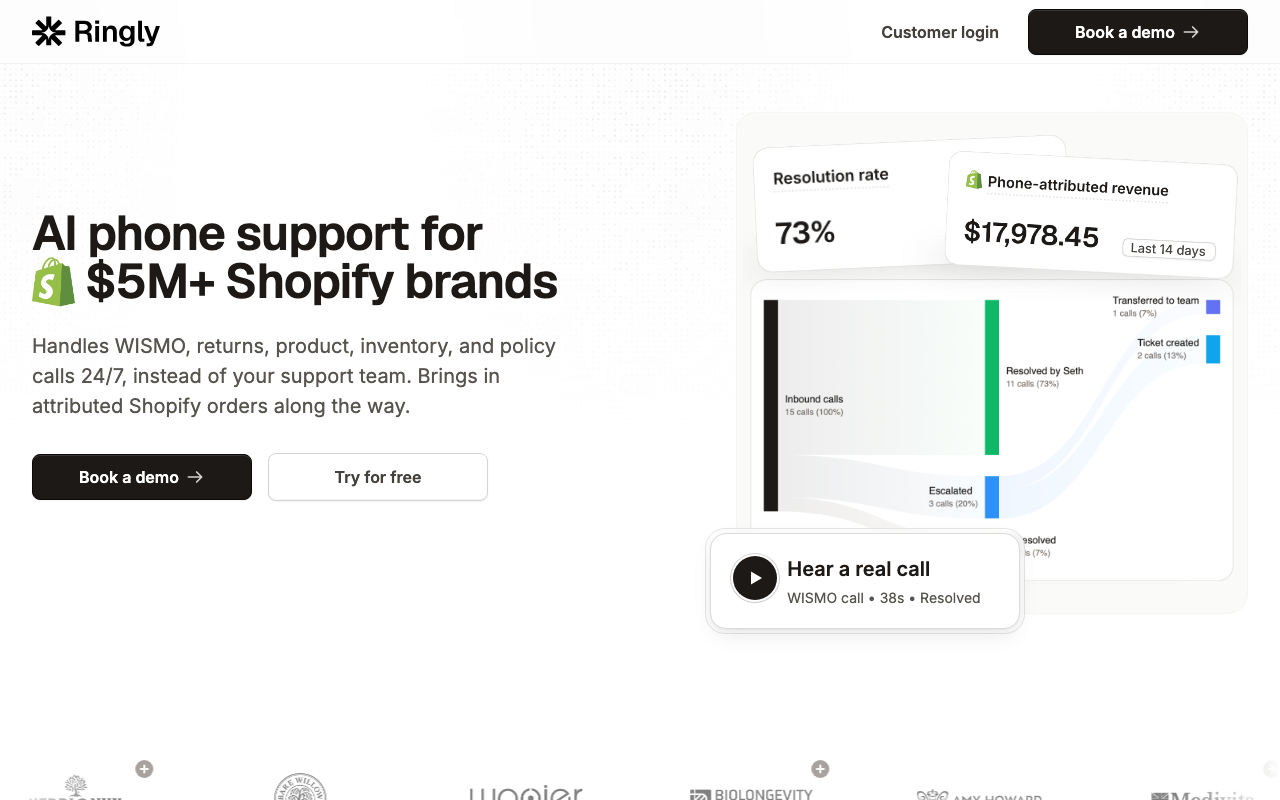
Ringly.io is a done-for-you AI phone agent built specifically for Shopify and e-commerce brands. Instead of handing you a platform and a setup wizard, the Ringly team builds your agent for you, trains it on your store, and gets it live. It is the option to start with if your support volume is mostly order and product calls rather than complex multi-channel enterprise routing.
Key features
- Autonomous call resolution: Resolves about 73% of inbound calls on its own, answering questions, looking up orders, and handling returns before escalating
- Built for Shopify: Connects directly to your store and understands order status, returns, and product questions out of the box
- Done-for-you build: The team builds and trains the agent for you, so you are not configuring an enterprise platform yourself
- 40+ languages: One agent answers callers in their own language
- 24/7 coverage: Calls get answered nights, weekends, and peak season without adding headcount
Pricing
Ringly.io is sold as a done-for-you build, quoted on a call rather than a public per-seat price. The model is built around outcomes: you only start paying once the agent resolves at least 65% of your calls. That is the Resolution Promise.
Pros
- Resolves about 73% of inbound calls without a human
- Live in 14 days, not 3 months
- Resolution Promise: you pay only once it resolves at least 65% of your calls
- Trusted by 50+ Shopify brands
- Has recovered $22k for a store by catching and converting calls that would have been missed
- Speaks 40+ languages
Cons
- Built for Shopify and e-commerce, not general multi-vertical contact centers
- No self-serve enterprise dashboard with hundreds of human-agent seats
- Quoted by call, so there is no instant public price
Best for
Shopify and e-commerce brands that want their phone calls resolved without building an enterprise contact center. If most of your calls are order status, returns, and product questions, Ringly fits, and you can see it built for your store before you commit.
2. Five9

Five9 has been named a Gartner Magic Quadrant Leader for CCaaS for 8 consecutive years. The platform serves 3,000+ global customers with a focus on enterprise-grade reliability and AI-powered automation.
Key features
- Five9 Genius AI: Agentic CX platform with AI agents, agent assist, and knowledge management
- Voice and digital AI agents: Handle routine inquiries with handoff to humans
- AI Agent Assist: Real-time guidance and automation for live agents
- IVA Studio: No-code platform for building virtual agents
- 99.999% uptime SLA: Enterprise-grade reliability
Pricing
| Plan | Price | Includes |
|---|---|---|
| Digital | $119/user/month | Digital channels only |
| Core | $159/user/month | All channels with AI essentials |
| Plus | Contact sales | Advanced AI features |
| Pro/Enterprise | Contact sales | Full WEM and advanced AI |
Minimum 50 seats for standard pricing. AI includes 3,000 minutes per bundled seat.
Pros
- Proven enterprise track record
- 212% ROI over three years (Forrester TEI study)
- Strong analyst recognition
- Comprehensive AI feature set
Cons
- Higher starting price than competitors
- Minimum seat requirements
- Complex pricing for advanced tiers
Best for
Large enterprises that need proven reliability and comprehensive AI capabilities. Five9 fits organizations with 50+ agents that want an established vendor with strong analyst credentials.
3. Talkdesk

Talkdesk leads with industry-specific solutions. Their "Experience Clouds" are pre-configured for healthcare, financial services, retail, and other verticals, promising faster time to value.
Key features
- Talkdesk Copilot: Real-time AI assistance for agents
- Talkdesk Autopilot: Agentic AI for voice and digital channels
- Industry Experience Clouds: Purpose-built solutions for specific verticals
- Talkdesk Navigator: AI-powered conversation routing
- Interaction Analytics: 100% conversation analysis
Pricing
| Plan | Price | Best For |
|---|---|---|
| Digital Essentials | $85/user/month | Digital-only operations |
| Voice Essentials | $105/user/month | Voice-centric teams |
| Elite | $165/user/month | Omnichannel + WFM |
| Industry Clouds | $225/user/month | Vertical-specific needs |
Talkdesk Express available for US/Canada small businesses (under 50 employees, 25 licenses minimum).
Pros
- Strong vertical specialization
- Fast deployment for industry clouds
- Good balance of features and price
- Solid customer results (40% containment in first week)
Cons
- Industry clouds carry premium pricing
- Express limited to US/Canada
- Some advanced features only on higher tiers
Best for
Organizations in regulated industries or those wanting pre-built industry solutions. Healthcare, financial services, and retail companies often find Talkdesk's vertical approach reduces implementation time.
4. Genesys Cloud CX

Genesys serves 10,000+ companies across 100+ countries, supporting over 7 billion conversations quarterly. The platform emphasizes "Experience Orchestration," connecting every touchpoint into cohesive customer journeys.
Key features
- Agent Copilot: AI assistance for agents
- Supervisor Copilot: AI-powered supervision and coaching
- Virtual Agents: Self-service across voice and digital
- Predictive Routing: AI-optimized customer matching
- Journey Management: Orchestrate complex customer journeys
Pricing
| Plan | Price | Includes |
|---|---|---|
| CX 1 | $75/user/month | Voice contact center basics |
| CX 2 | $115/user/month | Omnichannel + QA/compliance |
| CX 3 | $155/user/month | Adds full workforce management |
| CX 4 | $240/user/month | Advanced AI + journey management |
AI Experience tokens included: 250 named / 350 concurrent per organization monthly. Digital-only and hourly options available.
Pros
- Lowest starting price among enterprise platforms
- Named #1 in 3 of 5 use cases (Gartner Critical Capabilities 2025)
- 54-day average go-live time
- Strong global presence
Cons
- AI tokens can add costs at scale
- Feature complexity requires training
- Some capabilities need add-ons
Best for
Global enterprises wanting comprehensive journey orchestration. Genesys fits organizations that need to connect customer experiences across multiple touchpoints and channels.
5. NICE CXone

NICE powers 15 billion customer interactions annually for 25,000+ brands. The company's acquisition of Cognigy in early 2026 strengthened its conversational AI capabilities, creating what NICE calls "Two Leaders, One Platform."
Key features
- Agentic AI Agents: Autonomous agents for voice and digital
- CXone Platform: Unified AI-first customer experience platform
- Workforce Engagement: WFM, quality management, performance tools
- Interaction Analytics: AI-powered conversation intelligence
- Omnichannel Routing: Connected experiences across all channels
Pricing
NICE does not publish specific pricing. Contact their sales team for customized quotes based on your requirements.
Pros
- Massive scale (15B+ interactions annually)
- Leader in both CCaaS and conversational AI
- Strong enterprise customer base
- Proven ROI (Toyota: 95% booking via AI, Sony: 34% CSAT increase)
Cons
- No transparent pricing
- Enterprise focus may overkill smaller teams
- Complex implementation for full feature set
Best for
Large enterprises with complex requirements and high interaction volumes. NICE fits organizations that need proven scale and advanced AI capabilities.
6. Aircall

Aircall focuses on simplicity and speed. The platform targets SMBs and mid-market companies that need a modern phone system without enterprise complexity.
Key features
- Cloud Phone System: Virtual business phone system
- Call Center Software: Inbound and outbound calling
- Business Text Messaging: SMS and MMS capabilities
- Call Recording: Up to 1 year retention on higher tiers
- IVR and Call Routing: Intelligent call distribution
Pricing
| Plan | Minimum Users | Key Limitations |
|---|---|---|
| Essentials | 3+ | 3 teams max, basic analytics |
| Professional | 3+ | Unlimited teams, advanced analytics |
| Custom | 25+ | Unlimited international calling |
Additional numbers cost $6/month each. Specific per-user pricing requires contacting sales.
Pros
- Fast implementation
- 100+ integrations
- Strong ratings (4.3/5 on G2, 4.6/5 on Reviews.io)
- Intuitive interface
Cons
- 3-user minimum
- Limited AI capabilities compared to enterprise platforms
- Call recording limited on lower tiers
Best for
SMBs and mid-market companies that need a modern phone system with call center capabilities. Aircall fits teams that prioritize ease of use over advanced AI features.
7. CloudTalk
CloudTalk emphasizes global reach and AI voice agents. With support for 160+ countries and competitive European pricing, the platform suits international operations.
Key features
- AI Voice Agents: Automated voice conversations (add-on)
- Smart Dialer: Automated outbound calling
- Call Routing and Recording: Intelligent distribution and storage
- Analytics: Real-time reporting and insights
- IVR: Interactive Voice Response system
Pricing
| Plan | Price (Annual) | Key Features |
|---|---|---|
| Lite | €19/user/month | Basic calling |
| Starter | €25/user/month | Essential call center features |
| Essential | €29/user/month | Advanced features + integrations |
| Expert | €49/user/month | Full feature set + Salesforce |
AI Voice Agents add-on: €350/month for 1,000 minutes.
Pros
- Strong international coverage (160+ countries)
- Competitive European pricing
- 95+ integrations
- AI voice agents as a specific add-on
Cons
- AI capabilities require separate add-on
- Less brand recognition than US competitors
- Some features tier-locked
Best for
European businesses and companies with global operations. CloudTalk fits organizations needing local phone numbers across multiple countries.
8. Dialpad

Dialpad takes a different approach to AI pricing with its conversation-based model. Instead of per-seat fees for AI, you pay when the AI actually delivers value.
Key features
- Dialpad AI Agent: Autonomous voice and chat agents
- Support: Contact center for support teams
- Sell: Sales dialer and coaching
- Connect: Business phone system
- Handoffs: AI-to-human transitions
Pricing
Dialpad uses two pricing models:
- AI Agent: Conversation-based pricing (contact sales)
- Purchase AI Agent Credits
- Pay when AI retrieves information or executes actions
- Billable actions: scheduling, routing, order lookup
- Support/Sell/Connect: Monthly or annual per-user pricing (contact sales)
Pros
- Conversation-based AI pricing
- Pay-for-value model reduces risk
- Unified platform for AI, support, sales, and communications
- Focus on agentic AI that takes autonomous action
Cons
- No transparent pricing
- Credit system requires planning
- Newer approach may lack proven case studies
Best for
Companies wanting flexible AI pricing without committing to per-seat fees for automation. Dialpad fits organizations that want to experiment with AI agents without large upfront commitments.
Other AI call center tools worth knowing
A few newer voice-AI platforms come up often when people compare AI call center companies. They are worth a look depending on how technical your team is:
- Bland: An enterprise voice-AI platform for building inbound and outbound phone agents on its own infrastructure. Powerful, but you build and run the agent yourself.
- Retell AI: A developer-focused voice-AI platform for building call agents with your own logic and integrations.
- Nextiva: A unified communications platform that bundles voice, chat, email, SMS, and social with AI routing and transcription for omnichannel teams.
These are strong for teams that want to engineer their own agent. If you would rather have the agent built and proven for your store, that is where a done-for-you option like Ringly differs.
Key trends in AI call center software
The platforms above reflect several shifts worth noting:
Resolution is the new benchmark. Old metrics measured deflection: how many calls got pushed away from a human. The 2026 benchmark is resolution: how many calls the AI actually finishes. A platform that deflects 80% but resolves 30% is worse than one that resolves 73%.
Agentic AI is replacing simple chatbots. The best platforms now offer AI that can reason, decide, and take action autonomously, not just respond to scripted prompts.
Every platform now has a copilot. Real-time AI assistance for human agents is now standard. Expect live transcription, suggested responses, and automatic summarization.
Pricing models are evolving. Per-seat pricing still dominates, but new approaches are emerging: conversation-based (Dialpad), token-based (Genesys AI features), and outcome-based models where you pay only once the AI hits a resolution bar (Ringly).
Specialization beats one-size-fits-all. Talkdesk's vertical clouds and Ringly's Shopify focus both show that purpose-built solutions increasingly out-deliver generic platforms for a given use case.

How to choose the right platform
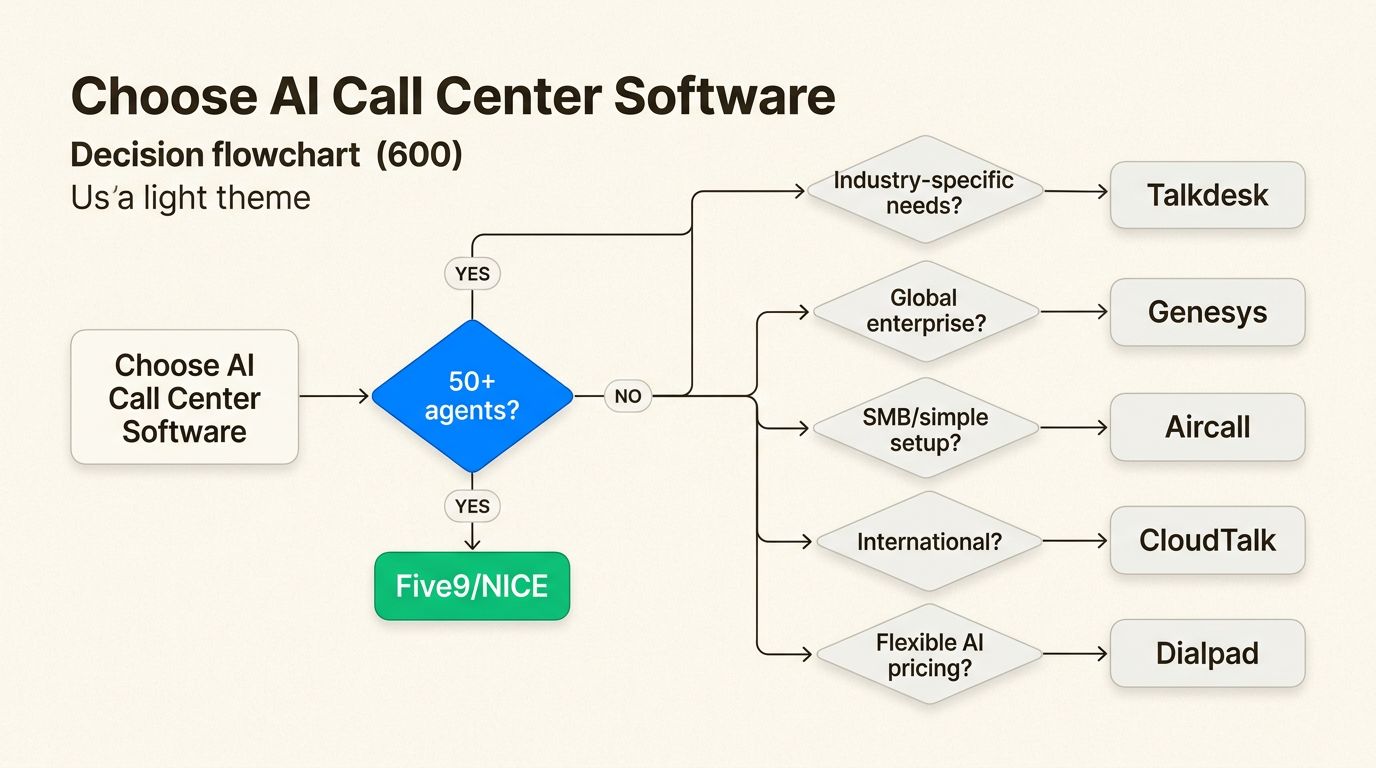
Selecting AI call center software depends on your specific situation:
Choose Ringly.io if: You run a Shopify or e-commerce store and want calls resolved without standing up an enterprise contact center. Best when most calls are order status, returns, and product questions.
Choose Five9 if: You need proven enterprise reliability and have 50+ agents.
Choose Talkdesk if: You are in a regulated industry and want pre-built vertical solutions.
Choose Genesys if: You want comprehensive journey orchestration at a competitive starting price.
Choose NICE if: You are a large enterprise with complex requirements and high volumes.
Choose Aircall if: You are an SMB wanting simplicity and fast setup.
Choose CloudTalk if: You operate internationally and need broad country coverage.
Choose Dialpad if: You want flexible AI pricing and do not mind a newer approach.
The simplest path for e-commerce
If you run a Shopify store, the fastest way to get calls resolved is the done-for-you route. We built Ringly.io for exactly that.
Our AI phone agent handles customer calls 24/7. It answers questions, looks up orders, processes returns and exchanges, and only escalates to your team when needed. It connects directly to Shopify, understands order status and return policies, speaks 40+ languages, and goes live in 14 days.
Across 50+ Shopify brands, customers see about 73% of calls resolved without a human, and the agent has recovered $22k for one store by catching calls that would have gone unanswered. The Resolution Promise means you only pay once it resolves at least 65% of your calls.
Want to see the latest data? Read our 45+ AI customer service statistics for 2026.
Conclusion
The AI call center software market has an option for every size and need. For Shopify and e-commerce brands, Ringly.io is the fastest path to resolved calls, with a done-for-you build, about 73% autonomous resolution, and pay-on-results pricing. Enterprise platforms like Five9, Genesys, and NICE provide deep capabilities for complex multi-channel operations. Mid-market options like Talkdesk and Aircall balance features with usability, and Dialpad's conversation-based pricing offers flexibility.
The right choice depends on your team size, your industry, and how you want to balance AI automation with human agents. Start with the comparison table above, narrow to two or three options that fit your criteria, and ask each one how many calls it resolves on its own, not just how many it deflects.
Our 2026 call center statistics roundup covers the latest benchmarks on cost per call, handle time, and automation rates.
Frequently Asked Questions
What is the best AI call center software in 2026?
It depends on your business. For Shopify and e-commerce brands, Ringly.io is our top pick: it is a done-for-you AI phone agent that resolves about 73% of inbound calls, goes live in 14 days, and you only pay once it resolves at least 65% of your calls. For large multi-channel enterprises, Five9, Genesys Cloud CX, and NICE CXone remain the leading platforms.
What is AI call center software and how does it work?
AI call center software uses artificial intelligence to automate customer interactions across voice and digital channels. It can handle inbound calls, assist human agents in real time, route conversations intelligently, and analyze interactions for insights. Modern platforms use large language models to understand natural language and respond conversationally rather than following rigid menus.
How much does AI call center software typically cost?
Pricing varies widely. SMB-focused platforms like CloudTalk start at €19/user/month. Enterprise solutions like Five9 start at $119/user/month. Many platforms require contacting sales for custom quotes, especially for AI features. Done-for-you options like Ringly.io are quoted on a call and built around outcomes, so you only pay once the agent resolves at least 65% of your calls. Additional costs may include implementation, training, and usage-based fees for AI tokens or minutes.
Can AI call center software replace human agents completely?
Not entirely. The best implementations use AI to handle routine inquiries (often 60 to 80% of calls, around 73% for Ringly across Shopify brands) while escalating complex issues to humans. This hybrid approach reduces costs while keeping quality for situations that need empathy, judgment, or complex problem-solving.
What integrations should I look for in AI call center software?
Essential integrations include your CRM (Salesforce, HubSpot), help desk (Zendesk, Freshdesk), and communication tools (Slack, Microsoft Teams). For e-commerce, the most important integration is your store: Ringly.io connects directly to Shopify so it can look up orders and returns. Most platforms offer 50 to 100+ pre-built integrations.
How long does it take to implement AI call center software?
Implementation time varies from days to months. Simple cloud phone systems like Aircall can be set up in hours. Done-for-you e-commerce agents like Ringly.io go live in about 14 days. Enterprise platforms like Genesys average 54 days for go-live, and complex implementations with custom integrations and training may take 3 to 6 months. Factor in time for data migration, agent training, and workflow configuration.
Is AI call center software secure and compliant?
Enterprise platforms typically offer robust security with SOC 2, ISO 27001, and GDPR compliance. They provide encryption, access controls, and audit logs. Verify specific compliance requirements for your industry (HIPAA for healthcare, PCI DSS for payments). Smaller platforms may have fewer certifications, so check their security documentation carefully.