

Every minute your store stays broken is money you will never see again.
You have a team to manage and a brand to grow, but you are stuck clicking through help links.
You need a human on the phone right now, but it feels like the system is built to keep you away.
Most founders don't realize that direct phone support is a locked door for almost every Shopify plan.
This guide shows you exactly how to bypass the loops and reach a real person.
First, we will find the hidden path to a live agent.
Then, we will look at how to stop this same frustration from killing your own customer sales.
Editor’s note: Want to hear some sample calls made for your Shopify store?
- Just paste your store URL
- Hear sample calls for your store (no email required)
- Listen to demo calls for my store
Is there an official Shopify support phone number?
Shopify does not provide a single, public phone number for all users to call for support. Access to a direct phone line is a premium feature reserved for merchants on higher-tier plans.
According to Shopify's help documents, real-time phone support is only available for merchants on the Shopify Plus and Shopify Retail plans. If you are on the Basic, Grow, or Advanced plans, the primary support channels are the AI-powered Help Center and 24/7 live chat.
For most users, a direct call is not an available option.
This structure can be challenging when dealing with urgent issues, like a checkout error or a payment gateway problem. Understanding this system helps set realistic expectations and clarifies the proper channels for seeking support.
The key is to know how to navigate the available system effectively.
How to get help when you can't find a Shopify support phone number
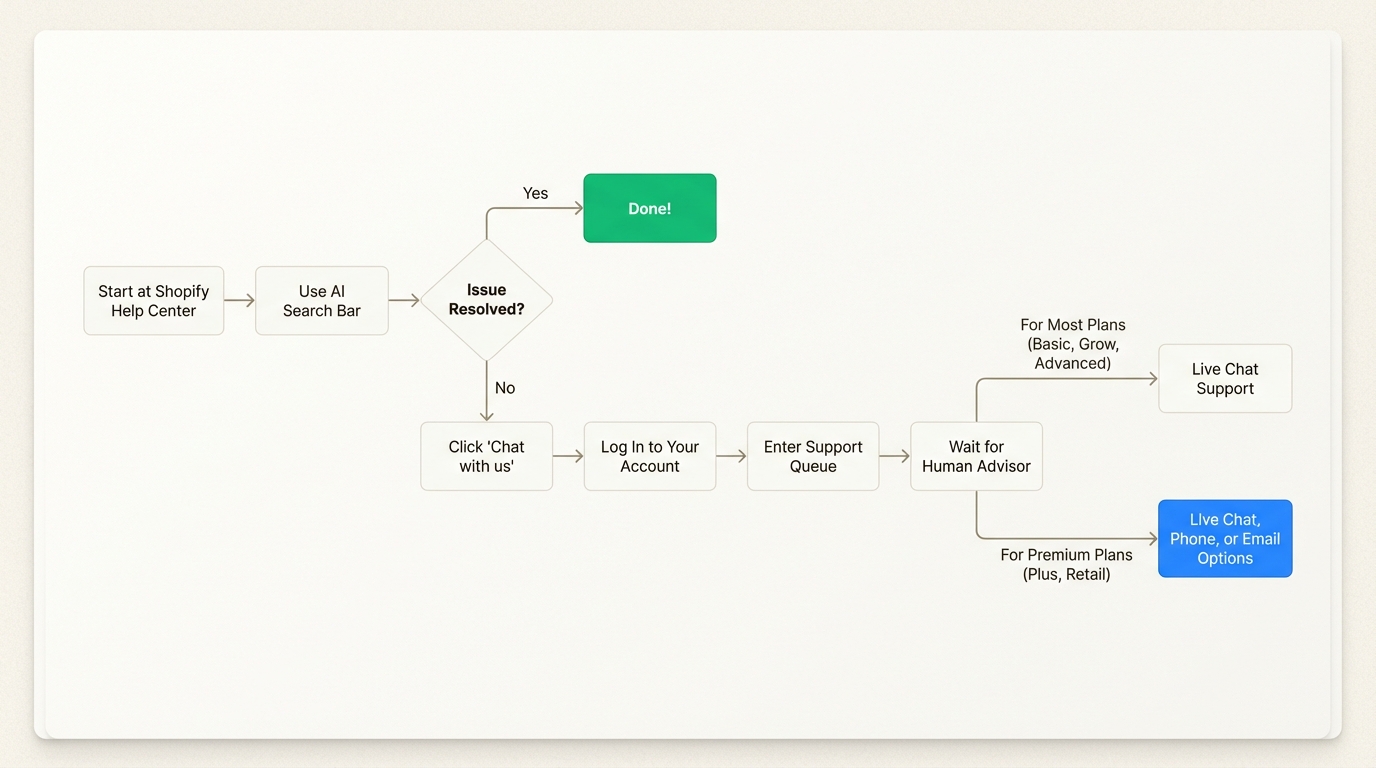
If direct phone support isn't an option, Shopify offers a structured process to get help. It is set up to answer common questions with automated tools first, before connecting you with a live person. Here’s a look at the process.
Step 1: Start with the AI-powered help center
Your first stop is always the Shopify Help Center. Shopify directs all support requests through here, and the whole system is built around its AI search bar.
The idea is to type your question with as much detail as you can.
The AI is programmed to find relevant articles, guides, or community forum posts that might solve your issue without you needing to talk to anyone. From Shopify's perspective, this is the quickest way to get an answer.
Some merchants report that this can occasionally lead to a loop if the AI does not correctly interpret the query.
If you find yourself stuck, try rephrasing your question with different keywords. Sometimes, being more specific (or even a bit more general) can help the system display the "Chat with us" option.
Step 2: Connect with a human advisor via live chat
When the AI search doesn't resolve the issue, it’s time to talk to a human. The process is fairly simple, but there are a couple of things to look out for.
According to Shopify’s guide, you need to go to help.shopify.com, scroll down to find the Chat with us button, and click it.
You'll then be asked to log into your account to verify you're a merchant. Some users have reported a "login loop," at this stage, where the system repeatedly prompts for login credentials.
If this happens to you, some users in the forums suggest a few workarounds. Opening the link in an incognito or private browser window often does the trick. Clearing your browser cache is another classic solution.
If you really can't log in, you can try the "I can't access my account" option, which might take you through a different verification path.
Premium support options that include a Shopify support phone number
Phone and email support are special perks for merchants on the Shopify Plus and Shopify Retail plans.
If you're on one of these plans, you still start the same way: through the Help Center. After you log in and go through the first couple of steps, you'll see more contact options, including the ability to request a callback or open an email ticket.
This is a big part of the value of Shopify's pricier plans, as you are not just paying for more features, but also for more direct access to support.
For a visual guide on navigating the Shopify Help Center to reach a support advisor, the following video provides a step-by-step walkthrough of the process.
This video provides a step-by-step walkthrough for navigating the Shopify Help Center to reach a support advisor.
Why Shopify limits access to a Shopify support phone number
Shopify's support model is a business decision based on several factors.
First, it's about scale and efficiency. Phone support is resource-intensive and doesn't scale as easily as other channels.
One agent can only handle one call at a time. With channels like live chat, a single advisor can manage several conversations at once, making them more efficient for a platform with millions of merchants.
Second, the AI assistant, which is part of their Shopify Magic toolkit, acts as a filter. It's designed to handle the high volume of common questions, such as "How do I add a product?" or "How do I set up shipping?" By automating these answers, Shopify allows its human advisors to focus on more complex issues that require direct intervention.
For merchants, this automated-first approach can be a concern during critical issues. When a site is down and impacting sales, many users prefer immediate human interaction.
This difference between platform efficiency and user expectations highlights the value many customers place on direct, easily accessible support.
The cost of inaccessible support for your own business
This situation highlights the importance of accessible support for any e-commerce business. The experience your customers have when they need help can directly impact their satisfaction and loyalty.
When customers cannot easily reach you by phone, it can lead to frustration and potential lost sales.
A customer with a simple question about an order may abandon their cart if they cannot get a timely answer.
In e-commerce, providing accessible support is a key part of the customer experience.
Many brands use tools like AI phone agents to ensure every call is answered promptly, 24/7. This approach helps ensure that no customer feels ignored while allowing human agents to focus on more complex inquiries.
Shopify pricing and access to the Shopify support phone number
To make it clear what kind of support you get at each level, here’s a breakdown of Shopify's main plans and their support channels, based on their official pricing page. This infographic breaks down the support options available for each plan, which might help you decide if upgrading for better support is worth it for your business.

| Plan Tier | Price (Monthly, Billed Yearly) | Primary Support Channel | Phone Support Access |
|---|---|---|---|
| Basic | $29 USD | 24/7 Live Chat | No |
| Grow | $79 USD | 24/7 Live Chat | No |
| Advanced | $299 USD | Enhanced 24/7 Live Chat | No |
| Shopify Plus | Starts at $2,300 USD | Priority Phone & Live Chat | Yes |
| Retail | $89 USD (+ plan fee) | Phone, Email & Live Chat | Yes |
Focusing on what you can control
Finding a direct Shopify support phone number is challenging because it’s a feature reserved for their top-tier plans.
For most merchants, the best way to get help is to work through the official channels: start with the AI Help Center, be persistent, and get connected with their 24/7 live chat team.
While you can't change Shopify's support model, you can control the experience you give your own customers.
Providing accessible customer service is one of the best ways to stand out from the competition and build a loyal customer base.
Providing accessible phone support for your customers
For merchants looking to enhance their own customer service, one option is to offer 24/7 phone support using an AI phone agent. Ringly.io offers a solution named the AI, which is designed specifically for Shopify stores.
the AI can answer common questions like "Where is my order?", look up order details, process returns, and transfer calls to a human team when necessary. According to Ringly.io, Seth resolves up to 90% of calls automatically. This can help free up your team to focus on other business areas.
To learn more about how AI can assist with phone support, you can explore the features offered by Ringly.io.
Frequently Asked Questions
Is there a public Shopify support phone number I can call?
No, Shopify does not have a single, public phone number for all users. Access to phone support is a premium feature that is limited to merchants on specific high-tier plans.
Why can't I find the Shopify support phone number for my Basic plan?
The Shopify support phone number is not available for merchants on the Basic, Grow, or Advanced plans. For these plans, Shopify provides support through its AI-powered Help Center and 24/7 live chat.
Which Shopify plans include a Shopify support phone number?
Only merchants on the Shopify Plus and Shopify Retail plans have access to a Shopify support phone number. These plans allow users to request callbacks directly from support advisors.
What is the process to get a callback from the Shopify support phone number if I'm on Shopify Plus?
If you're on a qualifying plan like Shopify Plus, you still need to start in the Shopify Help Center. After you log in and describe your issue, the system will show you available support options, which will include requesting a callback from their team.
Are there any unofficial websites that list a working Shopify support phone number?
You should be very cautious of third-party websites claiming to have a direct Shopify support phone number. The only official way to get phone support is through the process in the Shopify Help Center for eligible accounts. Using unofficial numbers could be a security risk.
What should I do if I have an urgent issue but don't have access to the Shopify support phone number?
If your issue is urgent and you don't have phone support, your best option is the 24/7 live chat. To speed things up, make sure you have your store URL, screenshots, and any relevant order numbers ready before you start the chat.



