

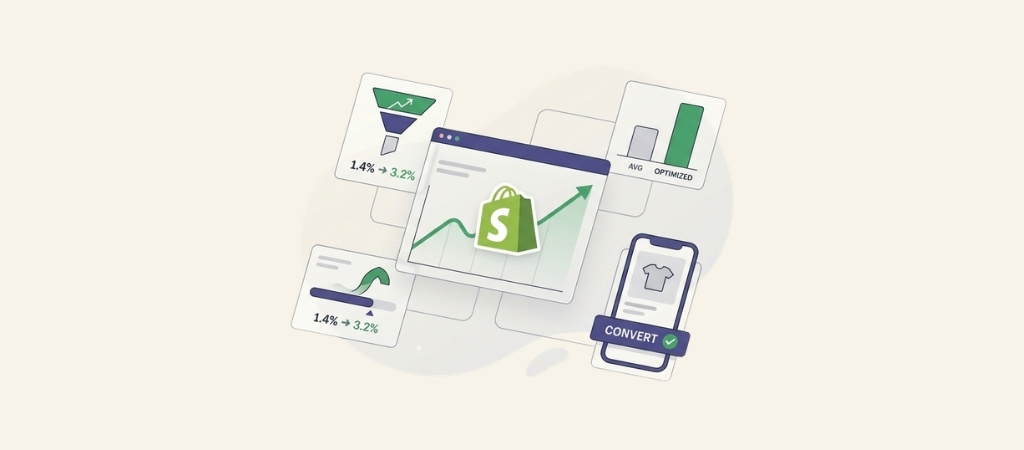
Most Shopify stores convert only 1.4% of visitors into customers. The top 20% of performers hit 3.2% or higher.
That gap represents thousands of dollars in revenue for the same amount of traffic.
Shopify conversion rate optimization is about closing that gap.
Instead of spending more on ads to get more visitors, you make the visitors you already have more likely to buy. Let's break down what actually works.
Editor’s note: Want to hear some sample AI support calls made for your Shopify store?
- Just paste your store URL
- Hear sample calls for your store (no email required)
- Listen to demo calls for my store
What is Shopify conversion rate optimization?
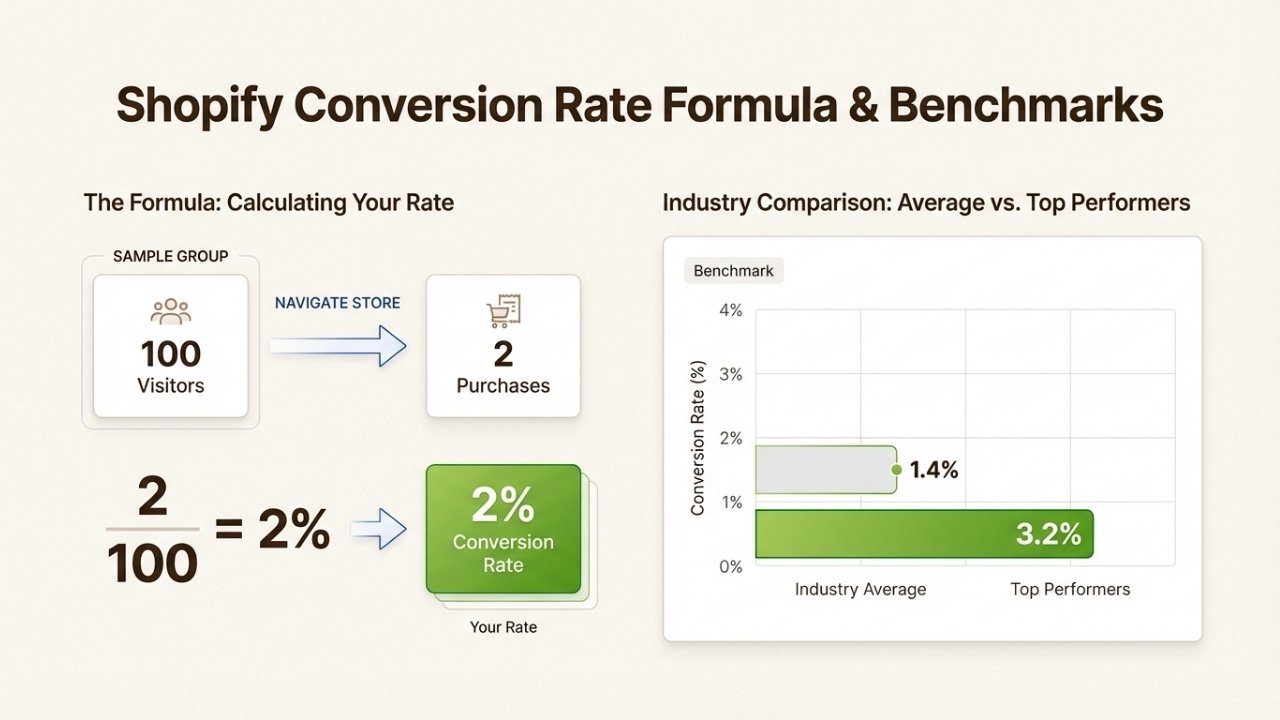
Conversion rate optimization (CRO) is the practice of increasing the percentage of visitors who complete a desired action, usually making a purchase. The formula is simple: (conversions ÷ visitors) × 100.
If 100 people visit your store and 2 make a purchase, your conversion rate is 2%. Move that to 3% and you've increased revenue by 50% without spending a dollar more on marketing.
According to LittleData, the average Shopify store converts at 1.4%. Anything above 3.2% puts you in the top 20% of performers. These benchmarks matter because they tell you whether your store has room to improve or if you should focus your budget elsewhere.
The key insight: CRO is often the highest-ROI activity you can pursue. Traffic is expensive. Converting more of the traffic you already have is not.
Technical foundations that drive conversions
Before you tweak product descriptions or run A/B tests, your store needs to work properly. Technical issues kill conversions before customers even see your offers.
Mobile-first optimization
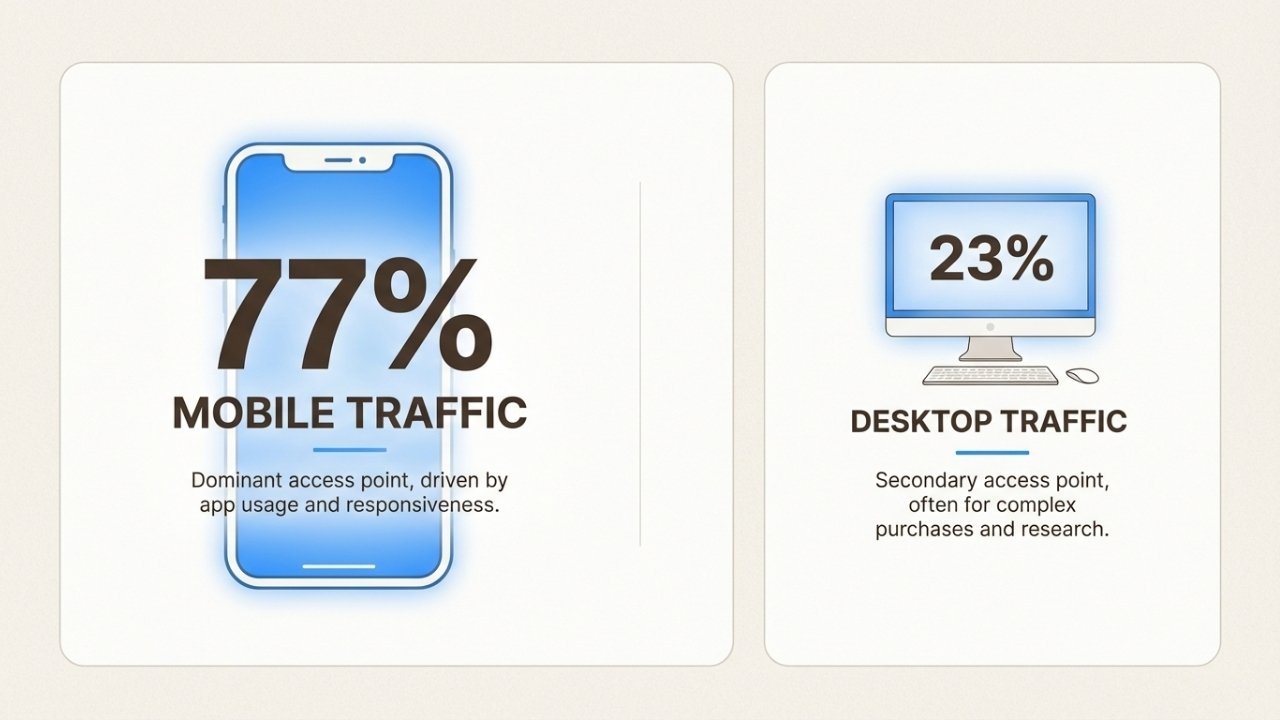
Statista research shows smartphones generate 77% of retail site traffic globally. Mobile isn't secondary anymore. It's the primary experience.
Yet many stores still treat mobile as an afterthought. Here's what actually matters:
- Font size: 16px minimum body text with 1.4 line height prevents squinting
- Touch targets: Buttons and links need at least 44×44 pixels to prevent mis-taps
- Navigation: Collapse bulky menus into tidy drawers with clear labels
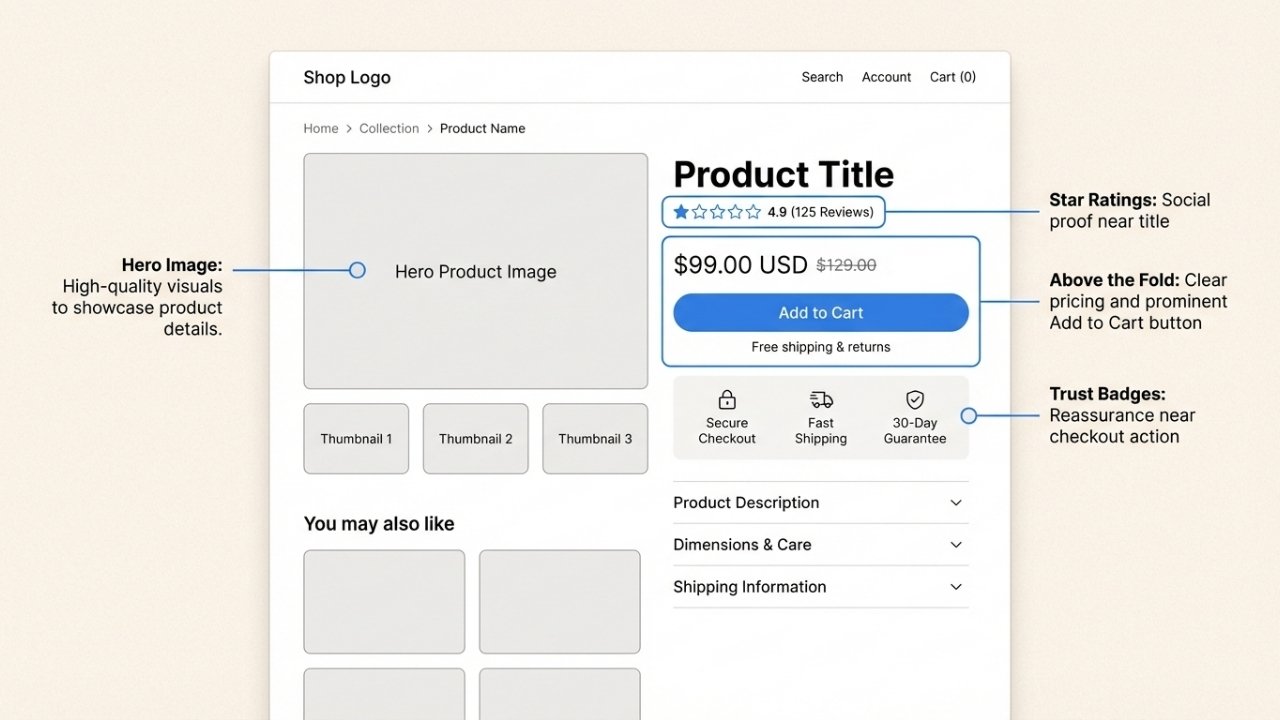
- Above the fold: Hero image, price, and primary button must be visible without scrolling
Test on real devices, not just Chrome DevTools. Browse your store on an aging Android over public wifi. If you can reach checkout in 60 seconds one-handed, it passes.
Page speed optimization
Speed is invisible until it's gone. Google research found that a one-second improvement in mobile load time can increase conversions by up to 27%.
Shopify handles a lot of optimization automatically through their global CDN. But you can still improve:
- Image compression: Run images through TinyPNG before upload. Shopify resizes automatically, but lighter originals help
- Lazy loading: Images below the fold should load only when needed
- App audit: Uninstall heavy apps you aren't using. One fashion boutique added an Instagram feed widget and immediately lost half a second plus 3% of sales
Check your Shopify Speed Report at Analytics → Reports → Online store speed. Record the score weekly alongside revenue to watch the correlation.
Site search and navigation
Around 69% of customers head straight to the search bar when they land on a store. If they can't find what they want, they leave.
Navigation improvements that actually move the needle:
- Keep top-level menus under 7 items to avoid cognitive overload
- Use descriptive labels like "T-Shirts" instead of clever names like "Threaded Favourites"
- Add autocomplete and live product thumbnails to search
- Implement breadcrumb navigation so users know where they are
Shoppers who search convert significantly higher than browsers. Make your search box impossible to miss.
Product page optimizations
Your product page is where browsing turns into buying. Every element should reduce doubt and make the decision easy.
High-quality visuals
Online shoppers can't pick up products or examine them from every angle. Your images need to compensate.
- Upload high-resolution photos with multiple angles
- Enable zoom functionality so customers can see details
- Include at least one lifestyle shot showing the product in use
- Add video when possible, even 15-second demonstrations help
One outdoor gear client added a looping clip of a tent being pitched in under two minutes. Conversions jumped nearly 8% overnight.
Compelling product descriptions
According to Baymard Institute research, 10% of ecommerce sites have product descriptions that are insufficient for users' needs.
Good product descriptions follow a pattern:
- Bullet essential specs first (weight, dimensions, materials)
- Follow with benefit-driven copy that addresses real anxieties
- Include shipping and returns information near the price
Compare "polyester outer shell" to "water-repellent fabric keeps you dry in unexpected showers." The second sells the outcome, not the material.
Social proof placement
Around 72% of people read reviews before buying anything. If they can see reviews on your site, they won't need to leave to find them.
Effective social proof placement:
- Feature verified reviews directly under the product name with total count and average stars
- Aim for at least 5 reviews per SKU (anything less looks suspiciously curated)
- Add trust badges near checkout buttons (SSL certificates, payment method icons, security seals)
- Include user-generated photos from real customers
Place social proof strategically near friction points. A "Loved by 12,000+ travellers" line beside shipping fees can overcome cost objections.
Checkout and cart optimization
The checkout process is where interested buyers become customers or abandoners. Small friction points here have outsized impact.
Streamlined checkout flow
The Baymard Institute found that 70% of online shopping carts are abandoned. Of those, 18% abandon because the checkout process feels too long or complicated.
Key improvements:
- Offer guest checkout. 34% of customers abandon if forced to create an account
- Delete unnecessary form fields. Digital goods don't need shipping addresses
- Enable address autocomplete to reduce typing
- Use clear progress indicators showing how close customers are to completion
Shop Pay increases conversions by up to 50% over guest checkout. It's 4x faster and recognizes returning customers automatically.
Payment options and transparency
Payment surprises are conversion killers. 55% of customers bounce when they encounter unexpected fees at checkout.
Best practices:
- Display shipping costs, taxes, and fees on product pages
- Offer multiple payment methods: credit cards, PayPal, Apple Pay, Google Pay, buy-now-pay-later options
- Show delivery timelines before the final checkout step
Transparency builds trust. Trust builds conversions.
Abandoned cart recovery
Not every abandoned cart is lost forever. A plain-text email sent one hour after abandonment routinely recovers 5-10% of lost orders. The key elements:
- Include a direct cart-restore link
- Remind customers what they left behind
- Address common objections (free shipping thresholds, return policies)
- Keep it simple and personal
Exit-intent popups offering first-time visitor discounts can also capture emails before abandonment happens.
How customer support impacts Shopify conversion rate optimization
Customer support is often treated as a post-purchase cost center. That's a mistake. Support is a conversion tool.
Research from Superoffice shows that adding live chat to your ecommerce website can increase conversion rates by 40%. When customers have questions or concerns, a quick answer nudges hesitant buyers into the cart.
But live chat has limits. Complex questions, high-consideration purchases, and customers who prefer voice communication need more. That's where phone support becomes a competitive advantage.
Phone support matters most when:
- Customers are buying expensive or complex products
- They need reassurance about sizing, compatibility, or fit
- They're comparison shopping and want expert guidance
- Something went wrong and they need immediate resolution
The problem: most Shopify stores can't afford 24/7 phone support. Hiring, training, and staffing a support team is expensive. So they skip phone entirely and lose those conversions.
This is where Ringly.io helps. the AI, our AI phone support agent, answers calls 24/7, handles order lookups, processes returns, and escalates complex issues to your team. It resolves up to 90% of calls without human intervention.
For Shopify stores, this means:
- Capture conversions from customers who need phone reassurance
- Handle "where's my order" calls automatically
- Process returns and exchanges without tying up your team
- Scale support without proportional hiring
Phone support isn't just for enterprise retailers anymore. AI makes it accessible to growing Shopify stores.
Testing and continuous improvement
Shopify conversion rate optimization isn't a one-time project. It's a continuous process of testing, learning, and iterating.
A/B testing framework
A/B testing lets you get hard data on potential changes before rolling them out store-wide. The key rules:
- Test one element at a time so results stay clear
- Set minimum sample sizes before declaring winners
- Document hypothesis, duration, and outcome in a shared spreadsheet
Elements worth testing: headline wording, CTA button colors, thumbnail sizes, price formats, product description length.
Even a 0.3% lift can fund weeks of advertising. Losing tests matter too. Each "no uplift" result prevents you from repeating mistakes.
Analytics and heatmaps
Gut feeling launches stores. Data scales them.
Connect Google Analytics 4 to your Shopify store and create events for product views, add-to-cart actions, and checkout starts. Funnel reports reveal exactly where interest leaks out.
Heatmap tools like HotJar or LuckyOrange show how users actually interact with your pages. Watch session replays on high-traffic, low-conversion pages. One merchant discovered a misleading size chart hiding below the fold that cost a kids' clothing brand 15% of potential orders.
User feedback collection
Quantitative data tells you what happened. Qualitative data tells you why.
- Add exit-intent surveys asking why visitors didn't purchase
- Send post-purchase email surveys to recent buyers
- Conduct 10-minute video interviews with 3-5 customers monthly
The patterns you spot in user feedback often reveal conversion blockers that analytics alone can't surface.
Quick-win checklist for immediate impact
Want to improve conversions this week? Start here:
- Mobile check: Browse your store on your phone. Can you reach checkout in under 60 seconds?
- Speed audit: Run your homepage through Google PageSpeed Insights. Aim for under 3 seconds load time
- Product page review: Pick your top 5 products. Do they have 5+ reviews, clear descriptions, and obvious shipping info?
- Checkout test: Go through checkout as a guest. Count the steps and fields. Remove anything unnecessary
- Support visibility: Can customers find help within 10 seconds of landing on any page?
Pick one item from this list. Fix it today. Watch what happens.
Start optimizing your Shopify store today
Shopify conversion rate optimization comes down to removing friction at every step of the buying journey. Technical performance gets customers to your product pages. Clear information and social proof convince them to add to cart. Streamlined checkout gets them across the finish line. Support availability handles the questions that arise along the way.
The stores that win aren't necessarily the ones with the biggest ad budgets. They're the ones that convert more of the traffic they already have.
If phone support is a gap in your conversion strategy, Ringly.io can help. The AI handles inbound calls 24/7, integrates directly with your Shopify store for order lookups, and escalates complex issues to your team when needed.
Try Ringly.io for free and see how AI phone support affects your conversion rates.
See how Shopify stores stack up in our 2026 ecommerce conversion rate statistics.
Some sales are lost to a question nobody answered before checkout. When those shoppers call, Seth, the AI phone agent from Ringly.io, answers 24/7 and can text a checkout link while they are still on the line.
Frequently Asked Questions
What is a good conversion rate for Shopify?
The average Shopify store converts at 1.4%. A good conversion rate is anything above 2.5%, and 3.2% or higher puts you in the top 20% of performers. Your target should depend on your industry, average order value, and traffic sources.
How do I calculate my Shopify conversion rate?
Use the formula: (number of orders ÷ number of sessions) × 100. Shopify Analytics shows this automatically in your dashboard. Track it weekly, not daily, since daily numbers fluctuate too much to be meaningful.
Why is my Shopify conversion rate low?
Common causes include slow page load times, poor mobile experience, complicated checkout, lack of trust signals (reviews, security badges), unclear shipping costs, and limited payment options. Start with a technical audit, then review your product pages and checkout flow.
How does customer support affect Shopify conversion rate optimization?
Live chat can increase conversions by 40%. Phone support captures high-consideration purchases where customers need reassurance. Quick answers to pre-sales questions remove friction and nudge hesitant buyers toward purchase. Post-purchase support affects repeat purchase rates and customer lifetime value.
What should I prioritize for Shopify conversion rate optimization?
Start with technical fundamentals: mobile responsiveness and page speed. Then optimize product pages with better images, descriptions, and reviews. Streamline your checkout process. Finally, add support channels that match how your customers want to communicate. Test changes one at a time so you know what works.
How long does it take to see results from Shopify conversion rate optimization?
Technical fixes like speed improvements can show results within days. Product page changes typically take 2-4 weeks to gather enough data. A/B tests need minimum sample sizes, usually several hundred visitors per variation. CRO is a continuous process, not a one-time project.
Looking for data to back up your strategy? Check out our latest research: 50 Shopify store statistics and trends for 2026, 50 ecommerce cart abandonment statistics for 2026 and 45 customer retention statistics for 2026.



