


Voicemail to email forwards a recorded voicemail to your inbox as an audio file, usually with a transcript. It's a real upgrade over dialing in with a PIN. But here's the part the feature pages skip:
- It only ever shows you the callers who left a message, and roughly 80% of people who hit voicemail hang up without leaving one.
- It relocates your voicemail backlog to your inbox. It doesn't shrink it.
- If you run a $10M-$100M Shopify brand with a phone line your team can't always reach, the win isn't reading the voicemail faster. It's the call never becoming a voicemail.
You set up voicemail to email so messages stop getting buried. They land in your inbox, you can read them on your phone, you can forward them to whoever owns the answer. Good. Worth doing.
Then you open your inbox at 9 a.m. and there are four voicemails from last night. Two are order-status questions. One is a return. The fourth person already bought from someone else before you ever pressed play.
That's the gap nobody selling this feature wants to talk about. If you're a founder or Head of CX at a Shopify brand doing $10M-$100M, your phone doesn't ring with strangers. It rings with customers who have an order number and a question, and most of them won't wait around in a voicemail tree to ask it.
Most posts about voicemail to email are written by VoIP companies for a generic small business. This one is written for the operator drowning in after-hours calls who keeps a paid helpdesk and a visible phone number, and who's tired of voicemails they never return. We build AI phone support for Shopify brands trying to fix exactly that. If your phone rolls to voicemail after 6 p.m., book a 30-min call and we'll show you what's slipping through.
What voicemail to email actually is
Voicemail to email is a feature that automatically forwards a voicemail message to an email inbox. When a caller leaves a message, your phone system records it, saves it as an audio file (usually an mp3 or a wav), and emails it to whatever address you set, often with the caller's number and the time of the call attached.
Instead of dialing an access number and punching in a PIN to hear your messages, you just open your email. You can listen on a laptop, a phone, a tablet, anything that gets email. You can forward a message to a teammate in two taps. You can search old voicemails the way you search any other email.
Most modern systems also run the recording through speech-to-text and drop a written transcript into the same email, so you can read the message instead of listening to it. According to OnSIP's VoIP fundamentals guide, this is the single most-cited reason businesses turn it on: triage by reading is faster than triage by listening.
If you already run a cloud phone system, you probably have this feature sitting in a settings menu. Almost everyone offers it now. The question isn't whether to use it. The question is what it actually solves, which we'll get to.
How voicemail to email works, step by step
The mechanics are simple, and they're the same across providers like Nextiva, Dialpad, and CloudTalk:
- A caller reaches your voicemail. Either you didn't pick up, or it's after hours, or every rep was on another line.
- The system records the message and saves it as an audio file.
- Speech-to-text transcribes it (on systems that offer transcription).
- An email goes out to your chosen address with the audio attached, the transcript in the body, and the caller's number plus a timestamp.
- You open the email and decide what to do: listen, read, forward, or call back.
The whole loop is built around one assumption: that the caller left a message in the first place. That assumption is where it falls apart, but we'll come back to it.
A quick honest note on transcription. It's good, not perfect. Providers like Vonage and Nextiva are upfront that accuracy drops with strong accents, background noise, or very short messages, and independent reviews of voicemail transcription back that up. So the transcript gives you the gist, and for anything important you'll still want to play the audio. Some systems also cap voicemails (around three minutes each) and limit how many you can store, so it's not infinite.
Worth knowing too: the email is a notification, not a workflow. It tells you a customer called and what they roughly said. It doesn't pull up their order, it doesn't know they're a subscriber, and it doesn't do anything until a human opens it and acts. For a brand whose callers mostly want an order status or a return, that gap between "you got a message" and "the customer got an answer" is the whole problem.
How to set up voicemail to email
Setup is nearly identical no matter who your provider is. The labels move around, but the steps don't:
- Sign in to your phone system or VoIP portal.
- Find the voicemail or notification settings. It's usually under "Features" or "Voicemail."
- Add the email address (or addresses) that should receive messages.
- Turn on the audio attachment so the actual recording comes through, not just a notification.
- Enable transcription if it's offered, then place a test call and confirm the email lands the way you expect.
One thing to check before you assume it's free: traditional cable and phone carriers often charge extra for voicemail to email and transcription, or they fold it into a higher-priced plan. Most hosted VoIP systems include it. If yours doesn't, it's worth the upgrade, but know what you're paying for.
That's the entire feature. It does what it says. Now let's talk about what it doesn't do.
The real benefits, and who they're for
I don't want to undersell this. Voicemail to email is genuinely useful, and if you have it turned off, turn it on. The real wins:
- Faster retrieval. Reading a transcript beats listening to a 90-second ramble. You triage the inbox, not the voicemail menu.
- A searchable record. Every message sits in your email, searchable, forwardable, timestamped. No more "wait, did anyone call this guy back?"
- Mobility. Your team reads messages from anywhere. Nobody has to be at a desk phone to know what came in.
- Cleaner handoffs. Forward a return question straight to the rep who owns returns. The message moves to the answer instead of sitting in a shared mailbox.
For a team that gets a handful of voicemails a day, this is a clean productivity win. The trouble starts when your phone rings a few hundred times a week and most of those callers never leave a message at all.
Where voicemail to email stops helping
Here's the number that should change how you think about all of this: roughly 80% of callers who get routed to voicemail hang up without leaving a message, a figure RingEden and others put anywhere from 75% to 90% depending on the industry and time of day.
Read that again with your inbox in mind. Voicemail to email only ever shows you the 20% who left a message. The other 80% don't appear anywhere. No email, no transcript, no name. The missed call just evaporates, and your tidy inbox makes you feel like you're on top of your phone when four out of five callers slipped past it.
And the ones who hang up don't go home and wait. CaptureClient found 71% immediately call another business after bailing on a voicemail. Broader research is harsher: 85% of callers who can't reach a person never call back, and 62% switch to a competitor (PCN's missed-call study). For a Shopify brand, that competitor is one search away.
I wanted to see this play out on a real store, so I forwarded one brand's voicemail box to email for two weeks and watched what landed. The overwhelming majority of missed calls left no message at all, exactly like the data says. The handful of voicemails that did come through were almost all order-status questions, the same ones over and over, and most of them sat several hours before anyone called back. By the time we returned a 7 p.m. "where's my order" voicemail the next morning, the customer had already emailed, opened a WISMO ticket, and cooled off.
"My customers also feel like it's a normal person. They feel like they can communicate if they have questions."
Claudia Droge, TechCraft Studio
So voicemail to email didn't reduce our missed calls. It organized the few messages we got and did nothing for the calls that vanished. It moved the voicemail backlog from a phone menu into an inbox, which feels like progress until you realize the backlog is the same size.
If your phone is dropping calls after hours and on weekends, the fix isn't a better mailbox. Book a 30-min call and we'll pull what your store is actually missing.
The better answer for a Shopify brand: answer the call
If 80% of callers won't leave a voicemail, the obvious move isn't to read voicemails faster. It's to stop sending callers to voicemail. When someone gets a real answer on the first ring, there's no message to transcribe, no inbox to clear, and no customer drifting to a competitor while your transcript sits unread.
That's the whole idea behind Ringly.io. Ringly is AI phone support for Shopify brands. Instead of routing the call to voicemail when your team can't pick up, the AI answers it live, 24/7. It finds the order in your Shopify store, handles returns and exchanges, answers product questions from your knowledge base, and escalates the genuinely complex calls cleanly to Gorgias, Richpanel, Reamaze, or whatever helpdesk you already run.
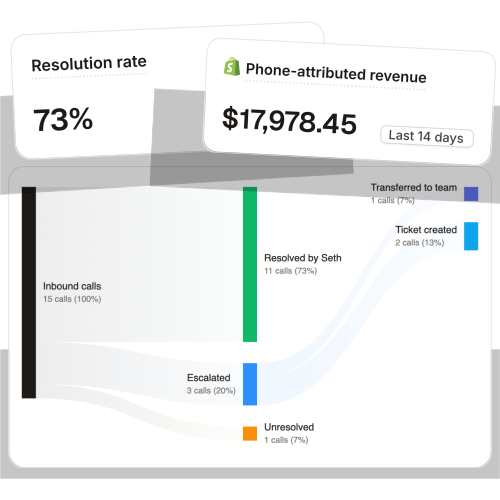
Across 50+ active brands, the AI resolves 73% of inbound calls on its own at roughly $0.42 per resolved call, versus $7 to $16 per call for a human BPO. WashCo, a Shopify brand we launched, recovered $22,664 in attributed revenue in its first 7 days on the phone. That's revenue that used to live in a voicemail box nobody returned in time.
It's not about replacing your team. It's about the routine calls (order status, returns, the same product questions over and over) getting answered the moment they come in, so your reps spend their day on the calls that actually need a person.
And because the call gets resolved live, there's nothing left to clean up afterward. No inbox of last night's voicemails. No "did we ever call this person back." No customer who left a message at 9 p.m. and quietly bought from a competitor by the time anyone read it. The most common after-hours calls, the WISMO questions that pile up every weekend, get handled while the customer is still on the line. That's the difference between managing missed calls and not missing them.
What this costs you today vs answering the call
Take a typical Shopify brand running a 6-rep CS team:
| Line item | Today | With Ringly |
|---|---|---|
| 6 reps × $4K loaded per rep | $24,000/mo | n/a |
| Ringly (~$5K/mo) | n/a | $5,000/mo |
| Net monthly CS spend | $24,000/mo | $5,000/mo |
| Monthly savings | n/a | $19,000/mo |
| Annual savings | n/a | $228,000/yr |
That's roughly 70% of repeatable calls routed to the AI. The other 30%, the genuinely complex ones, still go to your team, who now have time to actually solve them. Want the math on your own numbers? Book a 30-min call and we'll do it live.
Voicemail to email vs an AI phone agent
If you're weighing your options for after-hours coverage, here's how the three common approaches actually compare:
| Approach | What the caller experiences | Who handles it | When it's resolved | Best for |
|---|---|---|---|---|
| Voicemail to email | Leaves a message (if they bother) | Your team, later | Hours later, by callback | Low call volume, internal triage |
| Missed-call text-back | Gets an auto-text after the miss | Your team, async | Whenever the thread resolves | Catching the 80% who won't leave a voicemail |
| AI phone agent | Gets a real answer on the call | The AI, then your team for hard calls | On the call, live | Brands with steady inbound order and support calls |
Voicemail to email is the right tool when call volume is low and you mostly need a cleaner way to triage the few messages you get. A missed-call text-back at least reaches the people who hang up. But if the goal is to stop losing customers to voicemail entirely, the only approach that resolves the call while the customer is still on the line is one that answers the call.
You can keep voicemail to email running underneath all of it as a safety net. The point isn't to rip it out. It's to stop relying on it as your coverage.
Frequently asked questions
Is voicemail to email free? It depends on your provider. Most hosted VoIP systems include it at no extra cost, while traditional cable and phone carriers often charge extra or require a higher-priced plan. Check your voicemail settings before assuming you have it.
How accurate is voicemail transcription? Good, not perfect. Accuracy drops with strong accents, heavy background noise, or very short messages, so the transcript is best for triage and you'll still want the audio for anything important.
Can I send voicemail to email to multiple addresses or my whole team? Yes. Most systems let you add several recipient addresses or a shared inbox, which is useful for routing messages to whichever rep owns the answer.
Does voicemail to email reduce missed calls? No. It changes how you retrieve the messages people leave, but it does nothing for the roughly 80% of callers who hang up without leaving one. To reduce missed calls you have to answer them, with more staff or with an AI phone agent.
What's a better alternative for a Shopify store? Answering the call live. An AI phone agent picks up 24/7, handles order status, returns, and product questions, and only routes the hard calls to your team, so there's no voicemail to manage in the first place.
Does Ringly replace my voicemail? For most calls, yes, because the call gets answered instead of going to voicemail. You can still keep a voicemail-to-email fallback for the rare overflow, but the AI handles the routine inbound your team can't always reach.
Will customers know they're talking to AI? The most repeated thing customers say after a call is that it doesn't sound like AI. It speaks naturally, it has your order and product data, and it hands off to a human the moment a call needs one.
Talk to us

If you run a $10M-$100M Shopify brand and your phone rolls to voicemail after hours, a 30-min call is the fastest way to see what's actually slipping through. We'll pull your missed-call picture and show you what answering those calls would recover.
The 3-layer guarantee.
- Live in 14 days or it's free until launched.
- 65% resolution in 90 days or we refund the last 3 months of subscription fees.
- We keep working free until we hit it.
Ruben (Ringly co-founder) takes these calls personally.



