With over 2.7 million online stores in the US alone, Shopify has become the platform of choice for e-commerce entrepreneurs.
But setting up your store is only half the battle. Once orders start rolling in, you need a reliable way to get products into customers' hands.
That's where Shopify fulfillment comes in.
Shopify Fulfillment Network (SFN) promises to handle the logistics headache for you: warehousing, packing, shipping, the works.
But is it the right choice for your business? Let's break down how it actually works, what you'll pay, and whether it makes sense for your store.
Editor’s note: Want to hear some sample AI support calls made for your Shopify store?
- Just paste your store URL
- Get sample calls in under 20 seconds (no email required)
- Listen to demo calls for my store
What is Shopify Fulfillment Network?
Shopify Fulfillment Network is Shopify's native third-party logistics (3PL) solution, launched in 2019 to give merchants an integrated way to outsource order fulfillment.
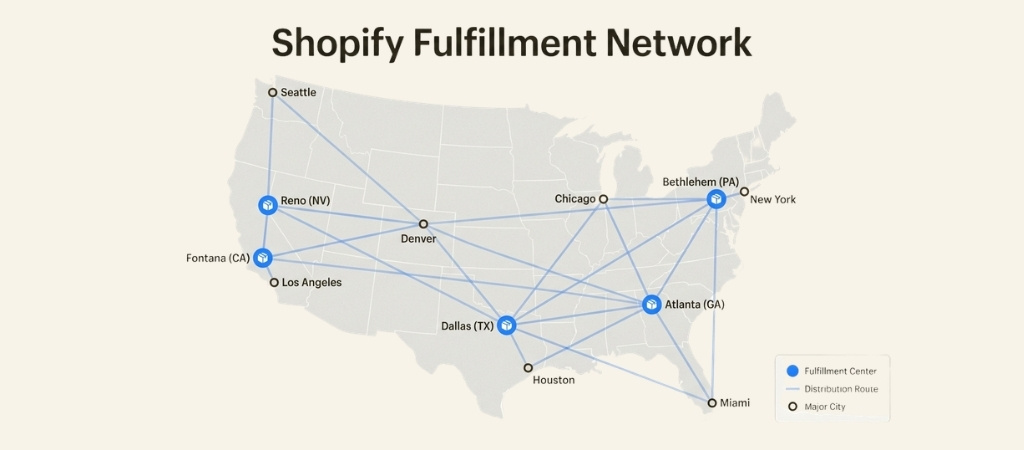
Instead of storing inventory in your garage or renting warehouse space, you send your products to Shopify's network of fulfillment centers across the US and Canada.
Here's the basic idea: when a customer places an order, the closest fulfillment center picks, packs, and ships the item.
You never touch the inventory. Everything syncs automatically with your Shopify admin, so you can track orders, inventory levels, and shipments from one dashboard.
To use SFN, you need to meet a few requirements. Your store must sell to US customers, have an active Shopify Payments account, and pass Shopify's eligibility review. This review looks at factors like order volume, product types, and shipping patterns.
Not every store gets approved, which is worth keeping in mind if you're just starting out.
The service integrates directly with your existing Shopify setup. There's no middleware, no complex API connections, no juggling multiple platforms.
For merchants already embedded in the Shopify ecosystem, this seamless integration is a major selling point.
How Shopify fulfillment works
The process is straightforward once you're set up. Here's how the typical flow works:
Step 1: Connect with a 3PL partner
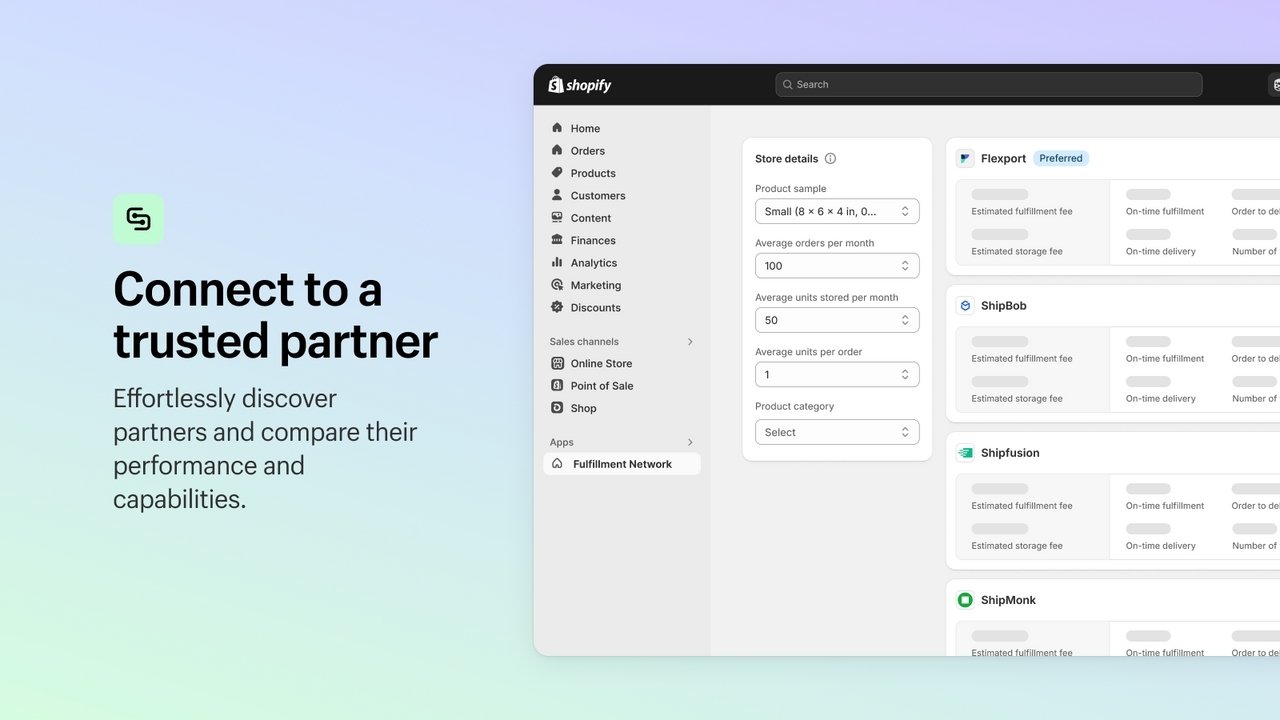
Shopify doesn't actually run all the fulfillment centers itself. Instead, SFN is a network of vetted logistics partners including Flexport, ShipBob, DHL, and others.
You complete a store profile with details about your products, average order volume, and shipping needs. Shopify then matches you with compatible partners and shows you pricing estimates.
Step 2: Send inventory to fulfillment centers
Once you choose a partner, you ship your inventory to their warehouses. Many merchants split inventory across multiple locations to position products closer to customers.
A customer in New York might get their order from a New Jersey warehouse, while a Los Angeles customer gets theirs from a California facility.
This distributed approach is what enables those fast delivery times.
Step 3: Orders route automatically
When a customer places an order, Shopify's system automatically routes it to the optimal fulfillment center based on inventory availability and proximity.
The partner handles picking, packing, and shipping. You don't need to do anything manually.
Step 4: Track everything in Shopify admin
All your fulfillment data lives in your familiar Shopify dashboard. You can monitor inventory levels across warehouses, track shipment statuses, handle returns, and pull performance reports.
For merchants used to checking multiple platforms, this consolidation saves serious time.
The whole system is designed to be hands-off. Once configured, fulfillment happens in the background while you focus on marketing, product development, and growing your business.
Shopify Fulfillment Network partners
One thing that confuses many merchants: SFN isn't a single fulfillment service.
It's a curated network of logistics providers, each with different strengths, pricing, and capabilities.
Here's a quick overview of the major partners:
| Partner | Specialty | Minimum Volume | Geographic Focus |
|---|---|---|---|
| Flexport | End-to-end supply chain | Varies | Global (preferred partner) |
| Amazon Multi-Channel Fulfillment | Fast, reliable shipping | None | US (97%+ on-time delivery) |
| Bigblue | EU omnichannel | Varies | Europe (9 warehouses) |
| DHL | Enterprise logistics | 3,000 orders/month | Global |
| GoBolt | Sustainable fulfillment | Varies | US/Canada |
| ShipBob | DTC-focused | Varies | US, UK, EU, Australia |
| ShipMonk | Subscription boxes | Varies | US, UK, EU |
Flexport holds "preferred partner" status, which means closer integration with Shopify and a more streamlined setup process.
They're positioned as the default choice for most merchants entering the network.
Amazon Multi-Channel Fulfillment is interesting because it lets you leverage Amazon's massive logistics infrastructure even for orders placed on your own Shopify store. The trade-off? You're dependent on Amazon's systems and policies.
Bigblue fills a crucial gap for merchants selling in Europe, where SFN's native coverage is limited. With nine EU warehouses, they're a strong option for cross-border commerce.
When choosing a partner, consider factors beyond just price. Look at their warehouse locations relative to your customer base, their experience with your product category, and their technology integration.
A partner with warehouses near your customers will deliver faster and cheaper, even if their per-order fee is slightly higher.
Pricing and costs
Let's talk numbers. The Shopify Fulfillment Network app is free to install, but the actual fulfillment services are pay-as-you-go.
You're charged per item fulfilled, with rates varying based on:
- Product weight and dimensions
- Storage duration (long-term storage costs more)
- Shipping speed selected
- Special handling requirements (fragile items, custom packaging)
Shopify doesn't publish standard rate cards because pricing depends on your specific products and chosen partner.
You'll get custom quotes after completing your store profile. This lack of transparency frustrates some merchants who want to compare costs upfront.
To give you a rough sense of how SFN stacks up, here's a comparison of fulfillment approaches at different order volumes:
| Approach | Best For | Typical Cost Structure | Key Considerations |
|---|---|---|---|
| Self-fulfillment | 0-50 orders/month | Packaging + labor + shipping labels | Time-intensive, limited scalability |
| SFN | 100-10,000 orders/month | Per-item fees + storage | Integrated, hands-off, US/Canada only |
| Direct 3PL | 5,000+ orders/month | Negotiated rates | More control, requires separate integration |
At low volumes (under 100 orders monthly), self-fulfillment often makes more sense.
The time savings from outsourcing don't justify the per-order fees when you're only shipping a few packages a day. Plus, you maintain complete control over packaging and presentation.
At medium volumes (100-10,000 orders monthly), SFN hits a sweet spot. The per-order economics work out favorably, and the time savings become significant.
You're no longer spending hours packing boxes.
At high volumes (10,000+ orders monthly), you might get better rates negotiating directly with a 3PL rather than going through SFN.
You also gain more flexibility for custom packaging, international shipping, and specialized requirements.
Don't forget hidden costs: inbound shipping to fulfillment centers, returns processing fees, and long-term storage charges for slow-moving inventory.
These can add up if you're not careful.
Pros and cons of Shopify fulfillment
Like any business decision, SFN has clear advantages and notable limitations. Here's an honest assessment:
What works well:
- Native integration: No middleware, no data sync issues, no learning a new platform. Everything lives in Shopify admin.
- Vetted partners: Shopify has done the due diligence on these 3PLs. You're not rolling the dice on an unknown logistics provider.
- Distributed inventory: Position products closer to customers for faster, cheaper delivery.
- Negotiated shipping rates: Partners leverage collective volume for better carrier rates than most individual merchants could get.
- Unified reporting: Track orders, inventory, and fulfillment performance in one place.
Where it falls short:
- Geographic limitations: SFN is primarily US and Canada. If you have significant international sales, you'll need additional solutions.
- Less control: You're outsourcing to a partner who may have standard packaging and processes. Custom unboxing experiences are harder to achieve.
- Eligibility requirements: Not every store qualifies. New or unusual businesses may get rejected.
- Pricing opacity: No public rate cards make comparison shopping difficult.
- Platform dependence: You're deepening your reliance on the Shopify ecosystem. If you ever migrate platforms, you'll need to rebuild your fulfillment setup.
The bottom line? SFN trades some flexibility and control for convenience and integration. For many Shopify merchants, that's a worthwhile trade. But it's not universal.
Setting up Shopify fulfillment for your store
Ready to get started? Here's the practical setup process:
Prerequisites:
- Active Shopify store with Shopify Payments enabled
- US-based customer base (or plans to ship primarily to US)
- Eligible product types (some categories like hazardous materials may be restricted)
Step-by-step setup:
- Install the app: Head to the Shopify Fulfillment Network app and add it to your store.
- Complete your store profile: Answer questions about your product types, average monthly orders, average units per order, and shipping requirements. Be accurate here; this data determines which partners you're matched with.
- Compare partner offers: Review the partner recommendations Shopify provides. Compare pricing estimates, warehouse locations, and service capabilities. Don't just pick the cheapest option; consider geographic fit.
- Connect your chosen partner: Once you select a partner, you'll complete their onboarding process. This usually involves signing a service agreement and setting up billing.
- Send initial inventory: Ship your products to the designated fulfillment center(s). Most merchants start with one location and expand as they learn the system.
- Configure fulfillment settings: In your Shopify admin, set your fulfillment preferences. Decide whether orders should fulfill automatically or require manual approval. Configure customer notification settings.
- Test before going live: Place a few test orders to verify everything works correctly. Check that inventory syncs properly, shipping notifications send, and tracking information flows back to Shopify.
Common pitfalls to avoid: underestimating initial inventory needs (you need enough stock to cover lead times), choosing a partner based solely on price (location matters more), and failing to set up proper inventory alerts (running out of stock at a fulfillment center is painful).
Is Shopify fulfillment right for your business?
SFN isn't the right choice for every store. Here's how to think about fit:
SFN works well for:
- US-based Shopify stores shipping primarily domestically
- Businesses processing 100-10,000 orders per month
- Merchants who value integration over customization
- Brands where shipping speed matters more than custom packaging
- Teams without dedicated logistics expertise
Consider alternatives if:
- You ship significant volume internationally (outside US/Canada)
- Custom unboxing is central to your brand experience
- You're processing 10,000+ orders monthly (negotiate directly with 3PLs for better rates)
- You're based outside North America
- You need specialized handling (cold chain, hazardous materials, oversized items)
The decision framework:
Start with geography. If most of your customers are in the US, SFN is viable.
If you're global, you'll likely need a different solution or a hybrid approach.
Next, consider volume. Under 100 orders monthly? Probably not worth it yet. Over 10,000 monthly? You have negotiating power SFN doesn't leverage.
Finally, assess your priorities. If you want the easiest possible setup and don't mind standard packaging, SFN delivers.
If you need custom workflows or white-glove presentation, look elsewhere.
Streamline your entire customer experience
Fulfillment solves the "get products to customers" problem. But what about everything else?
The pre-purchase questions, the "where's my order" calls, the return requests, the product inquiries?
Many Shopify stores find that as they scale fulfillment, customer support becomes the new bottleneck.
You might have perfect logistics, but if customers can't get answers about their orders, satisfaction suffers.
This is where support automation comes in. Ringly.io offers an AI phone agent called the AI that integrates directly with Shopify.
the AI can handle inbound calls 24/7: looking up order status, processing returns and exchanges, answering FAQs, and only escalating complex issues to your team.
The integration pulls real-time data from your Shopify store, so the AI always has accurate order information. When a customer calls asking about their shipment, the AI can instantly check tracking and provide updates.
For returns, the AI can verify eligibility and initiate the process without human intervention.
Stores using Ringly.io report resolving around 73% of phone calls without human involvement.
That means your team focuses on the complex, high-value interactions while routine inquiries get handled automatically.
If you're investing in streamlined fulfillment, it makes sense to streamline your support operations too.
Start your free trial and see how AI phone support fits into your operations.
Frequently Asked Questions
How does shopify fulfillment pricing work?
Shopify Fulfillment Network uses a pay-as-you-go model with no upfront costs. You're charged per item fulfilled based on weight, dimensions, and shipping speed. Storage fees apply based on how long inventory sits in warehouses. Exact rates are customized based on your store profile and chosen partner.
Is shopify fulfillment available outside the US?
SFN primarily serves US and Canadian merchants shipping to US addresses. Some partners like Bigblue offer EU fulfillment, but coverage is limited compared to the US network. If you need extensive international fulfillment, you'll likely need to supplement SFN with additional 3PL partners.
What are the eligibility requirements for shopify fulfillment?
To qualify for SFN, you need an active Shopify Payments account, must sell to US customers, and must pass Shopify's eligibility review. This review considers factors like order volume, product types, and business history. Some product categories may be restricted.
Can I use my own packaging with shopify fulfillment?
Packaging options vary by partner. Some partners offer branded packaging at additional cost, while others use standard boxes. If custom unboxing experiences are important to your brand, discuss packaging options during partner selection.
How long does shopify fulfillment setup take?
Initial setup in the app takes under an hour. Partner selection and onboarding typically takes 1-2 weeks. Once connected, sending initial inventory to fulfillment centers adds another 1-2 weeks. Plan for 2-4 weeks total from starting setup to being live with fulfilled orders.
What happens to my shopify fulfillment setup if I leave Shopify?
Your SFN integration is tied to your Shopify store. If you migrate to another e-commerce platform, you'll need to establish new fulfillment relationships. Your inventory remains with the physical 3PL partner, but the technical integration would need to be rebuilt.