

Figuring out how much Freshdesk will actually cost your team can feel like solving a puzzle. Between the two product lines, multiple plan tiers, and AI add-ons with usage limits, the pricing structure has plenty of moving parts to consider.
Let's break it down. This guide covers everything you need to know about Freshdesk pricing in 2026: what each plan includes, how the AI add-ons work, hidden costs to watch for, and how to choose the right setup for your team.
Editor's note: Want to hear some sample AI support calls made for your Shopify store?
- Just paste your store URL
- Hear sample calls for your store (no email required)
- Listen to demo calls for my store

What is Freshdesk?
Freshdesk is a cloud-based customer support platform from Freshworks. The company originally launched in 2010 as a helpdesk solution, then rebranded to Freshworks in 2017 to reflect its expanding portfolio beyond ticketing software.
Today, Freshworks offers two main customer support products:
- Freshdesk An email-first ticketing system for teams primarily handling support through email
- Freshdesk Omni A multichannel platform that unifies email, chat, social media, SMS, and messaging apps in one inbox
The platform serves over 74,000 businesses worldwide, including companies like Pearson, Bridgestone, Blue Nile, and Tata Digital. Both products follow a similar three-tier structure: Growth, Pro, and Enterprise.
Freshdesk pricing plans explained
Freshdesk uses a per-agent, per-month pricing model with significant discounts for annual billing. Here's how the two product lines break down.
Freshdesk (email-first) pricing
| Plan | Annual Price | Best For |
|---|---|---|
| Key Features | Free | $0 |
| 1-2 person teams | Basic ticketing, knowledge base, simple reports (6 months) | Growth |
| $19/agent/month | Small teams | Automation, customer portal, basic reporting |
| Pro | $55/agent/month | Growing teams |
| Custom portals, advanced routing, SLA management, 5,000 collaborators | Enterprise | $89/agent/month |
| Large organizations | Audit logs, skill-based assignment, sandbox, enhanced security | Source: Freshdesk Pricing |
The Free plan is genuinely useful for tiny teams. You get essential ticketing features, a knowledge base, and pre-built reports for up to two agents over six months. Just know that when the six months end, you'll need to upgrade or you'll lose access.
Growth is where most small teams start. You get automation capabilities, a customer portal, and marketplace app access. The jump to Pro adds the features that matter for scaling: custom support portals, custom objects for modeling data like subscriptions, and advanced ticket routing with multiple SLA policies.
Enterprise is for teams that need control. You get audit logs, IP whitelisting, data center selection, and skill-based ticket assignment that routes issues to agents based on their expertise.
Freshdesk Omni (multichannel) pricing
| Plan | Annual Price | Best For |
|---|---|---|
| Key Features | Growth | $29/agent/month |
| SMBs | Omnichannel inbox, SMS, messaging, email, basic automation | Pro |
| $79/agent/month | Scaling teams | Custom portals, advanced ticketing, WhatsApp campaigns, 5,000 collaborators |
| Enterprise | $119/agent/month | Large orgs |
Enterprise security, approval workflows, skill-based assignment
Source: Freshdesk Omni Pricing
Freshdesk Omni costs more because it handles more channels. The Growth plan at $29 per agent gives you the unified inbox across web, SMS, messaging, and email. Pro adds advanced analytics dashboards and the ability to run WhatsApp campaigns. Enterprise includes everything in Pro plus the security and customization features large organizations need.
The key difference? Freshdesk Omni has no free tier. If you want multichannel support, you're paying from day one.
Understanding the free plan limitations
The Free Program only applies to Freshdesk, not Omni. Here's what you get:
- Up to 2 agents for 6 months
- Email and social ticketing
- Knowledge base and self-service portal
- Basic ticket trend reports
- Team collaboration tools
- 24x5 support
Source: Freshdesk Support Documentation
The catch: when you switch from a trial to the Free Program, you'll lose certain features and configurations. It's designed for small businesses evaluating the platform, not for long-term production use.
Understanding AI and add-on costs
Here's where Freshdesk pricing gets complicated. The base plans are just the starting point. Most teams will need AI capabilities, and those come with their own pricing structure.
Freddy AI Agent pricing
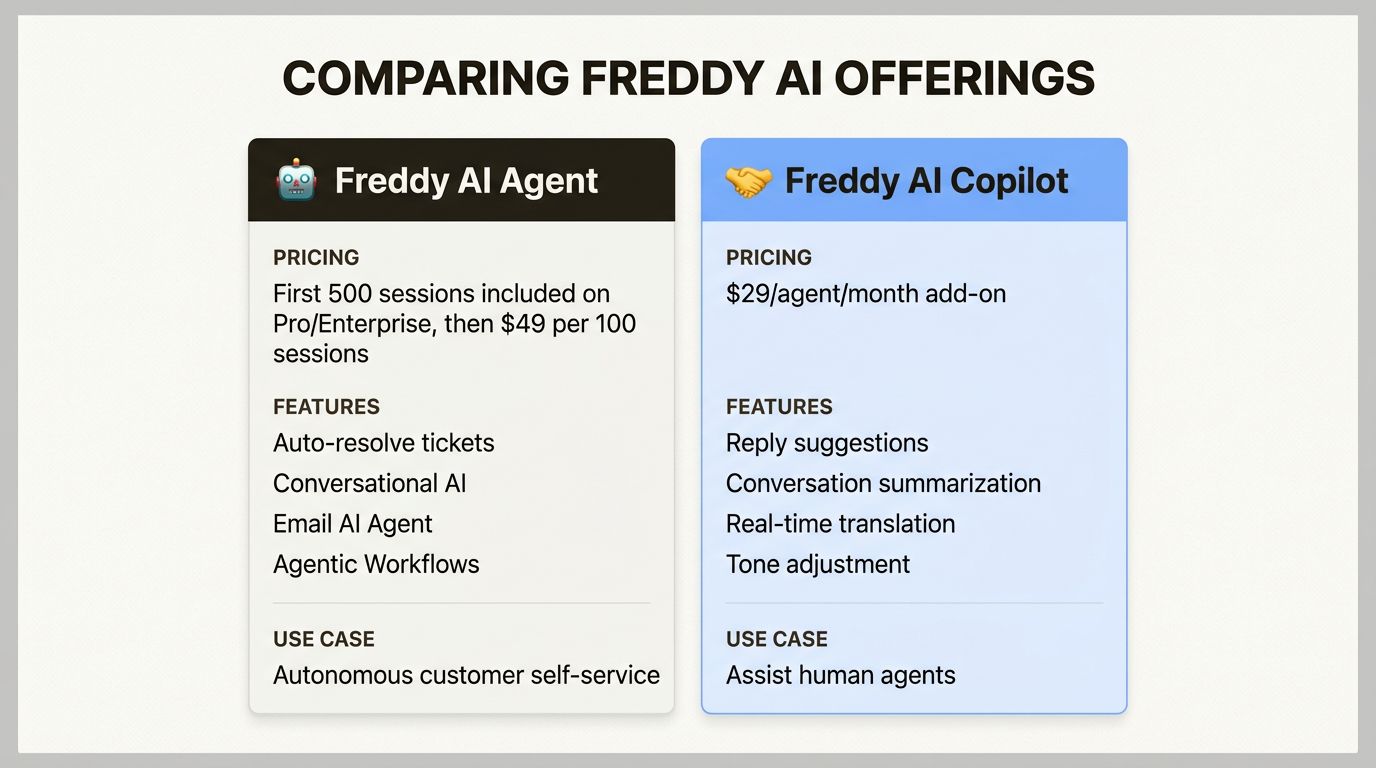
Freddy AI Agent is Freshworks' conversational AI that handles customer queries automatically. The pricing works like this:
| Component | Cost | Notes | Included sessions | 500 sessions | Included on Pro and Enterprise plans only |
|---|---|---|---|---|---|
| Additional sessions | $49 per 100 sessions | Billed based on your payment cycle | Session expiration | End of billing cycle | Unused sessions do not roll over |
Source: Freshdesk Pricing
A "session" is any unique interaction between a customer and the AI agent. For email AI, every AI response counts as one session. For chat, all interactions within a 24-hour window count as a single session.
The 500 included sessions sound generous until you do the math. If you've got 10 agents on Pro and each customer interaction generates one session, you could burn through those 500 sessions quickly. After that, you're paying $49 for every additional 100 sessions.
Freddy AI Copilot
Copilot is the AI assistant that works alongside your human agents, suggesting replies, summarizing conversations, and translating messages in real time.
- Price: $29 per agent per month (annual billing)
- Availability: Pro and Enterprise plans only
- Assignment: Can be purchased for select agents only (not all-or-nothing)
- Day passes: Not available
Source: Freshdesk Omni Pricing
This adds up fast. A 10-agent team on Pro would pay $790 per month for the base plan, plus $290 more if everyone gets Copilot. That's over $1,000 monthly before you've handled a single AI session.
Other add-ons to consider
| Add-on | Price |
|---|---|
| What It Does | Freshbot (chatbot) |
| $100 per 1,000 sessions | 24/7 web chat engagement |
| Freshcaller | $15/agent/month |
| Cloud phone system add-on | Day passes |
| $5 per pass | Occasional agent access (Growth, Pro, Enterprise) |
| Campaign contacts | $100/month for 10,000 |
| WhatsApp, email, SMS campaigns | Connector app tasks |
| $80 per 5,000 tasks | Workflow automation with third-party apps |
Source: Freshdesk Omni Pricing
If you need phone support alongside your ticketing, Freshcaller adds $15 per agent. For proactive outreach campaigns, you'll need to buy contact packs starting at $100 per month for 10,000 contacts.
Feature comparison: Freshdesk vs Omni
| Not sure which product line fits your needs? Here's a side-by-side comparison. | Feature | Freshdesk Growth |
|---|---|---|
| Freshdesk Pro | Omni Growth | Omni Pro |
| Email ticketing | ✓ | ✓ |
| ✓ | ✓ | Knowledge base |
| ✓ | ✓ | ✓ |
| ✓ | Automation | ✓ |
| ✓ | ✓ | ✓ |
| Chat & messaging | ✓ | ✓ |
| Social media | ✓ | ✓ |
| SMS | ✓ | ✓ |
| Custom portals | ✓ | ✓ |
| Advanced routing | ✓ | ✓ |
| SLA management | ✓ | ✓ |
| Freddy AI sessions | 500 included | 500 included |
| Collaborators | 5,000 | 5,000 |
The decision comes down to channels. If your customers contact you primarily through email, Freshdesk is probably sufficient. If they expect support via chat, social media, or messaging apps, you'll need Omni.
Hidden costs to watch for
Beyond the base pricing, several factors can inflate your monthly bill.
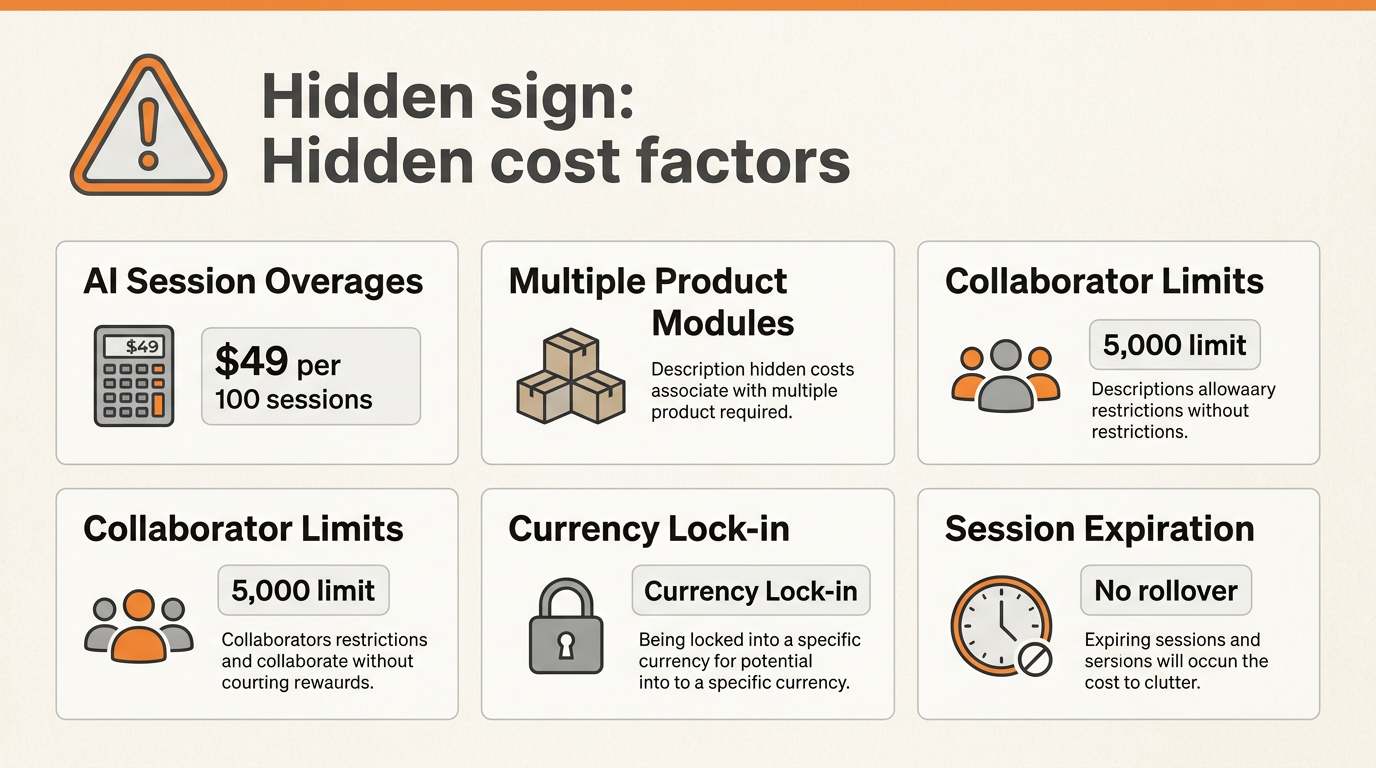
AI session overages. Those 500 included Freddy AI sessions disappear quickly with high ticket volume. A team handling 2,000 AI-assisted conversations monthly would need 1,500 additional sessions at $49 per 100. That's $735 extra per month.
Multiple product modules. Freshdesk, Freshchat, Freshcaller, and Freshsales are sold separately. If you need chat, phone, and CRM alongside your helpdesk, you're looking at separate subscriptions for each.
Collaborator limits. Only Pro and Enterprise include 5,000 collaborators (view-only users). Growth plans don't include this, which matters if you have external stakeholders who need ticket visibility.
Currency lock-in. Once you upgrade to a paid plan, your currency setting is fixed. Changing it requires contacting billing@freshdesk.com.
Session expiration. Unused AI sessions expire at the end of each billing cycle with no rollover. Pay quarterly, and your sessions expire quarterly. This makes it hard to optimize costs during slow periods.
Freshdesk alternatives for different needs
Freshdesk isn't the only option. Depending on your priorities, other tools might fit better.
For teams heavily focused on phone support, Ringly.io offers an AI phone agent called an AI agent that handles inbound calls 24/7. It integrates with Shopify to look up orders, process returns, and escalate complex issues to human agents. With a 73% call resolution rate without human intervention, it's worth considering if phone support is a major channel for your business.
If you need a simpler, more affordable helpdesk, Zendesk offers comparable features with a different pricing structure. For teams wanting modern AI-native support, newer platforms like Intercom's Fin offer different approaches to automation.
The key is matching the tool to your actual channels and volume, not just picking the biggest name.
Choosing the right Freshdesk plan for your team
Here's a simple framework to help you decide.
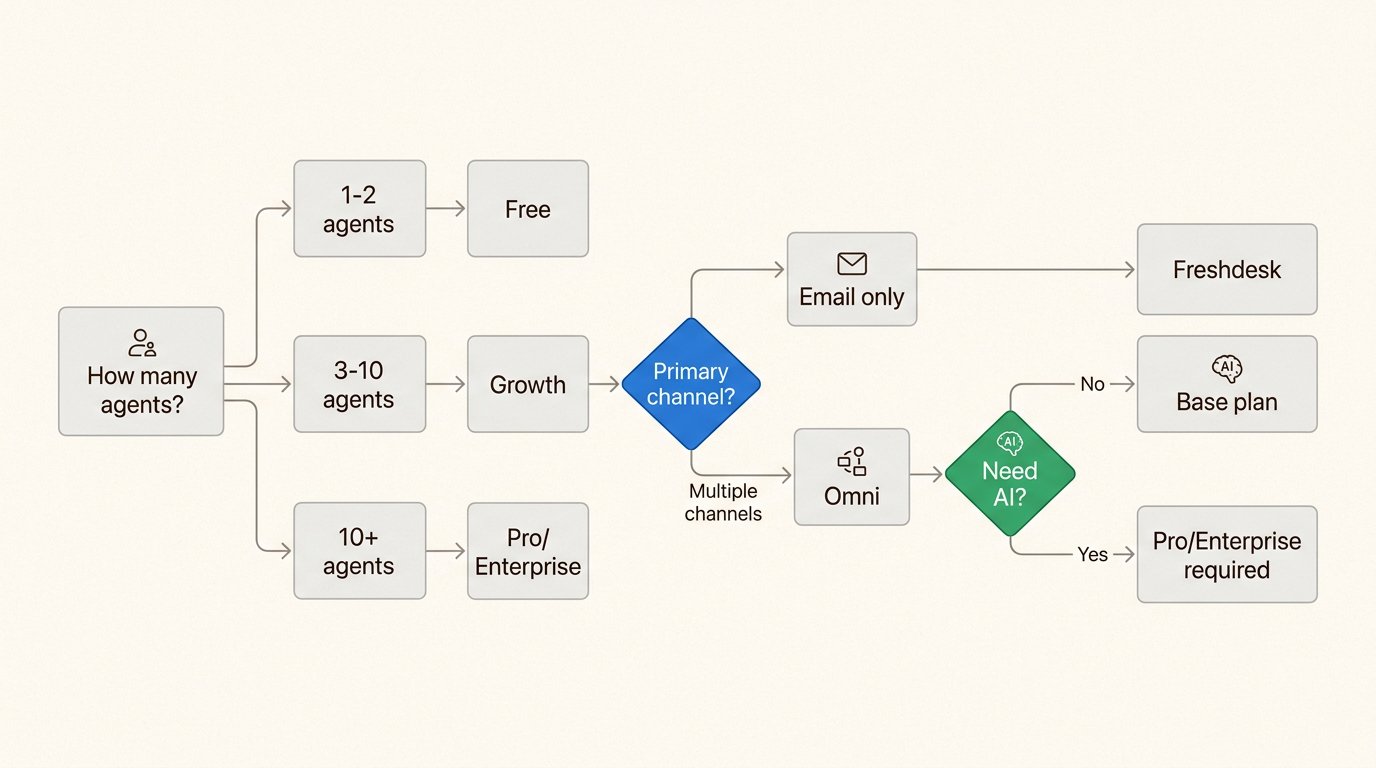
Start with Freshdesk Free if:
- You have 1-2 support agents
- Email is your primary channel
- You're evaluating helpdesk software
- Budget is extremely tight
Choose Freshdesk Growth if:
- You have a small team (3-10 agents)
- Email support is sufficient
- You need basic automation and reporting
- You're not ready for AI features yet
Upgrade to Freshdesk Pro if:
- You're scaling your support team
- You need custom portals or advanced routing
- You want to try Freddy AI (500 sessions included)
- You have external collaborators who need access
Go with Freshdesk Omni if:
- Your customers use multiple channels (chat, social, email)
- You need unified reporting across all touchpoints
- You want to run proactive campaigns via WhatsApp
- Phone support is important (add Freshcaller)
Consider Enterprise if:
- You have strict security requirements
- You need audit logs and compliance features
- Skill-based routing would significantly improve efficiency
- You have 50+ agents
Bottom line? Start with what you actually need today, not what you might need in two years. You can always upgrade as you grow, and the 14-day trial gives you full Enterprise access to test everything before you commit.
Frequently Asked Questions
How much does Freshdesk pricing cost for a small team of 5 agents?
For a 5-agent team on annual billing, Freshdesk Growth costs $95 per month ($19 x 5). If you need multichannel support, Omni Growth would be $145 per month ($29 x 5). Add Freddy AI Copilot for all agents and you're looking at an additional $145 per month.
Does Freshdesk pricing include AI features, or are those extra?
Basic AI features require add-ons. Freddy AI Agent includes 500 sessions on Pro and Enterprise plans, but additional sessions cost $49 per 100. Freddy AI Copilot is $29 per agent monthly and only available on Pro and Enterprise. The Free and Growth plans don't include any AI capabilities.
What's the difference between Freshdesk and Freshdesk Omni pricing?
Freshdesk starts at $19/agent/month for Growth and focuses on email ticketing. Freshdesk Omni starts at $29/agent/month and includes multichannel support (chat, social, SMS). Omni has no free tier, while Freshdesk offers a free plan for 1-2 agents for 6 months.
Can I switch between Freshdesk pricing plans after signing up?
Yes. Upgrades apply immediately with pro-rata charges for the remaining billing period. Downgrades take effect at the end of your current billing cycle. You can also switch between Freshdesk and Freshdesk Omni, though some features and configurations may be lost when downgrading.
Are there any hidden fees in Freshdesk pricing I should know about?
Watch for AI session overages ($49 per 100 sessions beyond the 500 included), separate costs for additional products like Freshcaller ($15/agent/month), and campaign contact fees for proactive outreach. Also note that AI sessions expire each billing cycle with no rollover.
Is the Freshdesk free plan actually free, or is there a catch?
The Free Program is genuinely free for 1-2 agents for 6 months with no credit card required. The catch is that it's only available for Freshdesk (not Omni), and you lose certain features when switching from a trial to the free plan. After 6 months, you must upgrade to a paid plan or lose access.



