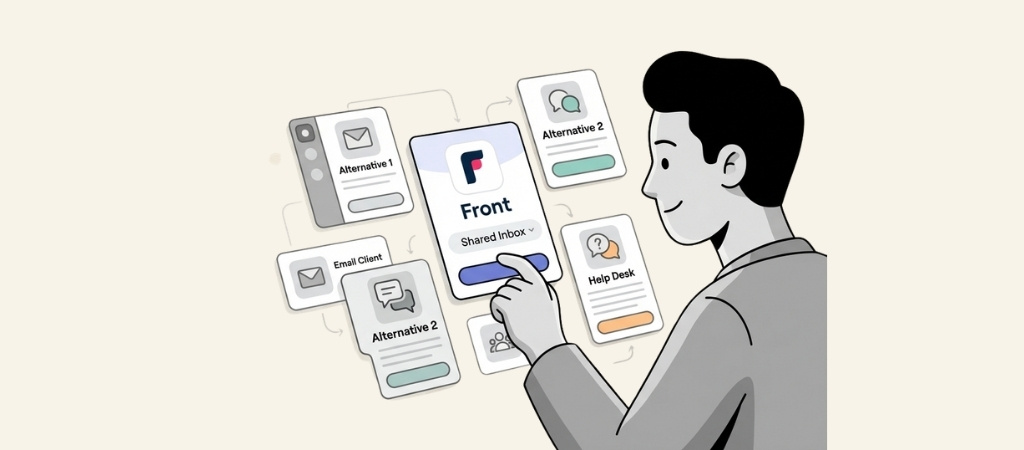
Front helped popularize the shared inbox concept, but it's not the only option on the market.
Teams switch away from Front for various reasons: pricing that escalates quickly, a rigid interface, or the need for features that Front's starter plans simply don't include.
If you're evaluating alternatives, you're probably looking for something that fits your team's workflow better without breaking the budget.
We've tested and researched the leading options to help you find the right fit.
Editor’s note: Want to hear some sample AI support calls made for your Shopify store?
- Just paste your store URL
- Get sample calls in under 20 seconds (no email required)
- Listen to demo calls for my store
What is Front and why look elsewhere?
Front is a collaborative inbox platform that lets teams manage shared email addresses like support@ or sales@ together. It adds assignment, internal comments, and automation on top of standard email functionality.
The platform works well for many teams, but common pain points drive people to explore alternatives:
- Pricing escalates steeply. Front's starter plan is $19 per user, but key features like automation and analytics require upgrades to $49 or $99+ plans.
- Interface rigidity. Users report the sidebar can't be collapsed, leading to excessive scrolling and clicking.
- Email organization issues. Some teams experience lost emails or confusing conversation threading.
- No offline mode. Technical limitations mean you can't access Front without an internet connection.
These limitations create openings for competitors to offer better value or a more flexible experience.
How we evaluated these Front alternatives
We focused on tools that solve specific Front pain points. Our criteria included:
- Pricing transparency. Clear, predictable costs without surprise upgrades.
- Ease of setup. How quickly can a team get started?
- Automation capabilities. AI and workflow features that reduce manual work.
- Integrations. Connections to the tools teams already use.
- Real user feedback. Reviews and experiences from actual users.
Comparison at a glance
| Tool | Starting Price | Free Trial | Best For | Key Differentiator |
|---|---|---|---|---|
| Missive | Free (3 users), then $18/user | 15 days | Email-first teams | True email client experience |
| Zendesk | $19/user (Support Team) | 14 days | Enterprise scale | 1,500+ integrations, advanced AI |
| Hiver | Free, then $25/user | 7 days | Gmail/Outlook users | Works inside existing email |
| Freshdesk | Free (2 agents), then $19/user | 14 days | Budget-conscious teams | Generous free tier, gamification |
| Help Scout | Free (5 users), then $25/user | 15 days | Small teams | Built-in knowledge base |
| Crisp | Free (2 agents), then $45 flat | 14 days | Startups | Flat pricing, unlimited agents |
| Tidio | $24.17/month (billed annually) | 7 days | Ecommerce and chat-first teams | Live chat + Lyro AI agent in one inbox |
| Kayako | $79/month + $1/AI ticket | Consultation | AI-first teams | Pay for outcomes, not seats |
The 8 best Front alternatives
1. Missive
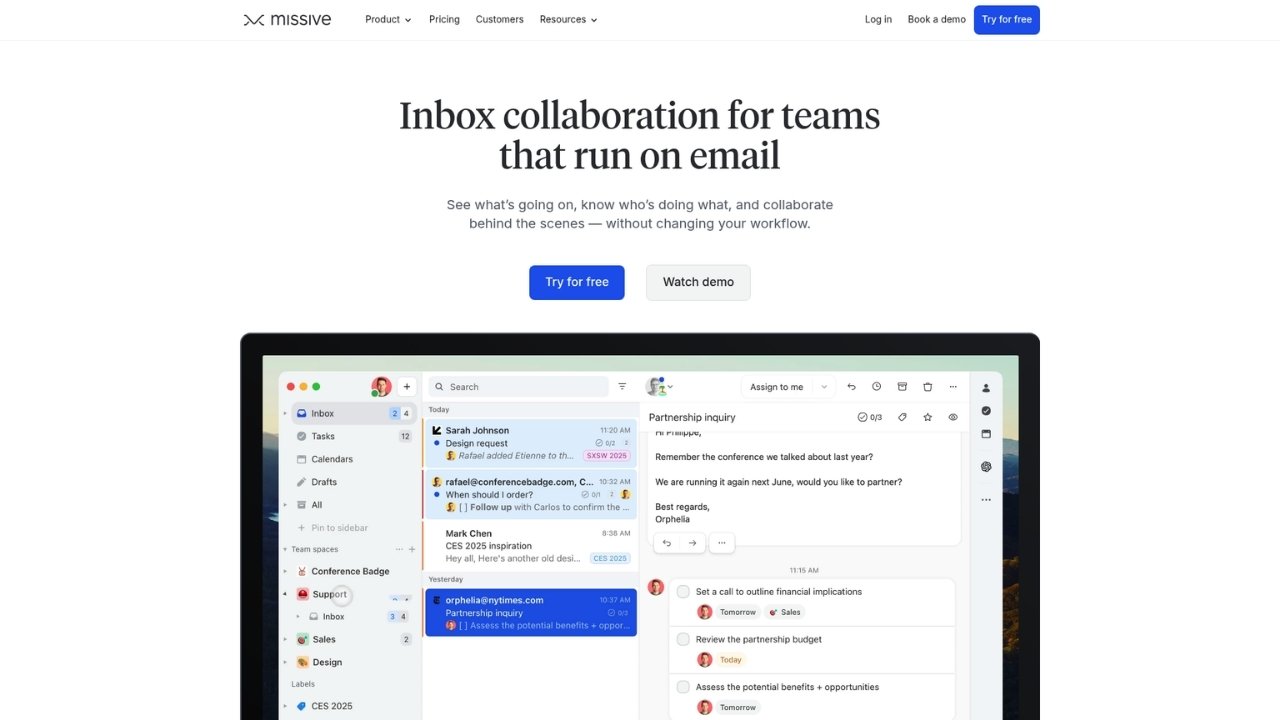
Missive is an email-first collaboration tool that feels more like a traditional email client than a help desk. If your team wants the familiarity of Gmail with added collaboration features, this is worth considering.
What makes it different:
Unlike Front's forwarding-based model, Missive offers full two-way sync with Gmail, Office 365, and other providers. Your labels, folders, and read statuses stay in sync across platforms. Front limits email history to 50,000 recent messages on some imports; Missive has no such restrictions.
Pricing:
| Plan | Price | Key Features |
|---|---|---|
| Free | $0 | Up to 3 users, basic features |
| Starter | $18/user/month ($14 annual) | Full features, unlimited users |
| Productive | $36/user/month ($28 annual) | Advanced features, analytics |
Source: Missive Pricing
Pros:
- Gmail-style interface reduces training time
- Excellent mobile apps for iOS and Android
- Full label and folder synchronization
- No email history limits
Cons:
- Less robust for chat and social media channels
- Smaller integration ecosystem than enterprise platforms
Best for: Teams that primarily need email collaboration and want to avoid learning a new interface.
2. Zendesk

Zendesk is the established leader in customer service software. If you need enterprise-grade features and don't mind the complexity, it's hard to beat.
What makes it different:
With 1,500+ integrations and advanced AI agents that can resolve 80% of issues autonomously, Zendesk scales to the largest organizations. The platform offers sandbox environments, audit logs, and HIPAA compliance for regulated industries.
Pricing:
| Plan | Annual Price | Monthly Price | Key Features |
|---|---|---|---|
| Support Team | $19/user | $25/user | Email, basic automations, 1,000+ integrations |
| Suite Team | $55/user | $69/user | AI agents, messaging, help center, voice |
| Suite Professional | $115/user | $149/user | Copilot, custom reports, SLA management |
| Suite Enterprise | $169/user | $219/user | Sandbox, 300 help centers, custom roles |
Add-ons: Copilot ($50/user), Quality Assurance ($35/user), Workforce Management ($25/user)
Pros:
- Most comprehensive feature set in the industry
- Advanced AI with reasoning and action capabilities
- Enterprise security and compliance certifications
- Massive integration ecosystem
Cons:
- Complex setup and steeper learning curve
- Many features require costly add-ons
- Overkill for small teams with simple needs
Best for: Growing teams and enterprises needing advanced automation, omnichannel support, and proven scalability.
3. Hiver

Hiver turns Gmail or Outlook into a help desk without requiring a new interface. For teams deeply embedded in Google Workspace, this is the fastest path to shared inbox functionality.
What makes it different:
Hiver works entirely within Gmail. You manage shared inboxes, assign conversations, and track performance without leaving your email client. All paid plans include AI features like Compose, Summarizer, and Copilot.
Pricing:
| Plan | Annual Price | Monthly Price | Key Features |
|---|---|---|---|
| Free | $0 | $0 | Unlimited users, email/chat/knowledge base |
| Growth | $25/user | $35/user | AI Compose, automation rules, analytics |
| Pro | $65/user | $85/user | AI Agents, voice/WhatsApp, SLA, CSAT |
| Elite | $105/user | $125/user | AI QA, skill-based routing, HIPAA, SSO |
Source: Hiver Pricing
Pros:
- No new interface to learn
- Fast deployment (minutes, not days)
- AI features included on all paid plans
- Strong Gmail integration
Cons:
- Limited to Gmail and Outlook
- Voice requires Aircall integration
- Seat minimums start at 2, increasing in increments of 5
Best for: Google Workspace teams that want help desk features without changing how they work.
4. Freshdesk

Freshdesk offers a generous free tier and competitive pricing, making it attractive for budget-conscious teams that still need omnichannel capabilities.
What makes it different:
The free tier supports up to 2 agents for 6 months with no credit card required. Freshdesk also includes gamification features to motivate agents, which most competitors lack.
Pricing:
| Plan | Annual Price | Key Features |
|---|---|---|
| Free | $0 | 1-2 agents for 6 months, ticketing, knowledge base |
| Growth | $19/user | Ticketing, customer portal, email AI agent |
| Pro | $55/user | Custom portals, custom objects, advanced routing |
| Enterprise | $89/user | Audit logs, approval workflows, skills-based assignment |
Source: Freshdesk Pricing
AI Add-ons: Freddy AI Agent at $49 per 100 sessions (500 included with Pro/Enterprise)
Pros:
- Generous free tier for small teams
- Built-in gamification and agent scoring
- Integration with Freshworks ecosystem (CRM, ITSM)
- Strong omnichannel support
Cons:
- AI features cost extra beyond included sessions
- Free plan limited to 6 months
- Field service module discontinued
Best for: Teams that want omnichannel support without enterprise pricing, especially existing Freshworks users.
5. Help Scout

Help Scout prioritizes simplicity and email-like communication. If Front feels too complex, Help Scout's clean interface might be refreshing.
What makes it different:
Help Scout focuses on doing email support exceptionally well. The built-in Docs knowledge base integrates seamlessly with the inbox, and the Beacon widget lets customers access help anywhere.
Pricing:
| Plan | Annual Price | Key Features |
|---|---|---|
| Free | $0 | 5 users, 1 inbox, 1 docs site, 100 contacts/month |
| Standard | $25/user | Multiple inboxes, multiple knowledge bases, basic workflows |
| Plus | $45/user | Advanced workflows, unlimited AI drafts, Salesforce/HubSpot |
| Pro | $75/user | Unlimited workflows, SSO, HIPAA, dedicated onboarding |
Source: Help Scout Pricing
AI Answers Add-on: $0.75 per resolution
Pros:
- Clean, intuitive interface
- Built-in knowledge base (Docs)
- Free plan supports 5 users
- Pay-per-resolution AI pricing
Cons:
- Limited automation on lower tiers
- Fewer integrations than larger competitors
- Voice support requires Aircall integration
Best for: Small teams that want straightforward email support with strong documentation capabilities.
6. Crisp

Crisp stands out with flat-rate pricing that doesn't charge per seat. For growing teams, this can mean significant savings.
What makes it different:
Instead of per-user pricing, Crisp charges per workspace. The Plus plan at $295/month includes 20+ agents with the option to add more at $10 each. All plans include unlimited conversations.
Pricing:
| Plan | Monthly Price | Agents | Key Features |
|---|---|---|---|
| Free | $0 | 2 | Website chat, mobile apps, basic integrations |
| Mini | $45 | 4 | Shared email inbox, shortcuts, custom domain |
| Essentials | $95 | 10 | Omnichannel inbox, workflow automation, AI chatbot |
| Plus | $295 | 20+ | AI-first suite, ticketing, 100+ integrations, white labeling |
Source: Crisp Pricing
Pros:
- Flat pricing makes costs predictable
- Unlimited conversations on all plans
- Co-browsing (MagicBrowse) included
- Video and audio chat capabilities
Cons:
- Ticketing system only on Plus plan
- Smaller integration ecosystem
- AI credits may not suffice for high-volume automation
Best for: Startups and growing teams that want predictable costs as they scale.
7. Tidio
Tidio puts live chat, ticketing and an AI agent called Lyro in one inbox. It is popular with ecommerce stores, and it fits teams whose conversations mostly start on the website rather than in email.
What makes it different:
Front is built around the shared email inbox. Tidio is built around chat, with Lyro answering common questions on its own and handing the rest to your team. Tidio reports that customers average a 75% resolution rate with Lyro. You pay for billable conversations, not seats.
Pricing:
| Plan | Price (billed annually) | Conversations | Key Features |
|---|---|---|---|
| Starter | $24.17/month | 100 billable | Live chat and ticketing, 50 Lyro conversations (one-off), basic analytics |
| Growth | From $49.17/month | From 250 billable | Advanced analytics, automatic assignment, macros, user permissions |
| Plus | From $300/month + usage | Custom | Dedicated success manager, departments, custom branding, OpenAPI |
| Premium | Contact sales | Custom | From 3,000 Lyro conversations, guaranteed 50% Lyro resolution rate |
Source: Tidio Pricing
Note: Lyro is also sold on its own, from $32.50/month for 50 AI conversations, and can sit on top of Zendesk, Salesforce or another help desk.
Pros:
- Live chat, ticketing and an AI agent in one tool
- Built with ecommerce stores in mind
- Lyro works with the help desk you already use
- 7-day free trial on the self-serve plans
Cons:
- Conversation-based billing is harder to predict in busy months
- Email-heavy teams may miss Front's shared inbox depth
- Departments and custom branding start on Plus at $300/month
Best for: Ecommerce and website-first teams that want chat and AI to handle the first reply.
8. Kayako

Kayako takes a unique approach with AI-centric pricing. Instead of paying per seat, you pay a base fee plus $1 for each ticket resolved by AI.
What makes it different:
Kayako's "One" plan costs $79 per month plus $1 per AI-resolved ticket. This aligns costs with outcomes rather than headcount. The platform emphasizes unified customer views across multiple brands.
Pricing:
| Component | Price | Details |
|---|---|---|
| Kayako One (Base) | $79/month | Brand Messenger, Shared Inbox, Ticketing, Reports, Help Center |
| AI Resolved Tickets | +$1 per ticket | Pay only for tickets resolved by AI |
Source: Kayako Pricing
Note: Kayako requires a strategy session for implementation.
Pros:
- Pay for outcomes, not seats
- Built-in multi-brand support
- AI-first approach to automation
- Unified customer journey visibility
Cons:
- Unique pricing can be harder to predict
- Smaller market presence than competitors
- Requires consultation for setup
Best for: Teams wanting to maximize AI automation and prefer outcome-based pricing.
Which Front alternative should you choose?
The right choice depends on your team size, budget, and primary use case.
Choose Missive if: You want a true email client experience with collaboration features. Best for teams that live in email and don't need complex omnichannel support.
Choose Zendesk if: You need enterprise scalability, advanced AI, and extensive integrations. Worth the complexity and cost for large teams.
Choose Hiver if: Your team uses Gmail or Outlook and wants help desk features without learning a new interface. Fastest deployment option.
Choose Freshdesk if: Budget is a primary concern. The free tier and competitive pricing make it accessible for small teams.
Choose Help Scout if: Simplicity matters most. Best for small teams that want straightforward email support with built-in documentation.
Choose Crisp if: You want predictable flat-rate pricing. Ideal for startups planning to scale their team without per-seat costs ballooning.
Choose Kayako if: AI automation is your priority and you prefer paying for resolved tickets rather than seats.
Making the switch from Front
Migrating from one platform to another requires planning. Here are some practical steps:
Export your data first. Most platforms let you export conversations and contact data. Do this before canceling Front.
Run parallel systems. Consider operating both platforms for a week or two to ensure nothing falls through the cracks.
Train your team early. Get your team access to the new tool before go-live so they can familiarize themselves.
Start with a trial. All the alternatives on this list offer free trials. Use them to test your actual workflows before committing.
Find the right shared inbox for your team
Front alternatives offer real advantages depending on your needs. Whether you prioritize pricing, simplicity, or advanced features, there's a platform that fits better than Front for many teams.
Start with free trials, involve your team in the evaluation, and choose the tool that matches how you actually work. The best shared inbox is the one your team will actually use.
Frequently Asked Questions
What should you look for in Front alternatives before switching?
Look for pricing transparency, ease of migration, and features that solve your specific pain points with Front. Test the trial version with your actual workflows before committing.
Do Front alternatives offer better pricing than Front itself?
Many do. Tools like Crisp offer flat-rate pricing, while others like Freshdesk and Help Scout have generous free tiers. Compare total costs based on your team size and feature needs.
Which Front alternatives work best for small teams?
Help Scout (free for 5 users), Freshdesk (free for 2 agents), and Missive (free for 3 users) are excellent starting points for small teams testing shared inbox software.
Can Front alternatives handle omnichannel support like email, chat, and phone?
Yes. Zendesk, Freshdesk, Hiver, and Crisp all offer omnichannel capabilities. Missive is more email-focused, while Help Scout focuses on email with chat as a secondary channel.
How difficult is it to migrate from Front to an alternative platform?
Migration difficulty varies by platform. Hiver and Missive integrate directly with Gmail, making transitions easier. Most platforms offer import tools and migration assistance for enterprise plans.
Do any Front alternatives include AI features without extra costs?
Hiver includes AI features on all paid plans. Zendesk includes essential AI agents on Suite plans. Others like Help Scout and Kayako charge per resolution for AI features.
What makes Front alternatives better for Gmail users specifically?
Hiver works entirely within Gmail. Missive offers full two-way sync with Gmail labels and folders. Both preserve your existing email workflow while adding collaboration features.
Also read: