


Phone support remains one of the most effective channels for ecommerce customer service.
When customers have complex order issues, payment problems, or high-value purchases on the line, they often prefer talking to someone directly.
Zendesk Talk is cloud-based call center software built into the Zendesk platform.
It lets ecommerce stores handle phone calls alongside email, chat, and social media from a single workspace.
This guide covers everything you need to know about setting up Zendesk Talk for your online store.
You'll learn about features, pricing, Shopify integration, and when an AI-first approach might make more sense.
Editor’s note: Want to hear some sample support calls made for your Shopify store?
- Just paste your store URL
- Get sample calls in under 20 seconds (no email required)
- Listen to demo calls for my store
What is Zendesk Talk and why ecommerce stores need it
Zendesk Talk is a voice solution built directly into the Zendesk omnichannel platform.
Unlike standalone VoIP systems, it connects phone support with your existing ticketing, chat, and email workflows.
The main advantage for ecommerce? Every call automatically creates a support ticket. Agents see the customer's full history (past orders, previous conversations, open issues) before they even say hello.
Phone support still matters in ecommerce, even with the rise of chat and self-service.
Certain situations demand a real conversation: frustrated customers with missing packages, disputes over charges, questions about high-ticket items, or complex return scenarios that don't fit neatly into a form.
Zendesk serves over 100,000 companies globally.
For online retailers already using Zendesk for email and chat, adding Talk creates a unified view of customer interactions across every channel.
Zendesk Talk features for online retailers
Let's break down the features that matter most for ecommerce operations.
Automatic ticket creation from calls
Every inbound and outbound call generates a ticket automatically. The ticket includes the call recording (if enabled), agent notes, customer information, and timestamps.
This eliminates manual data entry and ensures nothing falls through the cracks.
If a customer calls about an order issue and needs a follow-up, the ticket is already there with full context.
Voicemail transcription is available at $0.05/minute, which helps teams quickly scan messages without listening to each recording.
Call transcription runs at $0.01/minute for searchable call history.
IVR and call routing
Interactive Voice Response (IVR) menus let you direct callers to the right department.
A typical ecommerce setup might route "Press 1 for order status, Press 2 for returns, Press 3 for product questions."

Skills-based routing sends calls to agents with specific expertise.
You could route international shipping questions to agents who know customs procedures, or VIP customers to your most experienced team members.
Business hours settings define when calls route to live agents versus voicemail.
Overflow options handle busy periods by queuing calls, offering callbacks, or routing to backup numbers.
Call recording and quality monitoring
Recording calls is optional but valuable for training, compliance, and dispute resolution.
Supervisors can listen to recordings to coach agents on handling difficult ecommerce scenarios.
Real-time dashboards show active calls, queue depth, and agent status.
Performance reports track metrics like average handle time, first call resolution, and customer satisfaction by agent.
Forward-to-phone flexibility
Agents can answer calls in their browser or forward to a mobile phone.
This works well for distributed teams or stores that need after-hours coverage without dedicated night-shift staff.
The browser-based approach requires no hardware.
Agents need a stable internet connection (minimum 50kBits/sec per call) and a WebRTC-compatible browser like Chrome, Firefox, or Safari.
Zendesk Talk pricing for ecommerce businesses
Zendesk Talk comes bundled with Zendesk Suite plans, not sold separately. Here's what each tier includes:
| Plan | Price (Annual Billing) | Key Talk Features |
|---|---|---|
| Suite Team | $55/agent/month | Basic voice, IVR, group routing, 1 phone number |
| Suite Growth | $89/agent/month | Multiple numbers, overflow routing, SLAs, 100 light licenses |
| Suite Professional | $115/agent/month | Skills-based routing, custom reporting, up to 5 help centers |
| Suite Enterprise | $169/agent/month | Full customization, enterprise features, 300+ help centers |
Monthly billing runs higher ($69, $89, $149, $219 respectively). Most businesses opt for annual to lock in the lower rate.
Usage-based costs to factor in
Beyond the per-agent fee, you'll pay for phone numbers and call minutes:
| Cost Component | Rate |
|---|---|
| Local US/Canada number | $1/month |
| Toll-free number | $2-3/month |
| Inbound minutes (browser) | $0.012/minute |
| Outbound minutes (US/Canada) | $0.022/minute |
| Call transcription | $0.01/minute |
| Voicemail transcription | $0.05/minute |
International calls cost more. Rates vary by destination country, and outbound is always more expensive than inbound.
What small ecommerce stores should budget
Here's a rough calculation for different store sizes:
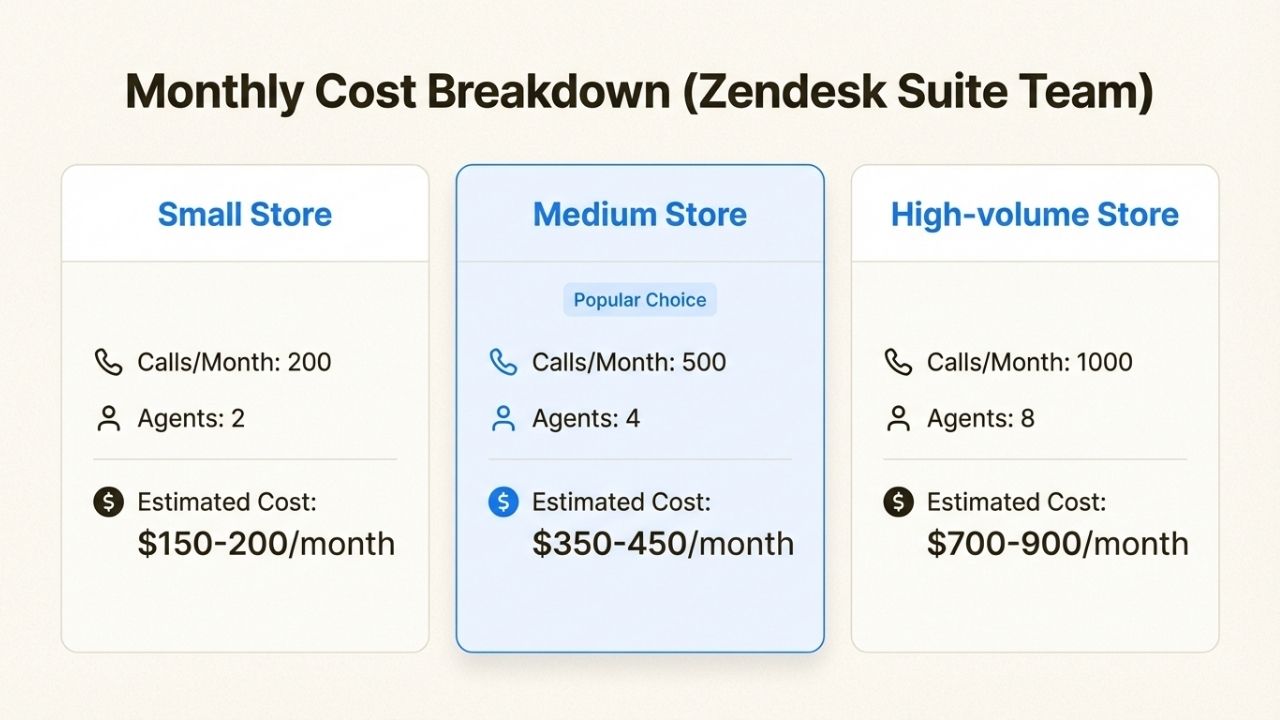
Smaller stores pay significantly less per-call when factoring in the flat monthly fee
For a store handling 500 calls per month with 3 agents on Suite Team:
- Base cost: $55 x 3 = $165/month
- Phone number: $1-2/month
- Call minutes (averaging 4 minutes per call): 2,000 minutes x $0.012 = $24/month
- Estimated total: ~$190-200/month
Hidden costs to watch: international calls add up fast, and high-volume periods (Black Friday, holiday season) can spike per-minute charges significantly.
Volume discounts are available for invoice billing. Prepay $5,000 and receive $5,556 in credits (10% savings). At $20,000, you get 15% savings.
Setting up Zendesk Talk for your ecommerce store
The setup process takes about 30 minutes if you already have a Zendesk account. Here's the step-by-step.
Step 1: Enable Talk in your Zendesk account
Navigate to Admin Center, then Channels, then Talk and email, then Talk. Click "Get Started" on the welcome page.
Zendesk offers a trial that includes $1 in calling credit (roughly 50 minutes of browser-based calls).
This gives you time to test the system before committing to a plan.
Step 2: Choose and configure your phone number

You have three options:
- Local number: Best for regional stores or specific market presence
- Toll-free number: Professional feel for national/international customers
- Port existing number: Keep your current business line
Zendesk offers numbers in 40+ countries. Availability varies by region, and some countries require business documentation.
Step 3: Set up business hours and greetings
Configure operating hours for each phone number. You can set different schedules for weekdays versus weekends, and different greetings for business hours versus after-hours.
Record or upload custom greetings. A typical ecommerce greeting: "Thanks for calling [Store Name].
Your call may be recorded for quality purposes. Please hold for the next available agent."
Set voicemail behavior for when agents are unavailable. Options include standard voicemail, callback requests, or routing to an overflow number.
Step 4: Configure routing and IVR menus
Create menu options that match your support structure. Common ecommerce options:
- Order status and tracking
- Returns and exchanges
- Product questions
- Billing and payment issues
Set up agent groups for specialized routing. A returns team might handle all "Press 2" calls, while product specialists take "Press 3."
Define overflow rules for busy periods. If wait times exceed 5 minutes, you might offer a callback option or route to a backup queue.
Step 5: Connect your Shopify store
The Zendesk Shopify integration is free and installed on 16,000+ stores. It displays customer and order data directly in Zendesk tickets.
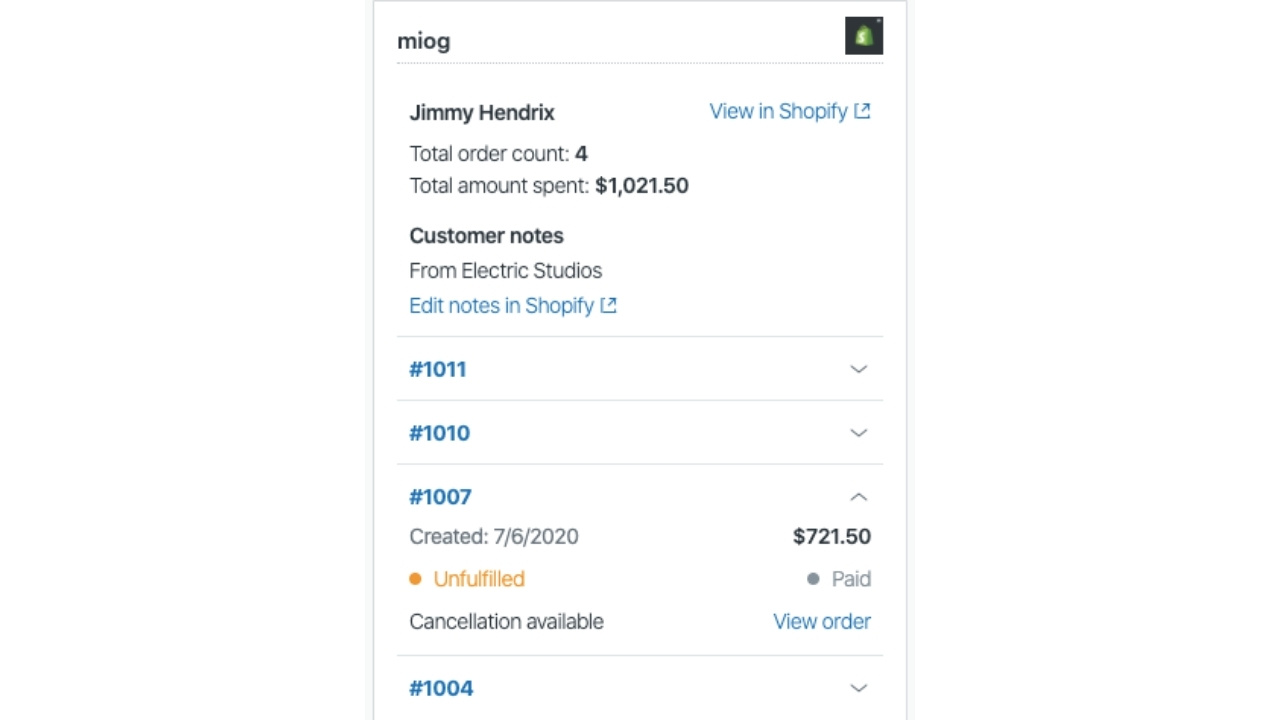
To set it up:
- Install the Shopify for Zendesk app from the Zendesk Marketplace
- Select your Shopify store during installation
- Authorize the connection and enter your Zendesk subdomain
- Name the connection in Zendesk Admin Center
Once connected, agents see a sidebar with:
- Customer details and order history
- Order status, payment status, and tracking numbers
- Direct links to Shopify admin for full order details
- Ability to process refunds and cancellations directly from Zendesk
The integration matches customers by email or phone number.
When a caller's information matches a Shopify customer, their order history loads automatically.
Best practices for ecommerce phone support with Zendesk
Getting the technical setup right is only half the job. Here's how to maximize ROI from your phone support investment.
Reduce call volume with self-service first
Build a knowledge base using Zendesk Guide. Cover the questions that drive most calls: shipping times, return policies, sizing guides, order tracking instructions.
Use Answer Bot to suggest help articles before connecting callers to agents.
Some stores deflect 20-30% of potential phone calls to self-service this way.
The goal isn't to make phone support harder to reach.
It's to handle simple questions efficiently so agents can focus on complex issues that actually need a conversation.
Prepare for seasonal peaks
Black Friday and holiday season can triple or quadruple call volume.
Plan capacity in advance rather than scrambling when queues overflow.
Consider temporary agent licenses for peak periods. Zendesk Suite Growth includes 100 "light" licenses for seasonal staff who only need limited access.
Pre-record messages for common peak-season questions.
A "Due to high volume, orders placed after December 15 may not arrive by Christmas" message can reduce repeat calls.
Track the right metrics
First call resolution (FCR) rate measures how often issues get solved in a single call.
Target 70% or higher for ecommerce support.
Average handle time matters, but not in isolation.
A 10-minute call that fully resolves a frustrated customer's issue is better than a 3-minute call that generates a callback.
Compare resolution rates across channels.
If phone consistently outperforms chat for certain issue types, consider routing those issues to phone proactively.
Customer satisfaction (CSAT) scores by channel reveal where your team excels. Track this monthly to spot trends.
Train agents on ecommerce-specific scenarios
The most common ecommerce phone calls follow predictable patterns:
- Order status inquiries: "Where's my package?" Train agents to quickly pull tracking info and set realistic expectations.
- Returns and exchanges: Walk through your return policy and process. Agents should know when to make exceptions.
- Payment issues: Failed transactions, double charges, and refund timelines. Agents need access to payment details and authority to resolve.
- Shipping delays: Know your carrier relationships and compensation policies. Proactive communication prevents angry calls.
When Zendesk Talk might not be the best fit
Zendesk Talk works well for many ecommerce operations, but it has limitations worth considering.
Limitations for high-volume ecommerce stores
Costs scale linearly with agent count and call volume.
A store handling 5,000 calls per month with 10 agents pays significantly more than a store with 500 calls and 2 agents.
Native Zendesk automation handles routing and macros well, but doesn't deeply automate call handling itself.
Agents still need to answer every call, even routine "where's my order" inquiries.
Multi-brand operations face setup complexity. Each brand may need separate phone numbers, IVR trees, and routing rules.
This gets manageable but requires more configuration.
Consider AI phone support for repetitive calls
Here's the reality: 60-70% of ecommerce phone calls are routine. Order status checks, return requests, shipping questions.
These follow predictable patterns and don't require human judgment.
AI phone agents can handle these automatically, around the clock, without staffing costs.
Human agents get freed up for complex issues that actually benefit from a personal touch.
Ringly.io offers the AI, an AI phone support agent built specifically for ecommerce. It integrates directly with Shopify to look up orders, process returns, and answer product questions without human intervention.

The AI resolves around 73% of calls automatically across Shopify stores.
The pricing model removes risk: you get your last 3 months refunded if Seth resolves under 65% of calls in 90 days on 100 calls within 21 days. After that, plans start at $349/month for 1,000 minutes.
For comparison:
| Factor | Zendesk Talk | Ringly.io (Seth) |
|---|---|---|
| Call handling | Human agents answer all calls | AI handles routine calls automatically |
| Availability | Depends on agent schedules | 24/7 without staffing |
| Cost structure | Per-agent + per-minute | Flat monthly + per-minute overage |
| Best for | Teams wanting omnichannel visibility | Stores wanting to automate routine calls |
| Setup time | 30-60 minutes | 3 minutes |
For businesses handling high call volumes or wanting 24/7 coverage without staffing costs, an AI-first approach can complement or replace traditional phone support.
Start your free trial to see how AI phone support handles your most common customer calls.
Getting started with ecommerce phone support
Zendesk Talk is a solid option for ecommerce businesses that want integrated phone support within an omnichannel platform. It works best for stores with dedicated support teams who need visibility across email, chat, and phone in one workspace.
Before committing, consider:
- Call volume: How many calls do you handle monthly? What's the cost at scale?
- Call types: Are most calls routine (order status, returns) or complex (disputes, custom orders)?
- Coverage needs: Do you need 24/7 support? Multilingual support?
Next steps:
- Start a Zendesk Talk trial to test the integration with your store
- Calculate your expected monthly costs based on agent count and call volume
- Evaluate whether AI phone support could handle your routine calls more efficiently
For ecommerce stores looking to automate phone support, Ringly.io's The AI handles order inquiries, returns, and FAQs automatically.
Try it free and only pay when it resolves at least 65% of your calls.
Frequently Asked Questions
Can Zendesk handle phone support for ecommerce stores?
Yes. Zendesk Talk is cloud-based call center software built into the Zendesk platform. It handles inbound and outbound calls, integrates with ticketing, and works alongside email and chat support. Ecommerce stores use it for order inquiries, returns, and customer service calls.
How much does Zendesk phone support cost for ecommerce businesses?
Zendesk Talk is included in Suite plans starting at $55/agent/month (annual billing). You also pay per-minute rates for calls ($0.012/minute inbound) and phone numbers ($1-3/month each). A small ecommerce store with 2-3 agents and 500 calls monthly typically pays $150-250/month total.
Does Zendesk Talk integrate with Shopify for ecommerce phone support?
Yes. The free Zendesk Shopify integration displays customer order data directly in support tickets. Agents see order history, tracking numbers, and payment status without switching systems. They can also process refunds and cancellations from within Zendesk.
What features does Zendesk Talk offer for ecommerce phone support?
Key features include automatic ticket creation from calls, IVR menus for routing callers, call recording, voicemail transcription, skills-based routing, real-time dashboards, and integration with Shopify. Agents can take calls in a browser or forward to mobile phones.
Is there an alternative to Zendesk Talk for ecommerce phone support?
Yes. AI phone agents like Ringly.io's the AI handle routine ecommerce calls automatically (order status, returns, product questions) without human agents. This approach works well for stores wanting 24/7 coverage or to reduce staffing costs on repetitive inquiries.
How long does it take to set up Zendesk Talk for ecommerce phone support?
Basic setup takes about 30 minutes if you already have a Zendesk account. This includes enabling Talk, choosing a phone number, configuring business hours, and setting up IVR routing. Connecting Shopify adds another 5-10 minutes.
Can Zendesk phone support handle high call volumes during ecommerce peak seasons?
Yes, but costs scale with volume. For peak periods like Black Friday, consider temporary agent licenses, pre-recorded messages for common questions, and callback options to manage queue overflow. Some stores add AI phone support during peaks to handle routine calls automatically.



