



Black Friday hits, your flash sale goes viral, or a product launch drives unexpected traffic.
Then your phone starts ringing off the hook.
During peak season, ecommerce stores can see 5-10x their normal call volume.
The problem? 85% of callers who reach voicemail won't call back.
That's revenue walking out the door.
This guide covers what overflow call answering is, why ecommerce stores specifically need it, and how to set it up before your next sales spike.
Editor’s note: Want to hear some sample support calls made for your Shopify store?
- Just paste your store URL
- Get sample calls in under 20 seconds (no email required)
- Listen to demo calls for my store

What is overflow call answering?
Overflow call answering is a backup system that handles calls when your team can't.
When your lines are busy, after hours, or during a sudden volume spike, calls automatically route to a secondary service.
The mechanics are straightforward. You set up triggers that determine when calls should overflow: after 3-4 rings with no answer, when all lines are busy, outside business hours, or when your queue hits a certain length.
Once triggered, calls route to either live human agents or AI-powered phone systems that answer on your behalf.
They can take messages, answer common questions, or even look up order information depending on your setup.
Ecommerce stores face unique challenges here. Unlike a law firm or medical practice with steady call patterns, your call volume swings wildly based on promotions, shipping deadlines, and product launches.
You might get 20 calls on Monday and 200 on Black Friday.
The 180-call difference needs to go somewhere.
Why ecommerce stores need overflow call handling
The math on missed calls is brutal for ecommerce. Here's why overflow matters more for online stores than most other businesses.
The seasonal spike problem
Ecommerce call patterns are inherently unpredictable. Black Friday, Cyber Monday, flash sales, new product drops, and even viral TikTok moments can flood your phone lines with zero warning.
Here's the double bind that makes it worse: almost 40% of ecommerce seasonal sales get returned during peak season.
That means your support call volume essentially doubles.
You're handling new order questions and return inquiries simultaneously.
Hiring seasonal staff for a 6-week holiday peak rarely pencils out. By the time they're trained, the rush is over.
That's where overflow solutions come in.
What missed calls actually cost
Let's run the numbers. According to research, 38% of calls from small businesses go unanswered.
Combine that with the 85% who won't leave voicemail, and you're losing a significant chunk of potential sales.
Here's a quick calculation for an average ecommerce store:
- 50 missed calls per day during peak season
- 10% of those callers would have converted
- $75 average order value
That's $375 per day in lost revenue, or $11,250 per month during your busiest selling period.
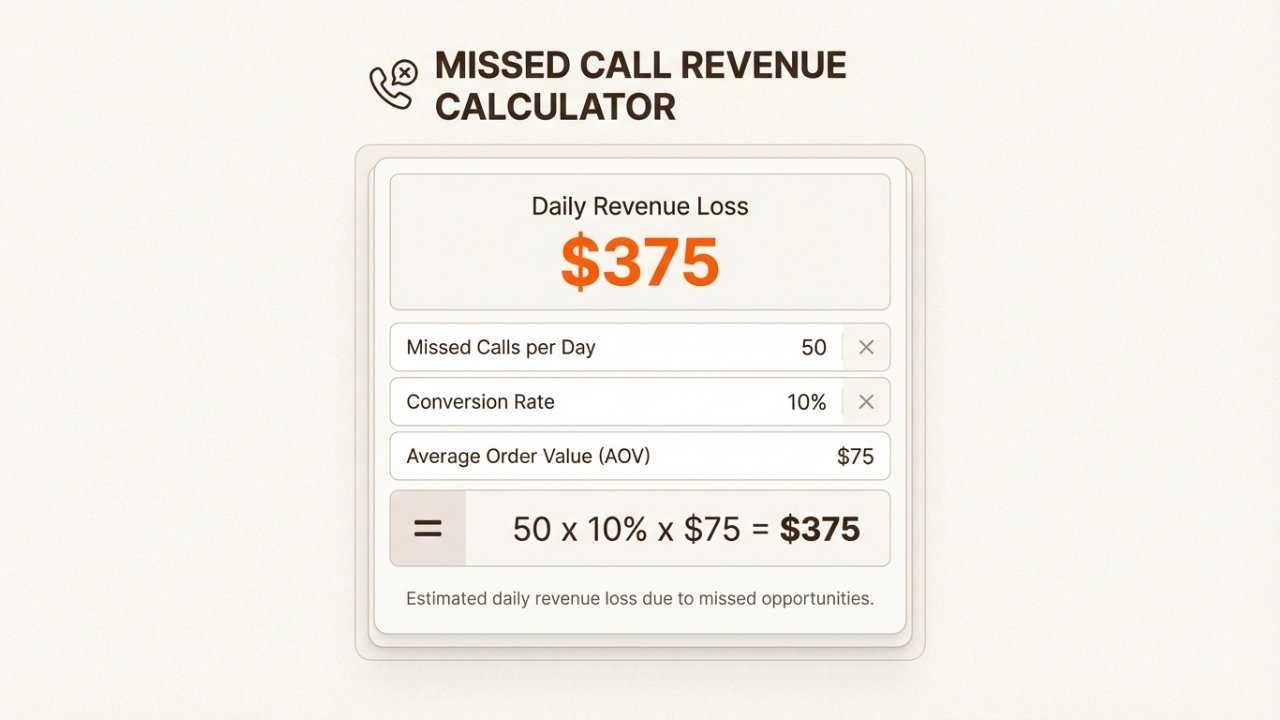
Each missed call during peak season represents real revenue walking away
Common ecommerce call types
Understanding what customers call about helps you pick the right overflow solution.
Most ecommerce calls fall into these categories:
- Where is my order? (tracking inquiries are the most common)
- Return and exchange requests (policy questions, how to initiate)
- Pre-purchase product questions (sizing, compatibility, features)
- Shipping cost clarifications (international, expedited options)
- Cart abandonment callbacks (customers who left items behind)
The good news: most of these are straightforward questions with predictable answers.
That's why AI solutions work well for ecommerce overflow.
Overflow call answering options compared
You have three main approaches to choose from.
Each has trade-offs depending on your call volume, budget, and how complex your customer interactions tend to be.
Live virtual receptionists
This is the traditional approach. US-based human agents answer your overflow calls using scripts you provide.
They take messages, answer basic questions, and transfer urgent calls to your team.
Best for: Complex complaints, price negotiations, high-touch customer relationships where empathy matters.
Pricing: Typically $25-$100/month base fee plus $0.80-$1.00 per minute of call time. High-volume months can get expensive quickly.
Pros: Personal touch, handles edge cases naturally, flexible responses to unexpected situations.
Cons: Higher cost per call, limited scalability during sudden spikes, requires training and script updates.
Key players in this space include ReceptionHQ, Map Communications, and Odondo.
AI-powered phone agents
Modern AI phone agents use speech recognition and natural language understanding to handle calls 24/7.
They can access your store data, look up orders, and answer FAQs without human involvement.
Best for: Order tracking, FAQ responses, returns processing, and high-volume simple queries.
Pricing: Typically $349-$799/month for hundreds to thousands of minutes included. Much lower effective cost per call.
Pros: 24/7 availability without premium charges, handles unlimited concurrent calls, integrates directly with Shopify, lower cost at scale.
Cons: Less effective for emotionally charged situations, requires upfront setup and knowledge base configuration.
Key players include Ringly.io (with their the AI AI agent), Smith.ai, and Numa.
Hybrid AI + human escalation
This emerging approach uses AI to handle the routine calls (typically 70-80% of volume) and routes complex ones to human agents.
You get cost efficiency on the bulk of calls without sacrificing quality on tough situations.
Best for: Ecommerce stores wanting the best of both worlds, or those uncertain which approach fits best.
Pricing: Varies by provider. Generally falls between pure AI and pure human costs.
Pros: Cost-efficient for volume, maintains quality for complex calls, smooth handoffs for frustrated customers.
Cons: Requires integration setup between AI and human systems, potential caller frustration during transfers if not handled smoothly.
Smith.ai offers this hybrid model, letting you choose AI-first or human-first with escalation either way.
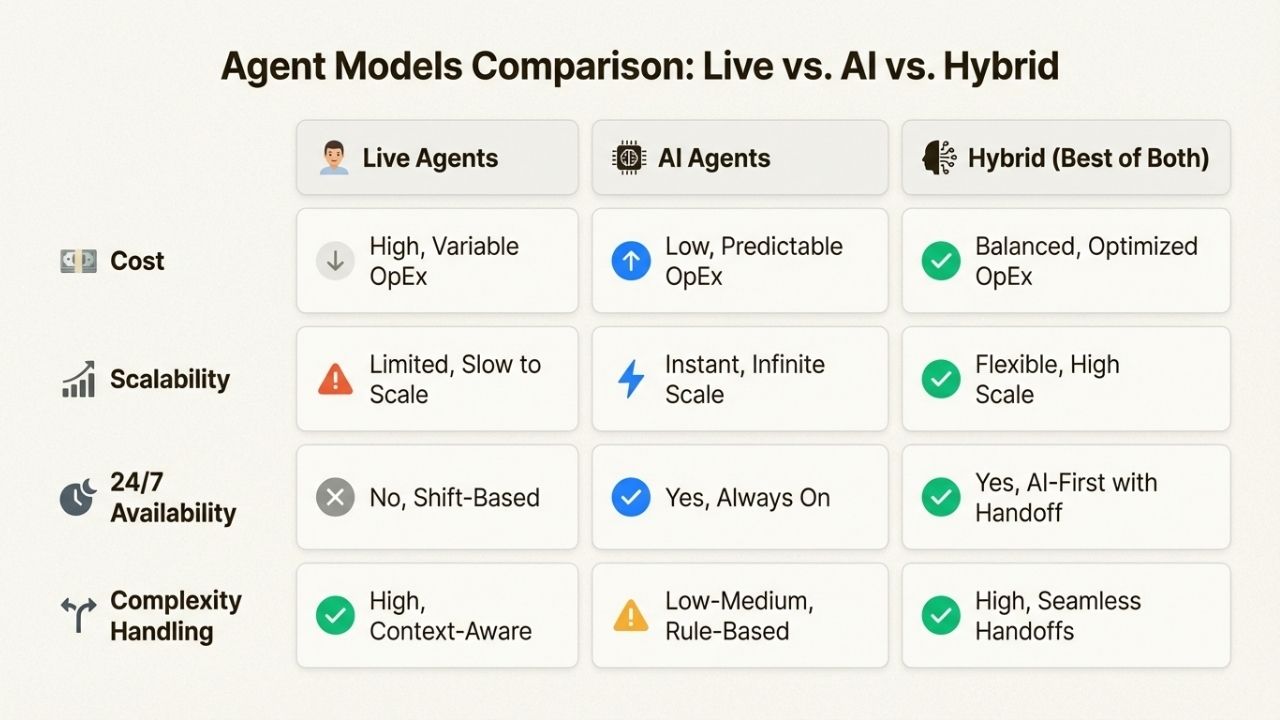
AI solutions cost 60-80% less per call while handling the majority of routine ecommerce inquiries
How to set up overflow call answering for your store
Here's a step-by-step approach to getting overflow call answering running for your ecommerce business.
Step 1: Audit your current call volume
Before choosing a solution, understand your baseline.
You need answers to a few key questions:
- How many calls do you get per day and per week?
- What percentage currently go unanswered?
- What are your peak times (days of week, hours of day)?
- What types of calls are most common?
Most phone systems or ecommerce platforms can provide this data. If yours doesn't, track manually for 2 weeks.
Even a rough estimate helps you pick the right pricing tier.
Step 2: Choose your overflow approach
Based on your audit, here's a general framework:
- Under 50 calls/day, mostly simple queries: AI-powered solution is likely your best value
- 50-200 calls/day, mix of simple and complex: Consider a hybrid approach
- 200+ calls/day or highly technical products: Robust AI or evaluate live agents for specific segments
Other factors to weigh include your budget constraints, typical call complexity, required integrations, and whether you need multilingual support.
Step 3: Select a provider and plan
For Shopify store owners specifically, look for these capabilities:
- Native Shopify integration (automatically pulls order data)
- Returns and exchange handling capability
- 24/7 coverage without premium night/weekend charges
- Multilingual support if you sell internationally
- Transparent per-minute or per-call pricing
Compare at least 2-3 providers before committing.
Most offer free trials.

Step 4: Configure your call routing
Set up the triggers that determine when calls route to your overflow service:
- After X rings (typically 3-4) with no answer
- When all your lines are busy
- After business hours (define your schedule)
- Based on caller menu selection (if using IVR)
Most services provide a phone number to forward to.
Some integrate directly with your existing phone system through apps or API connections.
Step 5: Train the system on your business
For AI solutions, this step matters most:
- Upload your FAQ document with common questions and answers
- Add product information and specifications
- Configure return and exchange policies word-for-word
- Set escalation rules (when should the AI transfer to a human?)
For live agent services, you'll provide call scripts, share common scenarios and their resolutions, and define escalation procedures.
Step 6: Test before peak season
Run a 2-week pilot before any major sales event:
- Make test calls yourself to experience the customer journey
- Review transcripts and recordings for accuracy
- Check order lookup functionality with real order numbers
- Verify escalations route correctly to your team
Fix any issues during the pilot.
You don't want to discover problems when your Black Friday traffic arrives.
Setting up overflow call answering with Ringly.io
For Shopify store owners, Ringly.io offers an AI-first solution built specifically for ecommerce overflow scenarios.
Why Ringly.io works well for ecommerce
Unlike general-purpose AI phone systems, Ringly.io's the AI agent was designed from the ground up for ecommerce:
- Native Shopify integration pulls order data automatically, so customers get accurate tracking info without manual lookups
- ~73% resolution rate means roughly three-quarters of calls get handled without human intervention
- Order tracking, returns, and exchanges work out of the box
- 30 languages supported for stores selling internationally
- quick setup instead of weeks of configuration
The performance-based pricing model is notable: on the Grow plan, you get your last 3 months refunded if Seth resolves under 65% of calls in 90 days.
That reduces the risk of trying AI for the first time.
Quick setup walkthrough
Getting started takes minutes:
- Sign up at Ringly.io
- Connect your Shopify store (one-click app install from the Shopify App Store)
- Choose a phone number (local or toll-free, US/Canada and international options available)
- Upload your knowledge base (FAQs, policies, product info)
- Configure escalation rules (when to transfer to your team)
- Forward your overflow calls to the AI's number
Pricing for ecommerce stores
| Plan | Price | Minutes Included | Best For |
|---|---|---|---|
| Start | $0 (performance-based) | Pay-as-you-go | Small stores, testing the waters |
| Grow | $349/mo | 1,000 | Growing stores, peak season prep |
| Enterprise | Custom | 5,000+ | High-volume operations |
Overage beyond your included minutes runs $0.19/minute.
Phone numbers cost $5/month each. There's a 14-day free trial with approximately half the paid plan minutes included.
You can test with real calls before committing.
Start your free trial to see how AI handles your specific call types before peak season hits.
Getting ready for peak season with overflow call answering
Timing matters.
Here's how to prepare so you're not scrambling when call volume spikes.
Timeline for implementation
Work backward from your peak season:
- 8 weeks before peak: Audit your current call volume and start researching providers
- 6 weeks before peak: Select your provider, sign up, and begin initial setup
- 4 weeks before peak: Configure routing rules, train the system, upload your knowledge base
- 2 weeks before peak: Run pilot tests, identify gaps, make adjustments
- 1 week before peak: Final review, brief your staff on escalation procedures
This timeline gives you buffer room for unexpected issues.
Don't wait until November to set up your Black Friday solution.
Peak season checklist
Before the rush hits, confirm these are in place:
- Overflow solution tested and working with real calls
- Return and exchange policies uploaded and current
- Escalation rules configured for different scenarios
- Your team knows when and how calls will route to them
- Monitoring dashboard bookmarked for quick checks
- Emergency contact for your provider saved
Print this list or add it to your pre-peak operations checklist for easy reference.
Post-peak review
After the season wraps, take time to assess:
- Review call transcripts for quality and accuracy issues
- Check resolution rates against expectations
- Identify gaps in your knowledge base that caused problems
- Decide whether to keep the service year-round or pause until next peak
Most ecommerce stores find that keeping overflow active year-round (even at lower tiers) pays for itself through recovered calls.
But seasonal-only usage is a valid option too.
Frequently Asked Questions
What is overflow call answering for ecommerce stores?
Overflow call answering routes inbound calls to a backup service when your team can't answer. For ecommerce stores, this typically means handling calls during peak seasons, after hours, or when lines are busy. The backup can be live agents, AI phone systems, or a hybrid of both.
How much does ecommerce overflow call answering cost?
Costs vary by approach. Live virtual receptionists typically run $25-$100/month base plus $0.80-$1.00 per minute. AI solutions like Ringly.io range from $0-$349/month for pay-as-you-go to 1,000 minutes included. Hybrid services fall somewhere in between depending on your volume.
Can AI handle overflow call answering for ecommerce order inquiries?
Yes. Modern AI phone agents can look up order status, answer shipping questions, and process simple return requests. Ringly.io's the AI agent resolves about 73% of ecommerce calls without human intervention. Complex situations still escalate to your team.
When should ecommerce stores set up overflow call answering before peak season?
Start 6-8 weeks before your peak period. This gives time to audit call volume, select a provider, configure the system, and run test calls. Rushing setup in the week before Black Friday leads to problems.
What's the difference between AI and live agent overflow call answering for ecommerce?
AI solutions handle calls 24/7 at lower per-call costs and scale instantly to any volume. Live agents offer more flexibility for complex situations and emotional customers. Many ecommerce stores find AI handles 70-80% of calls well, with escalation to humans for the rest.
Does overflow call answering integrate with Shopify for ecommerce stores?
Some providers offer native Shopify integration. Ringly.io connects directly to your Shopify store to pull order data automatically. Other services like Smith.ai connect via Zapier. Live agent services typically work with any system through simple call forwarding.
How do I measure ROI on overflow call answering for my ecommerce business?
Track calls answered versus missed before and after setup. Multiply recovered calls by your average conversion rate and order value. If you recover 50 calls per day at 10% conversion and $75 AOV, that's $375/day in recovered revenue versus your monthly service cost.



