


Google processes over 16.4 billion searches every day. For Shopify store owners, that represents a massive opportunity.
Search contributes around 68% of all trackable website traffic, making it the highest ROI channel for e-commerce businesses.
But here's the reality: most Shopify stores barely scratch the surface of what's possible with SEO.
They set up their store, add products, and hope Google notices. It doesn't work that way.
This guide walks you through the exact steps to optimize your Shopify store for search engines, from technical foundations to content strategies that actually drive sales.
Editor’s note: Want to hear some sample AI support calls made for your Shopify store?
- Just paste your store URL
- Get sample calls in under 20 seconds (no email required)
- Listen to demo calls for my store
Optimizing your Shopify site structure
Search engines and shoppers both prefer simple, logical site structures. If people can't find what they're looking for in a few clicks, they'll leave.
And if search engines can't crawl your site efficiently, they won't rank it well.
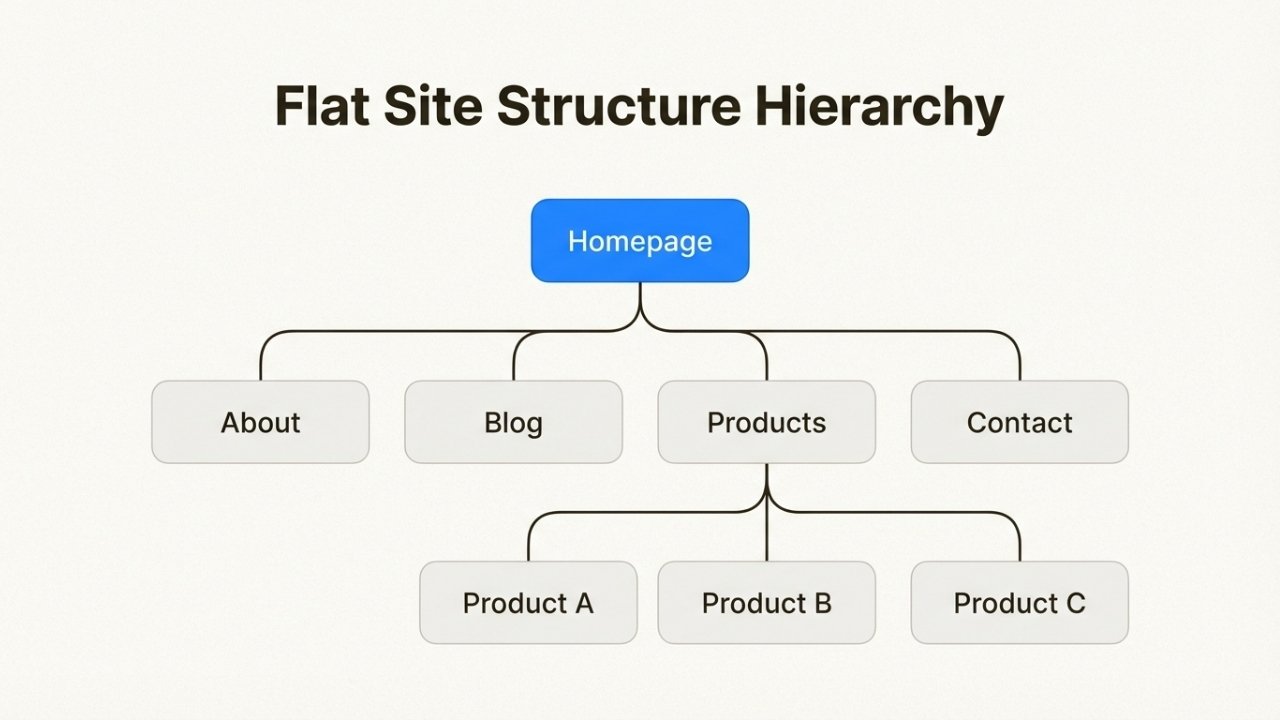
Keep navigation simple and flat
The best Shopify stores use a flat site structure. This means any product is reachable within two or three clicks from the homepage.
Here's the ideal hierarchy:
Homepage → Collection Pages → Product Pages
Or if you have many products:
Homepage → Category Pages → Sub-Category Pages → Product Pages
Avoid going deeper than three levels. Every additional click between your homepage and a product page reduces the SEO value passed to that product and frustrates shoppers.
Use clear, descriptive labels for your navigation. "Shop All" or "Products" is less helpful than "Women's Clothing" or "Home Decor."
Specific labels help visitors and give search engines more context about your content.
Internal linking strategy
Internal links connect pages within your own site. They help visitors discover related products and signal to search engines which pages are most important.
Add links between related products in your descriptions. If you sell coffee makers, link to your coffee filters and mugs.
If you write a blog post about winter skincare, link to your moisturizer collection.
Use descriptive anchor text. Instead of "click here," write "our organic face moisturizer."
This tells search engines what the linked page is about.
Your most important pages (bestsellers, key collections) should have the most internal links pointing to them. This concentrates SEO value where it matters most.
Essential pages for credibility
Every Shopify store needs certain pages to establish trust with both visitors and search engines:
- About page: Tells your story and builds emotional connection
- Contact page: Makes you reachable and shows you're a real business
- FAQ page: Answers common questions and targets long-tail keywords
- Shipping and Returns policy: Reduces purchase anxiety
These pages might not drive direct sales, but they signal legitimacy to Google and help convert visitors who are on the fence.
Include a search box in your header navigation. It won't directly improve your SEO, but it helps visitors find products quickly, which increases time on site and reduces bounce rate.
Both are user experience signals Google considers.
Mastering on-page SEO for products and collections
On-page SEO is where most store owners spend their time, and for good reason. It's the content you control completely.
Every product page, collection page, and blog post is an opportunity to rank for specific keywords.
Title tags and meta descriptions
Your title tag is the headline that appears in search results. It should be under 60 characters and include your primary keyword near the beginning.
For a product page, a good title tag format is: Primary Keyword - Brand Name
Example: "Organic Cotton T-Shirts - EcoWear"
Your meta description is the snippet of text below the title in search results. It doesn't directly affect rankings, but it influences whether people click.
Keep it under 160 characters, include your keyword naturally, and add a clear call to action.
Example: "Shop premium organic cotton t-shirts made sustainably.
Free shipping on orders over $50. Browse our collection today."
In Shopify, edit these by going to any product, collection, or page and scrolling to the "Search engine listing preview" section at the bottom.
Header tags and content formatting
Each page should have exactly one H1 tag, which is typically your page title.
Shopify themes handle this automatically for product and collection pages.
Use H2 tags for main sections and H3 tags for subsections.
This creates a clear content hierarchy that helps search engines understand your page structure.
Break up text with bullet points, short paragraphs, and images. Walls of text hurt readability and engagement.
Aim for paragraphs of 2-3 sentences maximum.
Image optimization
Product images are crucial for e-commerce SEO. Every image should have:
- Descriptive file names: Rename files from "IMG_1234.jpg" to "organic-cotton-blue-tshirt.jpg" before uploading
- Alt text: Describe what's in the image for accessibility and SEO. Example: "Blue organic cotton t-shirt on model"
- Compression: Use tools like TinyPNG to reduce file size without losing quality
Shopify serves images in WebP format automatically, which helps with load times. But starting with optimized files gives you an extra edge.
URL structure
Shopify automatically creates URLs based on your page titles. They're usually fine as-is, but sometimes you want to edit them.
Shorter URLs tend to perform slightly better. If your product title is "Premium Organic Cotton Crew Neck T-Shirt in Navy Blue," you might shorten the URL to "organic-cotton-t-shirt-navy."
Only edit URLs for new pages. If you change the URL of an existing page that's already indexed, you must create a 301 redirect from the old URL to the new one.
Otherwise, you'll lose any SEO value that page has built up.
Product descriptions that convert
Your product descriptions need to do two jobs: convince visitors to buy, and convince search engines to rank the page.
Start with benefits, not features. Don't just list "100% organic cotton, machine washable, available in sizes S-XL." Instead, write: "Stay comfortable all day in breathable organic cotton that gets softer with every wash. Machine washable for easy care."
Include your target keyword naturally in the first paragraph. Don't force it. If your keyword is "organic cotton t-shirt," work it into a sentence that makes sense.
Write unique descriptions for every product. Copying manufacturer descriptions or duplicating content across similar products hurts your SEO.
Even if you sell 20 variations of the same shirt, write distinct descriptions for each color or style.
Keyword research for Shopify stores
Keyword research is the foundation of everything else in this guide. Target the wrong keywords and you'll get traffic that doesn't convert.
Target the right ones and you'll attract buyers ready to purchase.
Start with customer intent
Not all searches are created equal. Someone searching "what is organic cotton" is in research mode.
Someone searching "buy organic cotton t-shirt" is ready to buy.
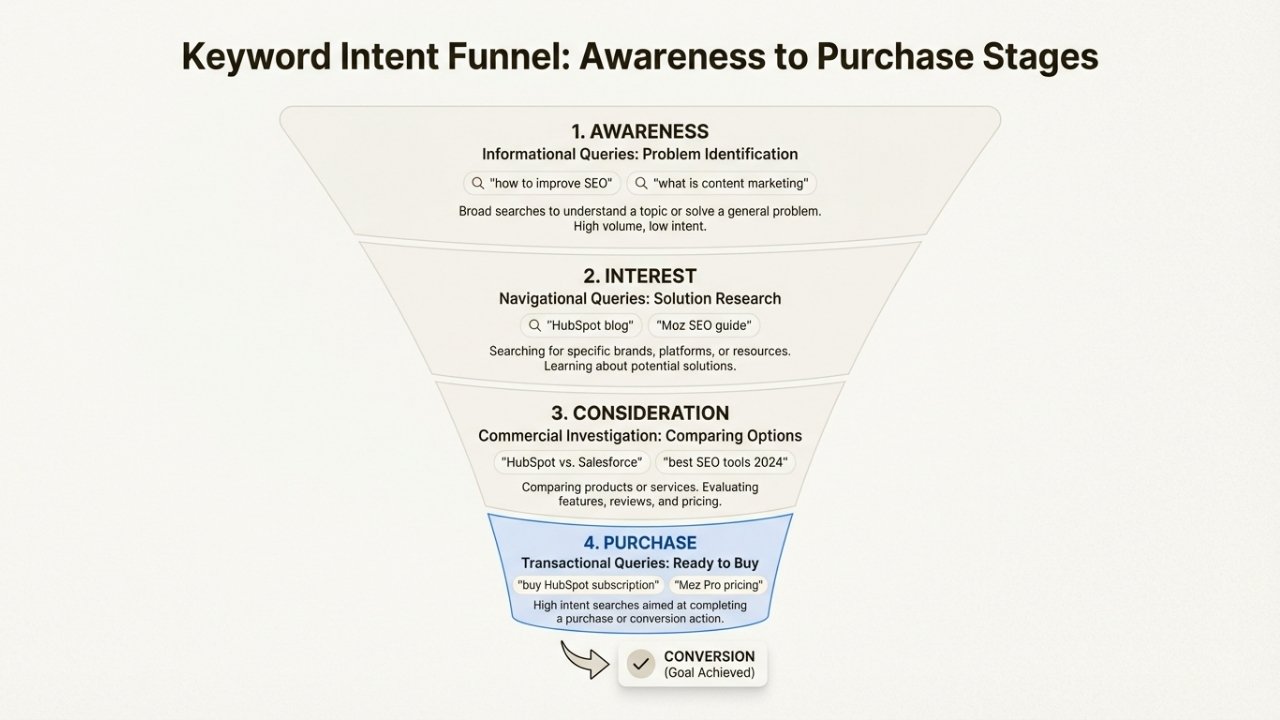
There are four main types of search intent:
- Informational: Looking to learn ("how to style a t-shirt")
- Navigational: Looking for a specific site ("EcoWear contact")
- Commercial investigation: Comparing options ("best organic cotton t-shirts")
- Transactional: Ready to purchase ("buy organic cotton t-shirt online")
Your product pages should target transactional keywords. Your blog should target informational keywords.
Collection pages work well for commercial investigation keywords.
Find long-tail opportunities
Long-tail keywords are longer, more specific phrases with lower search volume but higher conversion rates.
They're perfect for new stores that can't compete for broad terms yet.
Instead of targeting "t-shirts" (impossible for a new store), target "women's vintage band t-shirts" or "men's hemp t-shirts."
These have less competition and attract more qualified buyers.
To find long-tail keywords:
- Start with a broad term related to your product
- Type it into Google and look at the autocomplete suggestions
- Check the "People also ask" section for question-based variations
- Scroll to the bottom for "Related searches"
Free keyword research tools
You don't need expensive tools to do effective keyword research. Here are free options that work:
Google Trends: See how search interest changes over time and compare different keywords. Great for identifying seasonal trends.
Google Keyword Planner: Requires a Google Ads account (free to create), but gives you search volume data straight from Google.
Ubersuggest: Limited free searches per day, but shows volume, difficulty, and related keywords.
AnswerThePublic: Visualizes question-based keywords people are searching for. Perfect for blog content ideas.
Mapping keywords to content types
Different pages on your site should target different keyword types:
- Homepage: Your brand name and broad category terms
- Collection pages: Category keywords ("organic cotton clothing")
- Product pages: Specific product keywords ("navy blue organic cotton t-shirt")
- Blog posts: Informational and question keywords ("how to care for organic cotton")
Create a simple spreadsheet mapping your target keywords to specific pages.
This keeps your SEO efforts organized and ensures you're not competing with yourself by targeting the same keyword on multiple pages.
Content strategy that drives organic traffic
Your product pages alone won't build significant organic traffic. You need a blog that targets informational keywords and establishes your authority in your niche.
Why your Shopify store needs a blog
Blog content serves three purposes:
- Targets informational keywords that product pages can't rank for
- Builds topical authority so Google sees you as an expert in your niche
- Creates internal linking opportunities to boost your product pages
A well-executed blog strategy can drive thousands of qualified visitors who aren't searching for products yet, but will be soon.
Content ideas that work for e-commerce
The best blog topics connect to your products naturally. If you sell skincare, write about skin concerns your products solve. If you sell hiking gear, write about trail recommendations and packing lists.
Here are proven content formats:
- How-to guides: "How to build a capsule wardrobe" (fashion), "How to brew pour-over coffee" (coffee gear)
- Problem/solution posts: "Why your skin breaks out in winter" (skincare), "How to prevent blisters on long hikes" (outdoor gear)
- Comparison posts: "French press vs. pour-over: which is right for you?" (coffee), "Synthetic vs. down sleeping bags" (outdoor)
- Listicles: "10 essentials for your first camping trip" (outdoor), "5 ingredients to avoid in skincare" (beauty)
Every blog post should link to relevant products or collections. Someone reading "How to build a capsule wardrobe" should find links to your essential pieces.
Optimizing for AI search and voice
Search is changing. Google's AI Overviews and voice assistants like Siri and Alexa are becoming primary ways people find information.
To optimize for these:
- Use natural, conversational language in your content
- Answer questions directly in the first paragraph when possible
- Include FAQ sections on key pages with question-based headings
- Use structured data (Shopify themes include basic schema markup automatically)
Voice searches tend to be longer and more question-based. Instead of typing "best running shoes," someone might ask "What are the best running shoes for flat feet?" Target these longer phrases in your content.
Building authority with off-page SEO
Off-page SEO refers to everything that happens outside your website that affects your rankings. The biggest factor is backlinks, links from other websites to yours.
Quality backlink strategies
Google sees backlinks as votes of confidence. When a reputable site links to yours, it signals that your content is trustworthy and valuable.
Here are ethical ways to build backlinks:
Guest posting: Write articles for blogs in your niche.
Most allow a link back to your store in your author bio or within the content if it's relevant.
Product reviews: Reach out to influencers and bloggers in your niche.
Offer to send them free products in exchange for honest reviews with links back to your site.
Manufacturer links: If you sell established brands, check if they have "where to buy" pages. Email them asking to be added.
Broken link building: Find broken links on relevant sites using tools like Ahrefs or manually checking resource pages.
Email the site owner suggesting your content as a replacement.
Create linkable assets: Publish original research, infographics, or comprehensive guides that other sites want to reference.
A well-designed infographic about "The environmental impact of fast fashion" could earn links from sustainability blogs and news sites.
Avoid buying links or participating in link schemes. Google penalizes these practices and the short-term gains aren't worth the long-term risk.
Local SEO for physical stores
If you have a physical location or serve a specific geographic area, local SEO matters.
Create and optimize your Google Business Profile.
Add photos, respond to reviews, and keep your hours updated. This helps you appear in "near me" searches and Google Maps.
Get listed in local directories relevant to your industry. If you're a boutique in Portland, look for Portland business directories and fashion-specific listings.
Encourage customers to leave reviews on Google. Positive reviews improve your local rankings and convince potential customers to visit.
Measuring and improving your SEO performance
SEO isn't a set-it-and-forget-it task. You need to track what's working, identify problems, and continuously improve.
Key metrics to track
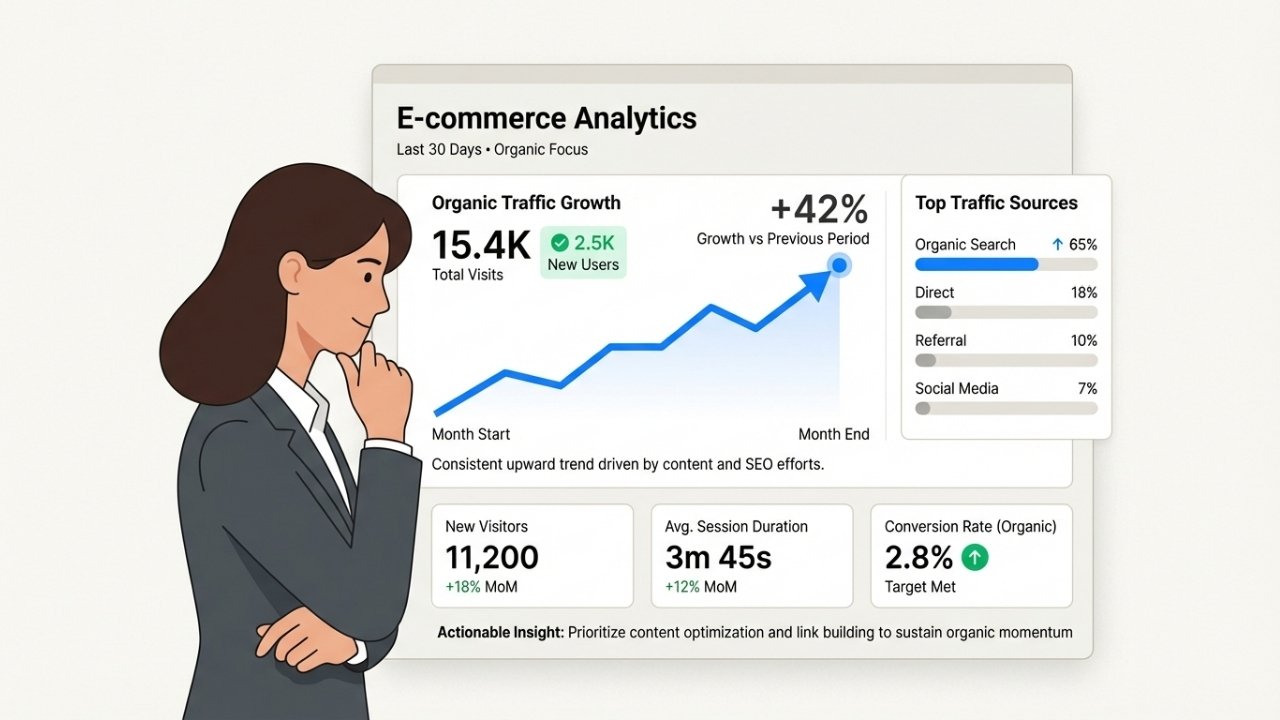
Organic traffic growth: The total number of visitors coming from search engines. Look for steady month-over-month growth.
Keyword rankings: Where your pages appear for target keywords. Use Google Search Console or tools like Ahrefs to track positions.
Click-through rate (CTR): The percentage of people who see your search result and click it. Low CTR means your title and description need work, even if you're ranking well.
Conversion rate from organic: How many organic visitors make a purchase. This tells you if you're attracting the right traffic.
Set up monthly reporting in Google Analytics and Search Console. Look for trends rather than obsessing over daily fluctuations.
Common Shopify SEO mistakes to avoid
Duplicate content: Shopify can create duplicate versions of pages through filters, tags, and variants. Use canonical tags (Shopify adds these automatically) and avoid creating multiple pages with similar content.
Ignoring mobile experience: With mobile-first indexing, a poor mobile experience kills your rankings. Test your store on actual phones, not just desktop browsers.
Keyword stuffing: Forcing keywords where they don't belong hurts readability and can trigger penalties. Write for humans first, search engines second.
Neglecting site speed: Slow sites rank worse and convert less. Compress images, remove unused apps, and choose a lightweight theme.
Forgetting about internal links: Every new piece of content should link to relevant existing pages. This spreads SEO value throughout your site.
Scale your Shopify store with smart automation
As your Shopify SEO efforts start paying off, you'll face a new challenge: handling the increased customer inquiries that come with more traffic.
More visitors means more questions about products, order status, and returns.
This is where Ringly.io becomes valuable. the AI, their AI phone support agent, handles incoming calls 24/7.
It answers questions, looks up orders, processes returns, and only escalates to your team when necessary.
The numbers are compelling: The AI resolves around 73% of calls without human intervention across the Shopify stores using the platform.
For store owners, that means scaling customer support without proportionally scaling headcount.
The setup is straightforward. You can deploy the AI within an hour for most stores by connecting your Shopify store and choosing a phone number.
It pulls order information directly from your store, so customers get accurate, real-time answers about their purchases.
Multilingual support across 30 languages means you can serve global customers without hiring native speakers for every market.
And the 14-day free trial lets you test whether it works for your specific store before committing.
If your SEO efforts are starting to drive serious traffic, consider how you'll handle the resulting customer conversations. Try Ringly free for 14 days and see if AI phone support fits your workflow.
Frequently Asked Questions
How long does Shopify SEO take to show results?
Most stores see initial improvements within 4-8 weeks, but significant ranking changes typically take 3-6 months. SEO is a long-term strategy. The work you do today compounds over time as your site builds authority.
Do I need to hire a Shopify SEO expert?
Not necessarily. Most store owners can handle the basics themselves using this guide. Consider hiring help if you're in a highly competitive niche, have hundreds of products, or want to scale aggressively. Many agencies charge $1,000-5,000 per month for ongoing SEO work.
What's the best Shopify SEO app?
TinyIMG is widely recommended for image optimization with 50 free optimizations monthly. Booster SEO handles meta tags and structured data. Sherpas: Smart SEO automates many optimization tasks. Most stores only need one SEO app, not several.
Can I do Shopify SEO on a free trial?
Yes, but with limitations. Your store is crawlable and indexable during the free trial, but if you don't upgrade to a paid plan, your store will be deindexed. Use the trial period to set up your technical foundation and optimize key pages, but expect to wait until you're on a paid plan to see real results.
How do I know if my Shopify SEO is working?
Check Google Search Console for impressions and clicks growth. Monitor organic traffic in Google Analytics. Track your target keyword rankings using free tools like Ubersuggest. Most importantly, watch your organic conversion rate. More traffic is only valuable if those visitors buy something.
Should I focus on Google Shopping or organic SEO?
Both. Google Shopping drives immediate sales but you pay per click. Organic SEO takes longer but delivers free traffic indefinitely. Set up Google Merchant Center and run Shopping ads while building your organic presence. Over time, organic can reduce your dependence on paid advertising.
Does blogging really help Shopify SEO?
Yes, significantly. Blog posts target informational keywords your product pages can't rank for. They build topical authority, create internal linking opportunities, and attract backlinks. Stores with active blogs typically see 2-3x more organic traffic than stores without them. Aim for at least one quality post per week.



