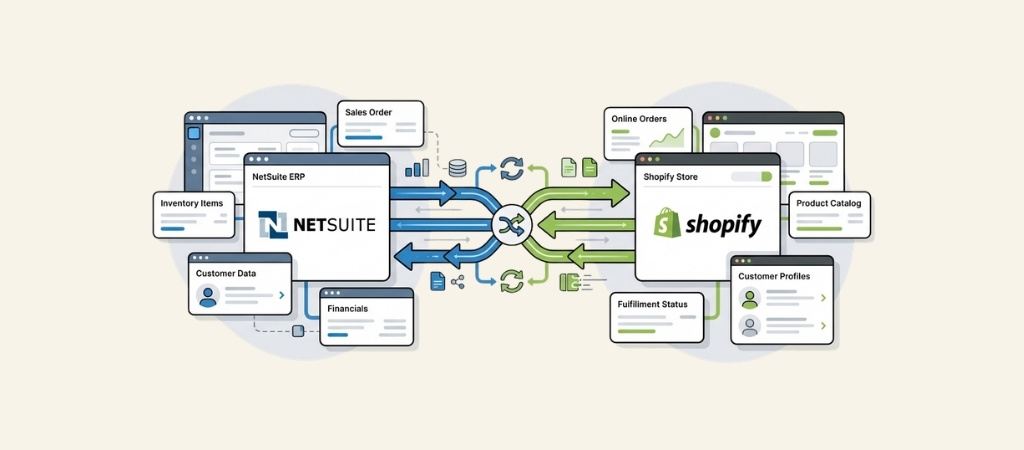
Managing orders across Shopify and NetSuite manually is a recipe for errors. When your e-commerce store takes an order, someone has to enter it into your ERP.
When inventory changes in NetSuite, someone has to update Shopify. And when a customer calls about their order, someone has to check both systems.
NetSuite Shopify integration connects your front-end store with your back-end operations so data flows automatically between the two platforms.
No more copying and pasting order details. No more overselling because inventory didn't sync.
No more confused customers because someone forgot to update a tracking number.
Here's what this integration actually does, which solutions are worth considering, and how to choose the right one for your business.
Editor’s note: Want to hear some sample AI support calls made for your Shopify store?
- Just paste your store URL
- Get sample calls in under 20 seconds (no email required)
- Listen to demo calls for my store

What is NetSuite Shopify integration?
At its core, NetSuite Shopify integration is automated data synchronization between your e-commerce platform and your ERP system.
Instead of treating Shopify and NetSuite as separate islands of information, an integration creates a bridge that keeps both systems in sync.
Here's what typically flows between the platforms:
- Orders: Shopify orders automatically appear in NetSuite as sales orders, cash sales, or invoices
- Inventory: Stock levels in NetSuite push to Shopify in real-time or on a schedule
- Products: Item details, pricing, and images sync from NetSuite to your storefront
- Customers: Customer data and order history stay consistent across both systems
- Fulfillment: Shipping updates and tracking numbers flow from NetSuite back to Shopify
- Financials: Payment data, refunds, and gift card transactions reconcile automatically
The business case is straightforward. Manual data entry takes time and introduces errors.
When a product sells out in your warehouse but Shopify still shows it as available, you end up with frustrated customers and canceled orders.
When someone has to manually copy order details into NetSuite, orders get delayed or details get entered wrong.
Integration eliminates these problems by making the systems talk to each other. It also frees up your team to focus on higher-value work instead of data entry.
Who benefits most? Growing e-commerce businesses that have outgrown manual processes but aren't ready to abandon Shopify for a full NetSuite e-commerce solution.
If you're processing more than a few dozen orders per month and finding that keeping systems in sync is becoming a bottleneck, it's time to look at integration.
Top NetSuite Shopify integration options
There are several ways to connect these platforms, ranging from official apps to third-party connectors to full integration platforms. Here's how the main options compare.
1. Oracle NetSuite ERP Connector
This is the official integration developed by Oracle NetSuite. It's available directly through the Shopify App Store.
If you want the backing of the company that makes NetSuite itself, this is your option.
Pricing is tiered based on your business type:
| Plan | Monthly Price | Best For |
|---|---|---|
| B2C Standard | $199.92 | Basic e-commerce with optional real-time sync |
| B2C Premium | $249.92 | High-volume B2C with real-time everything |
| POS | $249.92 | Retail locations using Shopify POS |
| B2B | $916.58 |
Wholesale and B2B commerce operations
The connector carries a 4.2/5 rating on the Shopify App Store from 7 reviews. It's been around since 2014, so it's a mature solution.
Key features include real-time sync options for orders and inventory, multi-warehouse support, 3PL integration for automated fulfillment, and accounting integration that simplifies AP/AR management.
It also works with other sales channels including Amazon, eBay, and Walmart. That's useful if you sell beyond Shopify.
The main advantage here is that you're getting an official solution with Oracle's backing.
The downside is the pricing structure can get expensive quickly, especially if you need B2B capabilities.
The tier system is also somewhat complex, with different features locked behind different price points.
2. Celigo Integration Platform

Celigo takes a different approach. Rather than being a single-purpose connector, it's an enterprise iPaaS (Integration Platform as a Service).
It offers a pre-built NetSuite-Shopify integration among its 1,000+ connectors.
Pricing isn't published publicly. You'll need to contact them for a quote based on your number of endpoints, integration flows, and which platform edition you need (Standard, Professional, or Enterprise).
They use flat-rate pricing rather than per-transaction fees. That helps with predictable budgeting.
What sets Celigo apart is the depth of automation beyond basic sync. Their platform includes multi-channel order synchronization, fraud prevention with order risk metrics, payouts reconciliation as an add-on, and support for complex POS scenarios like "buy online, pick up in-store."
They also offer store-to-store cloning. That's handy if you run multiple Shopify stores.
Celigo has been NetSuite's largest integration partner for over a decade and holds the #1 ranking for iPaaS on G2 Fall 2025.
They also earned Gartner Peer Insights Customers' Choice for 2025.
This solution makes sense for larger businesses with complex needs. If you're just connecting Shopify to NetSuite and nothing else, it might be overkill.
But if you have multiple systems that all need to talk to each other (Shopify, NetSuite, Salesforce, a WMS, etc.), Celigo's platform approach starts to shine.
3. NetScore Shopify Connector
NetScore takes a native approach. It's a SuiteApp, meaning it runs directly inside NetSuite rather than as an external service.
This is appealing if you prefer keeping everything within the NetSuite environment.
Pricing is customized based on your needs, so you'll need to contact NetScore for a quote.
The connector offers real-time inventory updates every 5 minutes, dashboard analytics within NetSuite, and error handling mechanisms for orders and returns.
It handles the standard data flows: items, inventory, pricing, orders, fulfillments, and refunds.
NetScore is a SuiteCloud Developer Network partner. That means they've met NetSuite's standards for development and security.
The solution has 27 reviews on SuiteApp.com with users reporting significant time savings.
One reviewer mentioned saving approximately 60 man hours per month. Another eliminated 4 hours of manual effort daily.
This option works well for businesses that want a native NetSuite experience and don't mind that pricing isn't transparent upfront.
The support team gets consistently positive mentions in reviews.
4. Folio3 NetSuite-Shopify Connector
Folio3 is a NetSuite Alliance Partner with 18+ years of experience and over 500 implementation projects under their belt.
Their connector emphasizes security by running natively within NetSuite with no middleware required.
Pricing is project-based and customized to your scope. They often use fixed-price models with milestone-based payment terms.
The connector is Built for NetSuite certified, which ensures compatibility.
Features include real-time two-way sync, multi-warehouse inventory management, multi-currency support, automatic Shopify payout reconciliation, and promotions tracking that matches Shopify discount codes with NetSuite coupon codes.
Folio3 includes 5 days of post-go-live support and offers optional 24/7 support plans.
They've earned multiple awards including Middle East Partner 2025, Sporting Goods Partner recognition, and Education Award 2025.
A Lisa Yang e-commerce manager shared this: "Folio3 has consistently provided reliable NetSuite-Shopify integration with outstanding support.
Their solution worked right out of the box & the team delivers exceptional service at reasonable rates."
This is a strong choice for security-conscious businesses that want their data to stay within their NetSuite environment.
The lack of middleware means no third-party data exposure, though it may require more upfront investment than simpler solutions.
5. TechMarbles NetSuite Integration
TechMarbles offers the most transparent pricing of the bunch. That's attractive for cost-conscious businesses that want to know exactly what they're paying.
Pricing is straightforward:
| Plan | Monthly Price | Key Features |
|---|---|---|
| Starter | Free | All Basic features, limited to 50 orders or 30 days |
| Basic | $99 | Full two-way sync, implementation support, POS orders |
| Enterprise | $199 | B2B optimization, multi-currency, intercompany POs |
The app has a perfect 5.0/5 rating from 26 reviews on the Shopify App Store. It's designed for both B2B and D2C brands. It includes detailed logs for troubleshooting, flexible tax and shipping mappings, and ongoing customization support.
TechMarbles is a web development company with 291+ clients and 15+ years of experience. Their 97% client retention rate suggests customers are generally happy with their service.
The free starter tier is a genuine try-before-you-buy option, not a stripped-down teaser. You get full Basic plan features, just limited by order volume or time. This makes it easy to test the integration with your actual data before committing.
NetSuite Shopify integration feature comparison
Here's how these solutions stack up across key dimensions:
| Solution | Starting Price | Rating | Real-time Sync | B2B Support | Best For |
|---|---|---|---|---|---|
| Oracle NetSuite ERP Connector | $199.92/mo | 4.2/5 | Optional | Yes ($916/mo) | Official Oracle support, multi-platform |
| Celigo | Contact for quote | N/A | Yes | Yes | Enterprise, complex multi-system needs |
| NetScore | Contact for quote | N/A | 5-min updates | Limited | Native NetSuite integration |
| Folio3 | Contact for quote | N/A | Yes | Yes | Security-focused, no middleware |
| TechMarbles | Free / $99/mo | 5.0/5 | Yes | Yes (Enterprise) | Cost-conscious, transparent pricing |
When evaluating these options, consider what matters most for your business.
If you need official Oracle support and don't mind paying for it, the native connector makes sense.
If you have complex integration needs across multiple systems, Celigo's platform approach is worth the custom pricing conversation.
If budget is tight and you want to test before committing, TechMarbles offers the most accessible entry point.
How to choose the right NetSuite Shopify integration
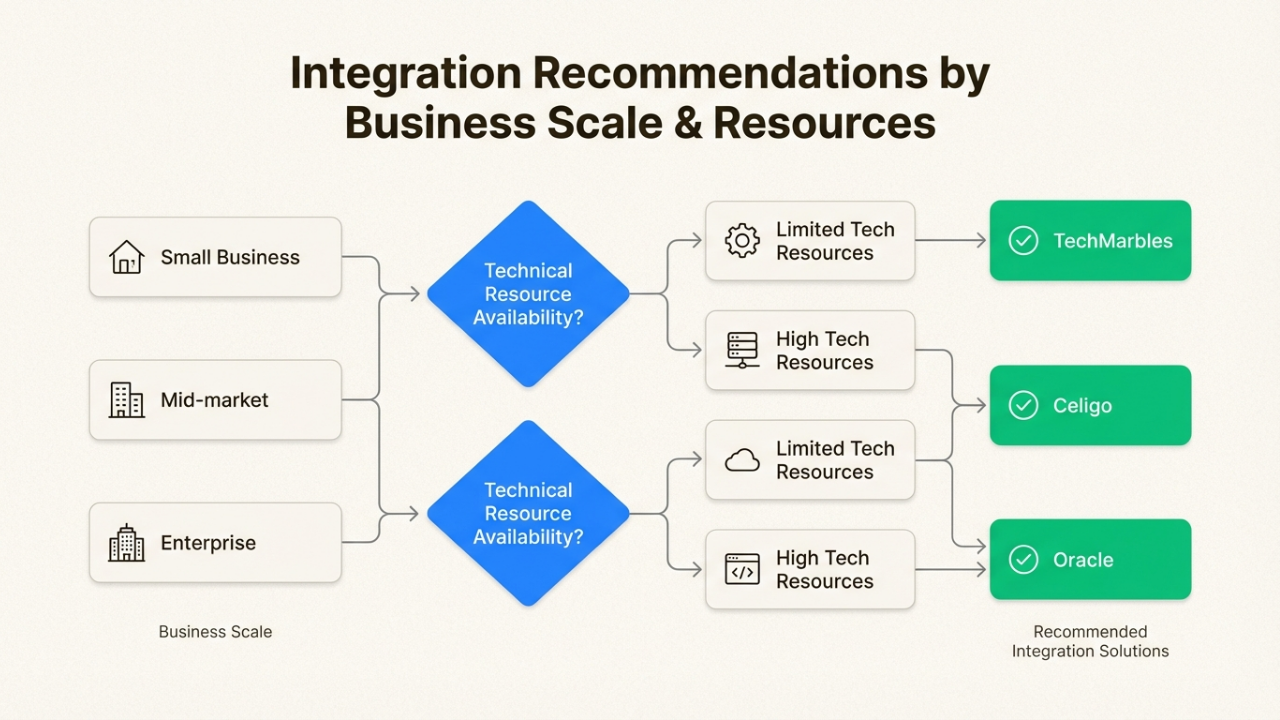
Selecting an integration isn't just about features and pricing. It's about matching the solution to your specific situation. Here's how to think through the decision.
Consider your business size
Small business (under 100 orders per month): Start with TechMarbles Basic at $349/month or the Oracle B2C Standard at $199.92/month.
At this volume, you don't need enterprise features. Focus on reliable sync and reasonable cost.
Mid-market (100-1,000 orders per month): This is where you have options. Oracle B2C Premium ($249.92/month) gives you real-time everything.
NetScore offers native NetSuite integration with strong support. Folio3 works well if you need customization and security.
Enterprise (1,000+ orders per month): At this scale, you need robust infrastructure. Celigo handles complex multi-system environments.
Oracle B2B ($916.58/month) supports wholesale operations. Custom Folio3 implementations are also worth considering for unique requirements.
Evaluate your technical resources
Limited IT team: Stick with Shopify App Store options like Oracle or TechMarbles. These install directly from the app store with guided setup.
You don't need a NetSuite developer on staff.
Strong NetSuite administrator: NetScore or Folio3 make sense. These native solutions leverage NetSuite expertise you already have.
Your admin can handle configuration and troubleshooting without external help.
Complex multi-system needs: If Shopify and NetSuite are just two nodes in a larger ecosystem, Celigo is purpose-built for this.
Their platform approach means you can connect Salesforce, your WMS, marketing automation, and more. All through the same interface.
Factor in total cost of ownership
The monthly subscription is just one part of the equation. Consider these additional costs:
Implementation: Some solutions require professional services to set up.
Costs can range from a few thousand dollars for simple configurations to tens of thousands for complex customizations.
Ask about implementation costs upfront.
Ongoing support: Will you need a retainer for support, or is it included? What are the response times?
Some vendors include basic support in the subscription while charging for premium tiers.
Scaling costs: How does pricing change as you grow? Per-transaction fees can add up quickly.
Flat-rate pricing is easier to budget for but may have limits you need to understand.
Internal time: Even the best integration requires internal effort for data mapping, testing, and training.
Don't underestimate how much time your team will spend on implementation.
NetSuite Shopify integration implementation best practices
Once you've chosen a solution, follow these practices to ensure a smooth rollout.
Plan your data mapping before starting. Don't assume the default field mappings will work for your business.
Document how Shopify fields should map to NetSuite fields. Pay special attention to custom fields, tax codes, and shipping methods.
Start with a subset of products and orders for testing. Don't flip the switch on your entire catalog day one.
Pick a small set of products and process a few test orders end-to-end. Verify that inventory updates correctly, orders flow through properly, and fulfillment status syncs back.
Train your team on error handling. Integrations occasionally hit snags. A customer enters an invalid address, a product goes out of stock mid-sync, a payment fails.
Make sure your team knows how to identify and resolve common errors without calling support every time.
Set up monitoring and alerts. Most integrations offer dashboards or email alerts for sync failures.
Configure these so you know immediately when something breaks rather than finding out when customers complain.
Schedule regular sync health checks. Even when things seem to be working, audit your data periodically.
Run reconciliation reports to catch discrepancies before they become problems.
Consider the full customer experience. Integration isn't just about data sync. It's about what your customers experience.
When someone calls about their order, can your support team see the full picture?
This is where tools like Ringly.io can help. Our AI phone agent, the AI, integrates with your systems to handle order inquiries, returns, and support questions without manual lookups across platforms.
Common NetSuite Shopify integration challenges
Even with a solid integration, you'll likely encounter some bumps. Here's how to handle the most common issues.
Inventory sync delays: If Shopify shows items as available that are actually out of stock, check your sync frequency settings.
Some integrations offer real-time sync while others run on schedules. If you're on a scheduled sync, consider upgrading to real-time or reducing the sync interval during peak periods.
Order mapping errors: When orders fail to import into NetSuite, it's usually a data mapping issue.
Common culprits are mismatched tax codes, unsupported shipping methods, or required NetSuite fields that aren't populated in Shopify.
Review the error logs and adjust your field mappings accordingly.
Duplicate customer records: If the same customer places multiple orders but shows up as multiple records in NetSuite, your customer matching rules need adjustment. Most integrations let you define how to match customers (by email, by name, by custom field).
Make sure these rules are strict enough to prevent duplicates but loose enough to catch legitimate matches.
Fulfillment status not updating: When you ship an order in NetSuite but Shopify still shows it as unfulfilled, check your webhook configuration.
Webhooks notify Shopify of changes in real-time. If they're not configured or are failing, status updates won't flow through.
Frequently Asked Questions
How much does NetSuite Shopify integration typically cost?
Pricing varies widely. Entry-level solutions like TechMarbles start at $349/month, while enterprise options like Oracle's B2B tier run $916/month. Custom implementations from Folio3 or Celigo require quotes based on your specific needs. Factor in implementation costs, which can range from a few thousand to tens of thousands depending on complexity.
How long does NetSuite Shopify integration take to implement?
Simple app-based integrations can be live in a few days to a week. More complex custom implementations typically take 2-6 weeks. The biggest time sink is usually data mapping and testing, not the technical setup itself.
Can I integrate NetSuite with Shopify myself, or do I need a developer?
App-based solutions like Oracle's connector or TechMarbles can be set up by a technically competent business user or NetSuite administrator. Platform solutions like Celigo or custom implementations from Folio3 typically require professional services or developer involvement.
What happens if the integration stops working?
Most integrations queue data when connections fail and retry automatically. Orders won't get lost, though there may be delays. Set up monitoring alerts so you know immediately when sync failures occur. Have a manual process documented as a backup for critical periods like Black Friday.
Does NetSuite Shopify integration work with Shopify Plus?
Yes, all major integration solutions support Shopify Plus. Some features like B2B commerce and wholesale pricing may require higher-tier plans or custom configuration.
Can I integrate multiple Shopify stores with one NetSuite account?
Yes, most solutions support multi-store setups. Celigo explicitly offers store-to-store cloning. Oracle's connector and TechMarbles also handle multiple storefronts. You'll typically pay per store or need an enterprise plan.
What data flows between NetSuite and Shopify in a typical integration?
The core data flows are orders (Shopify to NetSuite), inventory (NetSuite to Shopify), products (NetSuite to Shopify), customers (bidirectional), and fulfillment status (NetSuite to Shopify). Most solutions also handle refunds, gift cards, and promotions.
How do I choose between real-time and scheduled sync?
Real-time sync is best for high-volume businesses where inventory accuracy is critical. Scheduled sync (every 15 minutes, hourly, etc.) is usually fine for lower volumes and may be more cost-effective. Some solutions offer real-time for critical data like inventory and scheduled for less urgent data like analytics.