


Migrating from Zendesk to Gorgias, in 30 seconds.
- Tickets (up to 2 years), macros, tags, users, and ticket fields migrate. Attachments and CSAT ratings do not.
- The clean cutover is one order: import, verify, switch Gorgias on, pause Zendesk sync, then turn Zendesk off. Built for $10M-$100M Shopify brands running a paid helpdesk and a visible phone line.
- The import moves your tickets. It does not move your phone line.
Most Shopify brands leave Zendesk for one reason: the order data is right there in the ticket, but you still can't act on it without opening another tab. Gorgias is Shopify-native, so a rep can refund, edit, or cancel inside the conversation. If you run support at a $10M-$100M Shopify brand and your team is tab-switching forty times an hour, that's the whole pitch. The risk isn't whether Gorgias is better for Shopify. It's whether you can move without losing ticket history or dropping live conversations during the switch. If you want a second set of eyes on the plan before you flip anything, book a 30-min call.
This guide is for the founder, COO, or Head of CX who already decided Gorgias is the right helpdesk and now has to actually migrate without the phone backlog spiking or a week of tickets going missing. We work with 50+ Shopify brands on the phone side of exactly this stack, so the part most guides skip, what happens to your call volume during and after the move, gets its own section. If you'd rather talk it through, book a 30-min call and we'll map the cutover with you.
Here's the at-a-glance decision before the mechanics.
| Factor | Zendesk | Gorgias |
|---|---|---|
| Shopify actions in-ticket | Read-only sidebar (open Shopify to act) | Native: refund, edit, cancel, reship in-app |
| Pricing model | Per agent seat ($19-$169/agent/mo) | Per ticket volume, unlimited seats |
| Ecommerce integrations | No comparable library | 100+ (Recharge, Klaviyo, Loop, Yotpo) |
| AI Shopify actions | Custom dev on Advanced tier | Native autonomous actions with thread context |
| Built for | General-purpose support | Shopify and ecommerce brands |
Why Shopify brands move from Zendesk to Gorgias
The switch is almost never about features on paper. It's about whether your rep can close the loop without leaving the ticket.
Zendesk's Shopify integration surfaces order data in the sidebar, but it's read-only. Your rep sees the order, then opens a separate Shopify tab to issue the refund, edit the address, or cancel. Gorgias is built around the Shopify object: order history, spend, AOV, and VIP status sit in the ticket, and the rep acts there. Across a few hundred WISMO and return tickets a week, that tab-switching is real payroll.
Three things pull brands across:
- Shopify-native actions. Refunds, edits, cancellations, and reshipments happen inside the conversation, including from the AI. Zendesk AI doesn't take native Shopify actions without custom development on a higher tier, per Gorgias's own comparison.
- Ticket-based pricing with unlimited seats. Gorgias bills by ticket volume and includes unlimited agents on every paid plan. Zendesk bills per agent seat. If you flex headcount up for Q4 and back down in January, the seat model punishes you for it.
- An ecommerce integration library. Gorgias lists 100+ ecommerce integrations (Recharge, Klaviyo, Attentive, Yotpo, Smile.io, Loop Returns). Zendesk doesn't ship a comparable set out of the box.
Gorgias claims roughly 40% of the largest Shopify brands run on it instead of a general-purpose platform. Be honest with yourself on the cost side, though. Gorgias overages run about $0.36 to $0.40 per ticket once you pass your plan limit, and AI Agent interactions cost $0.90 to $1.00 each on top of that, with every AI interaction also counting as a billable ticket (Featurebase 2026 pricing analysis). At high AI usage, the per-resolution math can flip. For the full decision, our Gorgias vs Zendesk for Shopify breakdown runs the numbers. This guide assumes you've made the call and just want a clean move.
What migrates from Zendesk to Gorgias, and what doesn't
Gorgias imports macros, users, tags, tickets, and ticket fields, but the limitations matter more than the list.
The native import (no third-party tool) moves a specific set of records, in a specific order. Macros go first, then users, tags, and tickets. Knowing what survives the move tells you what to clean up first.
Here's what comes across:
| Record | What migrates | The catch |
|---|---|---|
| Macros | Active macros, imported first | Only reply-text and status-change actions; other actions import as empty |
| Users | Anyone assigned to or commenting on a ticket | Users with no ticket activity don't migrate |
| Tags | Tags that appear on an imported ticket | A tag never applied to a ticket can't be imported |
| Tickets | Up to the most recent 2 years | Deleted and blank tickets are excluded |
| Ticket fields | All fields | Skipped entirely if you have more than 500 fields |
Ticket fields also change type on the way in. Decimal, boolean, and date fields keep their type. Integer fields become decimal. Regex and multiselect fields import as text (the original config is saved in the field description), and credit-card fields import as text too.
Status mapping is the surprise that trips teams up. Gorgias only has two statuses, Open and Closed. Zendesk "Pending" tickets import as Closed and get auto-tagged "pending." On-hold, Solved, and Closed all become Closed. So your tidy Zendesk status taxonomy collapses into two buckets, and you rebuild any nuance with tags or views.
What doesn't migrate at all:
- Attachments on tickets. Images, PDFs, screenshots customers sent. Gone unless you use a paid migrator.
- Ratings and CSAT survey data. Your satisfaction history doesn't port.
- Lookup-type ticket fields. Not supported in the import.
- Help Center styling and scripts. Articles and categories can import, but the appearance and any custom scripts don't.
Two edge cases worth flagging. Any ticket with more than 250 messages gets split into multiple closed tickets, so your longest threads fragment. And you get one import per Zendesk domain, so you don't get a clean do-over. If attachments or CSAT continuity are non-negotiable, a paid migrator like Help Desk Migration can move records the native import skips, but most brands accept the native limits to keep it free and simple.
Before you import: the pre-migration cleanup
The most valuable hour in this whole project happens before you touch the import button. I've watched teams drag a decade of dead macros and orphaned tags into a fresh instance and then wonder why Gorgias feels as cluttered as the Zendesk they left.
Clean the source first:
- Deactivate dead macros. Unsupported macro actions import as empty shells anyway, so anything beyond reply text and status changes is noise. Cut macros nobody has fired in 90 days while you're in there.
- Prune your tags. Only tags sitting on a ticket inside the import window migrate, so unused tags die on their own. But consolidate the messy duplicates ("refund," "Refund," "refund-request") now, because they'll come across exactly as ugly as they are.
- Get under the 500-field cap. If you're over 500 ticket fields, none of your fields import. Delete the dead ones until you're safely under.
- Export anything that doesn't move. Pull the attachments and CSAT history you actually care about out of Zendesk before you cut it over. They won't be there afterward.
- Decide your phone plan now. Your Zendesk Talk number and after-hours call queue are not part of this import. Decide what happens to inbound calls before cutover day, not after (more on that below).
Treat the cleanup as the migration. The import is just the easy part that runs while you sleep.
Step-by-step: import your Zendesk data
The native import lives inside Gorgias and takes about five minutes to start. The waiting is the long part.
- Generate a Zendesk API token. In Zendesk, go to your API settings (Admin Center, then Apps and integrations, then APIs) and create a token. Copy it.
- Open Historical Imports in Gorgias. Click the Settings icon in the bottom-left corner, go to Advanced, then Historical Imports, then the Zendesk Import tab, and click Import.
- Enter your connection details. Three fields: your Zendesk subdomain, the email you sign into Zendesk with, and the API token pasted as the API Key.
- Click Import. Gorgias prioritizes your most recent 14 days of tickets, fields, and macros first, then backfills the rest oldest-to-newest.
Speed-wise, Gorgias imports about 720 tickets per hour, so a large history can take several days. The recent 14 days land fast, which means your team can start working live tickets in Gorgias quickly while the deep history backfills in the background. For the order-status questions that dominate that recent window, our order-status lookup is the kind of routine work you want flowing automatically once the dust settles.
The clean cutover: migrate without dropping a ticket
The migration only causes downtime if you flip the channels in the wrong order. Sequenced right, support never goes dark.
Gorgias recommends a four-step cutover, and the order is the whole game:
- Complete the Zendesk import. Let it finish, or at least let the recent 14 days finish, before you change any routing.
- Enable your channels in Gorgias. Connect email, social, and chat so Gorgias can receive new conversations.
- Pause the Zendesk sync. Once Gorgias is live and receiving, stop the continuous sync so you're not double-handling.
- Disable channels in Zendesk. Turn off Zendesk's channels last, so nothing routes to a helpdesk nobody's watching.
The reason order matters: if you disable Zendesk before Gorgias is live, every email that lands in the gap has nowhere to go. Run both helpdesks in parallel during the import and you get zero support downtime. Continuous sync runs every five minutes, pulling new tickets and any remaining history into Gorgias and de-duplicating as it goes, so your history stays current right up to the moment you pause it.
One more reason to keep both running a few days: it gives you a live A/B on whether reps actually prefer the new instance before you burn the bridge.
After the cutover: a 7-point QA checklist
Don't declare victory when the import finishes. Run this before you tell the team Zendesk is dead:
- Spot-check imported tickets. Open 20 random old tickets and confirm the conversation, customer, and timestamps look right.
- Fire a few macros. Confirm your top reply-text macros actually send. Anything with unsupported actions came in empty, so rebuild those now.
- Confirm your tags landed. Check that your core tag taxonomy survived and that the auto-applied "pending" tag is on the right tickets.
- Test Shopify actions. Issue a test refund, edit, and cancel from inside a ticket. This is the reason you moved, so prove it works.
- Verify users and assignment. Make sure every active rep is in Gorgias and that routing assigns tickets correctly.
- Validate ticket fields. Confirm fields imported (remember the 500-field cap and the type conversions) and that views relying on them still work.
- Watch the first 48 hours of volume. Compare ticket counts to your Zendesk baseline. A sudden drop usually means a channel didn't reconnect, not that demand vanished.
If volume looks lower than expected, the missing channel is almost always email authentication or a social reconnect, not lost customers.
The one thing the migration doesn't fix: your phone line
You can move every email ticket into Gorgias and still have the exact same phone problem you had on Zendesk. The import moves tickets. It does not move your phone line, your Zendesk Talk number, or the after-hours queue that rolls to voicemail.
That gap matters more than it looks. WISMO ("where's my order") runs 20-40% of DTC support contacts in normal periods and 50% or more at peak, according to Salesforce and the Gorgias 2024 CX report. For high-AOV and older-demographic brands, a big chunk of that arrives by phone, and switching helpdesks does nothing about it. You've upgraded where your reps work. You haven't changed how many times the phone rings with the same five questions.
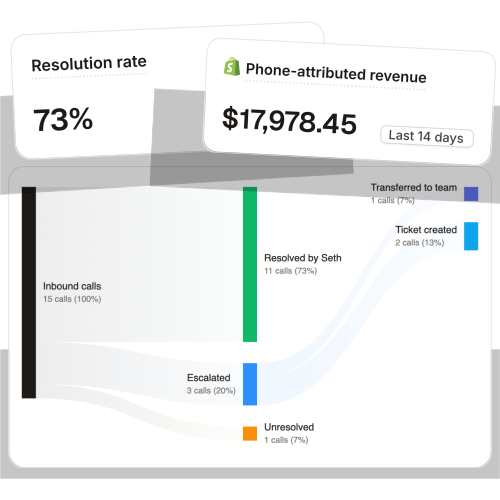
This is where Ringly fits, and it sits in front of Gorgias, not instead of it. Ringly is AI phone support for Shopify brands. Hiring a phone team scales linearly with call volume; the AI doesn't. It answers inbound calls 24/7, finds the order in Shopify, handles returns and exchanges, answers product questions from your knowledge base, and rescues abandoned carts with outbound follow-up. Calls that need a human escalate cleanly into your new Gorgias instance, so the phone becomes one more channel feeding the helpdesk you just migrated to. Across 50+ brands, the AI resolves 73% of calls autonomously at roughly $0.42 per resolved call. WashCo, a Shopify brand we launched, recovered $22,664 in its first 7 days on the phone.
"My customers also feel like it's a normal person. They feel like they can communicate if they have questions."
Claudia Droge, TechCraft Studio
The cost case is simple. Take a $50M Shopify brand running a 6-rep CS team:
| Line item | Today | With Ringly |
|---|---|---|
| 6 reps x $4K loaded per rep | $24,000/mo | n/a |
| Ringly (~$5K/mo) | n/a | $5,000/mo |
| Net monthly CS spend | $24,000/mo | $5,000/mo |
| Monthly savings | n/a | $19,000/mo |
| Annual savings | n/a | $228,000/yr |
That's roughly 70% of the repeatable calls (order status, returns, the same questions over and over) routed to the AI. The genuinely complex 30% still goes to your team in Gorgias, who now have time to actually solve them. If you're already moving helpdesks, book a 30-min call and we'll do the phone math live against your current call volume. It pairs naturally with automated phone support for Shopify brands, and it cuts the WISMO tickets before they ever land in your new Gorgias queue.
How much it costs and how long it takes
Two questions every operator asks before committing a date.
Time. The native import runs at about 720 tickets per hour. A small brand with a year of light volume finishes in hours. A high-volume brand with two years of history can take several days. The recent 14 days land first, so your team works live in Gorgias almost immediately while history backfills.
Cost. The native Zendesk-to-Gorgias import is free, included with your Gorgias plan. A paid migrator (Help Desk Migration, ClonePartner) runs a few hundred dollars and earns its keep only if you need attachments or CSAT history the native import skips. The bigger ongoing number is your Gorgias plan itself: plans run from about $10/mo at the low end to roughly $900/mo on Advanced, plus custom Enterprise, on top of per-ticket overages. Compare that against your current Zendesk pricing per-seat math and our Gorgias pricing breakdown before you sign an annual plan.
For the wider field if you're still weighing options, our Gorgias alternatives and Zendesk alternatives roundups cover the rest of the helpdesk market.
Frequently asked questions
Will I lose my ticket history when I migrate from Zendesk to Gorgias? No, not the bulk of it. Gorgias imports up to your most recent 2 years of tickets, plus macros, tags, users, and ticket fields. Attachments, CSAT ratings, and lookup-type fields don't migrate, so export anything in those categories you need to keep.
How long does the Zendesk-to-Gorgias import take? Gorgias imports about 720 tickets per hour. A year of light volume finishes in hours; two years of heavy volume can take several days. Your most recent 14 days are prioritized, so your team can work live in Gorgias quickly while history backfills.
Do my macros and tags come over? Yes, with caveats. Active macros migrate (imported first), but only reply-text and status-change actions are supported, so anything else lands as an empty macro you rebuild. Tags migrate only if they appear on a ticket inside the import window.
Will support be down during the migration? It doesn't have to be. Run both helpdesks in parallel during the import, then cut over in order: enable Gorgias channels, pause the Zendesk sync, and disable Zendesk channels last. Flip them in the wrong order and you create a gap where new tickets have nowhere to land.
Does my Zendesk phone number or Zendesk Talk migrate to Gorgias? No. The import covers tickets and helpdesk records, not your phone channel. Your phone number and after-hours call handling are a separate decision you should make before cutover day, since WISMO calls keep coming regardless of which helpdesk you run.
Is Gorgias cheaper than Zendesk? It depends on volume and AI usage. Gorgias bills by ticket with unlimited seats, which favors brands that flex headcount; Zendesk bills per agent seat. At high AI deflection, Gorgias's per-interaction AI cost can push the per-resolution number above Zendesk's, so run your own numbers.
Can I keep Zendesk and Gorgias running at the same time? Yes, and you should during cutover. Continuous sync runs every 5 minutes to keep Gorgias current while both are live, which lets you verify the new instance before you disable Zendesk's channels. Just don't run both indefinitely, or you'll double-handle and double-pay.
Talk to us

You're already opening up the support stack to move helpdesks. If you're moving helpdesks anyway, it's the right week to fix the phone too, before the WISMO calls pile back up in your shiny new Gorgias queue.
The 3-layer guarantee.
- Live in 14 days or it's free until launched.
- 65% resolution in 90 days or we refund the last 3 months of subscription fees.
- We keep working free until we hit 65%.
Ruben (Ringly co-founder) takes these calls personally.



