

This post in 30 seconds.
- You get the real Shopify local delivery setup, plus the operational part every other guide skips: the phone calls a live delivery window generates.
- Across 11,000+ calls handled by Ringly agents in the past 30 days, roughly 29% of inbound calls arrived after business hours (6 p.m. to 9 a.m. US Eastern), right when local-delivery questions land.
- Written for founders, COOs, and Heads of CX at Shopify brands doing $2.4M+ a year with a visible phone line.
We run AI phone support for 50+ Shopify brands and have handled more than 150,000 customer calls, so we see a side of Shopify local delivery that setup guides never mention. Turning it on is free and takes about ten minutes. The phone calls it generates are neither.
This post covers both halves honestly. First the actual setup: zones, radius versus postal code, pricing rules, and how to pick a delivery model. Then the part nobody writes about, which is what happens to your phone line once a customer is watching the clock for a delivery you promised by 7 p.m.
Most of the "how to set up local delivery" content ranking today stops at the logistics. Zones, drivers, packaging, done. That's the easy 80%. The hard part shows up two weeks later when the calls start.
If you run a Shopify brand doing a few million a year and you already have a phone number on your site, you know the "where's my order" call. Local delivery adds a sharper version of it, and it clusters in the evening when your team has gone home. Start a 14-day free trial and you can hear the AI answer those calls on your own store. We set it up for you.
How I know the call side of this
I'm Ruben, co-founder of Ringly. I ran every setup step below myself in a fresh Shopify admin, so the click-paths and the zone limits are what you'll actually see, not a paraphrase of the docs.
The call numbers are different. Those come from real production data across the 50+ Shopify brands we run phone support for, not from a competitor's blog. When I say a live delivery window creates an evening call spike, that's from watching thousands of those calls come in, timestamped, and reading what the customer actually asked. The 29% after-hours share is the one number that reframes this whole topic, and it's ours, so you won't find it anywhere else on this page's search results.
Where a step depends on your stack (your courier, your helpdesk, your existing phone setup), I've flagged it. Everything else is the standard Shopify path.
What Shopify local delivery is, and why brands switch it on
Local delivery is when a customer buys online and you deliver the order straight to their address yourself, instead of handing it to a carrier or asking them to pick it up in store. You define where you'll deliver by drawing a radius around your location or listing the postal codes you cover. That's the whole idea, and it's built into Shopify natively.
The feature is free on every Shopify plan, so the only real cost of local delivery is operational, not the setup. You set your own delivery price per zone, including $0 if you want free delivery over a threshold. Shopify lets you run up to 10 delivery zones per location and up to 3 conditional price rules per zone, per the Shopify Help Center.
Brands turn it on because it moves the numbers that matter. Same-day and local delivery lift conversion for shoppers inside the zone by roughly 25%, and carts run bigger when you offer pickup and delivery together. The demand is real and rising: 72% of consumers say same-day delivery influences what they buy, and 80% now expect retailers to offer it, according to Capital One Shopping's 2026 same-day delivery research. If you sell anything perishable, bulky, or time-sensitive, local delivery is often the difference between a sale and an abandoned cart.
The catch is the one every setup guide leaves out. A delivery you control end to end is a promise you now own end to end. When a carrier is late, the customer blames FedEx. When your local delivery is late, they call you, and answering "where's my delivery" the same way every time is the exact job of an AI order-status agent on the phone. More on that below, but keep it in mind while you configure zones, because your zone and pricing choices directly shape how many of those calls you'll get.
How to set up local delivery on Shopify, step by step
Here's the actual path. In your Shopify admin, go to Settings, then Shipping and delivery, then find the Local delivery section and activate it for the location you'll deliver from. You configure it per location, so a two-warehouse brand sets up each one separately.
Once local delivery is active, every choice you make in this screen is really a choice about how predictable your delivery promise is. Vague zones and loose pricing create confused customers, and confused customers pick up the phone.
You have two ways to define a delivery zone:
- Radius from your location. Shopify draws a circle around your store, up to a built-in maximum of 100 miles (160 km). Fast to set up, but a circle ignores rivers, highways, and neighborhoods you don't actually want to drive to.
- Postal or zip code list. You type in the exact codes you'll cover. More work upfront, more control, and far fewer "why can't I get delivery, my neighbor can" edge cases.
Radius is the faster start. Postal codes are what most brands settle on once they've done a few weeks of real routes.
On distance, the common pattern that brands use is worth copying:
| Zone setup | How it works | Best for |
|---|---|---|
| Radius, 10-25 miles | Circle around your location, tight | Same-day delivery you can actually fulfill |
| Radius, 25-50 miles | Wider circle | Next-day delivery, lower urgency |
| Postal code list | Exact codes you choose | Precise coverage, avoiding awkward edge zones |
Those distance bands (10-25 miles for same-day, 25-50 for next-day) come from easyappsecom's 2026 setup guide and match what we see brands run in practice.
For pricing, you set a base delivery price per zone, then add up to 3 conditional rules on top, like free delivery over $75 or a flat $5 under it. This is also your first lever on call volume. A clear "free over $75, otherwise $6" is easy for a customer to understand. Five overlapping tiers are not, and the confusion becomes a call.
Two more things worth doing before you go live:
- Customize the order confirmation email. Shopify lets you edit the delivery-information field so you can set the expectation up front ("delivered today between 4 and 8 p.m."). Setting the window in writing is the single cheapest way to prevent a call later. It also feeds directly into how customers track their order afterward.
- Get your drivers on the free app. Shopify's Local Delivery mobile app (iOS and Android) gives whoever is driving turn-by-turn routes, delivery status updates, and a way to mark orders delivered, per Shopify's own guide. It's the difference between a driver texting you for the next address and a driver who just works the route.
You can edit zones or switch the whole thing off per location at any time, so there's no lock-in. Start narrow, watch the first two weeks of real deliveries, then widen. Getting your order tracking tight from day one saves you the most grief.
Choosing your delivery model: in-house, third-party, or hybrid
Setup decides where you deliver. Your delivery model decides who drives, and it quietly settles who answers the phone when something goes sideways.
There are three models, and Shopify's own framing is the clearest:
| Model | Control | Scale | Cost per delivery | The part nobody mentions |
|---|---|---|---|---|
| In-house | Full | Caps fast | Lowest at low volume | Your staff drives AND answers "where's my delivery" |
| Third-party courier | Lower | Scales fast | Highest | The courier drives, you still take the call |
| Hybrid | Mixed | Flexible | Middle | In-house core radius, courier overflow at peak |
In-house delivery gives you the most control and the biggest hidden staffing problem, because the same small team that drives the route is the team fielding the phone. It's cheap and personal at 5 deliveries a day. At 50, your driver is on the road and your one CS person is drowning in "is it here yet" calls.
Third-party couriers like Roadie or DoorDash Drive solve the driving. They don't solve the phone. The customer bought from you, so they call you, not the courier, when their last-mile delivery is running late.
Hybrid is where most growing brands land: in-house for the tight core radius where you can guarantee the window, courier overflow for the far zones and the peak-season spikes. Whichever you pick, notice that the phone stays with you in all three. That's the thread the rest of this post pulls on.
The part the setup guides skip: local delivery generates phone calls
Every guide on this topic treats "customer communication" as automated notifications. Send the SMS, send the "driver is on the way" ping, done. And notifications help. But there's a quiet admission buried in all of them: the entire reason tracking exists is to prevent a phone call.
Which tells you the call is the default. Tracking and SMS reduce it. They never remove it. When the window slips, the driver can't find the door, the address was wrong, or the customer just wants to move the delivery an hour, the automated ping is exactly the thing they've already ignored, and they reach for the phone.
Local delivery windows run into the evening, so the calls they generate land after your CS team has gone home. Same-day cutoffs, dinner-hour drop-offs, weekend deliveries. This is where the number that reframes the whole topic comes in.
Across 11,000+ calls handled by Ringly agents in the past 30 days, roughly 29% of inbound calls arrived after business hours (6 p.m. to 9 a.m. US Eastern). Those are timestamps on real calls, and they line up almost exactly with when local-delivery questions happen. Your setup was perfect and your phone still rang at 7:40 p.m.
The calls themselves are simple and repetitive. "Where's my delivery." "What's my window." "Your driver's outside but can't find the buzzer." "I put in the wrong apartment number." These are the same WISMO calls you already know, just sharper, because a local delivery has a clock on it in a way a five-day carrier shipment never does.
The workaround the delivery-ops world recommends is telling: call the customer before you drop off. It's good advice and it does not scale. Nobody with 50 deliveries a day is hand-dialing 50 people, and the moment you skip it, the inbound calls come back. This is exactly the kind of routine, high-volume, emotionally-charged-but-simple work an AI phone agent is built to own. It can answer the phone after hours, pull the order, read back the delivery window, and text the driver's ETA, without a human awake to do it.
The stakes are higher here than with normal shipping, too. 63% of consumers switch to a different retailer after a slow delivery experience, and 70% are unlikely to come back after a failed one, per Capital One Shopping's ecommerce delivery research. A missed delivery call at 8 p.m. that goes to voicemail isn't a small thing. It's a customer deciding whether to order from you again.
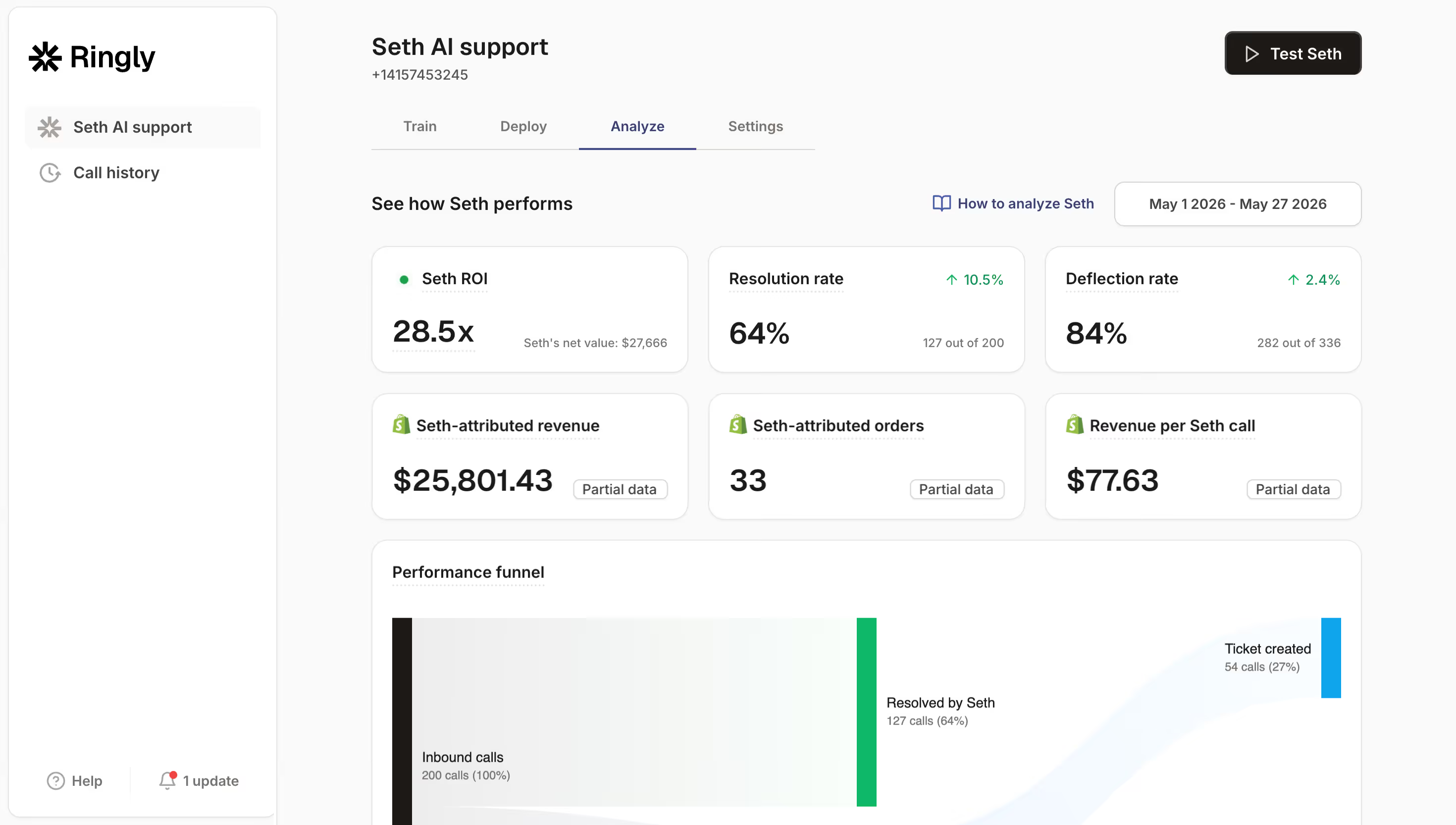
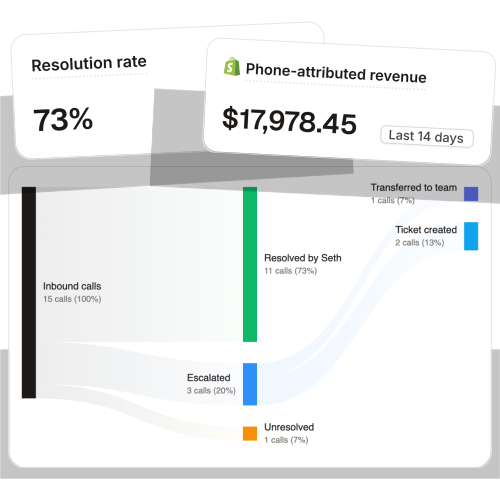
TechCraft Studio handles 88% of its calls without a human. Most delivery-status questions are simple enough to resolve end to end, which is why those numbers hold up. Across all 50+ brands we run, the AI resolves 73% of inbound calls on its own.
"My customers also feel like it's a normal person. They feel like they can communicate if they have questions."
Claudia Droge, TechCraft Studio
That "feels like a normal person" bit matters more for a delivery call than almost any other. The customer is already a little anxious, watching the clock, and the last thing that helps is a robotic menu. If you want the routine version of the "where's my delivery" question handled the same way every time, that's the case for automating the WISMO call while your team keeps the genuinely complex ones. You can also point the routine caller at checking their order status by phone, which is the exact job the AI does on the line.
What it costs to staff the delivery-call spike
Here's the math brands actually run when they realize the phone is now part of the delivery product.
Take a Shopify brand running a 6-rep CS team to cover the day plus the evening delivery windows:
| Line item | Today | With Ringly |
|---|---|---|
| 6 reps × $4K loaded per rep | $24,000/mo | n/a |
| Ringly, done-for-you (illustrative ~$5K/mo all-in) | n/a | $5,000/mo |
| Net monthly CS spend | $24,000/mo | $5,000/mo |
| Monthly savings | n/a | $19,000/mo |
| Annual savings | n/a | $228,000/yr |
That's roughly 70% of the repeatable calls (where's my delivery, what's my window, change the drop-off, the same five things over and over) routed to the AI. The genuinely complex 30% still go to your team, who now have room to actually solve them instead of reading tracking numbers off a screen all evening.
The number that usually stops the "we're too small for this" objection is the after-hours one. You're not staffing a night shift to cover a delivery-call spike that's bursty and unpredictable, you're covering it for a fraction of one rep's loaded cost. Gear Rider closed 1,595 calls in 90 days without a phone rep, which is the volume shape a lot of local-delivery brands hit during peak. And when the calls turn into saved sales, it shows up in revenue: WashCo, a Shopify brand we launched, recovered $22,664 in its first 7 days on the phone.
If your evening delivery windows are already outrunning your team, the fastest way to see the gap is to talk it through. Book a 30-min call and we'll do the math on your real call volume live.
Or skip the call. Start a 14-day free trial and hear it answer a real delivery call on your own store first. This is the same lever brands pull when they want to cut support cost without adding headcount, and it's why keeping phone support live around the clock stops being a staffing question.
Frequently asked questions
Is Shopify local delivery free? Yes. The local delivery feature is built into every Shopify plan at no extra cost. You set your own delivery price per zone, including free delivery over a spend threshold, so the only real cost is the driving and the support that comes with it.
How do I set up local delivery on Shopify? Go to Settings, then Shipping and delivery, then activate Local delivery for your location. You define a delivery zone by radius or postal code, set a base price plus up to 3 conditional pricing rules, and optionally edit the confirmation email to set the delivery window.
What's the difference between local delivery and local pickup on Shopify? Local delivery means you (or a courier) bring the order to the customer's address. Local pickup means the customer comes to your store or a pickup point to collect it. Both are free Shopify features, and plenty of stores offer them side by side.
What's the difference between local delivery and shipping? Shipping hands your order to a carrier like UPS or FedEx for delivery over days. Local delivery is same-day or next-day, driven by you or a local courier within a zone you define. The big operational difference is that late shipping gets blamed on the carrier, while a late local delivery gets blamed on you.
How many delivery zones can I set up on Shopify? Up to 10 delivery zones per location. If you deliver from more than one location, you configure zones separately for each one.
Can I charge different prices for different local delivery zones? Yes. Each zone has its own base delivery price, and you can add up to 3 conditional pricing rules per zone, like free over $75 or a flat fee under it. Keep it simple though, since complex pricing tiers tend to generate confused-customer calls.
What delivery radius should I use for same-day vs next-day? A common pattern is 10-25 miles for same-day delivery you can reliably fulfill, and 25-50 miles for next-day. Shopify's built-in radius maxes out at 100 miles, but tighter zones make your delivery windows far easier to keep.
Does Shopify have an app for delivery drivers? Yes. The free Shopify Local Delivery app for iOS and Android gives drivers optimized routes, turn-by-turn directions, delivery status updates, and a way to mark orders delivered.
Does local delivery reduce customer support calls? It reduces the routine "where is it" questions when your tracking and notifications are good, but it doesn't remove them. Windows still slip, drivers still can't find doors, and those calls cluster in the evening. Roughly 29% of the calls we handle arrive after business hours, which is exactly when a delivery-window question lands and nobody's staffed.
What happens if a local delivery is late or a driver can't find the address? The customer calls. That's the moment tracking couldn't prevent, and it's a high-stakes one, since 70% of shoppers are unlikely to return after a failed delivery. This is the exact call an AI phone agent can pick up 24/7, pull the order, and either reroute the driver or rebook the window.
Talk to us

If you run local delivery, the fastest way to hear what those evening calls sound like is to let the AI answer your own store's line. You configure the zones and the drivers. We handle the phone that all of it eventually rings.
The 3-layer guarantee.
- Live in 14 days or it's free until launched.
- 65% resolution in 90 days or we refund the last 3 months of subscription fees.
- We keep working free until we hit 65%.
Ruben (Ringly co-founder) takes these calls personally.
Start your trial today and you get:
- A free dedicated number to test on, so you hear the AI answer a real delivery call the same day.
- The agent built for you. We set it up around your zones and your delivery windows, you lift zero fingers.
- It plugs into your helpdesk. Gorgias, Richpanel, Re:amaze, Zendesk, or whatever you already run, with every call logged there.
Start your 14-day free trial →
Ringly.io is AI phone support for Shopify brands. Across 50+ brands the AI resolves 73% of inbound calls on its own at roughly $0.42 per resolved call, and plans start at $349/mo with a 65% resolution guarantee.