



This post in 30 seconds.
- Customer accounts are the logged-in area where shoppers track orders, reorder, and start returns themselves, and Shopify now runs two versions: new (passwordless) and classic (password).
- New accounts are simpler and the forward path. Classic keeps full Liquid customization, custom fields, and your third-party apps. The right pick depends on how much you customize.
- Self-serve accounts pull a chunk of order-status and return work off email and chat. They don't touch the phone, which is built for $10M-$100M Shopify brands with a visible phone line.
The real question most merchants are asking isn't "what are customer accounts." It's "do I switch to the new ones or stay on classic, and will it break anything." I set up both account types on a real Shopify store, signed in as a customer, and timed the passwordless login before writing this. So this is the operator's version, not the docs.
If you run a $10M-$100M Shopify brand and you keep a phone number on your site, one thing rarely comes up in the new-vs-classic debate: self-serve accounts move some support work off chat and email, but the phone keeps ringing. We've launched AI phone agents for 50+ Shopify brands trying to close that exact gap. Book a 30-min call and we'll show you what your store leaves on the line after-hours.
What Shopify customer accounts actually are
A customer account is the logged-in area of your store where a shopper can see their order history, track an order, edit their saved addresses, reorder something they bought before, and start a return without messaging anyone. It's the self-serve front door for everything that happens after checkout.
One thing to clear up first: accounts are optional. Turning them on does not force people to register before they buy. Guest checkout stays exactly where it is. You're just giving the customers who want it a place to manage their own stuff.
Shopify runs two systems for this, and the naming trips people up. "Classic" and "legacy" are the same older system. So there are really two account types, not three. The new system is the modern, passwordless one. Classic is the email-and-password one you've probably had on your store for years.
It also helps to separate accounts from the order status page. Every order gets a status page whether or not the customer has an account, and that's the link in their confirmation email. The account layers a persistent, logged-in home on top of that: order history across every purchase, saved addresses, payment methods, and the self-serve actions. Status page is per-order. The account is the customer's whole relationship with your store in one place.
Most of what customer accounts do is let people answer their own questions instead of contacting your team. That matters because around 69% of shoppers will try self-service before they reach out to an agent, according to 2026 self-service data. Give them a working account area and a slice of your ecommerce customer service volume handles itself.
New vs classic customer accounts: the honest comparison
Here's the side-by-side. I built both on the same store, so this is what actually differs, not a marketing chart.
| Feature | Classic (legacy) | New | Who it helps |
|---|---|---|---|
| Login | Email + password | Passwordless, 6-digit email code | New: lower friction. Classic: familiar. |
| Account customization | Full Liquid + theme branding | UI extension blocks (no Liquid) | Classic: heavy customizers |
| Third-party apps | Full support | Limited, more in dev preview | Classic: loyalty / wishlist / custom-field apps |
| Custom fields at signup | Yes | No | Classic: B2B, gated, regulated |
| Self-serve returns | Not native | Native | New: DTC volume |
| Saved payment methods | No | Yes | New: fast repeat buyers |
| Multipass / SSO | Supported | Plus only | Classic: multi-system logins |
The login difference is the one customers actually feel. Classic asks for a password they set up once and probably forgot. New emails them a 6-digit code, and the account is created automatically the first time they sign in. Sessions then stay live for up to 365 days per Shopify's documentation, so they're not re-authenticating every visit.
Classic wins on control. New wins on friction. If your store leans on custom registration fields, gated B2B pricing, Multipass logins, or a stack of apps living inside the account page, classic still does things the new system can't. If you're a high-velocity DTC brand and you mostly want fewer login headaches and native returns, new is the cleaner path. Shopify has signaled classic will eventually be retired, with no public date yet, so new is the direction of travel either way.
One honest caveat from the build: the new accounts drop Liquid customization and don't fully support third-party apps yet. If you run Shopify Plus customer service flows that depend on custom account-page apps, audit those before you flip anything.
How to set up customer accounts in your Shopify admin
The whole thing lives in one place. Here's the path I used.
- Open the setting. From your Shopify admin, go to Settings → Customer accounts.
- Pick your version. Choose new or classic customer accounts. New stores default to new.
- Turn on sign-in links. This shows the sign-in link in your header and at checkout so customers can actually reach their account.
- Leave passwordless on (new accounts). Customers enter their email and get a one-time 6-digit code. You can also add Sign in with Google, Facebook, or Shop if you want.
- Switch on self-serve returns. Under Settings → Returns, set up self-serve returns and cancellations so the return action appears inside the account.
- Test as a customer. Log in with a real email, place a test order, then check order history, the return flow, and reorder.
A few things to know before you commit. Switching is reversible within a limited window, but you should audit your apps and any Liquid customizations on the account page first. And remember accounts stay optional, so you're not breaking guest checkout. For the order-status piece specifically, it's worth confirming your order numbers resolve cleanly, since stores with non-numeric prefixes sometimes hit lookup issues. We cover that in how to enable order tracking on Shopify.
Setup itself is quick. The harder call is which version fits your stack, not how to flip the switch.
What self-serve customer accounts actually take off your team's plate
When accounts are working, the wins are real and specific. A returning customer can reorder in two taps instead of emailing "can you send me what I bought last time." Someone can update a shipping address before fulfillment instead of opening a ticket. And the big one: people can check their own order status and start their own returns.
That last bit matters because of where your support volume actually comes from. WISMO tickets, the "where's my order" ones, run 20-40% of ecommerce support contacts, and climb past 50% during peak, according to Salesforce. Each one costs roughly $4 to $12 to handle when a human touches it, per industry estimates. Every one a customer resolves in their own account is a ticket your team never sees.
So if your team is drowning in the same questions over and over, self-serve accounts genuinely help. They pull reorders, address edits, and return starts off your queue. For retention-heavy brands, the reorder flow alone is worth it, which is why we like pairing it with the rest of your ecommerce customer retention stack and a clean self-serve returns setup.
A couple of things make the deflection bigger than it looks. New accounts auto-create on first sign-in, so you're not asking people to remember a password they set months ago, which is where a lot of classic accounts went unused. Saved addresses and payment methods speed up the second purchase, so the same login that answers a support question also lifts repeat conversion. And because the return starts inside the account, your team picks it up already structured instead of as a free-text "I want to send this back" email they have to chase.
But be honest about the ceiling. Self-serve only catches the customer who's willing to log in and click through it. Plenty of your buyers won't. They'll skip the code, ignore the account, and reach for the channel they trust, which sets up the part of the support load accounts simply don't see.
Self-serve accounts are great at the work a customer is willing to do online themselves. The trouble is, a big slice of your customers aren't.
The part customer accounts don't touch: the phone
Here's the gap the new-vs-classic debate skips entirely. Customer accounts deflect over chat, email, and the web. They do nothing for the phone.
And the phone is still ringing. Across the 50+ Shopify brands we run AI phone support for, the after-hours line is exactly where the un-deflected volume lands. The caller is usually a different person than the one who'd log into an account: the 60-year-old reordering supplements who won't deal with a 6-digit code, the customer who never made an account placing a WISMO call, the after-hours order question that hits voicemail and never gets returned. Self-serve doesn't reach any of them.
This isn't a fringe segment either. About 76% of consumers still prefer the phone for support, and even 71% of Gen Z will reach out by phone, per Nextiva's 2026 data citing McKinsey. You can build the cleanest account area on Shopify and that group still calls. For a lot of founders, that's why their cell number quietly became the founder phone support line.
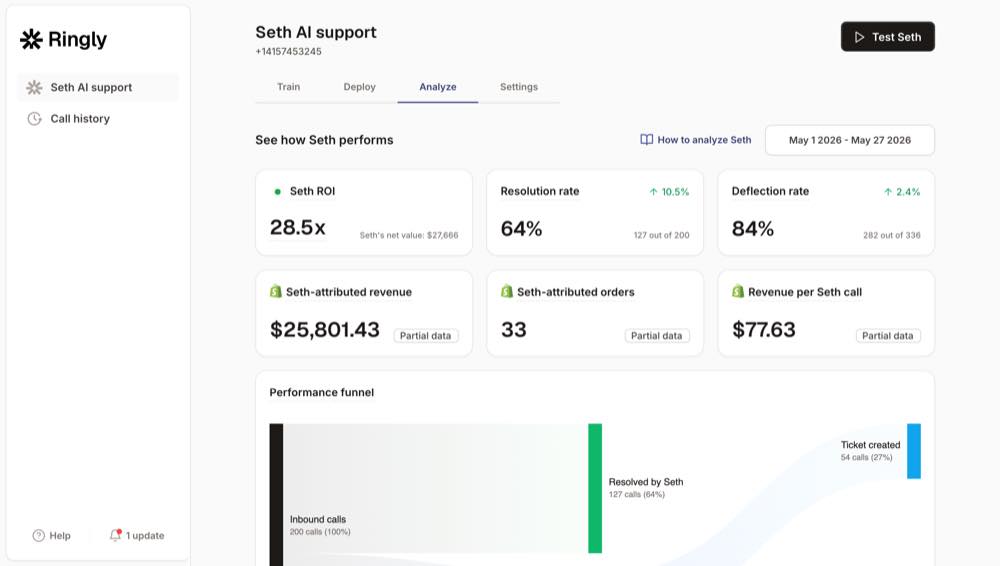
That's the channel Ringly.io covers. Ringly is AI phone support for Shopify brands. It answers inbound calls 24/7, finds orders in your Shopify store, handles returns and product questions from your knowledge base, and escalates cleanly to Gorgias, Richpanel, or whatever helpdesk you already run. Across 50+ brands the AI resolves about 73% of calls on its own, at roughly $0.42 per resolved call versus $7 to $16 for a human BPO. WashCo, a Shopify brand we launched, recovered $22,664 in attributed revenue in its first 7 days on the phone. It's the same self-serve idea your customer accounts give the web, applied to the one channel accounts can't reach. More on that at our 24/7 ecommerce phone support breakdown and the AI phone support agent for Shopify page.
What this costs vs leaving the phone to your team
Run the math on the calls self-serve doesn't catch. Take a typical $50M Shopify brand running a 6-rep CS team:
| Line item | Today | With Ringly |
|---|---|---|
| 6 reps x $4K loaded per rep | $24,000/mo | n/a |
| Ringly (~$5K/mo) | n/a | $5,000/mo |
| Net monthly CS spend | $24,000/mo | $5,000/mo |
| Monthly savings | n/a | $19,000/mo |
| Annual savings | n/a | $228,000/yr |
That's roughly 70% of repeatable calls (order status, returns, the same five questions over and over) handled by the AI. The other 30%, the genuinely complex calls, still go to your team, who now have time to actually solve them. If you want to pressure-test those numbers against your real call volume, book a 30-min call and we'll do the math live. You can also see how it stacks against your current spend on the pricing page.
Frequently asked questions
Are new or classic customer accounts better? It depends on how much you customize. New accounts are simpler, passwordless, and support native returns, reorder, and saved payment methods. Classic keeps full Liquid customization, custom registration fields, third-party apps, and Multipass, so heavy customizers and B2B stores often stay on it for now.
Will my third-party apps still work on new customer accounts? Not all of them. New accounts have limited third-party app support, so loyalty, wishlist, custom-field, and reorder apps that live inside the account page may not carry over. Audit every app on your classic account page before you switch.
Do customer accounts force shoppers to register before checkout? No. Customer accounts are optional and guest checkout is unaffected. You're only giving the customers who want one a place to manage orders, addresses, and returns.
How do I enable customer accounts on Shopify? Go to Settings then Customer accounts in your admin, pick the new or classic version, and turn on sign-in links. For returns, set up self-serve returns under Settings then Returns so the return action shows inside the account.
Will passwordless login confuse older customers? It can. Some older shoppers find the 6-digit email code less intuitive than a password, and a share of them skip the account entirely and call instead. That's normal, and it's worth planning for who you'll route those calls to.
Do customer accounts reduce support tickets and phone calls? They reduce the digital ones. Self-serve accounts deflect a meaningful slice of order-status, reorder, and return contacts over web, chat, and email. They don't reduce phone volume, since callers who won't log in still need somewhere to land, which is where an AI phone agent for Shopify brands fits.
Talk to us

Customer accounts are the right move. Turn them on, pick the version that fits your stack, and let self-serve carry the web. If your phone still rings after-hours while the rest of support has gone self-serve, that gap is the whole reason to talk. A 30-min call is the fastest way to see what your store is leaving on the line.
The 3-layer guarantee.
- Live in 14 days or it's free until launched.
- 65% resolution in 90 days or we refund the last 3 months of subscription fees.
- We keep working free until we hit 65%.
Ruben (Ringly co-founder) takes these calls personally.



