


This post in 30 seconds.
- What it is: software that turns your support docs into a searchable help center your customers and your team both pull from, so the same questions get answered without a ticket.
- The catch: most help centers don't move ticket volume, because they're stale, hard to search, or they only ever feed chat and email. The strongest self-service deflects 40-60% of tickets. Most teams sit at 20-30%.
- Built for founders and CX leads at $10M-$100M Shopify brands running a paid helpdesk and a visible phone line, where the same docs could answer your calls too.
You bought a help center to bring ticket volume down. Six months later the queue looks the same. The articles are there, customers just aren't finding them, or they're finding answers that stopped being true two product updates ago.
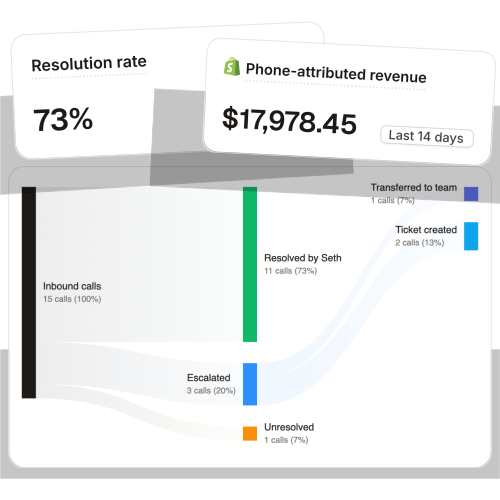
There's a quieter problem under that one. The docs you write to deflect chat and email can also answer your phone, and almost nobody sets them up to. Across 50+ Shopify brands we run AI phone support for, that one doc layer drives 73% autonomous call resolution. The same article that stops a "how do I start a return" email is what the phone agent reads out loud at 9pm on a Sunday.
This guide covers what helpdesk knowledge base software actually is, why most help centers never cut tickets, how the right docs answer your phone too, the five tools worth a look, and what the whole thing saves you.
If you run CX at a Shopify brand doing $10M-$100M and your team answers the same five questions all day while the phone rolls to voicemail after 6pm, this is for you. We've built the doc-and-phone layer for 50+ brands trying to fix exactly that. Book a 30-min call and we'll map which of your repeat questions could answer themselves.
What help desk knowledge base software actually is
A help desk knowledge base is a searchable library of your support answers. Return policy, shipping timelines, how-tos, product specs, the fix for the error customers hit most. The software is what lets you write, organize, search, and measure those articles instead of pasting the same reply into a ticket for the hundredth time.
Most tools serve two audiences from one library: your customers (a public help center) and your team (an internal answer source agents pull from mid-ticket). That dual use is the whole point. A good knowledge base does double duty, deflecting the customer who'd rather not contact you at all and speeding up the rep who has to.
Customers genuinely want this. 61% prefer self-service for simple issues, and 81% say they want brands to offer more ways to find answers on their own (HubSpot). The demand for good self-service support software is there. The execution is where it falls apart.
One quick distinction worth getting right. A help center is the customer-facing version, public, polished, tied to your product. An internal knowledge base for customer service is the team-facing version, where reps grab the canonical answer. Most modern tools handle both, but knowing which one you're optimizing changes how you write.
Why most help centers don't cut tickets
Here's the uncomfortable part. You can have a help center and still answer the same questions all day. Most teams deflect only 20-30% of tickets through self-service, while the strongest operations hit 40-60% or more (Decagon). The gap is almost never about whether the answer exists. It's about whether the customer can find it, trust it, and reach it in the channel they're already using.
Three things quietly kill deflection.
- Search that doesn't speak human. A customer searches "cancel subscription" and your article is titled "terminate account." No match, no answer, new ticket. If the search can't handle synonyms and typos, half your library is invisible.
- Stale content. A knowledge base full of outdated answers is worse than no knowledge base at all. Help-center docs decay faster than internal wikis because they're tied to your product UI, so every redesign quietly breaks screenshots and steps. A rep who trusts a bad article and passes wrong info to a customer creates a bigger mess than one who looked it up from scratch.
- The maintenance nobody owns. Setting up a KB is a project. Keeping it current is a job. When that job falls to whoever has a free afternoon, the docs rot, and rotting docs stop deflecting.
There's a fourth one, and it's the one this whole post is about. Your help center only ever serves chat and email. The phone, the channel that eats the most rep time per contact, gets none of it. That's the gap worth closing, and it's the one nobody's writing about.
The part everyone misses: your KB should answer the phone too
Think about where your repeat questions actually land. For a Shopify brand with a visible phone number, a real chunk of them ring through. WISMO ("where's my order") alone is 30-40% of support contacts and over 50% at peak (Salesforce). At $250 AOV, 12-18% of orders generate a phone call (Ringly internal data). Those are the exact questions your knowledge base already answers in writing. They're just being asked out loud.
The same docs that deflect a chat ticket can answer the phone, if something reads them and speaks. That something is an AI phone agent. It pulls from the same return policy, the same shipping timeline, the same product specs, and it handles the WISMO calls the way your best rep would. It can even check order status live in your Shopify store, except it never sleeps and never gets to the bottom of the voicemail queue too late.
This is where a good knowledge base pays off twice. Write the article once. It deflects the customer who searches your help center, and it answers the customer who calls. Across 50+ Shopify brands on Ringly, that shared doc layer resolves 73% of inbound calls without a human. WashCo, a Shopify brand we launched, recovered $22,664 in its first 7 days once its docs were feeding the phone agent. BioLongevity Labs, a supplement brand on comparable volume, runs at 79% resolution.
Stale docs hurt here even more than they hurt chat. A wrong help-center article is embarrassing. A wrong spoken answer to a customer on the phone is a refund and a Trustpilot review. So if you're going to point a phone agent at your knowledge base, the maintenance discipline from the last section stops being optional. The upside is that one well-kept library now defends two channels at once, and you can keep your current helpdesk doing the ticket volume work while the phone stops leaking.
5 help desk knowledge base tools worth a look
The category splits into two camps: dedicated KB tools where the docs are the product, and helpdesk-bundled KBs tied to ticketing. Then there's the phone layer that reads whichever one you pick. Here's the short list.
| Tool | Pricing | Best for | Verdict |
|---|---|---|---|
| Zendesk Guide | $55+/agent/mo (Suite only) | Teams already on Zendesk | Solid docs, but you can't buy it without the full Suite |
| Freshdesk | Free tier, paid from ~$15/agent/mo | Smaller teams wanting bundled KB + tickets | Good value, lighter on AI |
| Document360 | Quote-based, from ~$99/mo | Doc-heavy teams where the KB is the product | Powerful, more than most DTC brands need |
| Helpjuice | $249-$799/mo | Large internal wikis | Top-tier editor, expensive seat model |
| Ringly | $349/mo (Grow), Enterprise custom | Shopify brands whose phone line eats rep time | The phone layer that answers from your existing docs |
Zendesk Guide
Best for: teams already living in Zendesk who want docs tied to tickets. Zendesk Guide ships a help center and self-service portal, with AI search, wired into the ticketing system. The catch is you can't buy it on its own. It rides along with the Zendesk Suite at $55+ per agent per month, so you pay for ticketing infrastructure even if all you wanted was a knowledge base. If you're shopping the standalone KB market, look at Zendesk alternatives before committing to the whole suite.
Freshdesk
Best for: smaller and mid-size teams that want a knowledge base bundled with ticketing without a big bill. Freshdesk has a free tier and an intuitive article builder connected to its helpdesk, so self-help and tickets live in one place. Its search is lighter than the dedicated tools, but for a growing brand it's an easy on-ramp. Worth comparing against other Freshdesk alternatives if smart search is a priority.
Document360
Best for: doc-heavy teams where the knowledge base is the product, not a side feature. It's an AI-driven platform built for searchable documentation and help centers, and it rates 4.7/5 on G2 across 501 reviews. Pricing is quote-based starting around $99/mo. It's genuinely strong, but for most $10M-$100M Shopify brands it's more documentation machinery than the use case calls for.
Helpjuice
Best for: large internal wikis with lots of contributors. Helpjuice treats the knowledge base as the entire product and the editor shows it. Pricing runs $249/mo at the base, $449/mo to unlock the AI suite, and $799/mo for unlimited. Watch the seat model: it counts everyone added to the back end as a billable user, including people who only read. For a small CS team that adds up fast.
Ringly
Best for: $10M-$100M Shopify brands where a visible phone line is quietly eating rep hours. Ringly is AI phone support for Shopify brands. Instead of treating your knowledge base as a chat-and-email-only asset, the AI phone agent reads the same docs and answers calls out loud: order status, returns, product questions. Across 50+ brands it resolves 73% of inbound calls on its own at roughly $0.42 per resolved call, and calls that need a person escalate cleanly to Gorgias, Richpanel, Reamaze, or whatever helpdesk you already run.

Plans: Grow $349/mo (1,000 minutes), Pro $799/mo (2,500 minutes), Enterprise custom. Live in under an hour. 65% resolution guarantee: if the AI resolves under 65% of your calls in 90 days, we refund the last 3 months. It's not a replacement for your help center. It's the channel your help center never reached.
How to choose, and what it saves you
The decision comes down to where your docs need to live and which channels are leaking.
- Choose a dedicated KB (Document360, Helpjuice) if documentation is core to your product and you have someone who owns it.
- Choose a helpdesk-bundled KB (Zendesk Guide, Freshdesk) if you want self-service tied directly to ticketing and you're already on, or willing to adopt, that platform.
- Add the phone layer (Ringly) if you run a visible phone line and the same questions your KB answers in writing are ringing through and rolling to voicemail. This is also the move if you're trying to scale customer service without hiring the next two reps.
Now the math, because that's what gets it approved. Take a $50M Shopify brand running a 6-rep CS team.
| Line item | Today | With the phone layer added |
|---|---|---|
| 6 reps × $4K loaded per rep | $24,000/mo | n/a |
| AI phone support (~$5K/mo) | n/a | $5,000/mo |
| Net monthly CS spend | $24,000/mo | $5,000/mo |
| Monthly savings | n/a | $19,000/mo |
That's the roughly 70% of calls that are the same five questions, routed to the AI. The genuinely complex calls still go to your reps, who now have time to actually solve them. And the leak you can't see on a spreadsheet matters too: 85% of callers who can't reach a person never call back, and 62% switch to a competitor (PCN). A KB that answers the phone closes that hole.
Want to see which of your repeat calls could answer themselves from docs you already have? Book a 30-min call and we'll do the math live against your call volume.
Frequently asked questions
What is help desk knowledge base software? It's software that lets you create, organize, search, and measure your support documentation in one place. Customers use it as a public help center to answer their own questions, and your team uses it as the canonical answer source while handling tickets.
What's the difference between a help center and a knowledge base? A help center is the customer-facing, public version of your docs. A knowledge base often refers to the internal, team-facing version your reps pull from. Most modern tools manage both from one library, so the line is mostly about which audience you're writing for.
Does a knowledge base actually reduce support tickets? Yes, when it's searchable and current. The strongest teams deflect 40-60% of tickets through self-service, but most sit at 20-30% because their docs are stale or hard to find. The tool matters less than the search quality and the maintenance discipline behind it.
Can a knowledge base answer phone calls? On its own, no. But an AI phone agent can read the same knowledge base and answer calls out loud: order status, returns, product questions. Across 50+ Shopify brands on Ringly, that approach resolves 73% of inbound calls without a human.
How much does knowledge base software cost? It ranges widely. Freshdesk has a free tier; Document360 starts around $99/mo (quote-based); Helpjuice runs $249-$799/mo; Zendesk Guide requires the full Suite at $55+/agent/mo. Watch for seat-based pricing that counts read-only users.
How do you keep a knowledge base from going stale? Assign clear ownership, set a regular review schedule, and use analytics to spot articles with no search results or low helpfulness scores. If you point a phone agent at the docs, treat updates as non-negotiable, because a wrong spoken answer costs more than a wrong written one.
Talk to us

If you run a $10M-$100M Shopify brand and your knowledge base is only working one channel while the phone leaks, a 30-min call is the fastest way to see what your existing docs could already be answering.
The 3-layer guarantee.
- Live in 14 days or it's free until launched.
- 65% resolution in 90 days or we refund the last 3 months of subscription fees.
- We keep working free until we hit 65%.
Ruben (Ringly co-founder) takes these calls personally.



