


The short version.
- The native Gorgias Slack integration is a one-way webhook: it pings a Slack channel every time a ticket lands. You read it in Slack, you still work it in Gorgias.
- Three triggers are available (Ticket Created, Ticket Updated, Ticket Message Created), and the whole thing turns into noise fast unless you scope it.
- Built for $10M-$100M Shopify brands running Gorgias with a visible phone number, where the rest of the company lives in Slack and wants eyes on support without logging into the helpdesk.
Your CS team lives in Gorgias. The rest of the company lives in Slack. The integration is the bridge between the two, and most brands wire it up in ten minutes and then either forget it exists or quietly mute the channel because it pings forty times an hour.
There's a version of this that's useful, and a version that's noise. The difference is how you scope it. And there's one thing worth knowing before you start: the Slack feed only shows you what becomes a Gorgias ticket. The calls hitting your phone line that roll to voicemail never become a ticket, so they never show up here at all. More on that gap at the end, because it's the most expensive thing this integration leaves out.
If you run support at a Shopify brand doing $10M to $100M and you want the company to see what your CS team is dealing with without adding another login, this is the setup. Book a 30-min call if you want to talk through the calls slipping past your helpdesk entirely, and we'll look at your missed calls live.
What the Gorgias Slack integration actually does
The native integration does one thing: it pushes a notification from Gorgias into Slack when a ticket event fires. It's a one-way street, Gorgias to Slack, built on a standard incoming webhook.
When a ticket triggers it, the Slack message shows the ticket subject (hyperlinked straight to the ticket in Gorgias), the customer's name, and a preview of their first message. Someone clicks the link, lands in Gorgias, and works it from there.
This is a notification layer, not a place to work tickets. You can't reply, reassign, tag, or close anything from the Slack message. The ping tells you a ticket exists. The actual work still happens in Gorgias.
That distinction matters because of how teams misuse it. According to Supportbench, 78% of employees already feel overwhelmed by Slack alerts. Pipe an unfiltered ticket feed on top of that and you've built a channel everyone mutes by Thursday. Useful setups treat the integration as a signal, not a transcript.
How to connect Gorgias to Slack, step by step
The native route uses an incoming Slack webhook plus a Gorgias HTTP integration. When I wired this up on a test Gorgias instance, the whole thing took under fifteen minutes, and most of that was deciding which channel deserved the pings.
Here's the full sequence:
- Create a Slack app. Go to the Slack API dashboard, choose Create an App, then From scratch. Name it something obvious like "Gorgias tickets" and pick your workspace.
- Enable Incoming Webhooks. In the app settings, toggle Incoming Webhooks on.
- Add a webhook to your workspace. Click Add New Webhook to Workspace at the bottom of the page.
- Pick the destination channel. Choose the channel the notifications should land in, then click Allow.
- Copy the Webhook URL. Slack generates a unique URL. Copy it.
- Open the Gorgias HTTP integration. In Gorgias, go to Settings, then Integrations, and add an HTTP integration. Paste the Webhook URL into the URL field.
- Set the trigger and method. Pick your trigger (start with Ticket Created), set the method to POST.
- Add the JSON payload. Drop in the JSON block that maps ticket fields (subject, customer name, first message) into Slack's message format using template variables.
- Save it. Add the integration, then create a test ticket to confirm the ping lands.
You get three triggers to choose from in the HTTP integration: Ticket Created, Ticket Updated, and Ticket Message Created. Most brands reach for Ticket Created and pipe everything. Resist that. We'll get to why in the noise section.
One plan note worth flagging: Gorgias supports help with this setup only for customers on Advanced plans or higher, because of the manual work involved. You can configure it on lower tiers, but if it breaks, you're debugging the webhook yourself. If you're already deep in the Gorgias ecosystem and wiring up other tools, the same HTTP integration logic powers connecting Gorgias to other apps, and the Gorgias API opens up more than webhooks can.
What support teams use it for
The honest answer is that most of the value is visibility. The whole company gets to see what support is fielding without anyone opening the helpdesk. Used well, it does three jobs.
- Real-time visibility. Marketing sees the launch is generating angry order-status tickets before the CS lead has to Slack them about it. Ops sees the 3PL is causing a spike. Nobody asks "how's the queue looking" because the queue is right there.
- Cross-functional escalation. A ticket needs engineering, or your warehouse, or the founder. The ping lands in a channel where the right person already is, and they jump in without you forwarding an email. Slack's own data shows support workflows built this way cut escalations to technical teams by 60%.
- VIP and angry-customer alerts. Scope a rule so only tickets tagged VIP or refund-risk fire a ping into a dedicated channel. Now the people who need to know about a high-value customer find out in seconds, not after the Trustpilot review.
The integration earns its place when it routes the few tickets that need someone outside the CS team, not when it mirrors the entire queue. That's the whole game. A scoped feed is a tool. An unscoped feed is wallpaper.
This is also where a documented customer service escalation process pays off, because the Slack channel only works if everyone knows what a ping in it actually means.
How to keep the channel from becoming noise
This is the part the setup guides skip, and it's the part that decides whether anyone uses the integration in a month. The fix is scoping, and it has three moves.
First, don't trigger on every ticket. Ticket Created firing for all inbound is the default mistake. Build a Gorgias rule that only calls the webhook when a ticket matches a condition that actually needs the wider company: a VIP tag, a refund over a threshold, a specific channel, a keyword. Let the routine WISMO tickets stay in Gorgias where your reps handle them.
Second, one channel per job. A single firehose channel gets muted. Split it: an escalations channel for tickets that need another team, a VIP channel for high-value customers, maybe an FYI channel for launch-day awareness. People can mute the ones that aren't theirs and keep the one that is.
Third, skip Ticket Updated unless you mean it. Every status change, every reply, every reassignment firing a ping is how a channel hits forty messages an hour. Updated and Message Created have their uses, but they multiply fast. Default to Ticket Created on a scoped rule and add the others only when there's a specific reason.
The deeper point comes from Plain: Slack is the communication layer, not the support system, and it can only be one. It has no queue, no SLA timer, no assignment, and no metrics. The moment you try to run support inside Slack instead of routing signals out of Gorgias into Slack, it falls apart. Keep Gorgias as the Shopify helpdesk. Keep Slack as the place the company reacts.
The limits of the native integration
Before you architect your whole workflow around this, know what it can't do.
- It's one-way. You cannot reply to a ticket, change its status, assign it, or close it from Slack. The ping is read-only. Every action is a click back into Gorgias.
- No two-way without a third tool. If you want a Slack message to actually do something in Gorgias, you need automation. Zapier can post Gorgias events to Slack and, going the other way, create a Gorgias ticket or ticket message from a Slack action. It's still not a reply-from-Slack experience, but it closes part of the loop.
- No support-system features. No unified queue, no first-response timers, no SLA tracking, no per-rep metrics. Those all live in Gorgias.
- Setup support is gated. As noted, hands-on help is Advanced-plan-or-higher.
None of this makes the integration bad. It makes it a notification tool, which is exactly what it is. Problems start when a team expects it to be a workspace. If you're weighing the whole helpdesk stack, our take on Gorgias features and the broader customer service setup for Shopify covers where Slack fits and where it doesn't.
The channel the Slack feed never shows you
The integration quietly hides one channel. The Gorgias-to-Slack feed only contains what becomes a Gorgias ticket. Email tickets show up. Chat tickets show up. And the channel that produces the most expensive, highest-intent contacts at a brand with a visible phone number, the phone, mostly doesn't.
Across 50+ Shopify brands on Ringly, the calls that roll to voicemail or get missed never become a ticket, so they never ping Slack. Your "single pane of glass" has a phone-shaped hole in it, and it's exactly where the money is. WISMO runs 30-40% of all support contacts and spikes past 50% in peak season, at $5 to $25 each, and at brands with a phone number a big share of that comes in by phone, bypassing the helpdesk-to-Slack loop entirely.
WashCo, a Shopify brand we launched, recovered $22,664 in its first 7 days once those calls were actually getting answered. The point isn't the integration. The point is that the calls were invisible before, the same way they're invisible in your Slack channel right now.
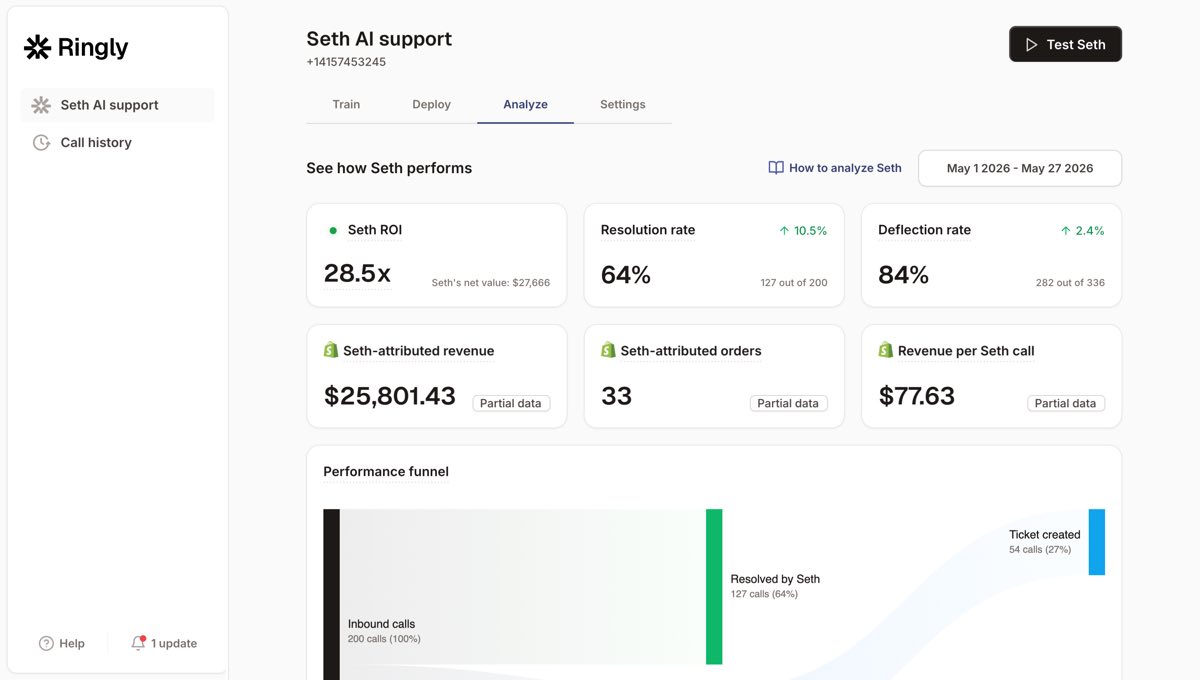
The fix is to get the phone into the same loop. Ringly is AI phone support for Shopify brands: it answers inbound calls 24/7, finds orders, handles returns and product questions, and across 50+ brands resolves 73% of calls on its own. The calls it can't resolve escalate cleanly into Gorgias, which means they finally become a ticket, which means they finally show up in the Slack channel you just built. The phone stops being the blind spot.
"My customers also feel like it's a normal person. They feel like they can communicate if they have questions."
Claudia Droge, TechCraft Studio
If your phone line goes to voicemail after 6 p.m. and you've never once seen those calls in Slack, that's the gap worth closing first. Book a 30-min call and we'll show you what's coming in on the line you can't see. For the wider picture, 24/7 ecommerce phone support and how ecommerce phone support fits next to a helpdesk both go deeper, and an AI receptionist for ecommerce is the same idea applied to the front door.
Frequently asked questions
Does the Gorgias Slack integration let you reply to tickets from Slack?
No. The native integration is one-way. It posts a notification into Slack with a link, and you click through to Gorgias to actually reply, tag, or close the ticket. Acting from Slack requires a separate automation tool.
Which triggers can the Gorgias Slack integration use?
Three: Ticket Created, Ticket Updated, and Ticket Message Created. Ticket Created is the most common, and the cleanest if you scope it with a Gorgias rule. Ticket Updated and Message Created fire far more often, so use them only when you have a specific reason.
Can a Slack message create a Gorgias ticket?
Not with the native webhook, which only runs Gorgias to Slack. With Zapier you can go the other direction and create a Gorgias ticket or ticket message from a Slack action, which is the closest thing to two-way the stack offers without an AI layer.
Do you need a paid Gorgias plan for the Slack integration?
You can configure the webhook on lower tiers, but Gorgias only provides hands-on setup and troubleshooting support for Advanced plan customers and higher. If you're comfortable with webhooks and JSON, you can stand it up yourself on a smaller plan.
How do I stop Gorgias Slack notifications from flooding the channel?
Scope the trigger. Instead of firing on every Ticket Created, build a Gorgias rule that only calls the webhook for tickets that match a condition (a VIP tag, a refund flag, a specific channel), and split notifications across dedicated channels by job. Skip Ticket Updated unless you genuinely need every status change.
Why don't my phone calls show up in the Gorgias Slack feed?
Because the feed only shows what becomes a Gorgias ticket, and most phone calls never do. Calls that roll to voicemail or get missed leave no ticket behind, so there's nothing to ping Slack. To make phone contacts visible, you need something answering the line and writing those calls into Gorgias as tickets.
Talk to us

If you run a $10M-$100M Shopify brand and your phone line is the channel Slack never shows you, a 30-min call is the fastest way to see what's slipping through. We'll pull your last few days of missed calls and walk the numbers with you.
The 3-layer guarantee.
- Live in 14 days or it's free until launched.
- 65% resolution in 90 days or we refund the last 3 months of subscription fees.
- We keep working free until we hit 65%.
Ruben (Ringly co-founder) takes these calls personally.



