This post in 30 seconds.
- You’ll see where Shopify POS earns its praise, where merchants turn on it, and what POS Pro actually costs once you add it all up.
- Capterra puts it at 4.6/5 across 241 reviews. The Shopify App Store puts it at 3.0/5 across 387 reviews, with 29% of them one-star. Same product.
- Written for omnichannel founders and ops leads at $10M-$100M Shopify brands running an online store plus a few retail doors.
Open three review sites and Shopify POS looks like a 4.6-star lock. Open the Shopify App Store and it’s a 3.0, with almost a third of reviewers giving it a single star. That gap is the whole story, and most reviews quietly pick one number and run with it.
So which one is real? Both, depending on what you are. If you already live in Shopify and you’re bolting a few retail doors onto an online business, the 4.6 is closer to your experience. If you bought it expecting a top-tier standalone register, the 3.0 crowd is where you’ll end up. This review sorts which complaints are real and which are noise, and what the thing actually costs.
We build AI phone support for Shopify brands, not a POS, so we have no horse in the register race. We do talk to a lot of omnichannel operators who are drowning in the same questions over and over across their store and their phone line, and Shopify POS comes up constantly. If you want to skip ahead and talk through your own setup, you can book a 30-min call and we’ll be straight with you about where POS ends and the phone begins.
Where the ratings actually land
Here’s the honest version. I read through the 387 Shopify App Store reviews, pulled every recurring complaint, and checked them against the 4.6 aggregate scores on Capterra and G2 to see which gripes are real and which are just one bad week someone vented about.
The split isn’t a fluke. It’s two different buyers reviewing two different jobs. Capterra reviewers tend to be omnichannel operators who already run Shopify and rate the integration. App Store reviewers skew toward people hitting the daily friction: a printer that drops off, a forced re-sign-in mid-rush, a $89 charge they didn’t expect.
| Source | Rating | Reviews | What it captures |
|---|---|---|---|
| Capterra | 4.6/5 | 241 | Omnichannel fit, integration, ease of use |
| G2 | ~4.x/5 | hundreds | Same skew as Capterra, aggregate |
| NerdWallet (editorial) | 5.0/5 | n/a | Pricing + feature review, not user volatility |
| Shopify App Store | 3.0/5 | 387 | Daily in-store friction, billing surprises |
The App Store breakdown is the tell: 45% five-star, 29% one-star, and not much in the middle (according to the Shopify App Store listing). A bimodal rating like that almost always means the product is great for one job and frustrating for another. Aggregators like Capterra average that volatility away into a clean 4.6, which is fair but hides the shape of it. If you’re about to put POS Pro on three retail doors, the shape matters more than the average.
What Shopify POS does well
When people give it five stars, it’s almost always for the same reason: it’s one system. For a brand that already runs Shopify online, POS removes the double-entry tax of running a separate register.
- Inventory syncs in real time across your online store, every retail location, and your marketplaces. One source of truth, no nightly reconcile.
- The Smart Grid checkout is fast to learn. Staff are usually productive in minutes, which matters when you’re hiring seasonal help with high turnover.
- BOPIS and ship-from-store actually work. Buy-online-pickup-in-store and shipping a web order from a retail location are where Shopify POS genuinely beats standalone systems.
- It’s mobile. The POS Go handheld and iPad setups make pop-ups and markets painless, and newer iPhones can take tap-to-pay with no extra hardware.
- 24/7 live chat on every plan. That’s a better support floor than most of the POS space offers (more on the phone-support catch below).
It also has reach most people never need but a growing brand eventually does: it operates in 175+ countries, plugs into 105+ payment gateways, and sits inside an ecosystem of 13,000+ apps. If you’re scaling toward Shopify Plus, the Shopify Plus feature set layers on top of this without you hitting a ceiling fast.
The recurring compliment in the reviews is simple. It’s the best omnichannel bridge on the market. Note the word bridge, because the criticism lives in the same sentence.
Where merchants get frustrated
The one-star reviews are remarkably consistent, which is what makes them worth reading. These aren’t random. The same five complaints show up across the App Store, Reddit threads, and Capterra’s lower-rated reviews.
- Hardware disconnects. Receipt printers and barcode scanners dropping their connection, sometimes daily, is the single most-cited problem. Merchants describe resetting the same hardware over and over.
- The app can feel sluggish. Slow navigation between screens and forced re-sign-ins every couple of days come up a lot, and they’re worst during a busy checkout line.
- Reporting is gated behind Pro. On the base tier there’s no clean breakdown by payment method and no per-staff attribution, which pushes serious retailers to the $89/month plan.
- Surprise charges. A cluster of reviewers report being billed for POS subscriptions they thought were inactive, with support declining refunds. Watch your per-location billing.
- Offline mode is thin. You can limp through a connectivity drop, but the experience is constrained and the reconnect sync can be sluggish in a high-traffic store.
There’s a structural one too: Shopify POS is the best omnichannel bridge, but it’s a weak standalone register. If you don’t sell online, you’re paying for an ecommerce subscription you don’t use and getting a POS that doesn’t match Square or Lightspeed on pure in-store depth. And it isn’t built for restaurants or hospitality at all.
Pricing and the true monthly cost
This is where the “is it worth it” question actually lives. POS Lite is free with any Shopify plan. POS Pro is the upsell, and it’s where retailers feel the squeeze.
| Tier | Cost | What you get |
|---|---|---|
| POS Lite | Free with any plan | Basic checkout, product management, payments. Fine for pop-ups + markets. |
| POS Pro | $89/mo per location ($79 annual) | Unlimited staff + performance tracking, advanced inventory, BOPIS, ship-from-store, cross-location returns, daily reports, custom receipts |
| Shopify Plus | Pro included | POS Pro free for the first 20 locations (with Shopify Payments per store) |
The headline number undersells the real cost, so do the full math before you decide. POS Pro is priced per location, and it stacks on top of your ecommerce plan (Basic $39, Shopify $105, Advanced $399 per month) plus hardware plus transaction fees of 2.6% + 10 cents in person (per NerdWallet’s 2026 review). Hardware runs $49 for a Tap & Chip reader, $219 for the countertop kit, and $349 for the POS terminal.
So a three-door retailer on the Shopify plan is looking at $105 for the plan plus $267 in Pro fees (three locations) plus card fees plus hardware. That’s not unreasonable for what it does, but it’s a long way from “free POS with Shopify.” If you’re on Shopify Plus, Pro is included for your first 20 locations, which quietly makes Plus the best value tier for any multi-door brand.
Is Pro worth it? If you run staffed retail with more than a couple of people, yes. The staff permissions and reporting alone justify it. If you’re testing retail with a pop-up, stay on Lite until the volume is real. And before you add headcount to cover the phones those locations generate, it’s worth costing out phone support for a Shopify store separately, because that bill scales with locations too.
Shopify POS vs Square, quickly
Every searcher comparing Shopify POS also looks at Square, so let’s be quick about it. On aggregate user ratings the two are basically tied: Square 4.73 versus Shopify 4.67 across the major review sites, per Style Factory’s comparison.
The split is clean. Square wins standalone retail; Shopify wins omnichannel. Square gives you a free basic POS and a free card reader, which is hard to beat if you only sell in person. Shopify charges a subscription but pays you back the moment you’re selling online too, because the inventory, orders, and customer profiles are already one system. Shopify also reaches 175+ countries to Square’s 8, and isn’t locked to a single payment processor.
If your business is a register first and a website maybe, Square. If it’s a Shopify store first and retail second, this isn’t close. It’s Shopify POS.
The phone line your POS doesn’t answer
Here’s the blind spot no POS review mentions. Shopify POS unifies the sale. It does nothing for the phone that keeps ringing while you ring people up.
Run an omnichannel brand and your phone fields a specific, repetitive load: “do you have this in stock at the Austin store,” “what are your hours,” “where’s my online order,” “can I return a web order in person.” WISMO calls alone are 30-40% of support volume, and 50% at peak per Salesforce. POS gives your staff the answer on a screen. It doesn’t pick up the call, and your retail staff can’t run a register and work the phone at the same time. Most of those are the kind of repeatable ecommerce support calls that don’t need a person.
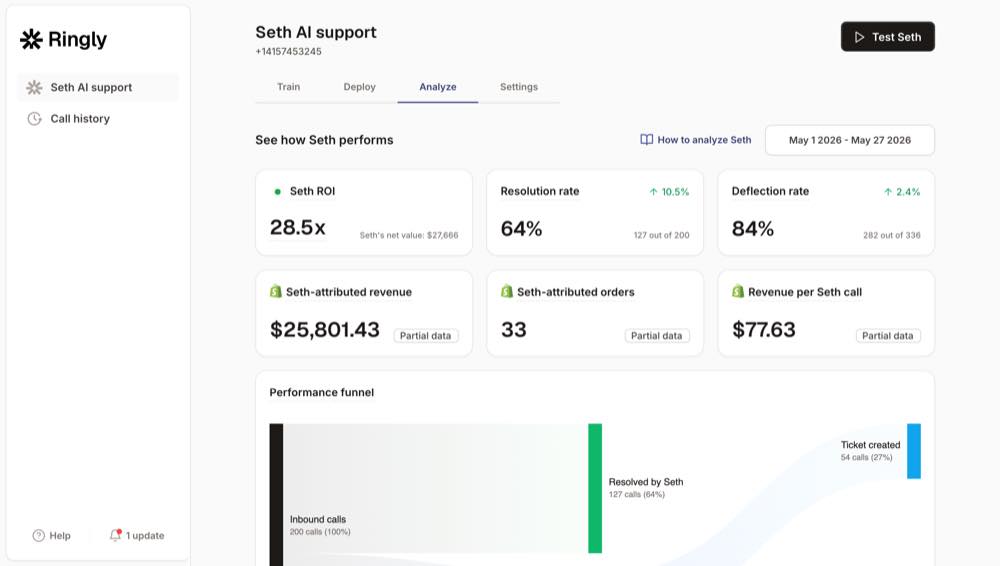
That’s the gap we build for. Ringly.io is AI phone support for Shopify brands. The AI answers inbound calls 24/7, checks order status in your Shopify store, handles returns and product questions, and escalates the genuinely hard calls to your team. Across 50+ brands it resolves about 73% of calls on its own at roughly $0.42 per resolved call. WashCo, a Shopify brand we launched, recovered $22,664 in its first 7 days on the phone. It works like an AI receptionist for ecommerce, plugs into your existing helpdesk, and keeps your current number. For brands trying to scale support without hiring, it’s the cheaper half of the omnichannel stack.
"My customers also feel like it's a normal person. They feel like they can communicate if they have questions."
Claudia Droge, TechCraft Studio
If your retail and online channels both generate calls your team keeps missing, that’s a fixable leak. Book a 30-min call and we’ll look at what your phone line is dropping.
Who Shopify POS is for (and who should look elsewhere)
Strip away the star ratings and the decision is about fit.
Choose Shopify POS if:
- You already run a Shopify store and you’re adding retail, pop-ups, or markets.
- You want one inventory and customer system across online and in-person, with BOPIS and ship-from-store.
- You’re on or heading toward Shopify Plus (Pro is included for 20 locations).
Look elsewhere if:
- You sell in person only and don’t want to pay for an ecommerce subscription. Square is cheaper.
- You need deep standalone retail features or run a restaurant or hospitality venue. Lightspeed or a vertical-specific POS fits better.
- You expected a flawless register out of the box. Budget for the hardware-connectivity headaches the reviews warn about.
Whichever way you land, remember the register is only half the omnichannel job. The other half is the phone, and there’s a real Shopify call center decision waiting on the other side of the POS one.
Frequently asked questions
Is Shopify POS Pro worth $89/month? For staffed retail with more than a couple of people, yes. The staff permissions, performance tracking, and proper reporting justify the per-location fee. For a pop-up or a single-person shop, stay on the free POS Lite tier until your volume is real.
Why is Shopify POS rated 3.0 on the App Store but 4.6 on Capterra? Different reviewers, different jobs. Capterra skews toward omnichannel operators rating the Shopify integration; the App Store catches more merchants hitting daily friction like hardware disconnects and the Pro upsell. The rating is bimodal, so the average hides the shape.
Does Shopify POS work offline? Partially. You can keep taking some payments during a connectivity drop, but offline mode is limited and the reconnect sync can be sluggish in a high-traffic store. Don’t rely on it as a primary mode.
What does Shopify POS hardware cost? A Tap & Chip card reader is $49, the countertop kit is $219, and the POS terminal is $349, with terminal countertop kits starting around $459. Newer iPhones can take tap-to-pay with no extra hardware at all.
Is Shopify POS good for a store that doesn’t sell online? Not really. You’d be paying for an ecommerce subscription you don’t use, and the standalone register experience trails Square and Lightspeed. Shopify POS earns its keep when online and in-person are one business.
Does Shopify POS handle phone calls or customer support? No. It gives your staff the data to answer questions, but it doesn’t answer the phone. The calls about stock, store hours, and order status are a separate job, which is the gap tools like Ringly fill for omnichannel brands.
Shopify POS vs Square: which is better? Square for standalone in-person retail (free, cheaper hardware). Shopify POS for omnichannel, where it’s clearly ahead because online and in-store share one system. Their user ratings are nearly tied, so the answer is about your business shape, not quality.
Talk to us

Shopify POS unifies the sale. It does nothing for the phone that keeps ringing while you ring people up. If your retail and online channels both generate calls your team can’t get to, a 30-min call is the fastest way to see what you’re leaving on the table after-hours and at the register.
The 3-layer guarantee.
- Live in 14 days or it's free until launched.
- 65% resolution in 90 days or we refund the last 3 months of subscription fees.
- We keep working free until we hit 65%.
Ruben (Ringly co-founder) takes these calls personally.