

This guide in 30 seconds.
- What you can actually customize on a Shopify Plus checkout in 2026, which technologies do it, and which ones still need Plus.
- The deadline that matters: Shopify Scripts stopped running on June 30, 2026, and checkout.liquid is already gone for the core steps. If you didn't rebuild, things quietly broke.
- The part every other guide skips: every customization you ship at checkout changes the phone calls your support team gets afterward.
Checkout is the most expensive 200 pixels on your store, and in 2026 the rules for editing it changed. The old way of dropping custom code into checkout.liquid is gone. The new way, checkout extensibility, is safer and faster, but it means relearning what you can do and rebuilding what you had. I rebuilt four common customizations on a test Plus store this spring, then tracked what happened to support afterward, and that second half is where most of the surprises live.
If you run a $10M-$100M Shopify or Shopify Plus brand, you are probably the person who has to sign off on the checkout build and then live with whatever it does to your week. This guide walks through what's possible, what it costs, and the operational fallout most teams only notice after launch. It pairs naturally with what else Shopify Plus actually unlocks once you're on it. If you want to skip ahead and talk through your specific setup, book a 30-min call and we'll map where your custom checkout is generating calls.
What changed for checkout customization in 2026
For years, Shopify Plus merchants edited a single file called checkout.liquid. It worked, but it was fragile. One bad edit could break the whole checkout, and Shopify couldn't ship platform upgrades without risking everyone's custom code.
So they killed it. checkout.liquid is no longer supported for the information, shipping, and payment steps. The thank-you and order status pages were sunset on August 28, 2025. And Shopify Scripts, the tool a lot of Plus stores used for custom discount and shipping logic, stopped running on June 30, 2026. That date is final.
The auto-upgrade is the part that bit people. Shopify started migrating stores off checkout.liquid automatically, with a 30-day email notice, and there is no rollback once it's done. If your team didn't rebuild before the cutover, the customizations were lost.
Here's the quieter problem. Orders kept flowing, so nothing looked broken on the surface. But the systems sitting downstream of checkout, like ad-platform tracking pixels, post-purchase upsells, and analytics, stopped reporting. A lot of Plus stores spent early 2026 with broken conversion tracking and didn't know it. If you migrated and never re-checked your pixels, check them.
Why did Shopify force all this? Because the replacement, checkout extensibility, is built from predictable, sandboxed building blocks. Customizations are upgrade-safe, they work inside Shop Pay, and Shopify says the modern checkout runs up to 1% higher conversion on average. For a brand doing real volume, 1% on the highest-intent page in the funnel is not a rounding error.
What you can customize, and what needs Shopify Plus
In 2026 there are five official ways to customize a Shopify checkout. Not all of them require Plus, which surprises people.
| Technology | What it does | Needs Shopify Plus? |
|---|---|---|
| Checkout UI extensions | Add custom fields, upsells, trust badges, content, gift notes | Plus for the info, shipping, and payment steps |
| Checkout Branding API | Colors, fonts, corner radius, logo, layout | Plus only |
| Shopify Functions | Backend logic: discounts, reorder or hide payment and delivery options | No (most plans, not Starter) |
| Post-purchase extensions | Offers or info captured after checkout, before confirmation | No (most plans) |
| Web Pixels | Track behavior and conversions post-extensibility | No (most plans) |
The short version: if you want to add fields or content to the core checkout steps, or you want full control over branding, you need Plus. The deeper backend logic through Shopify Functions is available more broadly.
If you're on a standard plan, you can change colors and fonts in the editor and add app blocks to the thank-you and order status pages, but you can't add custom fields or logic to the information, shipping, or payment steps. That gate is the single biggest reason brands move to Shopify Plus. If you're weighing the jump, the Shopify Plus vs Advanced breakdown lays out where the line sits, and the same logic shapes how you'll handle customer service at Plus scale.
How to customize your Shopify Plus checkout, step by step
You don't need to do all of this. Most brands ship two or three of these and leave the rest. Here's the order I'd work in.
- Brand it first. Use the checkout editor or the Branding API to set your logo, colors, fonts, and corner radius. This is the highest-ratio change: low effort, immediately on-brand, no dev required for the basics. Plus merchants get the drag-and-drop editor for this.
- Add UI extensions where they earn their place. Custom fields (delivery instructions, gift messages), a trust badge near the pay button, a single relevant upsell, or a loyalty widget. Each one is an app-based block you drop into a checkout step. Resist the urge to add five.
- Add backend logic with Shopify Functions. This is where your old Scripts logic moves. Tiered discounts, "hide express shipping for heavy items," reordering payment methods. It runs server-side, so it's fast and it doesn't break Shop Pay.
- Rebuild your tracking with Web Pixels. If you migrated off checkout.liquid, your old script-tag pixels are dead. Rebuild Meta, TikTok, and GA4 tracking through Web Pixels and Customer Events, then confirm events are firing. This is the step teams skip and regret.
- Test in the editor, preview, then ship. Run a real test order through guest checkout and through Shop Pay. Check it on mobile, where most of your traffic is. Then publish.
When I rebuilt a test checkout, the branding and a single gift-note field took an afternoon. The Functions logic and the pixel rebuild took the real time. Budget accordingly.
Checkout customizations that actually lift conversion
Not every change moves the number. These are the ones with real evidence behind them.
- Offer guest checkout, prominently. Baymard found that 19% of shoppers abandon when guest checkout isn't offered or isn't obvious, and 26% leave specifically because they were forced to make an account. Make guest checkout the default path.
- Cut the fields. Every field you remove is one fewer reason to bail. Ask for what you need to ship the order and nothing else.
- Lead with express pay. Shop Pay and other accelerated methods skip the form entirely for returning shoppers, and they convert well on mobile. Put them at the top.
- Add one targeted upsell, not a wall. A single relevant add-on at checkout can lift average order value. A cluttered shelf of offers slows the page and annoys people.
- Keep it fast. Roughly 70% of carts get abandoned on average (Baymard), and slow pages make it worse. A heavy checkout extension that adds a second of load time costs you orders.
If reducing abandonment is the goal, it's worth reading our deeper guide on cart abandonment statistics and Shopify conversion rate optimization alongside this.
Customizations that quietly hurt you
The flip side. These all start as good ideas.
- Too many fields. Every custom field you add is a slower form and another thing a customer can get wrong, then call about.
- Slow extensions. Checkout UI extensions have a performance budget for a reason. If your extension does heavy work, the render lag shows up in your abandonment rate.
- Breaking Shop Pay. Some custom logic falls over inside the express flow. Test every change in Shop Pay specifically, not just the standard checkout.
- Untested Functions logic. A discount or shipping rule that's slightly wrong doesn't crash. It just quietly charges the wrong amount until a customer notices and calls in.
- Ignoring mobile. Most of your checkout traffic is on a phone. A customization that looks clean on desktop and breaks on mobile is worse than no customization.
The pattern across all of these is the same: a checkout change that goes wrong doesn't crash loudly, it leaks slowly through your support inbox. Which brings us to the thing the other guides leave out.
The part no one mentions: every checkout change reshapes your support calls
Here's what I actually learned shipping those four customizations on a test store. Each one changed the questions customers asked afterward.
Add a custom delivery-instructions field and you get "can you change where it's going?" calls. Add a gift-message field and you get "did my note actually save?" calls. Add a subscription option at checkout and you get cancel, skip, and pause calls down the line. Add a B2B PO-number field and you get "will you invoice me, where's my PO" calls. Add an aggressive upsell and you get "I didn't mean to add that, refund it" calls.
None of this shows up in a checkout guide, but it shows up in your phone queue. And it stacks on top of a queue that's already heavy. "Where's my order" questions are 30-40% of support tickets in normal periods and over 50% at peak, per Salesforce. Your checkout customizations don't replace that volume. They add a new layer of "did the thing I just did at checkout work?" on top of it.
This is the gap between the team that builds the checkout and the team that answers the phone after. The first team ships a feature. The second team absorbs the questions it generates, usually without warning and usually understaffed.
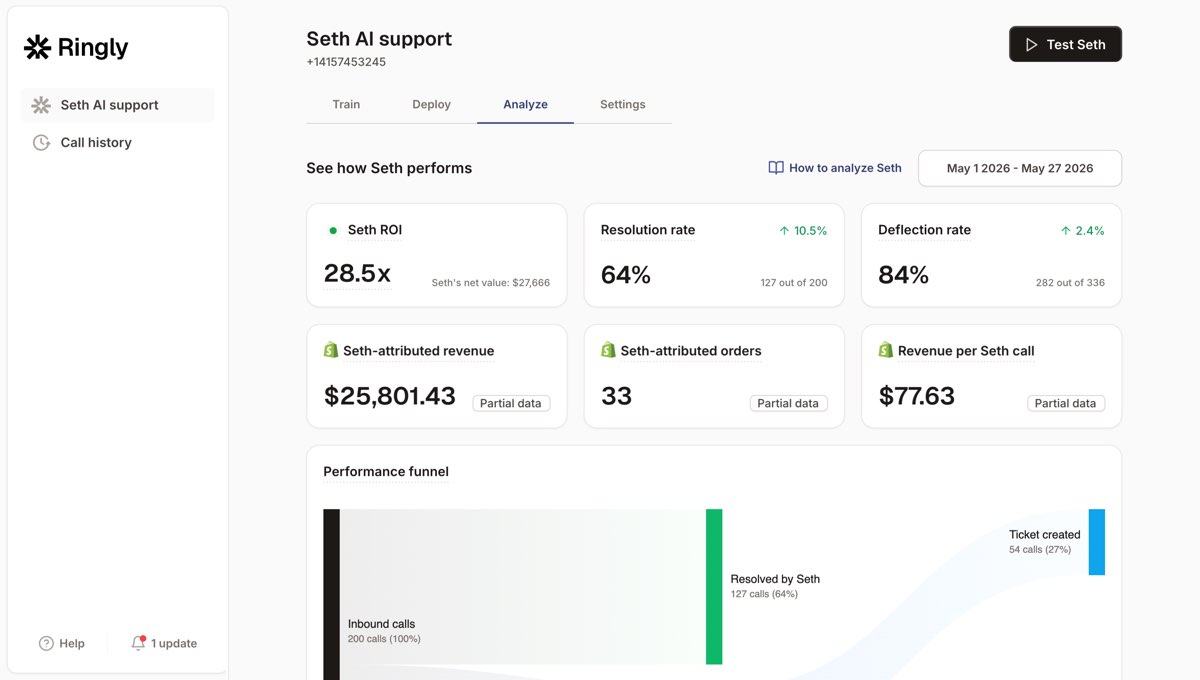
It's the problem we work on. Ringly.io is AI phone support for Shopify brands. Instead of growing your support headcount every time a checkout change drives a new wave of calls, the AI takes the routine inbound calls: order status, the "did my gift note go through" calls, returns, the same five questions over and over. Seth resolves up to 90% of calls autonomously. Calls that need a person escalate cleanly to Gorgias, Richpanel, or whatever helpdesk you already run.
WashCo, a Shopify brand we launched, recovered $22,664 in attributed revenue in its first 7 days on the phone. The point isn't the headline number. It's that the calls your checkout generates have revenue sitting inside them, and right now a lot of those calls go to voicemail.
If your custom checkout is driving more calls than your team can pick up, book a 30-min call and we'll look at what's coming through your line. For the order-status calls specifically, our order-status feature and our WISMO automation guide go deeper.
What it costs
The honest answer is "it depends on how much you build."
Editor-only changes (logo, colors, fonts, an app block) are free and need no developer. The moment you want custom UI extensions or Shopify Functions logic, you need a developer or an agency. Migration and build estimates from the field land around $5,000-$10,000 for a simple implementation, $10,000-$25,000 for moderate customizations, and $50,000 or more for complex builds. Shopify Plus itself starts around $2,300/mo.
There's a cost the quote doesn't include, though: the support load. A more capable checkout drives more post-purchase questions, and someone has to answer them. If those calls go to a growing CS team, the real cost of your checkout build is the headcount it quietly adds.
Run the math. A six-rep CS team at $4,000 loaded per rep is $24,000/mo. If 70% of those calls are repeatable (order status, the "did it go through" calls your new checkout fields generate, returns, the same questions over and over), that's roughly $17,000/mo of payroll doing work that doesn't need a person. Routing the routine calls to AI and keeping your team on the genuinely hard ones is where the support cost actually comes down. For the bigger picture on staffing the post-checkout queue, our take on scaling customer service without hiring covers the same trade-off in depth.
Frequently asked questions
Can I customize Shopify checkout without Shopify Plus? Partly. On standard plans you can change colors and fonts in the editor and add app blocks to the thank-you and order status pages. You can't add custom fields or logic to the core information, shipping, or payment steps. That requires Plus.
Is checkout.liquid still supported in 2026? No. It's gone for the information, shipping, and payment steps, and the thank-you plus order status pages were sunset in August 2025. Shopify Scripts also stopped running on June 30, 2026. Everything runs on checkout extensibility now.
What are checkout UI extensions? They're app-based blocks you drop into the checkout to add custom fields, upsells, trust badges, gift notes, or content. They run in a sandbox, so they're upgrade-safe and they work inside Shop Pay. UI extensions on the core steps require Shopify Plus.
Will I lose my customizations when Shopify auto-upgrades my checkout? Yes, if you didn't rebuild them on checkout extensibility first. The auto-upgrade had a 30-day notice and no rollback. If you migrated and never re-checked your tracking pixels, check them now, because they often break silently.
How much does Shopify Plus checkout customization cost? Editor changes are free. Custom builds run roughly $5,000-$10,000 for simple work, $10,000-$25,000 for moderate, and $50,000 or more for complex. Plus itself starts near $2,300/mo. Budget separately for the support volume a richer checkout creates.
Do checkout customizations slow down checkout? They can, if you over-build. Checkout UI extensions have a performance budget, and a heavy extension or too many fields adds load time, which raises abandonment. Keep it lean and test on mobile.
How do checkout changes affect my support volume? More than teams expect. Custom fields, gift notes, subscription toggles, and PO fields all generate "did it go through" and "can you change it" calls. These stack on top of WISMO calls, which are already most of the queue. Plan for who answers them before you ship the change, the same way you'd plan the rest of your ecommerce customer service.
Talk to us

If your custom checkout is driving more calls than your team can pick up, that is a fixable problem. A 30-min call is the fastest way to see what your new checkout is sending to the phone, and what it's costing you to answer it manually.
Our 3 promises.
- Live in under 1 hour. Setup and test calls are free.
- 30-day money back on the $99 plan fee.
- 65% resolution guarantee: if Seth resolves under 65% of your support calls in a month, that month comes back as credit (after 90 days on Pay per call).
Ruben (Ringly co-founder) takes these calls personally.



