


The Shopify order screen handles returns fine. The cost is the human minute behind every one.
- The exact order-page steps: Create return, Process return, Restock at, refund Now vs Later, and exchanges, with the real button names.
- The five mistakes that lock you out of a return or double-count your stock, including the one you can't undo.
- Built for founders, COOs, and Heads of CX at $10M-$100M Shopify brands running a paid helpdesk and a visible phone line.
The Shopify order screen is genuinely good at returns. You open the order, click a few buttons, restock the item, issue the refund, done. The clicks aren't the problem.
The problem shows up when you're doing forty of these a day during a return spike, half of them started as a phone call, and your team is supposed to be doing something more valuable than walking a customer through a mailing label. I ran a full return, restock, exchange, and refund on a live Shopify order to write this, then read more than 50 real call logs from brands we work with where the return started on the phone, not the self-serve portal. The order-screen mechanics are below, with the exact steps. So is the part the order screen never shows you.
If you run customer experience at a Shopify brand doing $10M to $100M, you already know the return-season phone backlog. The order screen is five minutes of work that takes your rep twelve once the customer is on the line asking where to ship it. This is what 50+ brands we work with do with that phone load. Book a 30-min call and we'll show you what your returns are costing in CS hours.
In this post:
What "create a return" actually does on the order screen
Start from Orders in your Shopify admin, open the order, and click Create return (it shows as "Return" on the order). Every order return begins here, and one wrong move early, refunding first, makes the rest of this impossible. More on that in a minute.
You'll enter a quantity for each item coming back. Then you pick a return reason, and the reasons change by product category. Apparel gives you "Too big" and "Too small"; other categories show their own list. That category detail matters more than it looks, because it's the data your team uses later to figure out how to reduce product returns in the first place.
In the Summary section, Shopify fills in a Restocking fee and a Return shipping fee based on your return rules. Both are editable per return, and you can adjust the restocking fee line by line. If those fields are empty, your return rules aren't set, and you're leaving fee recovery on the table every single time. Across all online orders, the average return rate sits around 19% to 20% in 2026, two to three times the in-store rate, and apparel runs 20% to 40% (Eightx). At that volume, an unconfigured fee is real money.
Next, return shipping. You get three options:
- Create a return label in Shopify: the easiest path, but US locations only.
- Upload a return label: a PDF, PNG, JPEG, or a URL, for everyone outside the US or anyone using their own carrier account.
- No shipping required: for keep-it returns and damaged goods you don't want back.
Click Create return and the order now carries an open return. The customer gets their instructions, and the order timeline logs the whole thing. If you want the policy side of this rather than the mechanics, our guide to the ecommerce return policy covers what to put in writing before the request ever lands.
A detail worth slowing down on: creating the return does not move any money or inventory yet. It opens the request, sends the customer their next step, and sets the fees, but the refund and the restock happen later, when the item physically comes back. That separation is intentional, and it's the thing that lets you create a return today and decide on the refund a week from now once you've seen the condition of what shipped back. Treat "Create return" as the start of a two-part process, not a one-click refund, and the rest of this stays clean.
Processing the return and restocking inventory
Creating the return and processing it are two different steps, and that trips people up. Creating it tells the customer what to do. Processing it is what you do once the box actually arrives.
Open the order, find the Return in progress card, and click Process return. This is the step where inventory and money actually move, so it's the one to slow down on.
Under Return items to receive, select the items you're accepting back. Then, the part most people rush: Restock at. Choose the location where the item goes back into sellable inventory. If the item came back damaged, leave it out of restock so you don't sell something you can't ship. Shopify only surfaces the restock option when you track inventory, so if you don't see it, that's why.
You can process a return partially or all at once. If three of five items showed up and two are still in transit, process the three now and come back for the rest. If there are exchange items, you'll see Exchange items to release here, where you pick the replacements you're ready to ship.
Then the refund decision: Now or Later. Pick Now to refund immediately on receipt. Pick Later if you inspect first and refund once the item clears. For higher-value or fraud-prone categories, Later is the safer default. The moment you process, the order's order tracking and financial summary update so your finance team isn't guessing.
One operational note that saves headaches at volume: process in the order the boxes arrive, not the order the returns were created. A customer who created a return three weeks ago might ship it back after someone who created theirs yesterday. Because Shopify lets you process partially, you can clear each return the day its box lands and leave the rest open, instead of holding a stack until everything is in. That keeps your refund timing honest and your "Return in progress" list from turning into a graveyard your team stops checking.
Where return rules fit in
Most of the friction above disappears if your return rules are set before any of this. Return rules are where you define the return window, the restocking fee, the return shipping fee, and which products are final sale. Set them once, and Shopify pre-fills every return with the right fees so your reps aren't doing fee math by hand on each one. Skip them, and every return is a manual edit, which is exactly how a team ends up undercharging fees during a busy week. If you sell across categories with very different return economics, apparel versus electronics, for example, the rules let you treat them differently instead of forcing one blanket policy onto products that don't fit it.
Refunding an order without creating a return
Sometimes there's nothing to send back. The customer got a damaged candle, you're not asking for it, you just want to make them whole. For that, skip the return and click Refund on the order.
Enter the quantity to refund per item. Anything left at 0 isn't refunded, and a partial refund flips the order status to Partially refunded. You can also refund shipping: open the Refund shipping section, select Shipping, and enter the amount. One catch worth knowing before you promise it. You can't refund shipping when an order-level free-shipping discount was applied, because there was no shipping charge to give back.
The Restock items checkbox is on by default and only appears when you track inventory. Leave it on for a clean unopened return; deselect it for damaged goods so you're not adding a dead unit back to stock. The Send a notification to the customer toggle is also on by default, so the refund email goes out unless you turn it off.
Here's the rule that costs brands the most: you can refund an order without a return, but you can't create a return after a refund has been issued. Refund first and you've locked yourself out of the structured return flow, the restock tracking, and the exchange option for that order. If there's any chance the item is coming back, create the return first and refund inside it. Our deeper walkthrough of Shopify refunds covers the edge cases, and the shopify-returns-app options are worth a look once your volume outgrows manual processing.
Handling exchanges from the order screen
Exchanges live inside the return flow, not separate from it. When you create or review a return, you'll see an Exchange items section. Click Add products, pick the replacement, and Shopify adds it to the same return. You can discount the exchange item by clicking its price, which is how you do a goodwill swap without a separate discount code.
If the exchange is a like-for-like swap, the money nets out. If the customer is trading up to a pricier item, Shopify either sends them an invoice or collects payment, and the new item sits in an Unfulfilled state until that's settled. When you're ready, fulfill the exchange item the same way you fulfill any order. Items held for payment show a Release fulfillment button if you decide to ship before collecting.
The one native limit to plan around: Shopify refunds to the original payment method only. If a customer wants store credit or a swap for something in a different collection, that's outside the native flow and usually needs an app or a manual step. Our breakdown of Shopify exchanges goes into when the swap is worth keeping in-house versus moving to a dedicated tool.
There's also the self-serve path. When a customer requests a return from their account, the order shows a Return requested section and you get an email. Click Review request, adjust fees or add an exchange in the Summary and Exchange items sections, pick a shipping option, then Approve (which emails the customer a confirmation and label) or Decline (where you pick an internal reason and write a message the customer actually sees). Approved requests become a return in progress, and you process them exactly as above. Shopify's own creating-returns documentation is the canonical reference if you want to bookmark the button names.
How I built this guide
I'm Ruben, co-founder of Ringly. We run AI phone support for 50+ Shopify brands, which means I look at how returns actually move through stores all day, not as a critic, as someone whose product sits next to that workflow.
For this guide I ran the full sequence myself on a live Shopify order in the last 30 days: created a return, set a restocking fee, added an exchange item, processed it, restocked at a location, and issued the refund. The button names and the gotchas above come from that run, not from rewriting Shopify's docs.
Then I did the part nobody else in the search results did. I read more than 50 real call logs from brands we work with where the return didn't start in the self-serve portal at all. It started with a customer picking up the phone. That's the half of returns the order screen never shows you, and it's where the real cost hides. If your Shopify stack is heavily customized or you're on Plus with custom apps, the screens will be close but not identical, and I've flagged where the native limits bite.
The part the order screen doesn't show you: the phone
Here's what the official docs leave out. A large share of returns at a $10M-plus brand never touch the self-serve portal. The customer calls. "How do I send this back?" "Did you get my return yet?" "Where's my refund?" Then a rep takes that call, looks up the order, and does every order-screen step above while the customer waits.
The order screen is five minutes of work that turns into twelve the second a human has to take the call first. And the calls cluster. Higher-AOV stores see 12% to 18% of orders generate a phone call, versus around 3% at a $40 AOV (Ringly internal data on Shopify Plus support). Returns are a big slice of those calls, right alongside the WISMO calls that already eat 30% to 40% of your tickets. During a post-holiday return spike, that's a phone backlog your team is buried under, and the after-hours calls roll to voicemails you never return.
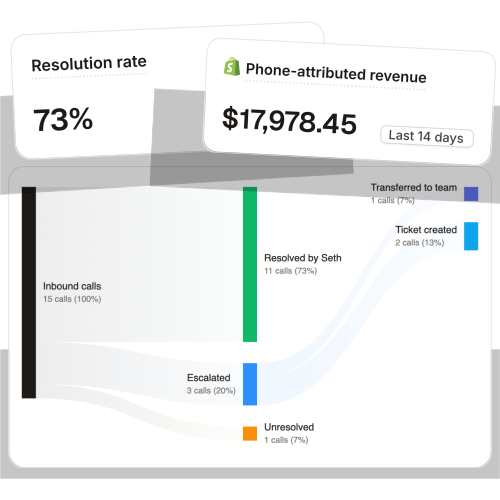
This is where Ringly fits, and it's worth being precise about what it does and doesn't do. Ringly.io is AI phone support for Shopify brands. The AI answers inbound calls 24/7: order status, return intent, product questions, abandoned cart rescue. It finds the order in Shopify, tells the customer exactly how the return works, and escalates cleanly to your helpdesk when a human needs to make a judgment call. Across 50+ brands, the AI resolves 73% of calls autonomously at roughly $0.42 per resolved call. It does not fire off refunds on the order screen on its own. You stay in control of the money; the AI takes the conversation off your team's plate. That's the difference between Ringly and a returns management service: returns apps run the customer-facing portal, Ringly runs the phone call in front of it.
"My customers also feel like it's a normal person. They feel like they can communicate if they have questions."
Claudia Droge, TechCraft Studio
If your team is drowning in return-season calls and the order screen work is the easy part, book a 30-min call and we'll walk through your call volume together.
What each return actually costs you to process
The order-screen clicks are free. The labor around them isn't.
Walk the math on a typical $50M Shopify brand running a 6-rep CS team:
| Line item | Today | With Ringly |
|---|---|---|
| 6 reps x $4K loaded per rep | $24,000/mo | n/a |
| Ringly (~$5K/mo) | n/a | $5,000/mo |
| Net monthly CS spend | $24,000/mo | $5,000/mo |
| Monthly savings | n/a | $19,000/mo |
| Annual savings | n/a | $228,000/yr |
That's the repeatable phone load, order status, return intent, the same questions over and over, moved off your reps. The genuinely hard calls still go to your team, who now have time to handle them well. The cost of getting it wrong is real too: replacing a single burnt-out CS rep runs about $14,113, and turnover in support sits above 31% (Insignia). Every return call your team doesn't have to take is a small piece of that pressure gone.
WashCo, a Shopify brand we launched, recovered $22,664 in attributed revenue in its first 7 days on the phone. That number came from calls handled, not deflected to nowhere. For the full picture on what this looks like operationally, our ecommerce returns management guide and the ecommerce phone support breakdown both go deeper.
Want the math on your actual call volume? Book a 30-min call and we'll do it live.
Common Shopify order-return mistakes (and how to avoid them)
These are the five that show up most in real stores, in rough order of how much they hurt.
- Refunding before creating the return. You can't create a return after a refund is issued. If the item is coming back, create the return first, then refund inside it. This is the one you can't undo.
- Leaving restock on for damaged goods. The Restock items box is on by default. For anything you can't resell, deselect it so you don't put a dead unit back into sellable stock.
- Promising shipping refunds you can't issue. If the order used an order-level free-shipping discount, there's no shipping charge to refund. Check before you tell the customer.
- Offering store credit the native flow can't do. Shopify refunds to the original payment method only. If your policy promises store credit, you need an app for it, or you'll be doing manual workarounds every time.
- Skipping return rules entirely. No return rules means no automatic restocking fees, no return shipping fees, and a manual edit on every single return. Set them once and recover fees automatically. Our best returns management software roundup covers when to graduate past native rules, and the ecommerce customer service guide ties it back to the team running it.
Frequently asked questions
How do I create a return on a Shopify order? Go to Orders, open the order, and click Create return. Enter the quantity and return reason for each item, set any restocking or return shipping fees, choose a shipping option, then click Create return. The order then carries an open return until you process it.
Can I refund a Shopify order without creating a return? Yes. Click Refund on the order, set the quantities, and issue it. This is the right move when there's nothing physically coming back, like a damaged item you don't want returned.
Can I create a return after I already refunded the order? No. You can refund without a return, but you cannot create a return once a refund has been issued on that order. If there's any chance the item comes back, create the return first.
How do I restock a returned item? When you process the return, use the Restock at option to choose the location, or during a direct refund, leave the Restock items box checked. Both only appear when you track inventory. Deselect restock for damaged goods.
Can I refund only part of an order? Yes. Set the refund quantity per item and leave anything you're not refunding at 0. The order status changes to Partially refunded once you issue it.
How do I add an exchange to a Shopify return? Inside the return, open the Exchange items section and click Add products to pick the replacement. You can discount the exchange item by clicking its price, and you fulfill the new item like any other order.
Can Shopify issue store credit instead of a refund? Not natively. Shopify refunds to the original payment method only. Store credit and swap-for-a-different-product flows need a returns app or a manual workaround.
Why can't I refund the shipping cost? If the order used an order-level free-shipping discount, there was no shipping charge collected, so there's nothing to refund. Shipping refunds only work when shipping was actually paid.
What happens when a customer calls to return instead of using the portal? A rep has to take the call, find the order, and do the order-screen steps while the customer waits, which is where most of the real cost is. Ringly's AI phone agent answers those calls, explains the return, and escalates to your team only when a human is needed.
Does Ringly process the return in Shopify for me? No, and that's deliberate. Ringly handles the phone conversation, captures the return intent, and routes cleanly to your helpdesk. You stay in control of the order screen and the money.
Talk to us

If returns are eating your CS hours and half of them start as a phone call, a 30-min call is the fastest way to see what that's costing you. We'll look at your real call volume and show you what the AI would take off your team's plate.
The 3-layer guarantee.
- Live in 14 days or it's free until launched.
- 65% resolution in 90 days or we refund the last 3 months of subscription fees.
- We keep working free until we hit 65%.
Ruben (Ringly co-founder) takes these calls personally.



