


The short version.
- There is no native Gorgias node in n8n, and that is fine. The reliable path is the HTTP Request node pointed at the Gorgias REST API, with one stored Basic-auth credential you reuse everywhere.
- A community node exists on npm, but it is unverified, which means self-hosted only (not on n8n Cloud) and it breaks the day the maintainer walks away.
- Built for $10M-$100M Shopify brands on Gorgias. One catch worth knowing before you build: every n8n and Gorgias workflow automates text. Your phone line still rings to a rep or a voicemail box.
You searched for "the n8n Gorgias node" expecting to drag it onto the canvas, wire two fields, and move on. It isn't there. n8n ships with close to 1,889 native integrations and Gorgias isn't one of them (n8n integrations directory).
That sounds like bad news. It isn't. The way most teams actually connect the two is cleaner and more durable than a native node would be, once you know which path to take. I run AI phone support for 50+ Shopify brands, so I evaluate this kind of plumbing constantly, and I wired the Gorgias setup on a real n8n instance to write this.
If you run support at a Shopify brand doing $10M-$100M and you are drowning in tickets, this is the guide for getting n8n to do the repetitive lifting against Gorgias without paying for a connector or betting on someone else's npm package. If you would rather have someone walk your specific stack with you, book a 30-min call and we will map it live.
Is there a native n8n Gorgias node?
No. There is no maintained core node for Gorgias inside n8n. When an app isn't in the built-in library, n8n gives you two real ways in, and picking the right one upfront saves you a rebuild later.
The HTTP Request node is the path that holds up, because it lives in n8n's core and you control every part of the call. You point it at the Gorgias REST API, set the method, pass the auth, and shape the body. Nothing to install, nothing to maintain on someone else's schedule.
The other option is a community node. Someone publishes a Gorgias package to npm, you install it, and you get a few prebuilt operations. It works right up until it doesn't.
- Native (HTTP Request): ships with n8n, works on Cloud and self-hosted, never goes stale because you own the config.
- Community node: faster to start, but unverified packages are self-hosted only and break when the author stops updating them.
For anything you actually depend on, use the HTTP Request node. We will get into the community-node tradeoff in detail below, but that is the headline.
Set up the Gorgias HTTP Request node in n8n
Here is the part that trips people up, and it is genuinely simple once you see it. Gorgias uses HTTP Basic auth, and the API key goes in the password field, not a header you build by hand.
Three pieces get you authenticated, and you store them once so every node reuses the same credential. Grab them from Gorgias, drop them into an n8n Basic-auth credential, and you are done.
- Get your credentials. In Gorgias, click the settings icon (bottom-left), open Account, then REST API (Gorgias REST API docs). You will see three things.
- Base URL. It looks like https://your-domain.gorgias.com/api. Swap in your own subdomain.
- Username. The email address on your Gorgias account.
- Password. Your API key. This is the part people miss. The key is the password, not the username.
- Store it as a credential. In n8n, create a Basic Auth credential with that email and key, then attach it to your HTTP Request node. Every future node reuses it, so you set this up exactly once.
To pull tickets, point the node at https://your-domain.gorgias.com/api/tickets with method GET. To write a tag back or post a message, you switch the method to POST or PUT and add the body. That is the whole pattern.
One security note worth repeating from the Gorgias authentication reference: the API key grants full access to your account's data. Treat it like a password, because it is one.
Community node vs HTTP Request node: which to use
The community node is tempting. It is a few clicks, you get named operations instead of raw URLs, and it feels like the native node you wanted. The problem is what happens after the demo.
Unverified community nodes only run on self-hosted n8n, which rules them out for every team on n8n Cloud. That is per n8n's own community node install docs. Verified nodes get a shield icon and can install on Cloud, but there is no verified Gorgias node, so a community Gorgias package is self-hosted only.
Then there is the maintenance question. A community node is one person's side project. When they get busy or move on, the package goes stale, Gorgias changes an endpoint, and your workflow quietly stops writing tags. You find out when leadership asks why the report looks empty.
- Use the community node only if you are prototyping on a self-hosted instance and you do not mind it breaking.
- Use the HTTP Request node for anything in production, anything on Cloud, or anything your team will count on next quarter.
I would not build a workflow my support team relies on around a package I can't control. The HTTP Request node is five more minutes of setup and it never surprises you. There is a third option some teams reach for, a paid third-party connector that sits between the two tools, but for a REST API as straightforward as Gorgias that is paying monthly for something the HTTP Request node already does. The honest answer for most $10M-$100M brands is: skip the connector, skip the community node, build it once on the HTTP Request node.
What the Gorgias API lets you wire
Once the HTTP Request node is authenticated, the whole Gorgias REST API is open to you. The resources map cleanly to the things you would want to automate, and the Gorgias developer index lists them all.
| Gorgias resource | Operations | What you would build |
|---|---|---|
| Tickets | list, get, create, update, delete | Pull new tickets, update status, route by content |
| Messages | list, get, create, update | Post an auto-reply or an internal note |
| Customers | list, get, create, update, merge | Enrich a ticket with order history |
| Tags | list, get, create, update, merge | Write an LLM-assigned tag back to a ticket |
| Views | list, get, create, update | Build a custom queue and pull from it |
| Events | list, get | Trigger a workflow when something changes |
Methods are standard REST: GET to read, POST to create, PUT to update, DELETE to remove. Nothing exotic.
A quick word on how the workflow starts. You have two ways to fire it. A schedule trigger polls Gorgias every few minutes and pulls anything new, which is simple and fine for tagging or reporting that doesn't need to be instant. A webhook fires the moment something happens in Gorgias, which you want for escalation workflows where a five-minute delay matters. Most teams run a mix: webhooks for the urgent stuff, a nightly schedule for the bulk reporting pulls.
The one place people get stuck is pagination, because list endpoints return a cursor and the HTTP Request node's pagination settings are easy to misconfigure. This shows up over and over in the n8n community forum. The fix per n8n's pagination cookbook: if the API returns the next-page URL, set Pagination Mode to "Response Contains Next URL." If you pass the cursor as a parameter, use "Update a Parameter in Each Request." Get that right once and your list pulls stop dropping records. Skip it and your "all open tickets" pull silently stops at page one, which is the kind of bug you only catch when a number looks too low.
Three workflows worth building
Theory is fine, but here is what actually earns its keep. These are the three n8n and Gorgias workflows that pay for the setup time fastest.
Auto-tag incoming tickets
Pull new tickets on a schedule or a webhook, send the message text to an LLM with your category list, and write the returned tag back through the tags endpoint. One agency running this reported 10+ hours a week saved on manual tagging, and it kills the inconsistency problem where one rep tags a refund "Product Defect" and the next tags it "General Inquiry." Clean tags are also what make your reporting trustworthy, which is the difference between leadership seeing a real trend and seeing noise. If you want the wider pattern, we covered it in customer service automation tips.
Escalate stale or urgent tickets
Watch for tickets sitting too long or flagged urgent, then fire a Slack alert with the customer, the order, and a direct link to the ticket. It is a small workflow that stops the "this one slipped" problem before a 1-star review shows up.
Enrich WISMO tickets with order status
When a ticket mentions an order, validate the email and order number, fetch the status from the Shopify Admin API, and post an internal note or reply with what is actually happening. If you already run Gorgias AI on the chat side, this is the n8n version for tickets that come in by email. This matters because WISMO ("where's my order") is 30-40% of tickets in normal periods and over 50% at peak. One published workflow claims order-status sync drops WISMO volume 30-40%, returning hours of capacity every week. If you want the deeper version, we wrote a whole guide on WISMO automation on Shopify.
If you are wiring these to take pressure off your CS team, book a 30-min call and we will compare it to what we run for brands your size.
The one channel the Gorgias node can't touch
Here is the honest limit, and it is the reason I keep this in front of every operator who builds these workflows. Every n8n and Gorgias workflow automates text: email, chat, social, reporting. The phone line is not in that list.
n8n can't tag a call that hit voicemail at 9 p.m., because that call never became a ticket in the first place. It just rang out. And for a brand with a visible phone number, that is not a rounding error. At a $250 AOV, 12-18% of orders generate a phone call, versus about 3% at a $40 AOV (Ringly internal data). The higher your order value, the more of your revenue is sitting on a phone line your automation can't see.
This is where Ringly.io fits next to your n8n setup. Ringly is AI phone support for Shopify brands. The AI answers inbound calls 24/7, finds orders in your Shopify store, handles returns and product questions, and escalates cleanly to Gorgias when a human is needed. Across 50+ brands it resolves 73% of calls on its own, at roughly $0.42 per resolved call. WashCo, a Shopify brand we launched, recovered $22,664 in its first 7 days on the phone.
"My customers also feel like it's a normal person. They feel like they can communicate if they have questions."
Claudia Droge, TechCraft Studio
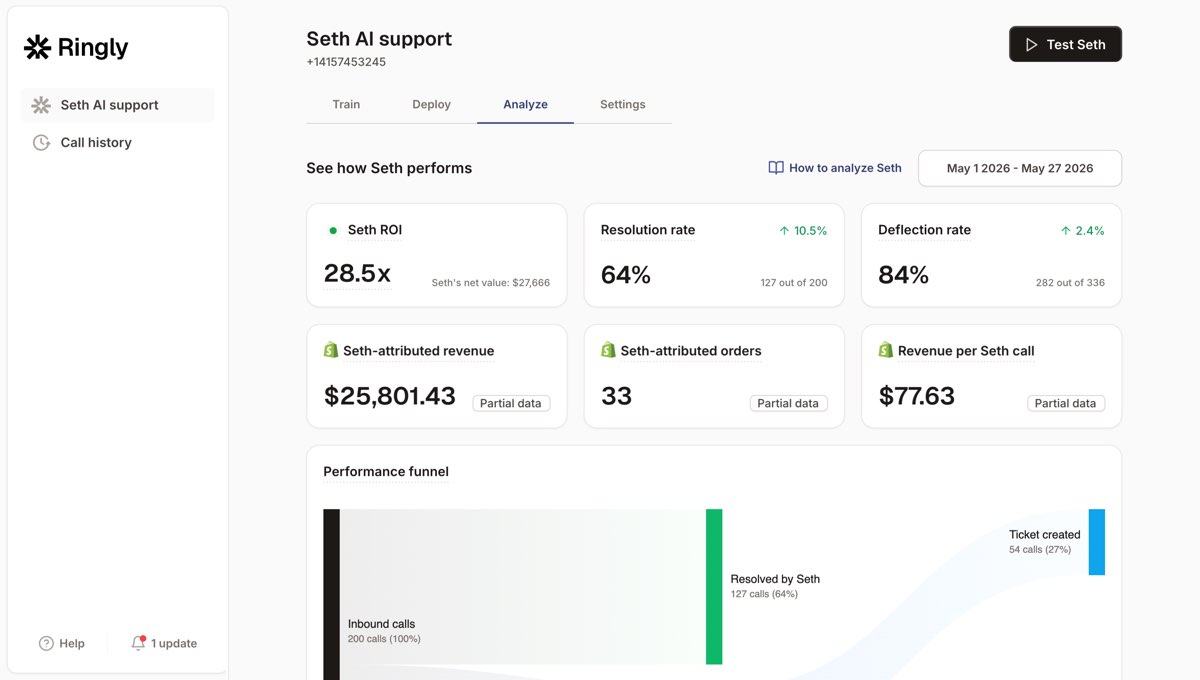
The math is the same one you run on tagging. Picture a 6-rep CS team at a $4,000 loaded cost each, so $24,000 a month. Route the routine calls (order status, returns, the same questions over and over) to the AI and a chunk of that spend stops being necessary, while your team keeps the genuinely hard calls. The order-status feature and smart call transfer do on the phone what your n8n workflows do in the ticket queue. Plans start at $349/mo with a 65% resolution guarantee, and you can see the full pricing breakdown. For the broader text-side setup, our n8n and Gorgias integration guide and the Gorgias API breakdown go deeper.
Frequently asked questions
Is there an official Gorgias node in n8n? No. Gorgias isn't among n8n's roughly 1,889 native integrations. You connect through the HTTP Request node pointed at the Gorgias REST API, which is the reliable path, or through an unverified community node if you self-host and don't mind it breaking.
How do I authenticate the Gorgias API in n8n? Gorgias uses HTTP Basic auth. Use your base URL (https://your-domain.gorgias.com/api), your account email as the username, and your API key as the password. Store it once as an n8n Basic Auth credential and reuse it across nodes.
Can I use a Gorgias community node on n8n Cloud? Not if it's unverified, and there's no verified Gorgias node today. Unverified community nodes are self-hosted only. On n8n Cloud, the HTTP Request node is your route to Gorgias.
What's the Gorgias API base URL? It's https://your-domain.gorgias.com/api, with your own subdomain swapped in. The tickets endpoint sits at /api/tickets. You can confirm yours under Settings, Account, REST API in Gorgias.
Can n8n answer Gorgias tickets automatically? Yes, for text. You can pull a ticket, run the message through an LLM, and post a reply or tag back via the API. It works for email, chat, and social tickets, not for inbound phone calls.
Does n8n plus Gorgias handle phone calls? No. Both tools work on text channels. Inbound calls don't become Gorgias tickets on their own, so n8n never sees them. Phone support needs a tool built for voice, like Ringly, which answers the call and then escalates into Gorgias.
What's the WISMO workflow and why does it matter? WISMO is "where's my order," and it's 30-40% of support tickets, more at peak. The n8n workflow fetches order status from Shopify and posts it into the Gorgias ticket so a rep doesn't have to look it up. It's the highest-volume thing you can automate on the text side.
Talk to us

The n8n Gorgias node setup handles your text tickets well. The piece it leaves open is the phone, and for a $10M-$100M Shopify brand with a visible number, that is where a real slice of revenue is quietly leaking after hours. A 30-min call is the fastest way to see what your phone line is actually doing.
The 3-layer guarantee.
- Live in 14 days or it's free until launched.
- 65% resolution in 90 days or we refund the last 3 months of subscription fees.
- We keep working free until we hit 65%.
Ruben (Ringly co-founder) takes these calls personally.



