


This post in 30 seconds.
- Every Gorgias webhook trigger, the real setup path, a payload example, and the retry behavior the popular guides get wrong.
- Gorgias retries a failed webhook 3 times, then auto-disables the integration after 500 consecutive failures (not 100, the number you'll see floating around).
- Written for ops and engineering at $10M-$100M Shopify brands wiring Gorgias into their stack, plus the one job webhooks can't do.
If you searched "Gorgias webhooks documentation," you probably landed on two kinds of pages already. The official docs, which are accurate but dry. And a handful of guides that explain the concept with a doorbell analogy and then stop right before the part you actually needed. One of those guides even quotes the wrong retry number.
This is the version that does both. The exact triggers, the setup path, a real payload, the reliability behavior, and a troubleshooting list. Then the thing none of those pages mention: what happens to the call that comes in while your webhook is busy syncing data.
We're Ringly, and we wire Gorgias into Shopify stacks for a living. If you run support ops or engineering at a $10M-$100M Shopify brand and you're trying to get your helpdesk talking to the rest of your tools, this is the reference. If you'd rather just walk through your setup with someone, book a 30-min call and we'll map it live.
What Gorgias webhooks actually are (and what Gorgias calls them)
First, the naming gotcha. Gorgias does have webhooks, but inside the product they're called HTTP Integrations. So when you search the docs for "webhooks" and find less than you expected, that's why. Same thing, different label.
A Gorgias webhook is an outbound HTTP request your helpdesk fires the moment something happens to a ticket. A new ticket arrives, a message comes in, a status changes, and Gorgias POSTs a small bundle of data to a URL you control. Your endpoint catches it and does something: updates a record, pings Slack, opens an issue.
That's the outbound direction. It's the opposite of the Gorgias REST API, which you call to read and write data into Gorgias. Webhooks push to you. The API lets you pull and push back. Most real integrations use both: a webhook tells you a ticket happened, then you call the API to grab the full detail.
One number to set expectations: the expected delay between the event and the request landing on your endpoint is around 10 seconds. Webhooks are near-real-time, not instant. If you need millisecond reactions, you're building the wrong thing. For everything support ops actually needs, 10 seconds is fine.
This all sits inside the broader Gorgias helpdesk platform, alongside macros, rules, the Gorgias AI agent, and the wider Gorgias feature set. Webhooks are the plumbing that connects it to everything else you run.
Every webhook trigger Gorgias fires
Here's the part the concept-only guides skip. Gorgias doesn't fire on "anything that happens." It fires on a specific, named set of triggers. Pick the wrong one and your integration runs at the wrong moment.
The HTTP Integration triggers available in settings:
- Ticket created: fires once, when a new ticket opens. Use this for CRM sync and new-conversation alerts.
- Ticket updated: fires on changes to a ticket (tags, fields, and more).
- Ticket message created: fires on each new message in a ticket, from the customer or an agent. This is the high-volume one, so plan for it.
- Ticket message failed: fires when an outbound message fails to send.
- Ticket self unsnoozed: fires when a snoozed ticket wakes itself back up.
- Ticket assignment updated: fires when a ticket is assigned or reassigned (this one is mutually exclusive with the others).
- Ticket status updated: fires when a ticket moves between open, closed, and so on (also mutually exclusive).
On the API and developer side, the event names you'll see referenced are ticket-created, ticket-updated, ticket-message-created, customer-created, and customer-updated, per the Gorgias developer documentation.
One real limitation worth knowing before you scope a project: Gorgias does not expose agent or user lifecycle webhooks. There's no agent-created, agent-deactivated, or agent-updated event. If you're trying to sync your support team roster to an HR or provisioning system off Gorgias events, you can't. You'll need to poll the API instead.
How to set up a Gorgias webhook, step by step
We wire these for Shopify brands all the time, so here's the path that actually works, not the abstract version.
- Open the right settings page. Click the settings icon at the bottom-left, then Account, then HTTP integration, then the Manage tab. Click Add HTTP integration. (Some accounts show it as Settings, then Integrations, then HTTP Integrations, then Create integration. Same destination.)
- Pick your trigger. Choose from the list above. For a CRM sync, that's usually Ticket created. For a live-conversation mirror, it's Ticket message created. Remember the two mutually-exclusive ones (assignment and status) can't be combined with the rest in a single integration.
- Set the method. Gorgias supports GET, POST, PUT, and DELETE. For sending data to your endpoint, you want POST.
- Set the content type. Request and response both support application/json or application/x-www-form-urlencoded. Use application/json unless your endpoint needs form encoding.
- Point it at your URL. Paste the public HTTPS endpoint you control (or a no-code URL from Zapier or Pipedream, covered below).
- Add authentication. Either header-based (a custom key like Authorization: Bearer
) or OAuth2 (Token URL, Client ID, Client Secret, Token Location, Token Key, optional Scopes). Don't ship an open endpoint with no auth. - Build the payload with template variables. Drop dynamic fields into the URL and body using {{ }} syntax (more on that next).
- Save and test with a real ticket. Gorgias doesn't give you a fake-event sandbox, so create a test ticket and watch your endpoint receive it. This is the step people skip, and it's the one that catches the bug.
That's the whole thing. For a basic CRM sync, you're done in 20 minutes. For anything with branching logic or data transformation, budget more, because now you own an endpoint that has to stay up.
The webhook payload and template variables
The payload is whatever you tell Gorgias to send. You build it yourself using template variables, which is more flexible than a fixed schema and slightly more work.
A typical JSON body for a Ticket created integration looks like this:
{ "ticket_id": "{{ticket.id}}", "subject": "{{ticket.subject}}", "customer_email": "{{ticket.customer.email}}", "status": "{{ticket.status}}", "channel": "{{ticket.channel}}" }
Gorgias substitutes each {{ }} token with live ticket data at send time. So {{ticket.customer.email}} becomes the real email, {{ticket.id}} becomes the real ID, and your endpoint receives clean JSON.
The template variables are the actual power of Gorgias webhooks, because you decide exactly which fields leave your helpdesk. You can keep the payload tiny (just an ID, then call the API for the rest) or send a fuller object. For a Shopify integration, this is where you'd pass the order number or email so the receiving system can match the customer.
There's a return path too. When your endpoint responds, Gorgias can display the response data back inside the ticket sidebar as a custom widget, with its own variables and even a border color. That's how teams surface a customer's lifetime value or last order right next to the conversation, without leaving Gorgias.
Retry behavior and reliability (the part most guides get wrong)
Here's the section worth reading twice, because the most-shared guide on this topic has the key number wrong.
The accurate behavior, straight from the Gorgias HTTP Integrations docs:
- Each request has a 5-second timeout. If your endpoint doesn't respond in 5 seconds, that attempt counts as a failure. So your handler has to be fast. Acknowledge first, process later.
- Gorgias retries up to 3 times with exponential backoff. First retry after 10 seconds, then 20, then 40. That's your buffer for a brief blip.
- The integration auto-disables after 500 consecutive failures. Not 100. A popular third-party guide says 100, and that's the kind of detail that quietly burns you when you're capacity-planning. The real threshold is 500 in a row.
- The failure count resets after one successful request. So an intermittent endpoint won't slowly march toward a shutoff as long as it's mostly succeeding.
The practical takeaway: respond to Gorgias in under 5 seconds, every time, even if the real work takes longer. The pattern is to accept the webhook, return a 200 immediately, and push the heavy processing to a background queue. Brands that block on a slow downstream call inside the webhook handler are the ones that hit timeouts and, eventually, the silent disable.
That auto-disable is a double-edged thing. It protects your endpoint from getting hammered forever, but it also means a broken integration can go dark without anyone noticing. Monitor it. If you don't want to own that reliability problem at all, Gorgias points teams at Hookdeck for managed ingestion.
No-code vs build-it-yourself
Not every webhook needs an engineer. The honest answer depends on what you're connecting and how much logic sits in the middle.
| Approach | Setup effort | Best for | Watch out for |
|---|---|---|---|
| Direct HTTP integration (your endpoint) | High (you build and host it) | Custom logic, high volume, full control | You own uptime, retries, the 5s timeout |
| Zapier | Low (visual, no code) | Simple event-to-action, small teams | Cost scales with task volume |
| Pipedream | Low-medium (visual + optional code) | Mixed no-code and light scripting | Same volume-based cost creep |
| Managed sync (MESA, Hookdeck) | Medium | Reliable ingestion without owning infra | Another vendor in the stack |
If the integration is one trigger to one action with no transformation, use Zapier or Pipedream and move on. Gorgias hands you a special URL, you paste it, you're live. The moment you need branching logic, data mapping across systems, or you're firing on Ticket message created at real volume, the per-task pricing on those platforms stops being cheap, and a direct integration usually wins.
For most $10M-$100M brands, the split is: no-code for the quick internal alerts, a real endpoint for anything customer-facing or revenue-touching.
Troubleshooting common webhook problems
The failures we see most often, and the fix for each:
- The integration turned itself off. You hit 500 consecutive failures. Check your endpoint logs, fix the root cause (usually a 500 error or a timeout), then re-enable. Add monitoring so you catch it at failure 5, not 500.
- Requests time out. Your handler is doing too much inside the 5-second window. Acknowledge with a fast 200, then process async.
- Duplicate events. Webhooks can deliver the same event more than once, especially around retries. Make your handler idempotent. Key off ticket.id plus a timestamp so reprocessing is a no-op.
- 401 / auth errors. Your header key or OAuth2 config drifted. Re-check the token and that the header name matches exactly.
- It fires too often. You picked Ticket message created when you wanted Ticket created. Message-created fires on every reply, customer and agent. Switch the trigger.
- You can't test it. There's no event sandbox. Create a real test ticket and watch the endpoint. A request-bin (or your no-code platform's run log) makes this fast.
Where webhooks stop: the phone call
Here's the thing the docs never say, and the reason we wrote this post.
A webhook moves data. It updates a CRM, it pings Slack, it opens a Jira ticket. What it does not do, and never will, is answer a ringing phone. A webhook fires after a ticket exists. The phone call that comes in at 7pm on a Saturday, while your reps are offline, isn't a ticket yet. It's a customer holding their phone, and in about 10 seconds they're going to hang up.
The numbers on this are brutal. Businesses answer only 37.8% of inbound calls, and 37.8% roll straight to voicemail, according to AmbsCallCenter's phone stats. Of the callers who can't reach a person, 85% never call back and 62% switch to a competitor, per a PCN missed-call revenue study. And the calls that do get through are mostly the same questions your team already answers all day. WISMO ("where's my order") runs 30-40% of tickets in normal periods and 50%+ at peak, each one costing $5 to $22 to handle manually, per Salesforce.
No webhook chain fixes that. You can sync the data perfectly and still lose the call.
That's the gap Ringly fills. Ringly is AI phone support for Shopify brands. The AI answers inbound calls 24/7, finds the order in Shopify, handles returns and product questions, and escalates the genuinely hard ones cleanly into Gorgias, the helpdesk you already run. Across 50+ active brands it resolves 73% of calls autonomously at roughly $0.42 per resolved call. WashCo, a Shopify brand we launched, recovered $22,664 in its first 7 days on the phone. Most of those calls are the same WISMO questions your reps field by hand today.
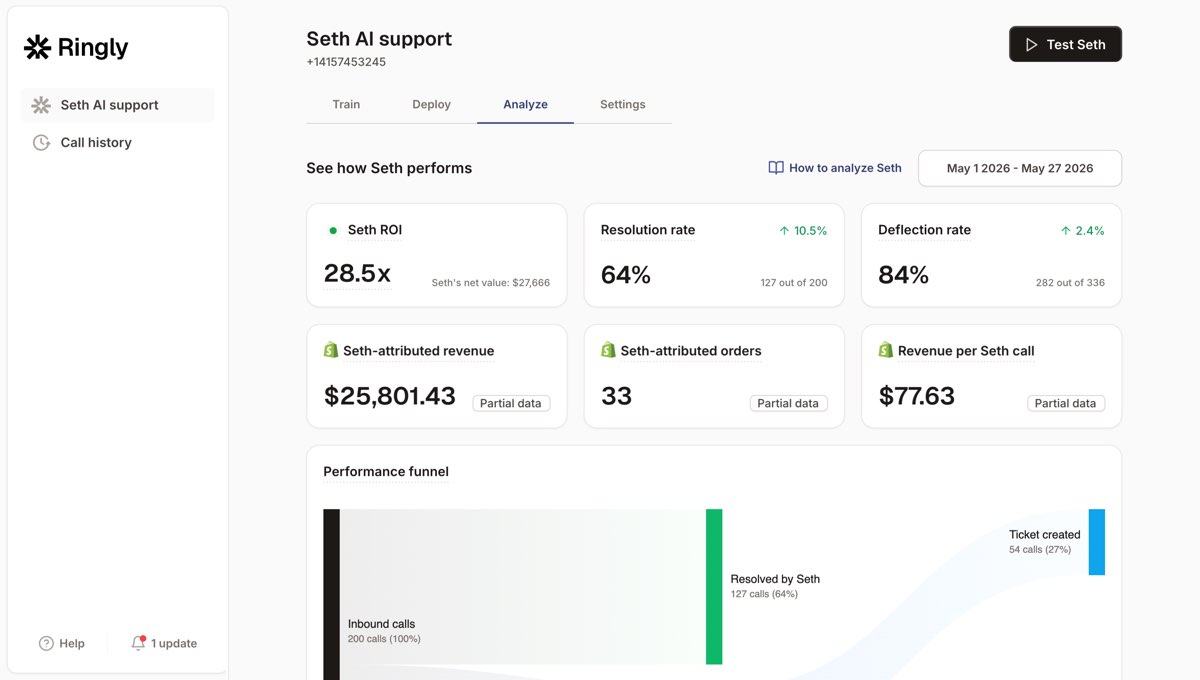
Think of it as the layer your webhooks can't reach. Webhooks connect Gorgias to your tools. Ringly connects the phone line to your store, then hands the exceptions back to Gorgias so your reps only touch what actually needs them.
Run the math on what that's worth. A typical $50M Shopify brand on a 6-rep CS team:
| Line item | Today | With Ringly |
|---|---|---|
| 6 reps × $4K loaded per rep | $24,000/mo | n/a |
| Ringly (illustrative) | n/a | $5,000/mo |
| Net monthly CS spend | $24,000/mo | $5,000/mo |
| Monthly savings | n/a | $19,000/mo |
| Annual savings | n/a | $228,000/yr |
That's roughly 70% of the repeatable calls (order status, returns, the same five questions over and over) handled by the AI, while the other 30% still go to your team, who now have time to actually solve them.
If your phone goes quiet after hours while your Gorgias queue keeps filling, book a 30-min call and we'll show you what those missed calls are worth.
Frequently asked questions
Does Gorgias have webhooks?
Yes, though inside the product they're called HTTP Integrations. They let Gorgias send an outbound HTTP request to a URL you control whenever a ticket event happens. You'll find them under Settings, Account, HTTP integration.
What events can a Gorgias webhook trigger on?
The HTTP Integration triggers are ticket created, ticket updated, ticket self unsnoozed, ticket message created, ticket message failed, ticket assignment updated, and ticket status updated. The last two are mutually exclusive with the rest. There are no agent or user lifecycle webhook events.
What does a Gorgias webhook payload look like?
You build it yourself with template variables like {{ticket.id}} and {{ticket.customer.email}}, which Gorgias swaps for live data at send time. You control which fields leave your helpdesk, so the payload can be a tiny ID-only body or a fuller JSON object.
How many times does Gorgias retry a failed webhook?
Each request has a 5-second timeout, and Gorgias retries up to 3 times with exponential backoff (10 seconds, then 20, then 40). If 500 requests fail in a row, the integration auto-disables. The failure count resets after one successful request.
Why did my Gorgias HTTP integration turn off by itself?
It hit 500 consecutive failures, which auto-disables the integration to stop it hammering a dead endpoint. Check your endpoint logs for timeouts or 500 errors, fix the cause, and re-enable. Add monitoring so you catch the problem long before it reaches the shutoff.
Can I set up Gorgias webhooks without code?
Yes. Tools like Zapier and Pipedream give you a webhook URL you paste into the HTTP integration, plus a visual builder for the action. It works well for simple event-to-action flows, though per-task pricing climbs as volume grows.
Do Gorgias webhooks handle phone calls?
No. A webhook fires after a ticket exists and moves data between systems. It can't answer a live inbound phone call. For that you need a phone agent, like Ringly's AI phone support, which picks up the call and escalates the hard ones into Gorgias.
Talk to us

Webhooks connect Gorgias to your stack. They can't pick up the phone. If you run a $10M-$100M Shopify brand and calls are leaking out the bottom of your support setup, a 30-min call is the fastest way to see what that's costing you.
The 3-layer guarantee.
- Live in 14 days or it's free until launched.
- 65% resolution in 90 days or we refund the last 3 months of subscription fees.
- We keep working free until we hit 65%.
Ruben (Ringly co-founder) takes these calls personally.



