


This post in 30 seconds.
- A working setup path for Gorgias on Shopify: connect your store, add your channels, build your first macros and rules, turn on AI Agent, and go live, in the order that actually works.
- The install takes about 30 minutes. Getting macros, rules, and AI Agent tuned well takes a few days, so plan the week, not the afternoon.
- Written for the founder, COO, or Head of CX at a $10M to $100M Shopify brand running a paid help desk, 3 to 12 reps, and a phone number on the site.
Most setup guides for Gorgias are either the official docs, which assume your account is already built, or AI Agent walkthroughs that skip the part where you actually wire your store and your team. So I set up a fresh Gorgias instance on a test Shopify store and timed every step, then mapped it to what a real support team needs before it can trust the thing in front of customers.
If you run customer experience at a Shopify brand doing $10M to $100M, you already know the Monday queue. The same questions over and over, the after-hours voicemails nobody returns, the WISMO pile that rebuilds itself every weekend. This guide gets your help desk live fast and points out the one thing it still won't cover when you're done. If you want to skip the reading and just talk through your own setup, book a 30-min call and we'll walk it with you.
Before you start: what a Gorgias setup actually needs
The install is fast. The tuning is the part teams underestimate, so block out a week, not a lunch break. A basic Gorgias install runs about 30 minutes: find it in the Shopify App Store, approve permissions, connect your email, drop in the chat widget. Getting your rules dialed in, training AI Agent on your catalog, and connecting every channel takes days, sometimes weeks if nobody owns it.
Three things to line up first.
- Shopify admin access. You need someone who can install an app and approve permissions. To configure AI Agent later, you'll need Lead, Admin, or Account Owner permissions inside Gorgias.
- A channel list. Write down every place customers reach you today: support email, chat, Instagram, Facebook, TikTok, WhatsApp, SMS, phone. You'll connect them one at a time.
- An owner. Pick the person who owns this build start to finish. Setups stall when "the team" owns it and nobody does.
One timing note for 2026. Gorgias retired its old Autoresponder Rules. They're gone for any account created after September 2024, and older accounts can use them only until January 30, 2026, after which the feature stops. If you've been leaning on auto-replies built on those rules, this is the year you move that logic into AI Agent. More on that below.
Gorgias is a help desk built for ecommerce, and it earns its reputation on the Shopify side specifically. Worth knowing going in: on Trustpilot it sits around 2.5/5 across 143 reviews, roughly 60% five-star and 34% one-star, which tells you the product works but the support experience can be uneven. Build with that in mind and document your own setup as you go.
Step 1 and 2: connect Shopify and add your channels
Connecting Shopify is the move that makes everything else useful, because it puts live order data inside every ticket. Install Gorgias from the Shopify App Store and approve the permissions. Once it's connected, every incoming ticket shows the customer's profile and recent orders in the right-hand sidebar. That sidebar is the data source for your macros, your variables, and AI Agent, so this step gates the rest.
If you run more than one store, you can connect multiple Shopify accounts to one Gorgias dashboard. Multi-store connections are unlimited on every plan, which matters if you're a brand group. Our full Gorgias Shopify integration guide goes deeper on the connection itself.
Now add your channels. Email, live chat, Instagram, Facebook, TikTok, and WhatsApp are included in the plans. Phone and SMS are add-ons, billed separately per ticket and tiered by volume, so they're a deliberate choice, not a default.
- Email. Connect your support address and set forwarding so inbound mail lands as Gorgias tickets. This is usually the highest-volume channel, so get it clean first.
- Live chat. Add the chat widget to your storefront. Decide up front whether it's staffed during business hours or always on.
- Social. Connect Instagram, Facebook, TikTok, and WhatsApp if customers reach you there. Each one becomes a ticket stream in the same inbox.
- Phone and SMS. These are paid add-ons. Add them only if you're committing to staff them, because an unstaffed phone line is worse than no line. Hold that thought for the last section.
That's the spine. One inbox, one customer record, every channel feeding it. From here it's about teaching the system how to respond.
Step 3: set up your inbox and views
Views are how a 5-rep team stops drowning in one giant queue, so build them before you invite anyone. Use the dropdown menu in the top-left corner of the sidebar to switch between key areas: Inbox, Workflows, Statistics, and Customers. The Inbox is where the work happens, and Views are saved filters that slice it into something a human can actually work through.
When I sat in the fresh inbox with test tickets flowing in, the difference between "usable" and "chaos" came down to three things: a few sharp Views, consistent tags, and clear assignment. Set those and the queue reads itself.
- Views. Create saved filters like "Unassigned," "WISMO," "Returns," and "VIP." Reps work their View, not the whole pile.
- Tags. Pick a small, consistent tag set. Tags drive your rules and your reporting later, so don't let everyone invent their own.
- Assignment. Decide whether tickets auto-route by View or get picked up manually. For a 3 to 12 rep team, routing by View plus a round-robin on the busy queues works well.
Keep it lean. You can add Views forever, but ten clean ones beat forty nobody trusts.
Step 4: build your first macros
Macros are the single biggest time-saver in week one, because they turn the same answer typed 50 times a day into one click. A macro is a pre-written response your team can drop in, and when Shopify is connected it can also take action on the order.
Here's the path: open the dropdown in the top-left, go to Workflows, then Tools, then Macros, then Create macro. Give it a name, write the response, add any tags, and attach actions.
With Shopify connected, a macro can duplicate, cancel, refund, or edit an order right from the ticket. So "process this refund" becomes one click instead of five. Gorgias says combining rules and macros lets a team handle around 20% of tickets with personalized, one-click answers.
Build these five first. They cover the bulk of a normal week.
- WISMO. A "where's my order" reply that pulls the tracking link from the connected order. WISMO is 30% to 40% of tickets in normal periods and over 50% at peak, so this one earns its keep immediately.
- Return request. A reply that explains your return window and attaches the next step, tagged "return" for reporting.
- Refund. A reply paired with the Shopify refund action, so the agent confirms and processes in one move.
- Cancel order. A reply paired with the cancel action, for the "I ordered the wrong size" message.
- Product question. A reusable answer for your top three product questions, the ones your team already knows by heart.
For more on these patterns, our Gorgias features breakdown maps macros to the specific support jobs they replace.
If you're standing this up because your CS payroll is climbing faster than your order volume, that's the real reason to read on. Book a 30-min call and we'll do the math on your queue live.
Step 5: set up rules, and what changed in 2026
Rules are the "if this, then that" layer that routes and tags tickets automatically, and they're separate from the answer itself. A rule watches for a condition, like a keyword or a channel, then does something: tag the ticket "refund request," assign it to a person or team, or trigger an action. Macros write the reply. Rules move the ticket to the right place.
Rules and AI Agent can run on the same ticket. The rule handles your conditional logic, the routing and tagging. AI Agent handles the actual conversation. They're complementary, not competing.
The 2026 change matters here. The old Autoresponder Rules, the simple "if keyword, send this template" auto-replies, are retired. New accounts never had them, and older accounts lose them on January 30, 2026. Gorgias now points you to AI Agent for automated replies, while standard rules keep doing routing and tagging. So if your team built a wall of autoresponder rules over the years, the migration plan is: keep the routing rules, move the auto-reply logic into AI Agent.
Start with a handful of rules, not fifty.
- Tag by intent. Tag tickets "wismo," "return," or "refund" based on keywords so your Views and reports stay clean.
- Route by channel. Send chat to one team, email to another, if that's how you're staffed.
- Flag VIPs. Tag high-value customers so they jump the queue.
Our Gorgias ticketing system guide goes deeper if you're rebuilding a complex routing setup.
Step 6: turn on AI Agent (the basics)
AI Agent can't do anything until you feed it knowledge, so that's step one, not an afterthought. AI Agent needs at least one source of knowledge before you can enable it. Here's the order Gorgias lays out in its go-live guide.
- Add knowledge. Go to AI Agent, then Knowledge, then Create content. Pull from your store website, help center articles, up to 10 public URLs, uploaded docs, or custom guidance you write yourself.
- Create skills. Go to AI Agent, then Skills, then Create skill. Start with your highest-volume conversation types: order status, returns, cancellations.
- Add actions (optional). Go to AI Agent, then Support Actions, then Create action. Actions let it complete a task, like a cancellation, without a human handoff. You don't need them to launch.
- Set tone and handover. Customize the tone of voice, and keep your handover rules minimal at first. Too many escalation triggers and the AI hands off everything, which defeats the point.
- Test. Use the Test feature to run conversations across email, chat, and SMS before anything goes to real customers.
- Deploy per channel. Toggle Enable AI Agent on Email, Chat, or SMS, channel by channel. Start with one.
- Monitor. Review at least 10 tickets in your first week and give feedback to tune it.
Two honest limits to plan around. AI Agent only reads a customer's last 10 orders, and it doesn't learn from your historical ticket data, so the quality of your knowledge sources is everything. And on cost: AI Agent runs $0.90 per interaction on annual plans, $1.00 on monthly, and when it resolves a ticket you pay both a help desk ticket fee and the AI fee. Gorgias caps automation at roughly 60% of email and chat, and published case studies land between 26% and 56%, so budget for "most of the easy stuff," not "everything." Our Gorgias AI Agent deep dive has the full picture.
Step 7: reporting and going live
Reporting is where you find out if any of the setup actually worked, so wire it before you call it done. Open the Statistics area from the top-left dropdown. The numbers worth watching from day one:
- First response time. The single metric customers feel most.
- Resolution rate. How many tickets close without bouncing around.
- Ticket volume by channel. Tells you where to point macros and rules next.
- Automation rate. What share AI Agent and your rules actually handle.
Then run a short go-live checklist before you flip everything on.
- Shopify connected and showing orders in the ticket sidebar.
- Email forwarding tested with a real message.
- Chat widget live on the storefront.
- Five core macros built and assigned to the team.
- Rules tagging and routing the main intents.
- AI Agent tested, deployed on one channel, with monitoring scheduled for week one.
Hit those and you have a working help desk. For the broader picture of running support on Shopify, our ecommerce customer service guide covers the operating side, and Gorgias pricing breaks down what each plan really costs once you add tickets, seats, and the AI fee.
The one channel this setup leaves open: live phone calls
You just wired email, chat, SMS, and social. The phone line is the channel a standard Gorgias setup still leaves wide open. Phone and SMS in Gorgias are paid add-ons, and even with the phone add-on, you're routing calls to humans through a ticketing layer, not resolving them automatically the way AI Agent resolves chat and email.
Here's the part that's easy to miss. The same repeatable questions you just automated, WISMO, returns, product questions, arrive by phone too. In the call data we see across Ringly customers, that repeatable set is 70% to 80% of inbound phone contacts, the identical questions your macros and AI Agent now answer on email and chat. And a chunk of callers won't use the website at all, so they pick up the phone instead. When that call hits voicemail, 85% of callers who can't reach a person never call back and 62% switch to a competitor.
So your setup handles the typed channels and the spoken one still routes to a person, or to voicemail after 6 p.m.
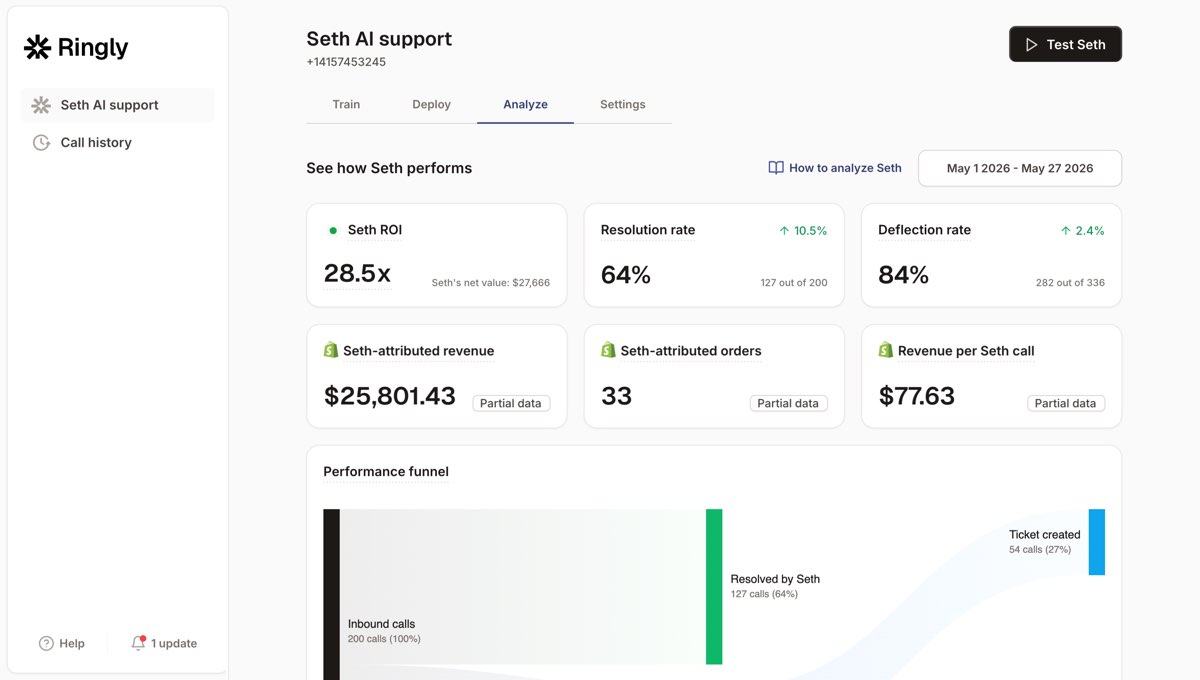
This is the gap Ringly.io fills. Ringly is AI phone support for Shopify brands. It answers inbound calls 24/7, finds orders in your store, handles returns and exchanges, and answers product questions from your knowledge base. It doesn't replace Gorgias, it sits in front of it: calls that need a human escalate cleanly into the help desk you just built. Across 50+ brands, the AI resolves 73% of calls on its own at roughly $0.42 per resolved call. WashCo, a Shopify brand we launched, recovered $22,664 in attributed revenue in its first 7 days on the phone.
Here's the cost shape if you're staffing the phone with people today.
| Line item | Today | With AI phone support |
|---|---|---|
| 6 reps × $4K loaded per rep | $24,000/mo | n/a |
| AI phone support (~$5K/mo) | n/a | $5,000/mo |
| Net monthly CS spend | $24,000/mo | $5,000/mo |
| Monthly savings | n/a | $19,000/mo |
| Annual savings | n/a | $228,000/yr |
That's roughly 70% of repeatable calls, the same five things over and over, handled by the AI, with the genuinely complex calls escalating to your team. If you want to see what your store is leaving in voicemail after-hours, our 24/7 ecommerce phone support guide and the WISMO calls breakdown both go deeper.
Frequently asked questions
How long does it take to set up Gorgias? The basic install takes about 30 minutes: install from the Shopify App Store, approve permissions, connect email, add the chat widget. Getting macros, rules, and AI Agent tuned to your catalog takes a few days, sometimes weeks if nobody owns the project full-time.
Do I need to know how to code to set up Gorgias? No. The whole setup, connecting Shopify, adding channels, building macros and rules, turning on AI Agent, is point-and-click. You need Shopify admin access to install the app and Lead, Admin, or Account Owner permissions in Gorgias to configure AI Agent.
What's the difference between macros, rules, and AI Agent? Macros are one-click canned replies that can also take a Shopify action like a refund. Rules are "if this, then that" logic that tags and routes tickets automatically. AI Agent handles full conversations on its own. Rules and AI Agent can run on the same ticket.
What happened to Gorgias autoresponder rules? They're retired. New accounts created after September 2024 never had them, and older accounts lose them on January 30, 2026. Gorgias now directs brands to AI Agent for automated replies, while standard rules still handle routing and tagging.
How much does Gorgias cost per ticket in 2026? Plans run from Starter at $10/mo (50 tickets) to Advanced at $900/mo (5,000 tickets), with Enterprise custom. Ticket overages are $0.36 to $0.40 each, and AI Agent interactions are $0.90 to $1.00 each on top of the ticket fee. Phone and SMS are separate add-ons.
Can Gorgias answer phone calls? Not autonomously. Phone is a paid add-on that routes calls to human reps through the ticketing layer. AI Agent automates email, chat, and SMS, but live inbound voice still goes to a person or to voicemail, which is the channel this setup leaves open.
Does Gorgias work with my existing phone number and helpdesk? Gorgias centralizes email, chat, SMS, and social in one inbox alongside your Shopify data. For the phone side, a tool like Ringly answers calls with AI and escalates the ones that need a human straight into Gorgias, so you keep your number and your help desk.
Talk to us

If you run a $10M to $100M Shopify brand and you just built a help desk that handles every channel except the phone, a 30-min call is the fastest way to see what those missed calls are costing you.
The 3-layer guarantee.
- Live in 14 days or it's free until launched.
- 65% resolution in 90 days or we refund the last 3 months of subscription fees.
- We keep working free until we hit 65%.
Ruben (Ringly co-founder) takes these calls personally.



