


This post in 30 seconds.
- The Gorgias email setup that actually holds at volume: the direct-vs-forwarding decision, the rule stack, the macro library, and the SLA config that drops your first response time.
- Median first email response on Gorgias is about 5 hours. Customers expect under one. Sub-1hr replies keep 71% of customers; 24-hour replies keep 48%.
- Written for founders, COOs, and Heads of CX at $10M-$100M Shopify brands running 3-12 reps, plus the one channel email structurally can't cover.
Monday, 8:34am. Your Gorgias queue has 200-plus tickets stacked since Friday. The subject lines are the same five things over and over: WISMO, refund, WISMO, "where is my order???", exchange. Your first reply on the oldest one is going out around hour five. Your reps are already behind before they finish coffee.
If you run customer experience at a Shopify brand doing $10M to $100M, this is the queue you inherited. Gorgias is a strong helpdesk for it, but most teams run the email setup on defaults and then wonder why first response time won't move. This post is the setup that actually holds when WISMO is 30% of your tickets, and an honest look at where email tops out.
We build phone support for 50+ Shopify brands, so I look at how email and phone hand off to each other every day. If your first response time is stuck and the same questions keep flooding in, book a 30-min call and we'll walk through your queue and your call log together.
How Gorgias turns email into tickets
Every email that hits your support address becomes a ticket. That ticket routes to your team no matter which channel it came from, and it stays open until someone works it and closes it, with or without a reply. That's the whole model, and it's why a Gorgias helpdesk beats a raw Gmail inbox the moment you have more than one rep.
The thing that makes email-to-ticket worth it isn't the inbox, it's the context stapled to every message. When a ticket opens, your rep sees the customer's full order history, shipping status, and prior conversations inline, without leaving the screen. On a default mail client they'd be tabbing into Shopify on every reply. The Gorgias Shopify integration is what pulls that order data in, and it's the single biggest reason Shopify brands pick it.
One setup note people miss: on connect, Gorgias imports up to two years of past email. Your team starts with history instead of a blank slate, which matters when a customer references an order from last spring. It also means your reporting has a baseline from day one, so you can see whether first response time is actually trending down after you tune the setup.
WISMO ("where is my order") runs 20 to 40% of ecommerce tickets, and climbs past 50% at peak, according to Salesforce. So the math is simple. A third of your queue is the same lookup. The email setup either turns that into a fast, templated reply or it doesn't, and most don't.
What separates a good Gorgias email setup from a default one is whether you've taught it your patterns. The helpdesk ships with the plumbing. The order context, the macros, the routing rules, that's the part you build, and it's the part that decides whether your reps spend the day answering or the day triaging. Most of what follows is ecommerce customer service hygiene applied to one specific tool.
Direct integration vs forwarding: the one setup decision
There are two ways to get email into Gorgias, and picking the wrong one is where setups quietly break.
Direct integration connects your Gmail or Outlook in a few clicks under Settings, Channels, Email. Gorgias recommends it for brands sending and receiving fewer than 500 emails a day, which covers most teams on the Basic or Pro plan.
Automatic forwarding gives you a unique Gorgias address (something like support-123@email.gorgias.com) and you point your provider's mail at it. This is the path for Advanced and Enterprise, or for anyone over 500 emails a day.
| Setup path | Best for | Volume | Plan |
|---|---|---|---|
| Direct Gmail/Outlook | Fastest setup, simplest | Under 500 emails/day | Basic, Pro |
| Automatic forwarding | High volume, multiple addresses | Over 500 emails/day | Advanced, Enterprise |
Two things break deliverability if you skip them. First, verify your domain with SPF and DKIM records, or your replies start landing in spam. Second, if you're forwarding a shared inbox, an alias, or a group address, know that Gorgias doesn't officially support those, though it doesn't block them either. Plenty of teams forward info@ and orders@ into one queue and it works. Just test it before you route real volume.
Pick forwarding if you have more than one support address or you're past 500 emails a day. Pick direct if you have one inbox and want it live this afternoon. If you're weighing the broader stack, our breakdown of email help desk software and the Shopify helpdesk app landscape covers the alternatives.
The rule and macro stack that holds at volume
Defaults won't move your numbers. The teams whose first response time actually drops have built two things: a rule stack that triages before a human touches the ticket, and a macro library that lets reps answer in seconds.
Rules are if-then automations that run the moment a ticket lands. A simple one: if the subject contains "refund," add the "Refund Request" tag and assign it to whoever owns billing. Build a handful and most of your queue sorts itself.
Here's a starter rule stack worth setting up first:
- WISMO routing: if the body mentions "where" plus "order" or "tracking," tag it WISMO and surface the order status macro.
- Refund and return triage: keyword "refund," "return," or "exchange" tags the ticket and assigns the right rep.
- VIP flag: if the customer's lifetime spend is over your threshold, tag VIP so it never sits in the general queue.
- After-hours auto-reply: outside business hours, send one honest acknowledgment with a realistic timeframe, not a fake "we'll be right with you."
- Spam and noreply filter: auto-close marketing bounces and noreply threads so they don't inflate your ticket count.
Macros are the other half. A macro is a reply template that auto-fills store data: the customer's name, their last order number, a live tracking link. You get the speed of a template with a reply that still reads like a person wrote it, as long as someone keeps the library current. Stale macros are worse than none, because they ship wrong tracking links at scale.
A macro library worth building covers your top ten ticket reasons, no more to start. Order status with a live tracking variable. Return started, with the policy window pulled in. Exchange instructions. Discount-code-not-working. Shipping-delay apology with a real timeframe. Address change before fulfillment. Damaged-on-arrival with the photo request. Cancel request. Subscription pause. Wrong-item-received. Name each one by the customer's words, not yours, so a new rep can find it under pressure. Then review the list monthly and kill the macros nobody uses.
One discipline that keeps macros from sounding canned: leave the first line blank for a human sentence, then let the macro fill the rest. The customer gets a personal opener and the rep gets the speed. It's a small thing that protects the part of email that still feels human.
The reason this matters: the same questions over and over are exactly what automation is for. A tight rule and macro stack is the difference between five reps drowning and three reps clearing the queue by lunch. If you want the full playbook, we wrote up how to scale customer service without hiring and a deeper WISMO ticket breakdown.
Set your SLA and business hours so first response actually drops
This is the part most teams never configure, and it's the one that moves the metric your founder keeps asking about.
The gap between expectation and reality is brutal. Around 89% of customers expect a response within one hour, while the average company takes 12 hours and 10 minutes, per EmailAnalytics. On Gorgias specifically, the median first email response runs about five hours, and only the top quartile of merchants clear it inside an hour.
That gap costs real money. Sub-one-hour email replies retain 71% of customers, while replies that take 24 hours retain 48%, according to LiveChatAI. Weekends are worse: email gets ignored roughly 8x more on Saturdays and Sundays, Netomi found.
So set the targets inside Gorgias and let the tool hold your team to them:
- Business hours: define them honestly. An auto-reply that promises an hour at 11pm on Sunday just sets a trap.
- SLA targets by type: aim for one hour on pre-purchase, two hours on order issues, four on returns. Double each window during peak.
- Priority views: surface the oldest unanswered tickets first, not the newest, so nothing ages out past a day.
"My customers also feel like it's a normal person. They feel like they can communicate if they have questions."
Claudia Droge, TechCraft Studio
A reply that reads human and arrives fast is the whole game. For the full benchmark set by industry, our customer service response time benchmarks post has the targets to copy.
What the Gorgias email setup costs (and where it bills twice)
Gorgias prices per ticket, not per seat, which is unusual and worth understanding before you scale. Five agents or fifty, the subscription is the same. What changes is ticket volume.
| Plan | Monthly price | Tickets/mo | Overage |
|---|---|---|---|
| Starter | $10 | 50 | $0.40/ticket |
| Basic | $60 | 300 | $0.40/ticket |
| Pro | $360 | 2,000 | $0.36/ticket |
| Advanced | $900 | 5,000 | $0.36/ticket |
| Enterprise | Custom | 5,000+ | Custom |
Annual billing knocks roughly 16% off (Basic $50, Pro $300, Advanced $750). The full picture is in our Gorgias pricing breakdown.
Here's the honest catch. The AI Agent that handles email is billed twice: once as a helpdesk ticket, and again as an automation fee of roughly $0.90 to $1.00 per resolved conversation. It's the most common pricing complaint in reviews, and it means the "automation" that's supposed to save money still meters against you on volume. Gorgias scores well overall (4.6/5 on G2, 4.7/5 on Capterra), but reviewers flag the per-ticket balloon, occasional reliability issues, and an AI Agent that runs email, chat, and SMS only. We covered the detail in our Gorgias AI customer service reviews writeup.
None of that makes Gorgias the wrong call for email. It makes it worth pricing your real volume before you commit. If you'd rather talk it through against your actual numbers, book a 30-min call and we'll do the math live.
Where email tops out: the call that rings right now
Here's the limit no setup fixes. Email and chat are pull channels. A ticket can sit in a queue for five hours and the customer, mostly, waits. A ringing phone is a push channel. It rings now, and if nobody picks up, the customer hangs up and buys somewhere else.
That's the one job a ticket queue structurally can't do. Gorgias knows it too: its AI Agent runs on email, chat, and SMS, with no phone automation in the box. So the calls still land on your reps, or on voicemail, or nowhere.
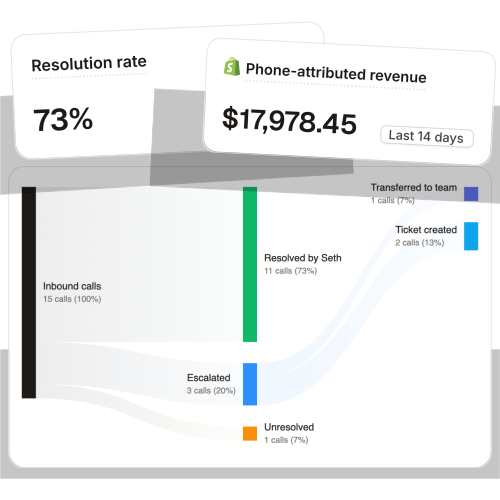
Running phone support for 50+ Shopify brands, the pattern I see is this: the email tickets that escalate to a live call are almost never the ones the rules caught. They're the ones a customer gave up typing about and dialed instead. That's the call that matters, and it's the one your queue can't hold.
Ringly.io is AI phone support for Shopify brands. It answers inbound calls 24/7, finds orders, handles returns, and answers product questions, then escalates the hard ones cleanly back into Gorgias or whatever helpdesk you already run. Across 50+ brands the AI resolves 73% of calls on its own at roughly $0.42 per resolved call. WashCo, a Shopify brand we launched, recovered $22,664 in its first 7 days on the phone. It sits beside your email setup, not on top of it. See how the AI phone support agent for Shopify handles the channel email can't, and our 24/7 ecommerce phone support and ecommerce phone support guides go deeper on why phone is its own problem.
Frequently asked questions
How do I connect my email to Gorgias? Two ways. Direct integration links Gmail or Outlook in a few clicks under Settings, Channels, Email, and Gorgias recommends it under 500 emails a day. Above that, or on Advanced and Enterprise, you set up automatic forwarding to a unique Gorgias address.
Direct integration or forwarding, which should I use? Direct if you run a single inbox and want it live fast. Forwarding if you have multiple support addresses or you're past 500 emails a day. Either way, verify SPF and DKIM so replies don't hit spam.
Can Gorgias handle a shared inbox or alias? Officially, no, Gorgias doesn't support aliases, groups, or shared addresses. In practice it doesn't block forwarding from them, and many teams route info@ and orders@ into one queue. Test it before you send real volume through it.
What's the difference between macros and rules in Gorgias? Macros are reply templates that auto-fill store data like order numbers and tracking links, so reps answer fast. Rules are if-then automations that triage tickets on arrival, like tagging and assigning every refund email. You want both.
How much does Gorgias cost for email support? Plans run from $10/mo (Starter, 50 tickets) to $900/mo (Advanced, 5,000 tickets), priced per ticket rather than per seat. Note the AI Agent is billed twice: as a ticket and as a roughly $0.90 to $1.00 automation fee per resolution.
Does Gorgias do AI on the phone? No. The Gorgias AI Agent runs on email, chat, and SMS only. For live inbound calls you need a phone-specific agent like Ringly that escalates back into your helpdesk.
Talk to us

If you run a $10M-$100M Shopify brand and your first response time is stuck while the phone keeps ringing, a 30-min call is the fastest way to see what your email setup and your call log are actually doing.
The 3-layer guarantee.
- Live in 14 days or it's free until launched.
- 65% resolution in 90 days or we refund the last 3 months of subscription fees.
- We keep working free until we hit it.
Ruben (Ringly co-founder) takes these calls personally.



