



Gorgias ships nine separate AI features now, and the marketing page makes all of them sound mandatory. The harder question, if you run support at a $10M to $100M Shopify brand, is which ones actually earn the per-resolution fee and which ones just sit there inflating the bill. I turned every Gorgias AI feature on inside a test Shopify store, pushed real tickets through, and then called the support line to see which ones touch a live phone call. So before you flip switches, book a 30-min call if you want a second read on what's worth it for your volume.
Most Heads of CX and founders I talk to are already paying for Gorgias and already drowning in the same questions over and over. They don't need a feature tour. They need to know what to switch on, what to leave off, and what the AI line item does to the budget. That's this post. If your phone line is part of the equation too, book a 30-min call and we'll do the math on your real numbers.
This post in 30 seconds.
- The nine Gorgias AI features, each scored "turn it on", "wait", or "skip", with the catch on every one.
- The pricing reality: $0.90 to $1.00 per AI resolution, double-billed against your ticket cap, with overage near $1.50 per interaction.
- Written for Heads of CX, founders, and COOs at $10M to $100M Shopify brands already running a paid Gorgias plan.
In this post:
The quick read: every Gorgias AI feature, scored
If you only read one section, read this one. Most of the value sits in two features, the AI Agent and Actions, and most of the cost surprise sits in how resolutions get billed. Here's the whole suite at a glance.
| Feature | What it does | Worth turning on? | The catch |
|---|---|---|---|
| AI Agent (Support) | Resolves WISMO, returns, cancels, address and subscription edits | Yes | Shopify-only, bills per resolution |
| AI Agent (Shopping) | Pre-purchase recs, sizing, discounts, upsells | Test it | Revenue claims are Gorgias's own |
| Auto QA | Scores AI replies, second-model confidence check | Yes | Included, low effort |
| Guidance + Actions | Instruction layer plus custom API actions | Yes | Actions need real setup work |
| Vision | Reads images like damaged-item photos | Maybe | Email only, not chat |
| Auto-close / handover | Hands to a human on low confidence or frustration | Yes | Tune exclusions or it over-resolves |
| Sentiment + intent | Routes sales vs technical vs urgent | Yes | Quiet win, leave it on |
| AI ticket tagging | Auto-tags ticket topics | Yes | Cleans reporting for free |
| AI Insights | Six report areas, 70+ metrics | Yes | Shows median, not average |
| Voice | Phone in the helpdesk, AI call summaries | Read the catch | A human still answers every call |
The two columns that matter are "worth turning on" and "the catch." Below I'll walk each one, but the short version is this: the features that change your numbers are the AI Agent and Actions, and the feature most people misunderstand is Voice.
How I tested every Gorgias AI feature
I'm Ruben, co-founder of Ringly. We run AI phone support for 50+ Shopify brands, which means I sit in the same stack our customers do, Gorgias included.
For this post I set up a test Shopify store, connected Gorgias, and turned every AI feature on, one at a time. Here's what I actually did:
- Pushed real tickets. I sent order-status, return, cancellation, and product questions through email and chat and watched what the AI Agent resolved on its own versus what it punted to a human.
- Built an Action. I wired a custom Action with API auth so the agent could actually issue a refund, not just talk about one. That step is where the setup time hides.
- Tested the handover. I sent an angry message and a sensitive one to see when Auto-close stepped back and handed off.
- Pulled the billing. I read the per-resolution charges against the ticket cap so I could see the double-count in the open.
- Called the line. I dialed the support number to find out which AI feature picks up a live phone call.
That last one is the test nobody in the search results runs, and it's the one that changes the picture. I also pulled per-resolution and call-volume data from our own 50+ customers to sanity-check the cost math. None of that lives on a vendor feature page.
The verdicts below come from running each feature, not reading the marketing for it. Where a feature earns its spot I say so plainly, and where the catch outweighs the upside I say that too. The goal is a list you can act on this week, not a tour.
The AI Agent: Support Agent and Shopping Assistant
This is the headline feature, and it's the one worth most of your attention. The Gorgias AI Agent runs in two modes.
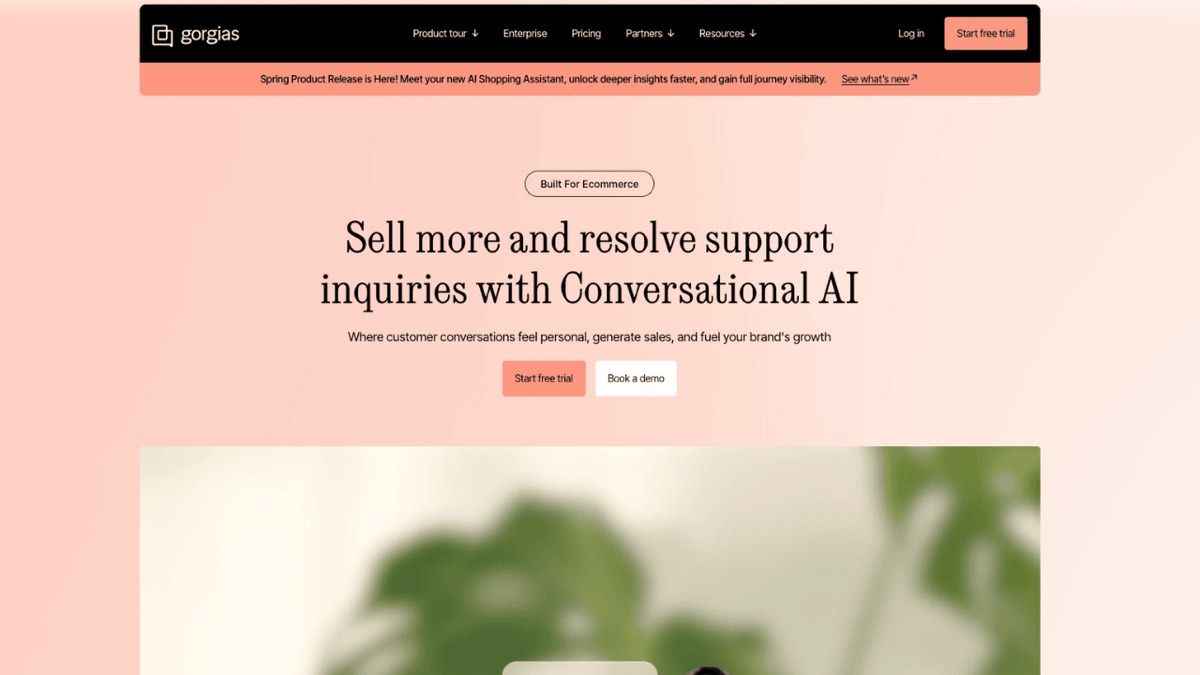
The Support Agent handles the post-purchase pile, the WISMO, returns, cancellations, address edits, and subscription changes that make up most of a Shopify support queue. With an Action configured it can issue refunds and edit orders directly. It works over email, chat, and SMS, and it's Shopify-only by design (no BigCommerce, Magento, or WooCommerce). It reads from your Help Center, uploaded docs, public URLs, and Shopify data, though that last source is capped at a customer's most recent orders.
One thing to watch in setup: out of the box the agent can report order status and surface self-serve options, but it can't actually fire a refund or cancellation until you build the Action behind it. That's the difference between an agent that talks about resolving a ticket and one that resolves it. Plan for that build before you judge the resolution rate.
The Shopping Assistant is the pre-purchase side: product recommendations, sizing help, discounts, and upsells based on live inventory and shopper data. Gorgias points to a Pepper case study claiming 19.2x ROI on AI-driven sales, which is a vendor-reported number, so treat it as a ceiling, not a promise. In practice the Shopping Assistant is the feature most worth A/B testing rather than assuming, because its payoff depends heavily on your catalog and how much pre-purchase chat you actually get.
Is it worth turning on? Almost always yes, with one honest caveat. The Reddit consensus on Gorgias for Shopify lines up with what I saw: if 40% or more of your tickets need a real Shopify action (refund, cancel, edit), the AI Agent earns its keep. If your volume is mostly conversational, you're paying action-grade pricing for chat-grade work.
Auto QA, sentiment, and ticket tagging
These three are the quiet ones, and they're mostly free wins. Turn them on and forget them.
Auto QA scores the AI Agent's responses and runs each reply past a second model, only sending it above a confidence threshold. You get resolution-time and conversion analytics out of it. Sentiment and intent detection reads each incoming message and sorts it (a sales question, a technical issue, a time-sensitive complaint) so the right ticket lands in the right place. AI ticket tagging then labels each conversation by topic automatically, which quietly cleans up your reporting without anyone touching a tag.
None of these carry the per-resolution weight the AI Agent does, and they make the rest of your Shopify helpdesk measurably tidier. Leave them on.
The two features that need a second look are the ones that write replies and the one that watches the queue. Guidance is the instruction layer where you tell the agent how to behave, and it's read before other knowledge sources, so it's the cheapest lever you have for brand voice. Actions are where the agent connects to your tools and fires real changes, and that's both where the value is and where the setup hours go. Vision reads images like a photo of a damaged item, but only over email, not chat, so it's a niche add for most teams.
Auto-close and handover decide when the AI stops. It hands a conversation to a human on low confidence, a sensitive topic, or detected frustration, and a ticket only counts as an AI resolution if it's handled without a human inside a 72-hour window. Worth it, but tune your exclusions, or it will resolve things you'd rather a person saw.
One more included feature worth a mention: Gorgias Insights, the analytics area (six report sections, 70+ metrics, a dedicated AI Agent view). It's genuinely useful, with one gotcha: it reports the median, not the average, for response and resolution time, so your numbers will look different than you expect. If you want a plain-English read of what the dashboard shows, we wrote up Gorgias ticket summaries and the full Gorgias feature set separately.
What Gorgias AI actually costs once it's on
Here's the part the feature pages skip. Gorgias bills the AI Agent per resolution, at $0.90 on an annual plan and $1.00 month to month, where a resolution means a ticket the AI handled without a human inside 72 hours.
The detail that catches people: each AI resolution is also counted as a billable helpdesk ticket, so a single resolved conversation hits your account twice. Once as the AI fee, once against your plan's ticket cap. Go past your included resolutions and overage runs around $1.50 per interaction, higher than the base rate. One Shopify App Store reviewer reported $14,000 in unexpected AI charges on top of a $13,500 annual Advanced plan, which is the kind of surprise that shows up when nobody's watching the resolution count.
It's also worth being honest about the automation rate. Gorgias markets "up to 60%," but its own published case studies land in the 26% to 56% range. That's still real money saved on the routine queue, but budget against the lower number, not the headline. For the full tier breakdown, our Gorgias pricing guide lays out what each plan includes.
When the math works, it works. WashCo, a Shopify brand we launched, recovered $22,664 in its first 7 days once the routine volume was off its team's plate. If you want to sanity-check the resolution count against your own ticket volume before you scale anything up, book a 30-min call and we'll run your numbers live.
The one place Gorgias AI doesn't reach: the live phone call
Run through that feature list again and notice what's missing. Every Gorgias AI feature is text. The AI Agent works on email, chat, and SMS. Auto QA, sentiment, tagging, Insights, all of it reads written conversations. When I called the support line during testing, not one AI feature picked up.
Gorgias does sell a phone product, Voice, and it's good at what it does: calls and voicemail live inside the helpdesk, with AI-generated summaries and transcripts, recordings, IVR menus, and call analytics. But as the Gorgias Voice docs make clear, the AI summarizes the call after the fact. It does not answer the phone. A human still has to pick up every ring. So a brand running the full Gorgias AI stack has automated its inbox and still staffs its phone line the old way, which is exactly the missed-calls and after-hours problem most teams started with.
That's the gap Ringly.io fills. Ringly is AI phone support for Shopify brands. Instead of hiring a phone team to cover the calls your inbox automation never touches, the AI answers inbound calls 24/7: it finds orders in your Shopify store, processes returns and exchanges, answers product questions from your knowledge base, and rescues abandoned carts with outbound follow-up. Across 50+ brands, the AI resolves 73% of calls on its own at roughly $0.42 per resolved call. Calls that need a human escalate cleanly to Gorgias or whatever helpdesk you already run, so it sits in front of your existing stack, it doesn't replace it.
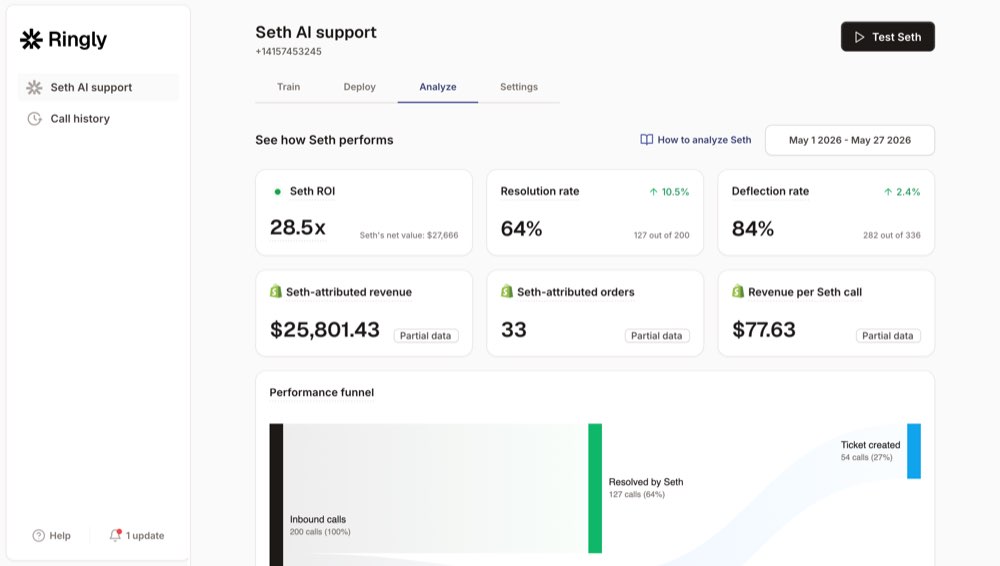
The thing brands worry about, that the phone version will sound robotic, is the thing customers comment on least.
"My customers also feel like it's a normal person. They feel like they can communicate if they have questions."
Claudia Droge, TechCraft Studio
If your team is fielding the calls that Gorgias phone support routes but never answers on its own, that's the layer worth adding next. We go deeper on this in our guide to AI phone agents for Shopify and scaling support without hiring.
Frequently asked questions
Is Gorgias AI worth it? For most $10M+ Shopify brands, yes, if a real share of your tickets need Shopify actions like refunds and cancellations. If your volume is mostly conversational, you're paying action-grade pricing for chat-grade work and a lighter tool may fit better.
How much does Gorgias AI cost per resolution? $0.90 per resolution on an annual plan and $1.00 month to month, where a resolution is a ticket the AI handled without a human inside 72 hours. Each resolution also counts as a billable helpdesk ticket against your plan cap, and overage runs around $1.50 per interaction.
Does Gorgias AI work without Shopify? The AI Agent is Shopify-only and isn't supported on BigCommerce, Magento, or WooCommerce. The broader helpdesk connects to more platforms, but the AI Agent's order actions depend on Shopify.
What automation rate is realistic with Gorgias AI? Gorgias markets "up to 60%," but its own published case studies range from 26% to 56%. Budget against the lower end and treat anything higher as upside.
Does Gorgias AI answer phone calls? No. The AI Agent works on email, chat, and SMS. Gorgias Voice brings calls into the helpdesk with AI summaries and transcripts, but a human still answers every call. The AI does not pick up the phone.
What's the difference between the Gorgias chatbot and the AI Agent? The older chatbot follows scripted flows, while the AI Agent reasons over your knowledge sources and can take Shopify actions like issuing refunds. The AI Agent is the one billed per resolution. See our Gorgias AI reviews for how teams rate each.
Talk to us

If you've turned on the Gorgias AI features that make sense and your phone line is still a human's full-time job, that's the next thing to fix. A 30-min call is the fastest way to see what your store is leaving on the table on the calls nobody's answering.
The 3-layer guarantee.
- Live in 14 days or it's free until launched.
- 65% resolution in 90 days or we refund the last 3 months of subscription fees.
- We keep working free until we hit 65%.
Ruben (Ringly co-founder) takes these calls personally.



