


This post in 30 seconds.
- What you'll get: where Facebook Messenger actually earns its keep for an ecommerce store, and the work it quietly drops on the floor.
- The number that matters: across the 50+ Shopify brands we run phone support for, roughly 70% of inbound is the same repeatable questions. The channel you route them to decides what they cost.
- Who this is for: founders, COOs, and Heads of CX at $10M-$100M Shopify brands already running a helpdesk and a visible phone line.
You turned on Messenger to take pressure off the inbox. Three weeks in, it's just another queue, and half of it sits unread overnight.
That's the trap with Facebook Messenger customer service for ecommerce. It looks like free reach, 1.04 billion people already have the app, so why not meet them there. But a channel only helps if the right work flows into it and the wrong work flows somewhere it actually gets answered. If you run customer experience at a $10M-$100M Shopify brand on Gorgias or Zendesk with a phone number in your footer, Messenger is one piece of a routing decision, not the whole answer.
Most of what's written about this treats Messenger like the destination. It isn't. It's one async lane next to your helpdesk and your phone line, and it's good at some jobs and bad at others. Below is what 50+ brands we work with actually put on it, what they keep off it, and what the whole thing costs when you get the routing wrong.
If your support volume is eating most of your CS payroll, book a 30-min call and we'll talk through where your missed messages and missed calls are actually going.
Why Facebook Messenger is worth running for an ecommerce store
Start with the reach, because it's real. Messenger has more than 1.04 billion active users globally and 194.8 million in the US, and over 40 million businesses already use it to talk to customers (SQ Magazine, 2026). Your buyers are in the app daily. They don't have to dig up your support email or sit on hold.
The single best thing Messenger does for a store is turn a product question into a sale before the customer leaves. A shopper messages "does this run small?", you answer, they buy. Shopify has had a native Messenger sales channel for years that lets a customer browse your catalog and recover a cart right inside the thread, which is why so many brands run it through the Shopify dashboard or a helpdesk app rather than a standalone login.
It also builds trust. 69% of people who message a business say it makes them feel more confident about buying from that brand (Facebook business survey), and 83% of consumers message a business to ask about products, with 75% of them going on to buy (eDesk). Tools like Help Scout route those threads into your inbox. A private thread is also where you move a public complaint off your page comments before it spreads. A buyer who fires off an angry comment under your latest ad doesn't want a public apology. They want the problem fixed, and a DM is where you do that without the whole feed watching.
So Messenger pulls its weight on three jobs: async product questions, browse-to-buy and cart recovery, and quiet complaint handling. Each one shares a trait, the customer is willing to wait a little for the answer. That's the boundary that decides everything else. Where Messenger gets expensive is when you ask it to be your whole support operation and route work into it that can't wait.
What Messenger handles well, and what it quietly drops
Here's the part the tool roundups skip. Messenger is an async chat lane. Its strengths and its blind spots both come straight from that.
It's good at anything that can wait a few minutes. Sizing questions, ingredient questions, a photo of a damaged box, a "did my discount apply" check. The customer pops in and out at their leisure, and 62% of people would rather get a quick bot answer than wait on hold (Tidio, via Gorgias). It's a meaningful slice of your ecommerce customer service load that can run async without a person.
But three kinds of work fall through.
- After-hours volume. A Messenger thread that comes in at 11pm sits unread until someone logs in the next morning. I've watched brands treat that as fine because it's "just chat," but the thread going dark overnight is the silent twin of the voicemail box nobody returns. The customer doesn't wait. They buy from someone who answered.
- High-intent and urgent buyers. Somebody who wants to place a $400 order, or who's panicking about a gift that didn't arrive, doesn't type into Messenger and wait. They call. If the phone rolls to voicemail, that's the sale you don't see leak.
- Real-time order status. "Where's my order" is 30-40% of most stores' tickets, and the same questions come in over and over. Messenger can field them, but only if a human or a real integration is pulling live Shopify data, not a canned reply that says "let me check." A thread that ends with "we'll get back to you" isn't a resolution. It's a deferral that becomes a second message, then a third.
The pattern underneath all three is the same. Messenger is fine when the customer accepts a delay. It fails the moment the customer won't wait, and the customers who won't wait are usually the ones about to spend the most. Your highest-AOV buyer and your angriest WISMO case are exactly the people who pick up the phone instead of typing into a chat window and hoping.
Messenger is great at a few jobs and quietly bad at the ones that cost you the most. Treating it as a replacement for your phone line is how brands leak revenue without ever seeing a number drop.
The channel-routing decision: Messenger vs phone vs helpdesk
This is the actual job. Not "should I use Messenger," but "what belongs on Messenger, what belongs on the phone, and what belongs in the helpdesk." Get this table right and every channel does what it's good at.
| Channel | Carries | Shouldn't carry |
|---|---|---|
| Facebook Messenger | Async product Qs, sizing/photo context, cart recovery, public-complaint-to-private | After-hours overflow, urgent high-intent buyers, the only WISMO path |
| Helpdesk (Gorgias / Zendesk / Re:amaze / Intercom) | Email, ticket history, the system of record across every channel | Real-time voice, anything a customer expects answered in seconds |
| Phone line | Urgent buyers, high-AOV orders, after-hours, older callers, WISMO surges | Long async threads better handled in writing |
The helpdesk is your system of record. Plug Messenger into Gorgias or Zendesk so the thread lands in the same place as email and your team isn't living in a separate Facebook tab. That part the existing guides get right.
What they miss is the phone. Messenger doesn't cover the customer who calls, and at a $10M-$100M Shopify brand a real slice of revenue still comes through the phone, especially after-hours and during a seasonal spike. A 24/7 phone line is the backstop Messenger can't be. WashCo, a Shopify brand we launched, recovered $22,664 in its first 7 days once the phone stopped leaking. That's the channel Messenger can't backstop on its own.
So the routing rule is simple. Async and browsing goes to Messenger. Email and ticket history lives in the helpdesk. Urgent, high-intent, and after-hours goes to a phone line that actually picks up. Drowning the same WISMO question across three channels with the same overworked team is the expensive mistake.
If you're sorting out which work goes where, book a 30-min call and we'll map your channels against your actual volume.
How to set up Messenger customer service the right way (7 steps)
Most setup guides stop at "connect the page." These are the steps that keep Messenger from becoming the next inbox you're drowning in.
- Connect Messenger to your helpdesk, not a standalone login. Route threads into Gorgias, Zendesk, Re:amaze, or Intercom so every message lives next to email and order history. One inbox, not two.
- Set a response-time expectation up front. 46% of customers expect a reply within 4 hours, yet the industry-average first response time is over 12 hours (SuperOffice). An auto-reply that states your hours and points urgent customers to the phone beats silence.
- Build saved replies that pull Shopify data. Order status, return policy, shipping windows. Your reps should answer "where's my order" with the real tracking link, not a generic line.
- Automate the repeatable FAQ, with a human handoff always visible. A bot can field sizing and policy questions. Keep a one-tap path to a person so nobody feels trapped.
- Respect Meta's rules. You can only message customers who messaged you first, and the standard window to reply outside of paid messages is 24 hours. Build your workflow around inbound.
- Route order-status and after-hours overflow off Messenger. Decide in advance where an 11pm "where's my package" goes. If the answer is "it waits till morning," that's a leak you've chosen.
- Measure first response time, resolution, and what's repeatable. If 70% of your Messenger threads are the same five questions, that's a scaling problem you can solve without hiring, not a reason for rep #5.
The setup that works treats Messenger as one routed lane inside your helpdesk, not a second support team running in a browser tab.
Automation on Messenger, and the line you can't cross
Automation is where Messenger gets genuinely useful at volume. Bots handle up to 80% of routine inquiries on the platform across 300,000+ active chatbots (SQ Magazine). For FAQ, sizing, and policy questions, a Messenger bot like Chatfuel or Manychat earns its place.
Here's the line. A Messenger bot can answer "what's your return window." It can't calm down a high-AOV customer at 11pm whose order is stuck, and it can't be the only thing standing between a caller and a sale. That's a voice problem, and it needs a voice channel that resolves the call instead of taking a message.
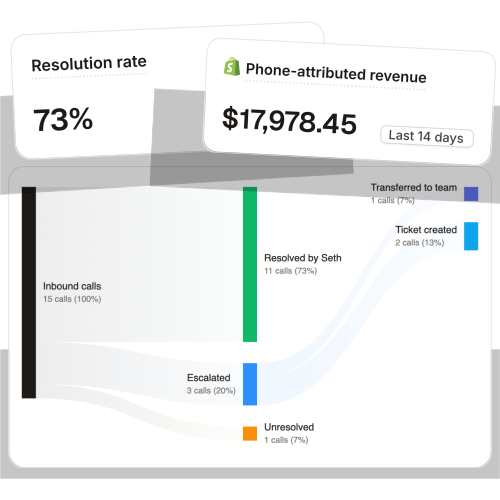
That's the slot Ringly.io fills. It's AI phone support for Shopify brands. Instead of growing your support headcount every time call volume jumps, the AI takes the routine inbound calls so your team can handle the work that actually needs a person. It answers 24/7, finds orders in your Shopify store, handles returns, answers product questions from your knowledge base, and escalates cleanly to Gorgias, Richpanel, or whatever helpdesk you already run. Across 50+ brands it resolves 73% of calls on its own at roughly $0.42 per resolved call, versus $7 to $16 per call for human BPO. Live in under an hour, backed by a 65% resolution guarantee.
The reason the handoff matters is voice quality. The most repeated thing customers say after a call is that they didn't realize it wasn't a person.
"My customers also feel like it's a normal person. They feel like they can communicate if they have questions."
Claudia Droge, TechCraft Studio
TechCraft handles 88% of its calls without a human. The point isn't that automation replaces the team. It's that the repeatable 70% across chat and phone stops landing on people who were hired for harder work.
What this actually costs you, and what it should
Adding Messenger doesn't save you money on its own. It just adds a lane. The savings come from getting the repeatable volume off your team across every channel, including the phone.
Run the math on a typical $50M Shopify brand with a 6-rep CS team:
| Line item | Today | With routing fixed |
|---|---|---|
| 6 reps × $4K loaded per rep | $24,000/mo | n/a |
| AI phone support (~$5K/mo) | n/a | $5,000/mo |
| Net monthly CS spend | $24,000/mo | $5,000/mo |
| Monthly savings | n/a | $19,000/mo |
| Annual savings | n/a | $228,000/yr |
That's the roughly 70% of repeatable calls, order status, returns, the same five questions over and over, routed to the AI. The other 30%, the genuinely complex calls, still go to your CS team, who now have time to actually solve them. Messenger handles the async slice of that 70% on the chat side. The phone handles the rest. The expensive version is the one where you add Messenger, keep the phone leaking, and still hire rep #5.
Notice what the math is really about. It isn't the cost of Messenger versus the cost of a phone tool. It's the loaded cost of the team you keep growing because the repeatable volume never stops, on whatever channel it lands. A rep at $4K loaded who spends their day on "where's my order" is the line item that scales with your call volume instead of your revenue. Route the repeatable work to systems that don't tire, burn out, or quit at month seven, and the headcount line stops climbing. That holds whether the question comes in on chat or on the phone, which is why the routing decision is the whole game.
Frequently asked questions
Is Facebook Messenger good for ecommerce customer service? Yes, for async work: product questions, sizing, cart recovery, and moving public complaints into a private thread. It's a strong complement to your helpdesk, but it doesn't cover urgent or after-hours buyers who call instead of typing.
Do I still need a phone line if I use Messenger? Yes. High-AOV orders, urgent issues, and older customers still call, and a real slice of revenue at a $10M-$100M brand comes through the phone. Messenger going unread overnight is the same revenue leak as a voicemail box nobody returns.
How fast should I reply to Facebook Messenger customer messages? 46% of customers expect a reply within 4 hours, while the industry average sits north of 12 hours (SuperOffice). Set an auto-reply with your hours, and route anything urgent to a channel that answers in real time.
Can a chatbot handle Messenger customer service? For routine FAQ, sizing, and policy questions, yes. Bots handle up to 80% of routine inquiries on the platform. Keep a visible one-tap handoff to a human, and don't expect a chat bot to resolve an urgent order-status call at 11pm.
How do I connect Facebook Messenger to Shopify or my helpdesk? Use the Shopify Messenger channel or a helpdesk integration (Gorgias, Zendesk, Re:amaze, Intercom) so threads land in the same inbox as email and order history. Avoid running Messenger from a separate Facebook tab.
What's the best way to handle after-hours Messenger messages? Set expectations with an auto-reply, and route anything time-sensitive to a phone line that picks up around the clock. After-hours is where most stores quietly lose orders across both chat and voice.
Talk to us

If your phone rolls to voicemail after 6pm while your Messenger threads pile up, you're leaking the same revenue twice. A 30-min call is the fastest way to see what your store is actually losing across channels, and where the repeatable volume should go.
The 3-layer guarantee.
- Live in 14 days or it's free until launched.
- 65% resolution in 90 days or we refund the last 3 months of subscription fees.
- We keep working free until we hit 65%.
Ruben (Ringly co-founder) takes these calls personally.



