

This post in 30 seconds.
- You'll see how to automate call routing so routine order-status calls resolve on their own, and only the calls that truly need a person reach one.
- Across calls handled by Ringly agents in the past 30 days, about 6% were transferred to a human. The other 94% never needed a handoff at all.
- Written for founders and CX leads at Shopify stores doing $2.4M+ a year with a visible phone line and a helpdesk like Gorgias.
We've handled more than 150,000 customer calls for 50+ Shopify brands, so we spend a lot of time watching where phone calls break. It almost always breaks at the handoff: a caller reaches someone, gets put on hold, then gets sent to a second person and explains the whole thing again. That's the moment call transfer automation is supposed to fix, and most stores set it up backwards.
This guide covers the right way: routing rules that resolve the routine call without a transfer, and a clean warm handoff for the few that need one. One in four inbound calls gets transferred at all, according to Platform28, and for a store most of those are avoidable, because most calls are the same questions over and over.
If you run support at a store past a few million a year, you know the pattern: WISMO all morning, a returns question, then a call that actually needs a human. Start a free 14-day trial and hear the AI answer your own store's calls. We set it up for you.
What call transfer automation actually means
Three words get used like they mean the same thing. They don't, and the difference is the whole strategy.
| Term | What it does | Who decides |
|---|---|---|
| Call forwarding | Sends an incoming call to another number before anyone picks up | A fixed rule (after 6pm, send to voicemail) |
| Call transfer | Moves a live call from one person or team to another | Whoever is on the call |
| Call routing | Decides where a call should go based on why it came in | Software, using intent and availability |
Call transfer automation is the layer that applies routing rules and executes the handoff without a human operator deciding each time. Done well, it means the caller never notices a handoff happened. Done poorly, it's a phone tree that makes people press four buttons before they can talk to anyone.
There are two ways to actually move a live call, and the gap between them is bigger than it sounds. A warm transfer briefs the receiving person before the caller is handed over, and roughly 80% of customers prefer it to a cold transfer where they get dropped in and have to repeat themselves. Blind handoffs also drop at a higher rate, since a caller who has to start over is quicker to hang up.
So the goal isn't just "route the call," it's "route it warm, with context, so the customer doesn't feel the seam." An AI phone agent can do that automatically: it collects the reason for the call, then passes a summary to the human, so the person picks up already knowing who's calling and why. If you want the mechanics of that specific handoff, we broke it down in how AI phone agents transfer calls to humans, and the feature itself lives on our smart AI call transfer page.
When a warm transfer beats a blind one
Not every handoff needs the full warm treatment, but for a store, most do. The trade-off is speed versus repetition. A blind transfer is faster to fire off, and a warm one costs a few extra seconds of context but saves the customer from re-explaining their order for the third time.
| Warm transfer | Blind transfer | |
|---|---|---|
| Caller repeats themselves? | No, the receiver is briefed | Yes, they start over |
| Speed | Slightly slower | Instant |
| Best for | Order problems, complaints, VIPs | Simple redirects to a known extension |
| Customer preference | ~80% prefer it | The one they complain about |
For anything with an order attached, warm wins, because a customer who has to repeat their order number twice is already annoyed by the time a human says hello. The old objection to warm transfers was that they tied up two people at once: one agent briefing another while the caller waited. An AI removes that cost. It gathers the context itself, hands the human a summary, and never puts a second rep on hold to do it. So you get the warm-transfer experience on the calls that need it without paying for two humans to coordinate. Blind transfers still have a place for the rare "just put me through to the warehouse extension" call, where there's nothing to brief.
Why most transferred calls never needed a person
This is where the setup usually goes wrong. If one in four calls gets transferred, the question isn't "how do I route them faster." It's "why are they being transferred at all."
For a Shopify store, the honest answer is that most inbound calls are routine. Where's my order, did my return get processed, is this back in stock, can you check my tracking. These are WISMO calls, and Salesforce puts them at 30-40% of tickets in a normal week and more than half at peak.
None of them need a person. They need an answer, pulled from your Shopify order data and your knowledge base, delivered on the phone.
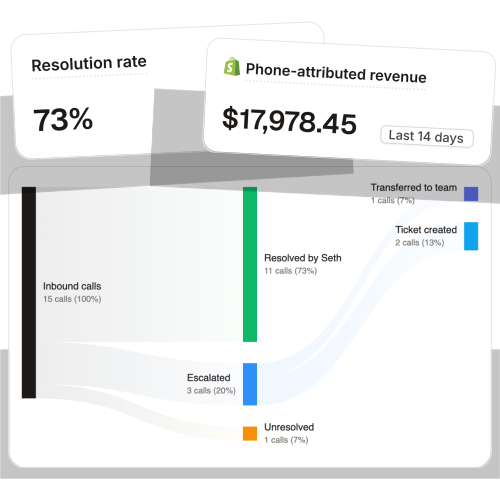
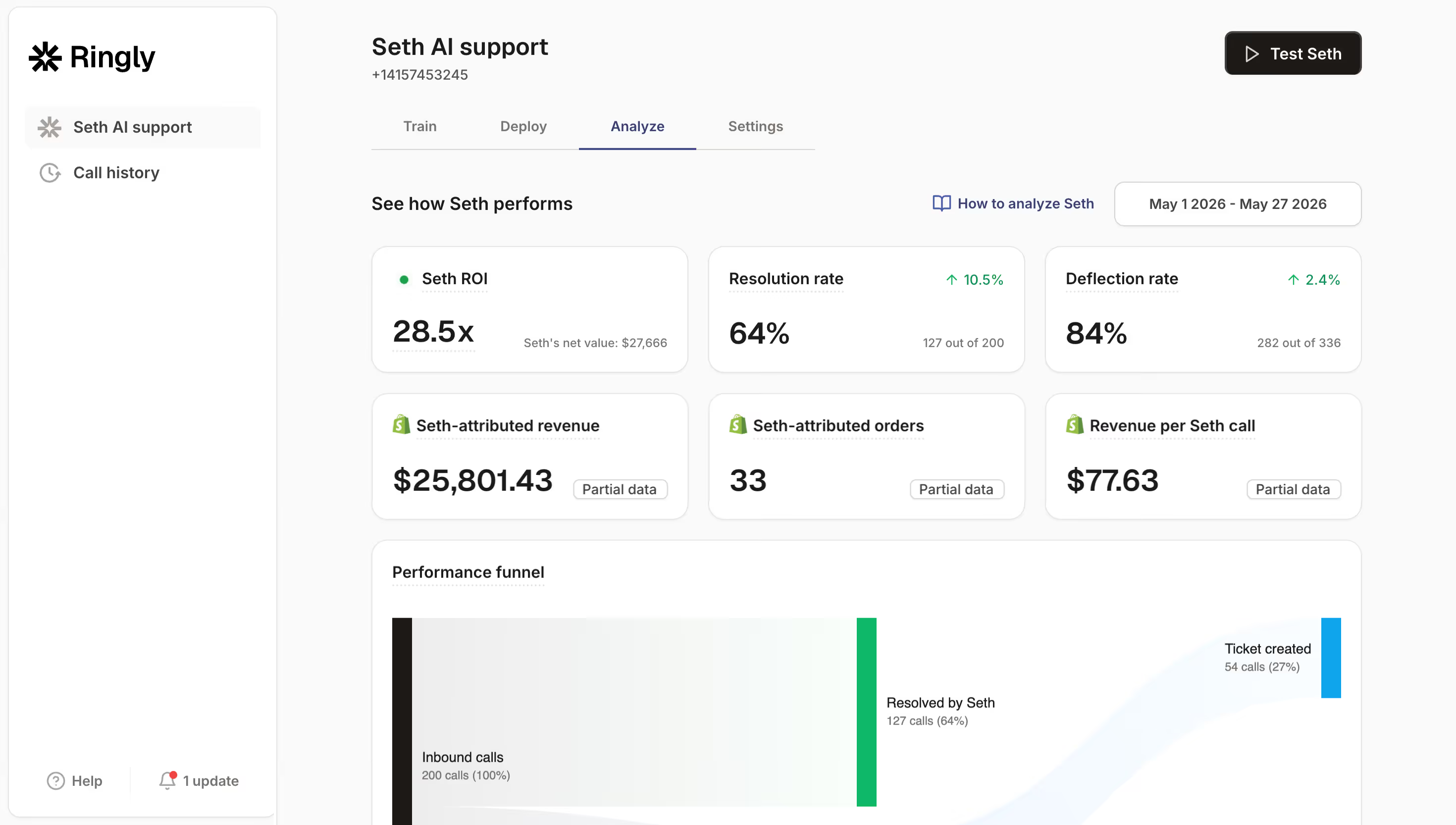
When the AI resolves the routine call itself, there's nothing to transfer. Our own data backs that up. Across calls handled by Ringly agents in the past 30 days, about 6% were transferred to a human; the rest were handled end to end or ended by the caller.
So the real routing job for a store isn't "who do I send this to," it's "which small slice actually needs a person," and that slice is a lot smaller than the one-in-four industry number. Across 50+ brands, the AI resolves 73% of inbound calls on its own, at roughly $0.42 per resolved call versus $7 to $16 per call for a human answering service.
TechCraft Studio handles 88% of calls without a human. The calls that still reach their team are the ones worth a person's time.
"My customers also feel like it's a normal person. They feel like they can communicate if they have questions."
Claudia Droge, TechCraft Studio
That matters because the fear with automation is that it makes the experience worse. A chatbot-style menu is not the same thing as resolution. The reason customers hate the old phone tree is that it routes without resolving, so they still end up transferred, which is the opposite of what good automation does.
The routing rules that actually matter for a store
Once the routine calls handle themselves, the routing rules left over are simple and few. These are the ones worth setting:
- Intent-based routing. Order status, returns, and product questions go to the AI to resolve. A billing dispute, a wholesale inquiry, or an angry escalation gets flagged for a human. You're routing by why they called, not by making them pick a menu option.
- Availability routing. After 6pm, calls should go to the AI, not to a voicemail box nobody empties. About 85% of callers who can't reach a person never call back and 62% switch to a competitor, according to PCN. A voicemail is a missed call with extra steps. This is the whole point of an after-hours answering setup.
- Priority routing. A VIP customer, a high-value order, or a caller who sounds upset can jump straight to a person. You decide the triggers.
- Warm handoff with context. When a call does escalate, the transfer carries a transcript and a summary, and it logs to your helpdesk. Your rep picks up already knowing the order number and the problem, so nobody repeats themselves.
The escalation rule is the one people skip, and it's the one that protects your team. You define exactly which calls reach a human and what they get handed. The rest is handled and logged. If you want the deeper telecom version of this, we covered call routing for ecommerce and the VoIP side of call routing separately. Escalations land cleanly in Gorgias, Richpanel, Re:amaze, or whatever helpdesk you already run.
What this costs you today vs with automation
The savings show up in two places: fewer transfers means shorter calls, and resolving the routine call means you stop staffing for overflow. Take a store running a 6-rep support team:
| Line item | Today | With automation |
|---|---|---|
| 6 reps x $4K loaded per rep | $24,000/mo | n/a |
| AI phone support, done-for-you (illustrative all-in) | n/a | $5,000/mo |
| Net monthly support spend | $24,000/mo | $5,000/mo |
| Monthly savings | n/a | $19,000/mo |
| Annual savings | n/a | $228,000/yr |
That's roughly 70% of repeatable calls resolved without a human, and the genuinely complex 30% still routed to your team, who now have time to actually solve them. The revenue side is real too. WashCo, a Shopify brand we launched, recovered $22,664 in attributed revenue in its first 7 days answering the phone. Calls that used to hit voicemail turned into orders.
If phone support is eating your team's day and you'd rather talk through the routing before you touch anything, book a 30-min call and we'll map it live.
How to set up call transfer automation the right way
When I set this up on a store, I run the same five steps every time. None of them require code, and the whole thing is live in under an hour.
- Map your call types first. Pull a week of calls and sort them: order status, returns, product questions, new orders, complaints. You'll usually find 70-80% fall into the first three. That's the slice the AI should own.
- Set the AI to resolve, not route. Connect it to your Shopify order data and your knowledge base so it can actually answer, including checking order status live. A call it can resolve is a call it never transfers.
- Define the escalation triggers. Write the short list of what goes to a human: billing disputes, wholesale, anything the AI can't confidently resolve, and any caller who asks for a person. Be explicit, because a vague trigger transfers too much.
- Wire the warm handoff. When a call escalates, the AI passes a summary plus transcript and logs the call to your helpdesk. Your rep answers already briefed.
- Test the after-hours path. Call your own number at 9pm. If it hits voicemail instead of the AI, you've routed a paying customer to a dead end.
Done in that order, you get 24/7 phone coverage that resolves most calls and hands off the rest cleanly, without adding headcount. It's the same playbook we use to scale support without hiring. Want to hear it on your own store's calls first? Start the free trial and test it on real calls.
Frequently asked questions
What is call transfer automation? It's using software or AI to apply routing rules and move a call to the right destination without a human operator deciding each time. For a store, the best version resolves the routine call up front so there's often nothing to transfer at all.
Warm transfer or cold transfer, which is better for a store? Warm, almost always. About 80% of customers prefer a warm handoff where the receiver already has context, and cold transfers make people repeat themselves. An AI agent can give every escalation a warm-transfer feel by passing a summary before the human picks up.
What's the difference between call transfer and call forwarding? Call forwarding sends a call to another number before anyone answers, on a fixed rule. Call transfer moves a live call that someone is already handling. Routing is the smarter layer that decides where each call should go based on why it came in.
Can an AI actually transfer a call to a human? Yes. The AI answers, resolves what it can, and when a call needs a person it hands off with a transcript and summary and logs it to your helpdesk. In our data only about 6% of calls reach that step.
Does automated routing really reduce transfers? It does, because the biggest driver of transfers is unresolved routine calls. Resolve those on the phone and the transfer disappears. AI routing has been shown to cut transfers by 40-60% and handle time by 15-25%.
Will my customers get stuck in a phone menu? Not if it's set up to resolve instead of route. The old phone tree frustrates people because it moves them around without answering. An AI that pulls up their order and answers the question skips the menu entirely.
Talk to us

If your phone line drops calls at the handoff, the fastest way to see the fix is to hear the AI answer your own store's calls and watch how few of them ever need a person. Most stores are surprised how small that slice is.
The 3-layer guarantee.
- Live in 14 days or it's free until launched.
- 65% resolution in 90 days or we refund the last 3 months of subscription fees.
- We keep working free until we hit 65%.
Ruben (Ringly co-founder) takes these calls personally.
Start your trial today and you get:
- A free dedicated number to test on, so you hear the AI route and resolve real calls the same day.
- The agent built for you. We map your call types and escalation rules, you lift zero fingers.
- It plugs into your helpdesk. Gorgias, Richpanel, Re:amaze, or Zendesk, whatever you already run.
Start your 14-day free trial →
We set the agent up for you, map your routing, and you keep your current number and helpdesk.