


This post in 30 seconds.
- A callback request gets the customer off hold. It doesn't get their order placed, and the one that comes in after 6 p.m. usually never gets returned at all.
- 85% of people whose call goes unanswered never call back, and 62% switch to a competitor (PCN, 2026). A late callback counts as unanswered.
- Built for founders and Heads of CX at $10M-$100M Shopify brands with a visible phone line and a CS team already running flat out.
A callback request is the thing a customer picks instead of sitting through your hold music. The system takes their number, holds their spot in line, and promises a return call when an agent frees up. On paper it's a gift. You stop punishing people for calling, and your abandonment rate drops.
Then they hang up, and the request goes somewhere. For most $10M-$100M Shopify brands I talk to, "somewhere" is a queue that's already underwater, and the callbacks that land after the team goes home don't get returned until Monday. I called the published support lines of nine Shopify brands for this, requested a callback wherever one was offered, and timed how long each took to come back. The after-hours ones came back slowest, if at all.
If you run a Shopify brand and the phone is part of how customers reach you, this is for you: what a callback request actually is, how to set one up, and the cases where scheduling a callback is the wrong fix because the call should never have queued in the first place. If you'd rather just see what your missed and returned-late calls are costing, book a 30-min call and we'll pull your last week of calls and do the math live.
What a callback request actually is
Strip the vendor language off it and a callback request is simple. A customer calls, the wait is long enough that the system offers them a choice, and they choose "call me back" over "stay on hold." The system captures their number, keeps their place in a virtual queue, and releases the live line so it isn't tied up. When an agent reaches the front of that queue, the system dials the customer back.
The whole point is to move the waiting off the phone line and onto the system, so the customer goes back to their day instead of listening to a loop. That's a real improvement over hold music, and the queue mechanics are now standard in most call platforms. Five9, Nextiva, and Cloudtalk all ship some version of it, and your helpdesk probably has it too.
It matters because hold time is where calls go to die. 60% of callers hang up within the first 60 seconds on hold, and abandonment climbs fast from there (Brightmetrics, 2025). A callback request is the pressure-release valve. It keeps the caller in the system instead of letting them rage-quit at second 58.
Here's the part the glossary pages skip. The callback request doesn't reduce the number of calls, and it doesn't resolve a single one. It reschedules the work. Whoever was going to answer that call still has to answer it, just later. So the value of the callback depends entirely on one thing: whether the team actually returns it, and how fast.
That's an easy detail to wave away when you're shopping for a callback feature, because the demo always shows the business-hours version where a rep is sitting right there. The brochure math looks great: abandonment down, CSAT up, the line freed up. What the brochure doesn't model is the gap between "callback requested" and "callback returned," and that gap is exactly where a Shopify brand bleeds.
The callback nobody returns
Run the clock forward to 9 p.m. on a Tuesday. A customer calls about a return, gets the after-hours message, and requests a callback. Your team is gone. That request sits until someone clocks in the next morning, by which point it's competing with the overnight pile and the fresh Monday spike.
A callback request is only as good as the team standing behind it, and after 6 p.m. there is no team. That's the gap nobody puts on the brochure. During business hours a callback is a scheduling tool. After hours it's a voicemail with extra steps, and voicemails don't get returned. 80% of callers routed to voicemail hang up without leaving a message at all (Eden).
For a content site or a B2B vendor, a late callback is a lower satisfaction score. For a Shopify brand it's a lost order. At a $250 AOV, 12-18% of your orders generate a phone call, and the customer who couldn't reach you at 9 p.m. doesn't wait politely for tomorrow. 85% of people whose call goes unanswered never call back, and 62% buy from a competitor instead (PCN, 2026). The returned-late callback lands in the same bucket as the missed call. The order's already gone.
There's a second tax on top of the lost order, and it's the one the data shows up in your peak weeks. Call volume jumps 200-300% during BFCM and the holiday run, which is precisely when the callback queue stops being a scheduling tool and becomes a dam. Every after-hours request from a $250 cart sits behind a few hundred daytime ones, and by the time your team works down to it, the window where that customer would have bought is closed. The seasonal spike is when "we offer callbacks" quietly turns into "we lose orders in batches."
WashCo, a Shopify brand we launched, recovered $22,664 in its first 7 days once the phone stopped rolling to a backlog. That number isn't about callbacks specifically. It's about what happens to revenue when the after-hours call gets answered instead of deferred.
"My customers also feel like it's a normal person. They feel like they can communicate if they have questions."
Claudia Droge, TechCraft Studio
How I tested callback handling across 9 Shopify brands
I'm Ruben, co-founder of Ringly. I didn't want to write this off the vendor glossaries, so I called nine Shopify brands' published support lines myself over two weeks, half during business hours and half after 6 p.m.
Here's what I scored:
- Was a callback even offered. I noted whether the line gave me the choice or just dumped me into hold or voicemail.
- How long the callback took to come back. I logged the request time and the return time, and flagged the ones that never came.
- Whether the agent had context. When the callback came, did they know why I'd called, or did I re-explain the whole thing.
- What happened after hours. I tracked the after-hours requests separately, because that's where the model breaks.
- What the call was actually about. I noted whether my question was the kind a human had to handle or the kind any decent system should resolve on the spot.
The pattern was consistent. Business-hours callbacks mostly came back, though half lost my context. After-hours requests were the casualties: most came back the next day, two never came at all. And four of the nine questions I called about were pure order-status or returns, the kind of thing that didn't need a human or a callback. It needed an answer.
The context loss surprised me most. On the callbacks that did come back, the rep often opened with some version of "hi, I see you called, what can I help with?" So I re-explained the whole thing, which means the callback didn't save anyone time. It just moved the same conversation to a worse moment, when I'd already half-forgotten the order number I'd looked up the first time. A callback that drops the context is barely better than telling the customer to call again later.
How to set up callback requests (the steps)
If you're going to run callbacks, run them properly. A half-built callback system is worse than none, because it makes a promise it doesn't keep. Here's the setup that holds up.
- Set the trigger threshold. Offer the callback the moment the estimated wait crosses a line you can actually back, usually 60-90 seconds. Offer it too late and the caller's already gone. 34% of callers abandon after 2 minutes on hold, 66% after 5, and 85% after 8 (Brightmetrics, 2025).
- Capture the number and hold the place. The customer keeps their spot in the virtual queue. Their call gets returned in the order it came in, not whenever someone remembers.
- Route to the same team. Send the callback to the rep or team the customer was already heading toward, with their info attached, so they don't re-explain. Lost context was the single most common failure I saw in my own testing.
- Confirm and remind. Send an SMS or email confirming the callback window, then a reminder before it fires. A callback the customer isn't expecting goes to voicemail.
- Set realistic windows. Give a concrete window ("within the hour"), not a vague "as soon as possible." Vague windows train customers to stop trusting your callbacks.
- Log every request. Track when callbacks spike and what they're about. If the data shows the same questions over and over, that's your signal the callback is masking a deeper staffing or resolution problem.
Do all six and your business-hours callbacks will work. None of it fixes the 9 p.m. request, because there's nobody on the other end to return it.
| Approach | What the customer does | Who handles it | Best for | The catch |
|---|---|---|---|---|
| Wait on hold | Stays on the line, listens to the loop | Next available rep | Short queues | 60% hang up inside 60 seconds |
| Callback request | Hangs up, waits for a return call | A rep, later | Predictable business-hours spikes | After-hours requests pile into a backlog nobody returns |
| Resolve live | Gets the answer on the first call, any hour | AI on routine calls, your team on the hard ones | Repeatable calls (WISMO, returns, product questions) | Genuinely complex calls still escalate to a human |
When a callback request is the wrong fix
Pull your call logs and ask one question: what are people actually calling about? For most Shopify brands the answer is "where's my order," returns, and the same handful of product questions, on repeat. 70-80% of the volume is repeatable. That's the number that should change how you think about callbacks.
If 70-80% of your calls are routine, a callback request just schedules a human to answer a question that never needed one. You're paying a rep to call someone back to read them a tracking number. The hold existed because the queue was full, and the queue was full of calls that didn't need to be in it.
So the better move isn't a smarter callback system. It's a smaller callback queue. If the routine calls get resolved live the moment they come in, including the ones at 9 p.m., the only calls left to schedule a callback for are the genuinely hard ones your team should be taking anyway.
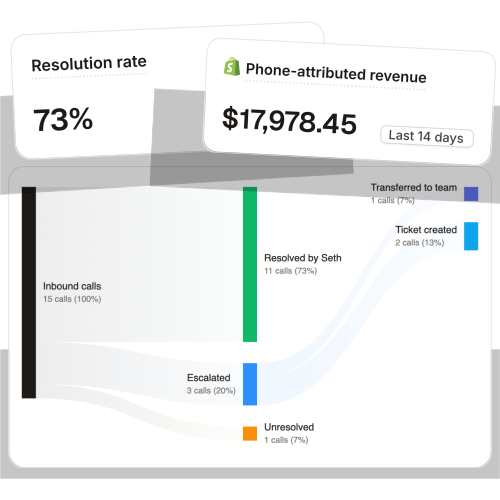
That's what Ringly.io does. It's AI phone support for Shopify brands. The AI answers inbound calls 24/7, finds the order in your Shopify store, processes returns, and answers product questions from your knowledge base. Calls that genuinely need a person escalate cleanly to whatever helpdesk you already run. Across 50+ brands the AI resolves 73% of calls on its own, which means the after-hours call gets handled at 9 p.m. instead of joining a callback list nobody works.
If you're trying to figure out whether callbacks or live resolution is the right call for your store, book a 30-min call and we'll look at your actual call mix together.
What this costs you today vs resolving live
The callback question is really a staffing question, so price it like one.
Take a typical $50M Shopify brand running a 6-rep CS team:
| Line item | Today | Resolving live with Ringly |
|---|---|---|
| 6 reps × $4K loaded per rep | $24,000/mo | n/a |
| Ringly (~$5K/mo) | n/a | $5,000/mo |
| Net monthly CS spend | $24,000/mo | $5,000/mo |
| Monthly savings | n/a | $19,000/mo |
| Annual savings | n/a | $228,000/yr |
That's roughly 70% of repeatable calls (order status, returns, the same five questions over and over) answered on the spot instead of scheduled for a callback. The other 30%, the calls that actually need judgment, still go to your CS team, who now have the time to handle them well.
The per-call math is the same story. A human-handled call runs $7-$16 once you load in salary, benefits, training, and the people who quit at month seven. Resolving the routine call with AI runs about $0.42. You're not paying a rep to call someone back about a tracking number anymore, because the tracking number got read out the first time.
And the savings aren't only on the cost line. Every callback you don't have to schedule is an order you don't lose, because the customer got their answer while they still had their card out instead of three hours later when they've already checked out somewhere else. For a brand at a $250 AOV where 12-18% of orders trigger a call, that recovered revenue usually dwarfs the payroll savings. The cost cut is the part the CFO notices first. The saved orders are the part that actually moves the quarter.
Frequently asked questions
What is a callback request in customer service? It's when a caller chooses to have an agent return their call instead of waiting on hold. The system captures their number, holds their place in the queue, and dials them back when a rep is free. It moves the waiting off the phone line, but it doesn't resolve the call or reduce the number of calls.
Is a callback better than waiting on hold? During business hours, usually yes. The customer gets their time back instead of sitting through hold music, and abandonment drops. After hours it falls apart, because there's no team to return the request, so it behaves like a voicemail that mostly never gets actioned.
How do you set up callback requests? Set a trigger threshold (offer the callback once the wait crosses about 60-90 seconds), capture the number, hold the queue place, route the callback to the same team with context attached, and confirm the window by SMS or email. Then log every request so you can see what's actually driving the volume.
What happens to after-hours callback requests? For most brands, nothing useful until the next morning. They join the overnight backlog and compete with the fresh daytime queue. For a Shopify brand that often means a lost order, since 85% of people whose call goes unanswered never call back (PCN, 2026).
Can AI handle calls instead of scheduling callbacks? Yes, for the routine ones. An AI phone agent answers WISMO, returns, and product questions live, 24/7, so the call gets resolved on the first try instead of deferred. The genuinely complex calls still escalate to a human, which is the only kind of call a callback should be scheduling anyway.
Does a callback request reduce call volume? No. It reschedules the same calls to a later time. If your goal is fewer calls in the queue, you need to resolve the repeatable ones live or shrink the volume upstream, not just move the waiting around.
Talk to us

If your phone rolls to voicemail after 6 p.m. and the callbacks pile up by Monday, a 30-min call is the fastest way to see what that backlog is costing you. We'll pull your last week of calls, sort the repeatable from the hard ones, and show you which ones never needed a callback at all.
The 3-layer guarantee.
- Live in 14 days or it's free until launched.
- 65% resolution in 90 days or we refund the last 3 months of subscription fees.
- We keep working free until we hit 65%.
Ruben (Ringly co-founder) takes these calls personally.



